
Key points
- The best endpoint management software based on final scoring: 1) NinjaOne, 2) Action1, 3) Hexnode UEM, 4) Symantec Endpoint Management, 5) Microsoft Intune, 6) HCL BigFix, 7) Workspace ONE, 8) IBM Security MaaS360, 9) Quest KACE, 10) Citrix Endpoint Management
- Endpoint management platforms centralize monitoring, patching, security, and remote control so IT teams can proactively manage devices.
- Modern endpoint management tools enforce policies, automate patching, and support zero-trust access controls to reduce attack surfaces and maintain regulatory compliance across all devices.
- Intuitive dashboards, automation, and clear reporting reduce onboarding time and administrative overhead.
- The best solutions balance unified management, real-time visibility, automation, scalability, and strong vendor support, especially for enterprises managing large or distributed device estates.
In this guide, we outline the top 10 best endpoint management software based on genuine feedback from G2 and Capterra and scored using a unique formula based on the most up-to-date rankings. We also highlight evaluation criteria and best-fit use cases for each solution.
The demand for endpoint management solutions continues to grow. According to Fortune Business Insights, the unified endpoint management market is projected to grow from $10.49 billion in 2026 to $57.51 billion in 2034 (23.70% CAGR).
Enterprises, in particular, face mounting pressure to consolidate their endpoint management tooling, with sprawling device estates that can span thousands of endpoints across multiple operating systems and geographies. Large organizations need endpoint management software that can scale, automate routine tasks, and integrate with existing security infrastructure.
When reviewing this list, keep in mind that each solution varies. While certain core capabilities are essential (covered later in the article), the best option depends on your operational goals. Evaluate available options, conduct a vendor risk assessment, and test solutions where possible. You should also consider the cost of endpoint management software and how it aligns with your IT budget.
For a visual breakdown of this topic, watch Best Endpoint Management Software.
Top endpoint management solutions at a glance
| Endpoint management software | Software type | Key features | Trial Information |
| NinjaOne | Unified Endpoint Management (UEM) | Full endpoint visibility, automation, patching, remote remediation, integrated platform for mobile + desktop + servers | 14-day free trial |
| Action1 | Cloud-based Endpoint Management | High ease of use, remote management, lightweight agent, excellent support ratings | 15-day free trial |
| Symantec Endpoint Management | Endpoint Management + Security | Unified security + management, Active Directory protection, cloud + on-prem options | Free trial available |
| Hexnode UEM | Unified Endpoint Management | Cross-platform device support, BYOD security, automated patching, location tracking | 14-day free trial |
| Microsoft Intune | Cloud Endpoint Management | Zero-trust controls, BYOD support, deep Microsoft ecosystem integration | 30-day free trial |
| IBM Security MaaS360 | Unified Endpoint Management (UEM) | Centralized management, threat detection + remediation, third-party integrations | 30-day free trial |
| Quest KACE | Endpoint Management | Asset discovery, lifecycle management, inventory + patching | 14-day free trial |
| HCL BigFix | Endpoint Management & Compliance | Multi-OS support, compliance automation, enterprise-scale automation | 30-day free trial |
| Workspace ONE | Unified Endpoint + Digital Workspace Platform | Conditional access, app management, SSO + MFA | 30-day free trial |
| Citrix Endpoint Management | Unified Endpoint Management | Mobile application management, security integrations, cloud or on-prem deployment | Free trial available |
Why endpoint management?
An endpoint management system is necessary for any business that uses computers, printers, tablets, or other IT devices, otherwise known as “endpoints.”
When it comes to practical use, the best endpoint management software should be able to monitor, manage, and secure endpoints in one integrated platform, allowing IT technicians to perform necessary actions remotely.
Essentially, endpoint management tools are integral to any proactive IT management strategy. The right one can automate certain tasks, provide readouts of device health, and allow you to pre-emptively act on devices, whether to update, patch, or remotely control them.
It’s a powerhouse tool that maximizes your IT talent and lowers your total cost of ownership.
What is enterprise endpoint management?
Enterprise endpoint management differs slightly from the “traditional” definition. While it still refers to the practice of monitoring, securing, and managing endpoints, it requires the comprehensive monitoring of a larger estate spanning thousands of devices across multiple operating systems and user groups from a centralized platform.
This brings about a unique set of challenges that require more advanced capabilities, including managing endpoints across distributed workforces, enforcing compliance across multiple regulatory frameworks (such as HIPAA, SOC 2, or GDPR), supporting complex identity and access management integrations, and coordinating IT operations across large teams with varying levels of access and responsibility.
Enterprise endpoint management solutions must also be built to scale. As an organization grows, the platform must be able to accommodate thousands of additional endpoints without degradation in performance or visibility.
Key capabilities that differentiate enterprise-grade endpoint management from standard solutions include role-based access control (RBAC), multi-tenant management, advanced compliance reporting, API extensibility, and deep integration with enterprise security tools such as SIEM platforms, identity providers, and vulnerability management systems.
5 important features for endpoint management
Before we list our top endpoint management solutions, it’s crucial that you understand the 5 most important features that your software must have. Take note that while all software vendors offer the same core functionalities, their specific solutions may differ in speed, reliability, automation capabilities, and potential for scaling.
1. Unified endpoint management
Ideally, your endpoint management system should allow you to perform all essential tasks for multiple devices—including mobile devices such as Android, iOS, and iPadOS—across several systems (such as Windows, macOS, and Linux) from a central dashboard.
What buyers should verify:
- Which operating systems and device types are supported (desktops, laptops, servers, mobile devices, BYOD, kiosks)
- Whether all endpoints can truly be managed from a single console, or if separate tools or add-ons are required
- How well the platform supports cross-platform policy deployment, remote access, and patching at scale
Using this single-pane-of-glass approach, the best endpoint management software empowers your team to easily configure, control, and manage any device within your IT network from one console, reducing the risk of redundancy. Endpoint management also makes performing essential tasks–such as policy deployment, remote access, and patching software–much easier.
2. Real-time visibility and monitoring
Your endpoint management system is only as good as the information it can provide. Think about it this way: you can’t fix what you can’t see, so your endpoint management solution needs to provide real-time visibility and monitoring of your IT environment.
What buyers should verify:
- Whether monitoring is truly real-time or relies on delayed polling
- The depth of device health, performance, and security telemetry
- How monitoring data integrates with identity platforms, SIEM tools, and security stacks
- Whether alerts can trigger automated actions, not just notifications
An effective remote monitoring and management (RMM) and robust remote access are just as essential as other functionalities if you’re deciding on an endpoint management solution to deploy.
3. Patch management
Patch management is essential for maintaining your IT network’s security, compliance, and system health. In addition to resolving security vulnerabilities and updating software in all your managed endpoints, patch management addresses any software bugs and performance issues that may lead to downtime or operational disruptions.
What buyers should verify:
- Support for OS and third-party application patching
- The level of automation (approval workflows, scheduling, rollback options)
- Patch compliance reporting across devices and operating systems
- Integration with security and vulnerability management tools
When selecting your endpoint management solution, choosing one that offers automated patching is a good idea to ensure a safer digital environment.
4. Data protection and access control
A good endpoint management system ensures data protection and access control for all managed devices, from company-owned devices to bring-your-own-devices (BYOD).
What buyers should verify:
- Support for a zero-trust security model
- Integration with identity providers such as Microsoft Entra ID or other IAM platforms
- Enforcement of device-based access policies tied to compliance posture
- Controls for encryption, configuration enforcement, and conditional access
It should support a zero-trust security model, requiring all users to be authenticated and continuously validated before being granted access to sensitive information found in the IT network. As its name suggests, zero trust assumes an agnostic view of any user in an organization for enhanced cybersecurity.
5. Alerting and reporting
The best endpoint management software helps you track performance, health, and status data about an endpoint device. With real-time monitoring, your endpoint management tool has the information it needs to send immediate alerts when specified metrics meet conditions in a defined way to the right IT technician.
What buyers should verify:
- The flexibility of alerting rules and thresholds
- Availability of prebuilt and customizable reports
- Support for compliance, audit, and executive reporting
- Use of analytics or AI-driven insights to identify trends, anomalies, or risks
Moreover, this information can be aggregated or analyzed in detailed reports so you’re always aware of how your endpoint management solution is performing.
Other factors to consider for the best endpoint management software
Other things to note when making an endpoint management software comparison are:
- The variety of devices in your network
- Your proposed business trajectory and the possible need for scaling
- The quality of customer support
- The number of in-office or remote employees
- The software’s ease of administration and use
These elements need to be combined to create a customizable and powerful platform that is truly effective for your IT environment.
10 best endpoint management software solutions for IT teams
All G2 & Capterra data as of April 2026.
1. NinjaOne
NinjaOne Endpoint Management simplifies work by monitoring, managing, and securing all endpoints in businesses and enterprises. It gives your IT personnel the tools they need to experience IT efficiency from day one. Its platform is proven to increase productivity, reduce security risks, and lower IT costs.
Trusted by nearly 40,000 customers worldwide and recently named as a leader in the 2026 Gartner Magic Quadrant, NinjaOne Endpoint Management gives you market-leading visibility and control in an easy-to-use platform. It was created by a professional team with over a century of combined experience in IT management to provide you with a game-changing platform.
One of the main reasons users love NinjaOne is that its integrated platform has everything you need to manage your distributed workforce efficiently.
The numbers speak for themselves:
- 98.4 average customer satisfaction score (CSAT)
- 95% experienced increased IT efficiency with automation
- 94% reduced ticket volumes and ticket resolution times
- 90% faster patching
- 5 to 9 tools replaced with NinjaOne
- 88 net promoter score (NPS) according to G2 (80 is world-class)
NinjaOne endpoint management for large enterprises
NinjaOne, an enterprise-ready endpoint management solution, is consistently praised for its ability to seamlessly manage thousands of endpoints across distributed locations while offering unlimited support, onboarding, and training. For large enterprises, especially for those in highly regulated industries, this capability and continuous assistance is priceless.
NinjaOne offers a single-pane console that supports multi-site management, cross-platform device coverage, and granular role-based access control, making it well-suited for enterprise IT teams that need to delegate responsibilities without sacrificing oversight. In addition, the IT enterprise management solution allows IT teams to build custom workflows, automate routine remediation tasks, and enforce policies at scale, reducing the manual burden that grows with device estate size.
What users say
Oliver Guy, IT administrator at DECKED, needed an endpoint management solution that could manage a hybrid, distributed workforce and keep pace with rapid business growth. He found that with NinjaOne, he can now easily remediate endpoints from almost anywhere in the world.
“Leveraging the automation feature within NinjaOne has enabled me to save upwards of what would likely be 20 to 30 to even 40 hours per week,” said Guy. “With NinjaOne, I’m really able to troubleshoot on the fly no matter where I am, whether it’s in the field or remote and on the go, I’m able to leverage NinjaOne’s cloud-based solutions to effectively remediate any problems that may arise.”
Read more NinjaOne customer stories or check out NinjaOne reviews.
NinjaOne reviews on G2
| Category | NinjaOne Rating |
| Overall | 4.7 out of 5 (3,884) |
| Has the product been a good partner in doing business? | 9.4 |
| Quality of Support | 9.1 |
| Ease of Admin | 9.1 |
| Ease of Use | 9.1 |
NinjaOne reviews on Capterra
| Category | NinjaOne Rating |
| Overall | 4.7 out of 5 (283) |
| Ease of Use | 4.7 |
| Customer Service | 4.7 |
| Features | 4.5 |
| Value for Money | 4.6 |
Explore NinjaOne Endpoint Management
Automate how you manage endpoints and take IT efficiency to new levels.
Learn more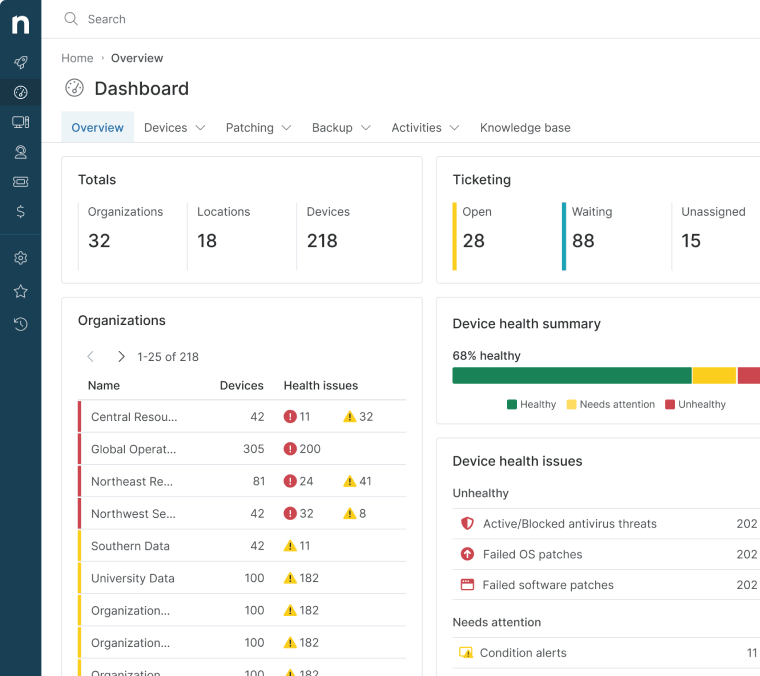
2. IBM Security MaaS360
IBM Security MaaS360 is a SaaS unified endpoint management solution that helps your team stay connected, protected, and efficient in a single console. Its solution manages iOS, Android, iPadOS, macOS, and Windows endpoints.
The platform is intended for remote and hybrid workforces. MaaS360 enables IT professionals to quickly enroll and configure devices, manage their cybersecurity, and integrate with multiple third-party business apps. More specifically, IBM Security MaaS360 integrates easily with the Microsoft ecosystem, enabling more efficient and seamless endpoint management.
Read IBM Security MaaS360 alternatives or see how IBM Security MaaS360 compares with NinjaOne.
Use Case:
IBM Security MaaS360 is best for organizations with remote or hybrid workforces that need unified endpoint management with strong security and compliance capabilities.
Features:
- Centralized device management: IBM MaaS360 offers a single console that’s ideal for IT administrators looking for a platform that provides centralized management of endpoints.
- Threat detection and remediation: The platform monitors potential threats in real time, aiding IT administrators in deciding on remediation actions.
- Integrations: IBM MaaS360 integrates with helpful third-party tools to expand the platform’s usability.
Shortcomings:
- Steep learning curve: Some users noticed a steep learning curve when using IBM MaaS360, potentially impacting user adaption. (Verified G2 review)
- Occasional slowdowns: Others pointed out the platform’s occasional performance issues affecting user productivity. (Verified G2 review)
- Documentation: Some IBM MaaS360 users said that documentation could be improved by ensuring timely updates, which would improve the troubleshooting experience. (Verified G2 review)
IBM Security MaaS360 reviews on G2
| Category | IBM Security MaaS360 Rating |
| Overall | 4.2 out of 5 (202) |
| Has the product been a good partner in doing business? | 8.0 |
| Quality of Support | 8.1 |
| Ease of Admin | 8.0 |
| Ease of Use | 8.2 |
IBM Security MaaS360 reviews on Capterra
| Category | IBM Security MaaS360 Rating |
| Overall | 4.2 out of 5 (26) |
| Ease of Use | 3.8 |
| Customer Service | 3.8 |
| Features | 4.3 |
| Value for Money | 4.0 |
3. Microsoft Intune
Microsoft Intune offers end-to-end endpoint management. Because it is a product of Microsoft, Intune offers seamless integration into all Microsoft products.
Intune is a cloud-based solution that manages user access to organizational resources and simplifies app and device management from a centralized dashboard. Following a zero-trust security model, Intune helps businesses comply with various regulations.
Read Microsoft Intune alternatives or see how Microsoft Intune compares with NinjaOne.
Use Case:
Microsoft Intune is best for organizations operating primarily within the Microsoft ecosystem that need endpoint management tightly integrated with Microsoft 365 and Azure Active Directory.
Features:
- Zero-trust architecture: Microsoft Intune enforces strict access controls by continuously verifying user identities through its zero-trust architecture.
- BYOD support: The platform allows for secure management of devices under BYOD models and those that are company-owned.
- Endpoint security: Microsoft Intune employs security tools to strengthen endpoint security while continuously monitoring devices for vulnerabilities.
Shortcomings:
- For IT professionals: Some users mentioned that Microsoft Intune caters more to experienced and advanced users, making it less beginner-friendly. (Verified G2 review)
- User interface: Other users also pointed out the complexities of navigating the platform’s user interface. (Verified G2 review)
- Deployment delays: According to some users, Microsoft Intune changes such as deployments or configuration updates can take time to propagate to user devices due to its extensive infrastructure. (Verified G2 review)
Microsoft Intune reviews on G2
| Category | Microsoft Intune Rating |
| Overall | 4.4 out of 5 (260) |
| Has the product been a good partner in doing business? | 8.9 |
| Quality of Support | 8.4 |
| Ease of Admin | 8.6 |
| Ease of Use | 8.6 |
Microsoft Intune reviews on Capterra
| Category | Microsoft Intune Rating |
| Overall | 4.5 out of 5 (41) |
| Ease of Use | 4.2 |
| Customer Service | 3.7 |
| Features | 4.4 |
| Value for Money | 4.0 |
4. Workspace ONE
Workspace ONE, now part of Omnissa (formerly VMWare), is a well-known UEM solution and helps organizations manage and monitor their devices from a centralized dashboard.
It’s designed to deliver a modern solution for hybrid workforces without sacrificing the security and control needed by IT teams.
Use Case:
Workspace ONE is best for enterprise organizations looking to deliver a secure digital workspace with unified endpoint management and identity-based access controls.
Features:
- Login security: Workspace ONE enforces robust login security by leveraging single sign-on (SSO) and multi-factor authentication (MFA) when authorizing users.
- Conditional access: Workspace ONE also enables conditional access policies that grant or deny access based on factors like user identity, device compliance, and location.
- App management: The IT solution offers a centralized platform for deploying, updating, and managing applications across various devices.
Shortcomings:
- Occasional slowdowns: Some Workspace ONE users reported experiencing intermittent slowdowns, especially when managing a large number of endpoints. (Verified G2 review)
- User experience: Others pointed out their challenges with Workspace ONE’s interface, saying it could be improved by making it more user-friendly. (Verified G2 review)
- Resource-heavy: According to some users, the platform consumes significant system resources, which may impact device performance. (Verified G2 review)
Workspace ONE reviews on G2
| Category | Workspace ONE Rating |
| Overall | 4.5 out of 5 (39) |
| Has the product been a good partner in doing business? | 7.4 |
| Quality of Support | 7.7 |
| Ease of Admin | 7.9 |
| Ease of Use | 8.1 |
Workspace ONE reviews on Capterra
| Category | Workspace ONE Rating |
| Overall | 4.6 out of 5 (40) |
| Ease of Use | 4.3 |
| Customer Service | 4.2 |
| Features | 4.5 |
| Value for Money | 4.2 |
5. Hexnode UEM
Hexnode UEM provides unified device management for Android, iOS, Windows, macOS, tvOS, and FireOS devices. Its comprehensive platform enables businesses to handle mobility issues by providing a simple and efficient way to monitor, manage, and secure their entire fleet from anywhere in the world.
Hexnode ensures the total separation of corporate and personal data on devices, making it recommended for remote employees and companies following BYOD policies.
Read Hexnode alternatives or see how Hexnode compares with NinjaOne.
Use Case:
Hexnode UEM is best for organizations managing a wide variety of mobile and desktop devices, including BYOD environments.
Features:
- Endpoint security: Hexnode UEM implements several features focused on endpoint security, such as device encryption, automatic device lockdown, threat management, and more.
- Patch management: The platform also allows IT administrators to automate patch deployment, reducing vulnerabilities and ensuring that devices are always updated with the latest security patches.
- Location tracking: Hexnode UEM provides IT administrators with a broad overview of their managed endpoints’ locations that can also log location history and related reports.
Shortcomings:
- Dashboard complexity: Some users said the platform’s dashboard can sometimes feel overwhelming and unintuitive. (Verified G2 review)
- iOS support: Other users mentioned encountering issues when managing iOS devices, such as syncing problems and device management challenges. (Verified G2 review)
- Application installation issues: According to some users, delays in application installations to devices occur occasionally. (Verified G2 review)
Hexnode UEM reviews on G2
| Category | Hexnode UEM Rating |
| Overall | 4.5 out of 5 (227) |
| Has the product been a good partner in doing business? | 9.1 |
| Quality of Support | 9.2 |
| Ease of Admin | 9.0 |
| Ease of Use | 8.9 |
Hexnode UEM reviews on Capterra
| Category | Hexnode UEM Rating |
| Overall | 4.6 out of 5 (153) |
| Ease of Use | 4.5 |
| Customer Service | 4.7 |
| Features | 4.5 |
| Value for Money | 4.5 |
6. HCL BigFix
HCL BigFix’s endpoint management leverages automation to help IT enterprises manage and assure compliance with all their services, desktops, and mobile devices.
It’s an AI Digital+ platform designed to improve employee experience and intelligently automate infrastructure management. BigFix helps IT teams secure and manage their endpoints across nearly 100 operating systems while ensuring continuous compliance with regulations.
Read HCL BigFix alternatives or see how BigFix compares with NinjaOne.
Use Case:
HCL BigFix is best for medium to large enterprises that need endpoint management across diverse operating systems with a strong focus on compliance and automation.
Features:
- Multi-platform support: HCL BigFix supports major operating systems and platforms, making it an ideal endpoint management solution for diverse IT infrastructures.
- Compliance automation: The platform also allows the automation of compliance processes, enabling IT teams to monitor and enforce regulatory standards across all endpoints.
- Enterprise-ready: HCL BigFix offers essential features ideal for enterprise setups, such as runbook automation and endpoint protection.
Shortcomings:
- Integrations: Compared to other endpoint management tools, HCL BigFix has limited integrations with essential tools and can be complex, which affects functionality maximization. (Verified G2 review)
- Learning curve: According to some G2 users, there is a steep learning curve. (Verified G2 review)
- Mobile device support: While there are good reviews on its endpoint management, specifically for desktop computer endpoints, some users have expressed a desire for enhanced features and functionalities in the mobile device management area. (Verified G2 review)
HCL BigFix reviews on G2
| Category | HCL BigFix Rating |
| Overall | 4.5 out of 5 (87) |
| Has the product been a good partner in doing business? | 9.0 |
| Quality of Support | 9.2 |
| Ease of Admin | 8.3 |
| Ease of Use | 8.4 |
HCL BigFix reviews on Capterra
| Category | HCL BigFix Rating |
| Overall | 4.0 out of 5 (3) |
| Ease of Use | 4.0 |
| Customer Service | 4.3 |
| Features | 4.0 |
| Value for Money | 4.3 |
7. Citrix Endpoint Management
Citrix Endpoint Management is a unified endpoint security solution offering a simplified platform for IT departments to monitor different endpoints in their IT network.
Its platform allows IT teams of all sizes to easily manage and control their infrastructure, with over 300 policies for additional security. Citrix Endpoint Management is available on the cloud or on-premises, allowing business leaders to access the right resources at the right time.
Read Citrix Endpoint Management alternatives.
Use Case:
Citrix Endpoint Management is best for organizations that require mobile application management and secure access to corporate resources across cloud or on-prem environments.
Features:
- Security integrations: Citrix Endpoint Management integrates with security services to prevent advanced cyberattacks and protect endpoints.
- Suited for corporate settings: The platform is also enterprise-friendly and scalable, making it ideal for IT environments in corporate settings.
- Mobile application management: Citrix Endpoint Management’s mobile application management (MAM) functionality can help IT administrators deploy and distribute apps.
Shortcomings:
- Login persistence issue: One drawback some users mentioned is that a device can remain logged in even after disconnecting or logging off, leading to access denial when logging in from a different location. (Verified G2 review)
- Intermittent slowdowns: Some users also experience occasional slowdowns when using Citrix Endpoint Management in specific scenarios. (Verified G2 review)
- Access challenges: Other users pointed out their experiences with frequent application authentication and additional steps required for access, which can take up valuable time. (Verified G2 review)
Citrix Endpoint Management reviews on G2
| Category | Citrix Endpoint Management Rating |
| Overall | 4.5 out of 5 (27) |
| Has the product been a good partner in doing business? | 7.5 |
| Quality of Support | 7.9 |
| Ease of Admin | 7.5 |
| Ease of Use | 7.5 |
Citrix Endpoint Management reviews on Capterra
| Category | Citrix Endpoint Management Rating |
| Overall | 4.0 out of 5 (20) |
| Ease of Use | 3.7 |
| Customer Service | 4.0 |
| Features | 3.9 |
| Value for Money | 4.0 |
8. Quest KACE
Quest KACE is an endpoint management solution that helps you track every device in your IT network, automate administrative tasks, and secure you from a wide range of cyber threats.
KACE centralizes systems management while enhancing visibility and control through a single view of your assets. Additionally, its platform helps IT teams protect your endpoints while minimizing the risks of noncompliance with data protection and licensing requirements.
Read Quest KACE alternatives or see how Quest KACE compares with NinjaOne.
Use Case:
Quest KACE is best for IT teams that need strong asset management, inventory tracking, and reporting alongside traditional endpoint management capabilities.
Features:
- Endpoint security: Quest KACE includes features to enhance endpoint security by detecting and mitigating threats.
- Inventory and discovery: Quest KACE provides a centralized platform for discovering and tracking all IT assets across managed IT infrastructure.
- Lifecycle management: The platform also offers tools for managing the lifecycle of endpoints, including software deployment, patch management, and device configuration.
Shortcomings:
- Windows update management: Some users reported challenges in reliably tracking the execution status of scheduled Windows updates, occasionally requiring multiple attempts to deploy updates successfully. (Verified G2 review)
- Customer support: Other users said that Quest KACE’s support and service could be improved to swiftly resolve issues. (Verified G2 review)
- Search capabilities: According to some users, the platform’s search functionality can be slow, particularly when querying data or searching for tickets based on keywords. (Verified G2 review)
Quest KACE reviews on G2
| Category | Quest KACE Rating |
| Overall | 4.1 out of 5 (95) |
| Has the product been a good partner in doing business? | 8.3 |
| Quality of Support | 8.1 |
| Ease of Admin | 8.2 |
| Ease of Use | 7.9 |
Quest KACE reviews on Capterra
| Category | Quest KACE Rating |
| Overall | 4.0 out of 5 (23) |
| Ease of Use | 4.0 |
| Customer Service | 3.9 |
| Features | 4.0 |
| Value for Money | 3.9 |
9. Action1
Action1 is a cloud-based endpoint management solution focused on simplifying patch management and remote endpoint administration for IT teams. Designed with ease of use in mind, the platform enables organizations to manage Windows endpoints without the need for on-premises infrastructure.
Action1 emphasizes automation and rapid deployment, allowing IT professionals to identify vulnerabilities, deploy patches, and remediate issues from a centralized, web-based console. Its lightweight agent and streamlined interface make it particularly appealing to small and mid-sized IT teams that want to reduce manual effort while maintaining visibility and control over their endpoints.
Read Action1 alternatives or see how Action1 compares with NinjaOne.
Use Case:
Action1 is best suited for small to mid-sized IT teams that primarily manage Windows endpoints and want a lightweight, cloud-based solution for patch management and basic remote administration.
Features:
- Automated patch management: Action1 helps IT teams deploy security updates and patches across Windows endpoints to reduce vulnerabilities.
- Remote endpoint administration: The platform allows administrators to remotely execute commands and remediate issues without direct device access.
- Cloud-native architecture: Action1 operates entirely in the cloud, eliminating the need for on-premises servers or complex infrastructure.
Shortcomings:
- Learning curve: Advanced features have a steep learning curve. (Verified G2 review)
- Linux support: G2 users have said that Action1 currently lacks support for endpoints that use Linux. (Verified G2 review)
- MDM support: Action1 could enhance its MDM capabilities, as several users have stated some problems when using them. (Verified G2 review)
Action1 reviews on G2
| Category | Action1 Rating |
| Overall | 4.9 out of 5 (997) |
| Has the product been a good partner in doing business? | 9.6 |
| Quality of Support | 9.3 |
| Ease of Admin | 9.5 |
| Ease of Use | 9.5 |
Action1 reviews on Capterra
| Category | Action1 Rating |
| Overall | 4.9 out of 5 (237) |
| Ease of Use | 4.8 |
| Customer Service | 4.8 |
| Features | 4.7 |
| Value for Money | 4.9 |
10. Symantec Endpoint Management
Symantec Endpoint Management is a complete endpoint security and management software solution by Broadcom, Inc. The tool helps you efficiently manage and secure hardware in a single, unified console.
Its integrated endpoint security platform delivers cloud-based protection with AI-guided security management, all on a single agent/console architecture. Symantec also offers Active Directory protection, using AI-driven obfuscation for AD query results, preventing attackers from stealing AD information and credentials, and blocking lateral movements at the point of breach.
Use Case:
Symantec Endpoint Management is best for organizations with advanced security and compliance needs that want endpoint management tightly integrated with endpoint protection.
Features:
- Endpoint security: Symantec Endpoint Management provides security measures to protect endpoints from various threats.
- Flexible deployment options: The solution supports various deployment models, including on-premises, cloud, and hybrid environments.
- AD protection: Symantec Endpoint Management includes features to enhance the security of Active Directory environments.
Shortcomings:
- Initial setup: Some Symantec Endpoint Management users said initial configurations can cause a moderate learning curve, impacting productivity. (Verified G2 review)
- Support and service: Other users mentioned that the platform’s support could be improved to enhance the troubleshooting and issue resolution experience. (Verified G2 review)
- Resource-heavy: Some users have reported that Symantec Endpoint Management can be resource-intensive, potentially impacting system performance. (Verified G2 review)
Symantec Endpoint Management reviews on G2
| Category | Symantec Endpoint Management Rating |
| Overall | 4.2 out of 5 (38) |
| Has the product been a good partner in doing business? | 8.2 |
| Quality of Support | 8.8 |
| Ease of Admin | 8.2 |
| Ease of Use | 8.3 |
Symantec Endpoint Management reviews on Capterra
| Category | Symantec Endpoint Management Rating |
| Overall | 4.4 out of 5 (548) |
| Ease of Use | 4.3 |
| Customer Service | 4.1 |
| Features | 4.3 |
| Value for Money | 4.2 |
Comparison of endpoint management software (G2)
| Category | NinjaOne | IBM Security MaaS360 | Microsoft Intune | Workspace ONE | Hexnode UEM | HCL BigFix | Citrix Endpoint Management | Quest KACE | Action1 | Symantec Endpoint Management |
| Overall | 4.7 out of 5 (3,884) | 4.2 out of 5 (202) | 4.4 out of 5 (260) | 4.5 out of 5 (39) | 4.5 out of 5 (227) | 4.5 out of 5 (87) | 4.5 out of 5 (27) | 4.1 out of 5 (95) | 4.9 out of 5 (997) | 4.2 out of 5 (38) |
| Has the product been a good partner in doing business? | 9.4 | 8.0 | 8.9 | 7.4 | 9.1 | 9.0 | 7.5 | 8.3 | 9.6 | 8.2 |
| Quality of Support | 9.1 | 8.1 | 8.4 | 7.7 | 9.2 | 9.2 | 7.9 | 8.1 | 9.3 | 8.8 |
| Ease of Admin | 9.1 | 8.0 | 8.6 | 7.9 | 9.0 | 8.3 | 7.5 | 8.2 | 9.5 | 8.2 |
| Ease of Use | 9.1 | 8.2 | 8.6 | 8.1 | 8.9 | 8.4 | 7.5 | 7.9 | 9.5 | 8.3 |
Comparison of endpoint management software (Capterra)
| Category | NinjaOne | IBM Security MaaS360 | Microsoft Intune | Workspace ONE | Hexnode UEM | HCL BigFix | Citrix Endpoint Management | Quest KACE | Action1 | Symantec Endpoint Management |
| Overall | 4.7 out of 5 (283) | 4.2 out of 5 (26) | 4.5 out of 5 (40) | 4.6 out of 5 (40) | 4.6 out of 5 (152) | 4.0 out of 5 (3) | 4.0 out of 5 (20) | 4.0 out of 5 (23) | 4.9 out of 5 (237) | 4.4 out of 5 (548) |
| Ease of Use | 4.7 | 3.8 | 4.2 | 4.3 | 4.5 | 4.0 | 3.7 | 4.0 | 4.8 | 4.3 |
| Customer Service | 4.7 | 3.8 | 3.7 | 4.2 | 4.7 | 4.3 | 4.0 | 3.9 | 4.8 | 4.1 |
| Features | 4.5 | 4.3 | 4.4 | 4.5 | 4.5 | 4.0 | 3.9 | 4.0 | 4.7 | 4.3 |
| Value for Money | 4.6 | 4.0 | 4.0 | 4.2 | 4.5 | 4.3 | 4.0 | 3.9 | 4.9 | 4.2 |
See NinjaOne’s intuitive endpoint management software in action.
Schedule a 14-day free trial or watch a demo.
Final scores and summaries of endpoint management software solutions
| Vendor | Final Score | Summary |
| NinjaOne | 1.338 | A market leader in unified endpoint management, NinjaOne is the #1 choice for 35,000+ customers worldwide for its robust and reliable solution. |
| Action1 | 1.077 | A lightweight, cloud-based endpoint management solution focused on Windows patching and basic remote administration, Action1 is best suited for smaller IT teams seeking simplicity and a low-cost entry point. |
| Hexnode UEM | 0.946 | Hexnode may be suitable for clients looking for proactive training and support. |
| Symantec Endpoint Management | 0.900 | Symantec is a solution to consider if you have higher security compliance protocols. |
| Microsoft Intune | 0.869 | Microsoft InTune is a good option for hybrid workforces looking for an endpoint management solution deeply integrated within the Windows ecosystem, yet versatile enough for other platforms. |
| HCL BigFix | 0.860 | HCL BigFix is a balanced endpoint management solution for medium-sized enterprises. |
| Workspace ONE | 0.827 | Workspace ONE, now part of Omnissa (formerly VMware), is an enterprise platform that provides unified endpoint management. |
| IBM Security MaaS360 | 0.824 | A good contender for endpoint management, IBM Security MaaS360 allows you to manage and monitor your endpoints from a single console. |
| Quest KACE | 0.813 | Quest KACE is a decent solution for IT teams looking for flexible reporting functions. |
| Citrix Endpoint Management | 0.775 | Citrix Endpoint Management is an option worth considering if you have a limited IT budget. |
Our top endpoint management software comparison and ranking methodology
This review and ranking of the best endpoint management software in 2026 is based on a transparent, structured methodology. The process includes:
- Data Sources: Aggregated ratings and review counts from G2 and Capterra as of April 21, 2026.
- Metrics Considered: Star ratings, review volume, quality of support, business partnership feedback, ease of use, and customer service ratings
- Weighting: Each metric is weighted based on importance to MSPs, detailed as:
- Final Score = w1 * G2 Good Partner in Doing Business + w2 * G2 Quality of Support + w3 * G2 Ease of Admin + w4 * G2 Ease of Use + w5 * Capterra Ease of Use + w6 * Capterra Customer Service + w7 * Capterra Features + w8 * Capterra Value for Money + w9 * G2 Total Number of Reviews (Scaled) + w10 * Capterra Total Number of Reviews (Scaled), where:
- w1 = 0.125 (Weight for G2 Good Partner in Doing Business)
- w2 = 0.125 (Weight for G2 Quality of Support)
- w3 = 0.125 (Weight for G2 Ease of Admin)
- w4 = 0.125 (Weight for G2 Ease of Use)
- w5 = 0.125 (Weight for Capterra Ease of Use)
- w6 = 0.125 (Weight for Capterra Customer Service)
- w7 = 0.125 (Weight for Capterra Features)
- w8 = 0.125 (Weight for Capterra Value for Money)
- w9 = 0.1 (Weight for G2 Total Number of Reviews, Scaled)
- w10 = 0.1 (Weight for Capterra Total Number of Reviews, Scaled)
- Final Score = w1 * G2 Good Partner in Doing Business + w2 * G2 Quality of Support + w3 * G2 Ease of Admin + w4 * G2 Ease of Use + w5 * Capterra Ease of Use + w6 * Capterra Customer Service + w7 * Capterra Features + w8 * Capterra Value for Money + w9 * G2 Total Number of Reviews (Scaled) + w10 * Capterra Total Number of Reviews (Scaled), where:
- Data Freshness: All data was collected and last validated on April 21, 2026.
- Process: Products were evaluated for both core and advanced IT management features, customer feedback, recent security incidents, and breadth of integrations, with sources referenced where relevant.
⚠️ Note: Special consideration was also given to scalability, multi-site management capabilities, compliance reporting depth, and integration with enterprise security infrastructure. These factors are especially relevant for enterprise endpoint management use cases where IT teams must manage large, complex device estates across distributed environments.
Choosing the right endpoint management software for your organization
Now that you’ve gotten a glimpse of the top endpoint management solutions on the market—their features, scores, shortcomings, and respective ranks—you can determine which of these would be the best fit for your business by answering the following questions:
- First, what type of organization are you running?
- How many endpoints do you need to manage, and where are they located?
- Will your chosen solution need to scale according to your business growth plans?
- How much time and resources can you invest in the onboarding process?
- Can this software easily merge with your current IT tools?
- Last but not least, what’s your overall IT budget?
Remember that choosing the right endpoint management software for your organization isn’t a “one size fits all” strategy. It pays to try out these solutions before making a final decision—and take your time doing so. See if each tool has a demo you can watch or a free trial so you can get an actual feel for the software.
Watch a free demo of the #1 Unified IT Management Platform
See how organizations simplify endpoint management, strengthen security and scale IT operations with NinjaOne.
The best endpoint management software solutions
As more organizations shift toward more flexible work strategies, security threats continue to evolve and become more complex. It’s now crucial for IT enterprises to use endpoint management to enhance their security and improve the productivity of their end users.
Having a strong endpoint management software solution can offer many benefits, not least of which are more streamlined operations. Your endpoint management should eliminate redundant tasks so your IT technicians can focus on more complex problem-solving.