MDM for iOS with NinjaOne MDM
NinjaOne MDM enrolls, configures, and secures iPhones at scale, with remote lock, wipe, and Lost Mode to protect company data if a device is lost or compromised.
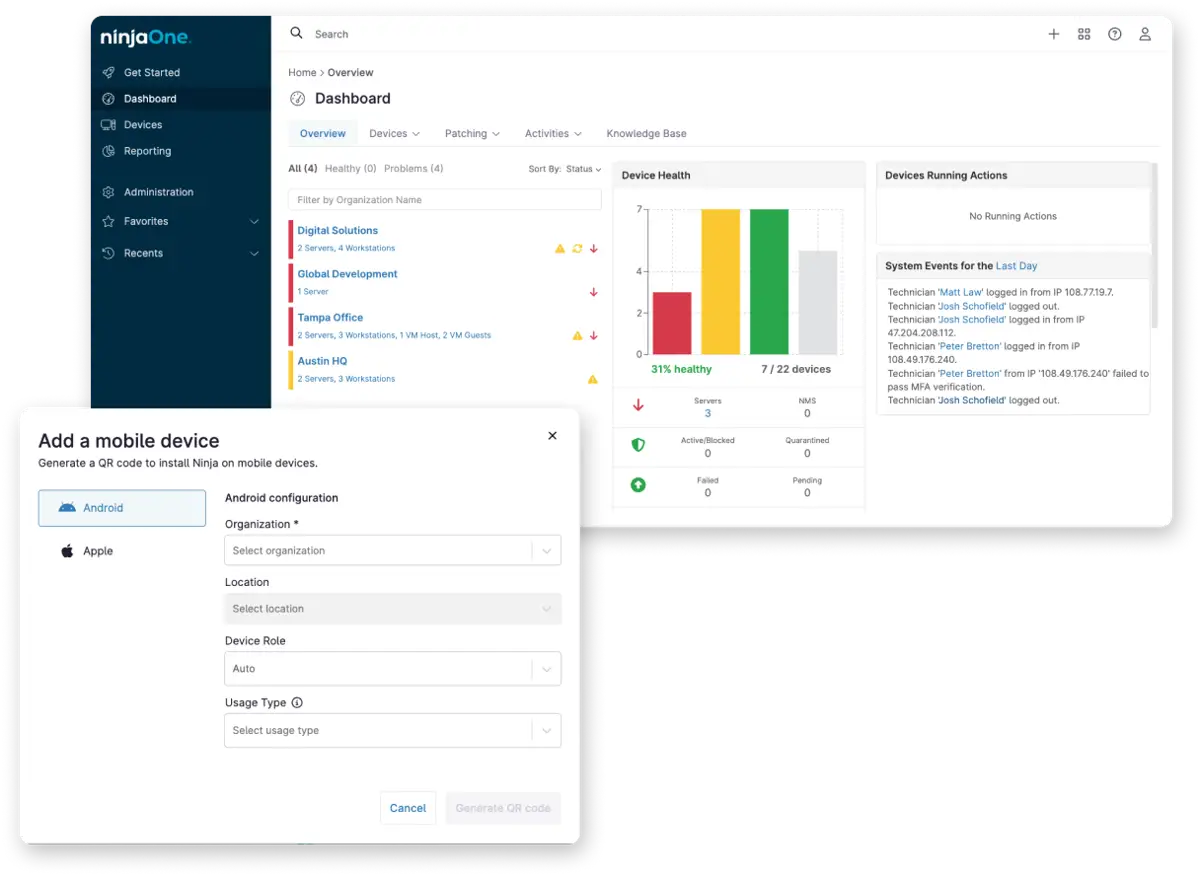
NinjaOne MDM enrolls, configures, and secures iPhones at scale, with remote lock, wipe, and Lost Mode to protect company data if a device is lost or compromised.






The following problems describe common friction points in managing iPhones at scale, and how NinjaOne MDM addresses them.
Problem | How NinjaOne resolves it |
Manually configuring each iPhone one at a time doesn’t scale as a fleet grows, especially across a mix of company-owned and personally owned devices. | Once enrolled, iPhones are configured through policies that apply consistently across the fleet, keeping settings aligned regardless of how many devices are added. |
A lost or stolen iPhone puts corporate data at risk for as long as it takes IT to notice and respond. | Administrators can remotely lock or wipe an iPhone, or activate Lost Mode to lock the screen and display a custom message, the moment it’s reported missing. |
Letting anyone install any app on a company-connected iPhone risks unapproved software, but blocking installs outright makes the device harder to use for work. | Administrators can push required apps silently through Apple Apps and Books, or make approved apps available through the App Store for the user to install with their own Apple ID, while blocking unauthorized installs either way. |
Supporting a distributed workforce carrying company iPhones without physical access to each device can turn troubleshooting into a lengthy back-and-forth. | IT tracks device status, policy alignment, and security posture remotely from the NinjaOne console, without needing to physically handle the device. |
Zero-touch enrollment and policy-based configuration get new iPhones into service without IT configuring each device individually, so onboarding a new hire or a new batch of devices moves faster.
Combining location tracking, remote lock, remote wipe, and Lost Mode lets IT respond to a missing iPhone within minutes of it being reported, rather than leaving corporate data exposed indefinitely.
Because app deployment and settings are enforced through policy, every enrolled iPhone stays aligned with the same security and compliance standard, no matter how many devices are added.
Centralized inventory and device monitoring give IT visibility into the status, location, and ownership of every iPhone from one console, without maintaining a separate spreadsheet or system.

Brand-new iPhones purchased through an authorized reseller can be enrolled automatically through Apple Business Manager, where applicable. NinjaOne policies and security settings apply the moment the device connects to the internet, without IT touching each device individually.

IT teams can configure organization- or location-based policies covering passcode requirements, network settings, restrictions, and other security controls. Once applied, these policies keep every enrolled iPhone aligned with the same standard, regardless of how many devices are added.

NinjaOne can silently install, update, or remove approved apps across managed iPhones through Apple Apps and Books. Apps can also be made available through the App Store instead, where the user installs them using their own Apple ID.

If an iPhone is lost, stolen, or at risk, administrators can use remote lock or wipe to help protect corporate data. Lost Mode locks the screen and displays a custom message or contact information to support recovery.

IT teams can track device status, policy alignment, and security posture from the NinjaOne console. This gives visibility into the iPhone fleet without requiring physical access to each device.

NinjaOne maintains an accurate inventory of the iPhone fleet, tracking device details, ownership, installed software, and location. This keeps IT informed of what’s deployed and where, without manual tracking.
Employees who work outside a traditional office, such as delivery drivers or field technicians, can be issued a company iPhone that’s already configured with the right apps and security policies before it reaches them.
MSPs supporting several clients’ iPhone fleets can apply client-specific policies during enrollment, keeping each customer’s devices, apps, and data separate while managing everything from one console.
When an employee reports an iPhone missing, IT can lock it with Lost Mode or wipe it outright, depending on how sensitive the data on it is, from the same console used for other endpoint types.



Here’s how MDM for iOS is set up and used in NinjaOne MDM, at a high level.
IT teams configure organization- or location-based policies covering passcode requirements, network settings, restrictions, and other security controls before enrolling devices.
Administrators enroll iPhones using the method that fits how the device is provisioned: user-driven BYOD enrollment, manual enrollment through Apple Configurator for existing company-owned iPhones, or zero-touch enrollment for brand-new iPhones through Apple Business Manager, where applicable.
NinjaOne deploys required apps silently through Apple Apps and Books, or makes approved apps available through the App Store for the user to install with their own Apple ID.
IT tracks device status, policy alignment, and security posture from the NinjaOne console, then uses remote lock, wipe, or Lost Mode if an iPhone is lost, stolen, or at risk.
"One of the reasons we chose NinjaOne MDM is that it's really easy to use, effective, and reliable. Unlike our previous solution, configuring and managing Apple devices is simple and works. With our previous solution, pushing out policies and monitoring Apple devices was difficult. It's a night and day difference with NinjaOne. We can manage all our devices knowing the policies we push out will take effect on all our devices."
- Dustin Skelton, IT Director, FCC Behavioral Health.
Source: FCC Behavioral Health – NinjaOne
100,000
Endpoints managed
“NinjaOne is a scalable solution. It’s built on a modern SaaS architecture and it’s future-proof.”

40%
More Cost Effective
“NinjaOne’s price point is 40% less than any other endpoint management tool on the market, while being more powerful and easy to use.”

10-15
Tools Replaced
“Before, I needed 10-15 different tools to execute what NinjaOne does in its centralized, single pane of glass.”

30%
Less time for patching
“We observed a 30% reduction in the time taken for patch deployments compared to our previous solution.”

2,000
Endpoints managed
“NinjaOne gives me much more flexibility and security in my work”

30%
Annual ROI
“[NinjaOne] has already shown its value in ROI…it’s at least a hundred thousand dollars annually.”

24x
Faster Endpoint Management
“Our processes have become 24x faster with NinjaOne.”

20-40
Hours Saved Each Week
“Leveraging the automations feature within NinjaOne has enabled me to save upwards of what would likely be 20 to 30 to even 40 hours per week.”
See how NinjaOne MDM enrolls, configures, and secures iPhones from one console.
MDM for iOS is built into the broader NinjaOne MDM platform. It enables IT teams to enroll, configure, and manage iPhones at scale alongside Windows, macOS, Linux, iPadOS, and Android endpoints from a single console.
Yes, for brand-new iPhones purchased through an authorized reseller and registered with Apple Business Manager. Existing or previously used iPhones are enrolled through other supported methods instead.
A BYOD iPhone is owned by the end user, not the company. Because of that ownership, the managed scope is limited to the work side of the device. Administrators cannot see, manage, or wipe the personal apps and data on it. A supervised iPhone, enrolled through Apple Business Manager where applicable, is typically company owned, and NinjaOne manages the entire device, giving administrators full visibility and control rather than being limited to a managed portion.
Yes. Administrators can remotely lock or wipe the device, or use Lost Mode to lock it and display a custom message or contact information on the screen.
Apple Apps and Books lets IT deploy and manage approved apps without requiring user interaction. With the App Store, users download and install apps themselves using their Apple ID.
.
Yes. NinjaOne can track an iPhone’s last known location when location tracking is enabled and the required location permissions are granted. IT teams can use this information to help locate a device or determine whether further action, such as locking or wiping it, is necessary.