
Key Points:
- ChromeOS fleets solely live in the Google Workspace console, separate from the Windows, Mac, and mobile devices IT manages elsewhere, so basic questions like “how many devices do we have?” take two exports to answer.
- NinjaOne ChromeOS Device Support uses the NinjaOne Google Workspace integration to sync ChromeOS devices into the same inventory as every other managed endpoint, with online and offline status for each device.
- IT teams and MSPs can connect multiple Google Workspace tenants and report across all of them from a single NinjaOne view, and find ChromeOS devices in the existing /v2/devices API routes.
- Users choose how devices come in: auto-approve them or review them manually and merge them into existing records by serial number.
- Technicians can reboot a device, set volume, erase user data, power wash a Chromebook, or open a Chrome Remote Desktop session from NinjaOne.
- Policy configuration stays in the Google Workspace console, and NinjaOne links to it from the device page.
- ChromeOS Device Support is available now in the 16.0 release and requires an active Google Workspace license.
You’re asked for a report of your total assets for an audit, and while your Windows and Mac assets are accessible from your primary management console, your Chromebooks are locked away within Google Workspace. If you’re an MSP, that’s multiple reports per client, every time, along with manual consolidation too.
Two consoles for one fleet
Many schools, districts, and local government offices run Chromebooks alongside Windows and Mac devices. The devices are all part of the same environment, but the data usually isn’t. Asset details, last-user information, and reporting end up split between NinjaOne and the Google Workspace console, and every tenant you support means another login.
Lean teams feel this most. When the same two or three people handle everything from help desk requests to audit prep, switching consoles to piece together a single fleet report is time you don’t have.
Introducing NinjaOne ChromeOS Device Support
NinjaOne ChromeOS Device Support extends the NinjaOne Google Workspace integration to ChromeOS environments. When you connect your Google Workspace tenants, ChromeOS and ChromeOS Flex devices sync into NinjaOne automatically, right alongside Windows, Mac, and mobile endpoints. You get one system of record for asset tracking, reporting, and device actions, without a second console to manage.
One inventory for every endpoint
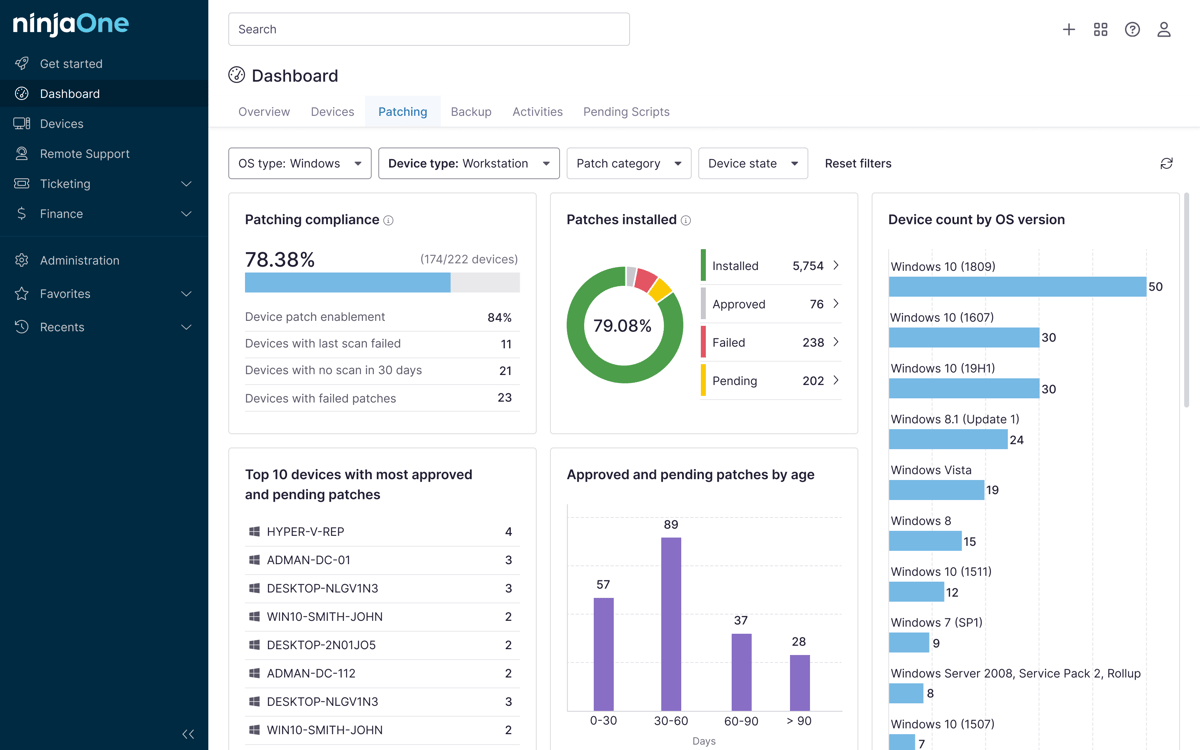
ChromeOS devices appear in the same inventory as every other managed device, with device details, OS version, and Google Workspace org unit. One asset report covers the whole fleet.
Multi-tenant reporting at scale
Connect as many Google Workspace tenants as your organization runs, whether that’s a dozen school buildings or a handful of county departments, and report across all of them from a single NinjaOne view. MSPs can consolidate reporting across client environments without logging in to each Workspace console separately.
Onboarding without a new rollout
There’s no new agent, console, or credential set for technicians to learn. ChromeOS devices appear within the NinjaOne instance you already use, so onboarding a Chromebook fleet is a configuration step instead of a new tool rollout.
You also control how devices come in. Auto-approve discovered devices to add them to your inventory right away, or require manual approval and merge a device into an existing record by serial number.
Bring order to IT asset chaos
Device actions without the detour
Reboot a device, set volume, erase user data, or power wash a Chromebook straight from NinjaOne. When a device needs hands-on help, open a Chrome Remote Desktop session from the same place.
Asset and compliance tracking
Device details, last logged-in user, and inventory history live in the same system of record as the rest of your fleet, so audits and asset reports pull from one place.
Available through the API
ChromeOS devices appear in the existing /v2/devices API routes. MSPs and IT teams that build their own reporting and tooling can pull ChromeOS devices the same way they pull other devices.
Simplify remote IT management
Who it’s for
NinjaOne ChromeOS Device Support fits district IT teams and state and local government offices running hundreds or thousands of Chromebooks, plus MSPs who support multiple Google Workspace tenants. If you manage ChromeOS devices in one place and everything else in another, this puts them in the same view.
Availability
NinjaOne ChromeOS Device Support is available now with the 16.0 release. It requires an active Google Workspace license.