


Key Points
- Remote endpoint management covers monitoring, securing, updating, and troubleshooting off-site devices.
- MSPs should define their service scope and minimum baseline controls before selecting tools or onboarding any client.
- A documented baseline sets the minimum controls every managed endpoint must meet before onboarding.
- A structured onboarding workflow ensures visibility, ownership, and policy readiness before your MSP takes operational responsibility.
- A pre-service security audit checklist helps identify gaps in protection before management starts.
Remote endpoint management is the practice of monitoring, securing, updating, and troubleshooting IT devices without physical access. Most MSPs focus on remote support and basic checks, but enterprises demand more in-depth support, which warrants a solid framework that simplifies tasks.
MSP endpoint management: Where to start
Follow these steps to establish a solid bedrock for your remote management capabilities.
What remote endpoint management should include
Creating your remote management services starts with knowing what you need to effectively deliver value. This can vary, as certain enterprises operate on higher service tiers. But defining your remote endpoint management scope can help avoid any confusion later.
To support clients remotely, make sure you have the following:
- Endpoint discovery: Automatically detects and identifies devices on a network
- Device inventory: Records hardware devices and their attributes
- Agent deployment: Installs and configures configurations across fleets
- Patch management: Applies important software updates to endpoints
- Remote monitoring: Centrally tracks health, performance, status, and location of endpoints continuously
- Alerting and escalation: Notifies IT support during patch failures or cyberattacks
- Software deployment: Pushes application installs at scale
- Endpoint protection: Protects endpoints against security threats
- Backup validation: Checks if data copies are intact, healthy, and secure
- Remote support: Enables technicians to troubleshoot from afar
- Compliance reporting: Supports SLAs and improves visibility
- Lifecycle tracking: Keeps track of asset usage to ensure operational efficiency
Define the MSP endpoint management baseline
Lay out the minimum required controls for every endpoint you’ll be managing. This gives you a clear picture of your capabilities before you take on large enterprise fleets. Your baseline should include:
- Supported operating systems (such as Windows and macOS) and device types
- Required monitoring policies
- Patch cadence and maintenance windows
- Endpoint protection requirements
- Remote access standards
- Local administrator and privilege rules
- Backup expectations
- Alert thresholds and escalation paths
- Reporting frequency
- Client approval workflows
Build the endpoint onboarding workflow
When devices are eventually added to your remote endpoint management plan, ensure that visibility, accountability, security measures, and policy compliance are established before your MSP takes responsibility.
To streamline your endpoint onboarding process, include these steps:
- Collect an inventory of all devices currently used by the client.
- Identify the following:
- Managed endpoints
- Unmanaged endpoints
- Remote endpoints
- High-risk endpoints
- Link each device to a person, team, or department to establish accountability.
- Install remote monitoring and management (RMM) software on each endpoint to confirm check-in status.
- Push baseline security configurations for constant monitoring and consistent schedules.
- Continuously verify that security and backup workflows run as expected.
- Confirm that MSPs have an appropriate level of access to client devices.
- Record exceptions, unsupported endpoints, and security gaps.
- Provide client-friendly summary reports on endpoint health, status, and performance.
Create an endpoint security audit checklist
An audit checklist helps you pinpoint any security issues before service is delivered. Before managing endpoints virtually, answer the following questions:
- Are all endpoints inventoried and assigned to an owner?
- Are unsupported operating systems present?
- Are critical patches missing?
- Are endpoint protection or EDR tools installed and active?
- Are local administrator rights controlled?
- Is disk encryption enabled where required?
- Are backups configured and recoverable?
- Are remote access tools approved and secured?
- Are risky applications or unauthorized software present?
- Are monitoring alerts mapped to escalation workflows?
- Are compliance reports available for regulated clients?
Choose MSP management software around workflows
Endpoint management tools exist to simplify remote monitoring and centralize control. That said, you shouldn’t simply go for the choice with the most features. Clients may need a tailored approach. And your MSP can help achieve SLAs faster with standardized workflows and careful attention to client needs.
Complexity also arises when you work within more than one environment. With higher operational needs, automating important tasks like system-wide patch management becomes a must. Integrate an endpoint management platform that consolidates key features while simplifying IT supervision.
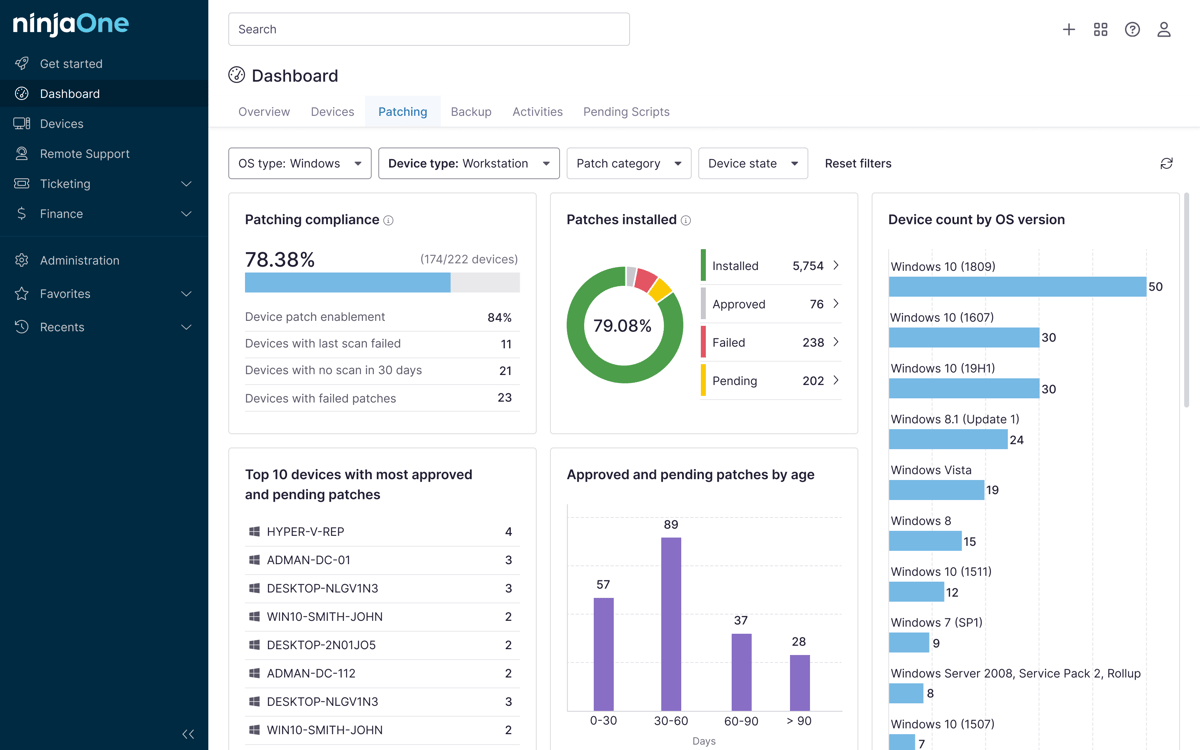
Streamline remote management with a centralized dashboard.
Read how NinjaOne’s RMM can help you eliminate IT headaches.
Common mistakes MSPs make
Here are the most common pitfalls MSPs should avoid as they develop workflows for remote endpoint management.
Starting with tools before defining the endpoint service model
Choosing and deploying endpoint management toolsets before knowing that your client actually needs them can lead to coverage gaps and unnecessary overhead. List out your SLAs and only procure tools that help satisfy those needs.
Onboarding clients without a complete device inventory
Unknown endpoints generate risk from day one. As a prerequisite, detect, identify, and record the total number of known client devices before your MSP fully takes on responsibility.
Creating alerts without clear ownership or escalation rules
Alerts that aren’t assigned to a person or team can get buried, leaving major issues unresolved. To avoid slow response times, add governance structures for each major group of endpoints.
Overlooking backup validation and recovery readiness
Backup configuration and validation go hand in hand. Create an ongoing process of checking data copies for any damage or corruption to increase your ransomware resilience.
Failing to define patching standards
Without a regular patch schedule and without planned maintenance windows, your security posture can be compromised across clients. This creates compliance risks and avoidable overhead, but with automated patching platforms, you can simplify alerting and endpoint health checks at scale.
Centralize your remote endpoint management
Remote endpoint management gives MSPs a structured way to monitor, troubleshoot, onboard, and maintain client devices over the network. MSPs servicing their first few enterprise clients must focus on clear service scope and ongoing monitoring, security audits, and reporting for best results.
Related topics: