Ratings
Microsoft Intune
Veeam

Overall
4.8
Meets Requirements
9.2
905 responses
Ease of Use
9.3
912 responses
Ease of Setup
9.4
804 responses
Ease of Admin
9.5
80 responses
Quality of Support
9.4
876 responses
Ease of Doing Business with
9.6
808 responses
Product Direction (% positive)
Based on G2 Winter 2026
Competitors
Microsoft Intune
Product Summary
Microsoft Intune offers cloud-based endpoint management with comprehensive support for Microsoft product integration. Intune allows managed service providers (MSPs) and IT teams to set up laptops and mobile devices, manage corporate and BYOD devices, and enforce security policies. It offers features such as app management, data protection, device configuration, and software updates, all from a single cloud-based platform. With Intune, customers can remotely secure their data and ensure device compliance with company security policies.
Use Cases
- Centralized device management:
Streamlines device onboarding, configuration, and administration for highly homogenous environments and device configurations. - Application management:
Intune is commonly used to deploy applications, push updates, and manage user permission for multiple device types. - Easy integration with Microsoft products:
Built for seamless integration with Azure Active Directory and other Microsoft products such as Office and Microsoft Endpoint Configuration Manager.
Shortcomings
- Performance:
Several user reviews have stated that Intune can slow down when performing multiple tasks simultaneously, such as deploying and assigning configuration profiles or showing the status of items. - Universal compatibility:
Users have reported that configuring macOS and Apple mobile devices may be challenging, and fewer functionalities are available for non-Windows devices. - Learning curve:
According to G2 reviews, InTune’s interface can be complex, requiring new users to expend more time and resources to learn and understand how to use the platform fully.
Veeam
Product Summary
Veeam is a data protection and backup software vendor that offers various solutions for safeguarding organizations’ business data. These include Veeam Data Cloud for platforms such as Microsoft 365, Azure, and Salesforce as well as Veeam Backup for Google Cloud and AWS. Veeam’s backup suite enables IT teams to store backups of files in the cloud and rapidly restore them in the event of a disaster, cyberattack, or retention policy gap.
Other solutions offered by Veeam include Veeam Data Platform, which packages Veeam Backup & Replication with additional security and recovery capabilities. These capabilities include anomaly detection, automated updates, full system recovery, and immutable backups.
Use Cases
- Enterprise-scale backup:
Veeam is widely used in enterprise environments with large virtual infrastructures and multi-cloud deployments. - Cloud workload protection:
Veeam offers dedicated solutions for various cloud platforms such as Microsoft 365, Azure, Salesforce, and so on. - Advanced backup features:
Additionally, Veeam supports granular restore capabilities, data replication, and immutable backups.
Shortcomings
- Multiple products for full coverage:
Users may need to deploy multiple Veeam solutions for full protection of SaaS apps, endpoints, and cloud workloads. - Learning curve:
Some reviews report that setting up Veeam’s full suite may involve a steep learning curve for new users. - Primarily backup-focused:
Veeam focuses on backup and recovery, so endpoint management, patching, and monitoring would require separate tools.
NinjaOne
Why your peers choose NinjaOne + Intune over Veeam
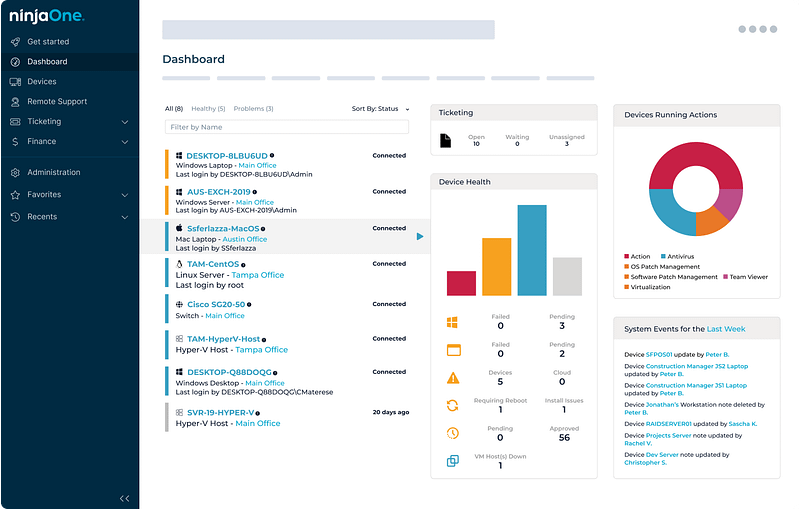
NinjaOne and Microsoft Intune work seamlessly together to unify device visibility and control across every endpoint. By connecting Intune-managed devices with NinjaOne, IT teams gain a single-pane, intelligent view for real-time health monitoring and compliance. This means that IT pros can seamlessly perform various actions, from deploying patches to enforcing policies and configurations, from one dashboard. Together, they create a streamlined, secure endpoint management experience that saves time and reduces complexity.
Compared to other similar tools, NinjaOne delivers unmatched agility and efficiency. It stands out for its extensive compatibility with a wide range of third-party applications (an area where other RMM solutions often have limitations), making it a more adaptable choice for diverse IT environments. Combined with advanced, customizable reporting and a customer-first approach, NinjaOne remains the leading choice for IT professionals who need a dependable, efficient, and future-ready RMM platform.
What they're saying



Watch a Demo of the #1 IT Management Software on G2
Related resources
Microsoft Intune
JumpCloud vs Microsoft Intune
Microsoft Intune vs Miradore
Jamf vs Microsoft Intune
Microsoft Intune vs Moki Total Control
Microsoft Intune vs SureMDM
Microsoft Intune vs Sophos Mobile
GFI Languard vs Microsoft Intune
Microsoft Intune vs Mosyle
Esper vs Microsoft Intune
Addigy vs Microsoft Intune
Kandji vs Microsoft Intune
Cisco Meraki vs Microsoft Intune
BMC Helix Client Management vs Microsoft Intune
Microsoft Intune vs SOTI MobiControl
IBM Security MaaS360 vs Microsoft Intune
Microsoft Intune vs Pandora FMS
Microsoft Intune vs Scalefusion
Microsoft Intune vs SysAid
Microsoft Intune vs VMware Workspace One
Kace vs Microsoft Intune
Action1 vs Microsoft Intune
Microsoft Intune vs Syxsense
Microsoft Intune vs SuperOps
GoTo Resolve vs Microsoft Intune
Level vs Microsoft Intune
Bacon Unlimited vs Microsoft Intune
ITarian vs Microsoft Intune
Hexnode vs Microsoft Intune
Baramundi vs Microsoft Intune
Microsoft Intune vs N-able N-sight
Microsoft Intune vs SolarWinds Dameware
Microsoft Intune vs Panorama9
Microsoft Intune vs Veeam
Datto vs Microsoft Intune
Microsoft Intune vs N-able N-central
Microsoft Intune vs Naverisk
Acronis vs Microsoft Intune
IT Glue vs Microsoft Intune
Ivanti vs Microsoft Intune
Microsoft Intune vs Pulseway
Arcserve vs Microsoft Intune
Lansweeper vs Microsoft Intune
Microsoft Intune vs Tanium
BigFix vs Microsoft Intune
LogicMonitor vs Microsoft Intune
Goverlan vs Microsoft Intune
Auvik vs Microsoft Intune
Automox vs Microsoft Intune
Microsoft Intune vs SyncroMSP
Kaseya VSA vs Microsoft Intune
Connectwise Automate vs Microsoft Intune
Microsoft Intune vs PRTG Network Monitor
Bravura Optitune vs Microsoft Intune
ManageEngine Endpoint Central vs Microsoft Intune
LogMeIn vs Microsoft Intune
Atera vs Microsoft Intune
Veeam
JumpCloud vs Veeam
Miradore vs Veeam
Jamf vs Veeam
Moki Total Control vs Veeam
SureMDM vs Veeam
Sophos Mobile vs Veeam
GFI Languard vs Veeam
Mosyle vs Veeam
Esper vs Veeam
Addigy vs Veeam
Kandji vs Veeam
Cisco Meraki vs Veeam
BMC Helix Client Management vs Veeam
SOTI MobiControl vs Veeam
IBM Security MaaS360 vs Veeam
Pandora FMS vs Veeam
Scalefusion vs Veeam
SysAid vs Veeam
Veeam vs VMware Workspace One
Kace vs Veeam
Action1 vs Veeam
Syxsense vs Veeam
SuperOps vs Veeam
Matrix42 vs Veeam
GoTo Resolve vs Veeam
Level vs Veeam
Bacon Unlimited vs Veeam
ITarian vs Veeam
Hexnode vs Veeam
Baramundi vs Veeam
N-able N-sight vs Veeam
Auvik vs Veeam
Goverlan vs Veeam
LogicMonitor vs Veeam
Atera vs Veeam
LogMeIn vs Veeam
ManageEngine Endpoint Central vs Veeam
Microsoft Intune vs Veeam
Bravura Optitune vs Veeam
PRTG Network Monitor vs Veeam
Connectwise Automate vs Veeam
Kaseya VSA vs Veeam
SyncroMSP vs Veeam
SolarWinds Dameware vs Veeam
Panorama9 vs Veeam
Automox vs Veeam
Datto vs Veeam
N-able N-central vs Veeam
Naverisk vs Veeam
Acronis vs Veeam
IT Glue vs Veeam
Ivanti vs Veeam
Pulseway vs Veeam
Arcserve vs Veeam
BigFix vs Veeam
Tanium vs Veeam
Lansweeper vs Veeam
