Key Points
- Top patch management tools: 1) NinjaOne, 2) Patch My PC, 3) Pulseway, 4) Automox, 5) Atera (tied with 6), 6) ManageEngine Patch Manager Plus (tied with 5), 7) LogMeIn Resolve, 8) Datto, 9) N-able N-central, 10) Microsoft Intune, 11) Kaseya VSA
- NinjaOne stands out with multi-OS coverage, multiple app patches, AI-driven prioritization, full automation, and a cloud-first agent that patches devices anywhere.
- Patch tools were compared on automation, reporting, OS/app coverage, support quality, and ease of use.
- Must-have features include OS and third-party patching, automation, customizable workflows, reboot control, and strong reporting.
- Choose based on device mix, remote workforce needs, third-party app requirements, vendor reliability, support responsiveness, and administrative ease.
Businesses increasingly depend on various technologies, from specialized applications to complex networks. This growing reliance on technology also comes with a surge in vulnerabilities, creating numerous opportunities for errors to be exploited. For this reason, businesses must take proactive measures to secure their IT environment, and one effective way is by using the best patch management software.
We put dozens of patch management solutions through the wringer and came up with the 11 best ones on the market
Best patch management software for MSPs and IT teams at a glance
Patch Management Solution Provider | Features | Free Trial? |
| NinjaOne | NinjaOne Autonomous Patch Management, which is purpose-built for enterprise-scale environments, automates patching across Windows, macOS, and Linux systems with centralized visibility and control. Its policy-based automation allows users to schedule, approve, and deploy updates across diverse environments. | 14 days |
| LogMeIn Resolve | LogMeIn Resolve’s patch management features focus on automating software updates, reducing vulnerabilities, and improving system reliability through centralized oversight. | 14 days |
| Datto | Datto’s patch management features allow users to automate updates, manage third-party application patches, and manage patching policies. | 14 days |
| Atera | Atera supports automated scheduling, approval workflows, and patch deployment, aiming to improve efficiency for MSPs and IT teams. | 30 days |
| N-able N-central | N-able N-central automates the deployment of patches for operating systems and third-party applications, with customizable policies and detailed reporting for compliance. | 14 days |
| Kaseya VSA | Some of Kaseya VSA’s key features include automated patch scheduling, vulnerability scanning, and support for third-party applications. These features give IT teams greater control over patching processes. | 14 days |
| Microsoft Intune | Microsoft Intune focuses on managing Windows updates and security patches, offering policy-driven deployment, compliance monitoring, and integration with Microsoft Entra ID. | 30 days |
| ManageEngine Patch Manager Plus | ManageEngine Patch Manager Plus allows users to push for operating systems and third-party applications. It features patch testing, scheduling, and reporting to ensure compliance and security. | 30 days |
| Pulseway | Pulseway makes it easier for users to track compliance with patching policies. It provides automation tools that take care of repeatable patch management tasks. | 14 days |
| Patch My PC | Patch My PC specializes in third-party application patching and integrations with Microsoft SCCM and Intune. Users can package, test, and deploy application updates across different devices. | 30 days |
| Automox | Automox offers policy-based automation to streamline patching for Windows, macOS, and Linux devices. Users can ensure that operating systems and applications stay up-to-date. | 15 days |
Important features for patch management software
Modern patch management solutions supply a variety of helpful features to assist you in patching your systems, devices, and IT infrastructure. These features include the following:
1. Operating system support
Cross-platform compatibility should be a major factor when evaluating the top patch management software. Whether your devices run on Windows, macOS, or Linux, you’ll want to make sure that the patch management software you choose supports the existing systems in your IT environment. The ability to tackle patching across various types of operating systems and third-party applications from a single dashboard helps reduce complexity and costs.
2. Automation
IT teams have numerous tasks to complete each day. Patch management should be a high priority, but organizations impacted by ransomware attacks often don’t have effective patch management processes in place. As such, automation can ensure that this task is never forgotten.
Allowing the software to do the manual work required for patch management by setting up automatic scanning for vulnerabilities and automated patch deployment will make the patching process less prone to human errors and result in more consistency and reliability.
3. Customization
IT systems vary widely across businesses. The top patch management solutions that offer customization also give you the opportunity to create a unique patch management system for your organization. Customization for when the software scans for vulnerabilities, responds to the scan results, and deploys patches can help reduce the unique security risks your organization faces.
4. Rebooting
Options for rebooting systems can be another helpful feature for IT teams. Depending on the level of the patch, many patches require a reboot of the system after the software is updated because it can’t be modified while open or in use. Patch management software can provide options for when this reboot happens: it can force a reboot, tell a system not to reboot, or postpone and schedule when the reboot should occur.
5. Auditing and reporting
You can assess the performance of the patch management solution and evaluate your organization’s patch management process using patch management audits and reports. This feature offers insight into how effective the software is across the IT environment and helps you identify areas that could use improvement. The best patch management tools also make it easier for organizations to demonstrate compliance with regulatory requirements.
Best patch management solutions for MSPs and IT teams in 2026
All G2 Capterra data as of May 2026.
1. NinjaOne Patch Management
NinjaOne Autonomous Patch Management features AI-driven patch reporting and activity tracking as well as smart cloud-based patching for Windows, macOS, and Linux, allowing you to effectively secure devices running these operating systems and apps within your IT environment. With a broad catalog of third-party patching for NinjaOne allows enterprises to ensure all their endpoints are kept up-to-date. NinjaOne is one of the best patch management software thanks to its intuitive patching dashboard, which also gives you full visibility over all your endpoints and lets you know each device’s patching status at a glance.
With patching automation capabilities that let you designate which groups or devices are patched and when they’re patched, you can remediate vulnerabilities up to 90% faster. Automation also enables more accurate patching since it essentially eliminates human error in the process. This is owed to the software’s Patch Intelligence AI, which also pauses the deployment of risky patches, thereby preventing further operational disruptions.
NinjaOne Autonomous Patch Management
NinjaOne’s patching automation capabilities that let you designate which groups or devices are patched and when they’re patched, you can remediate vulnerabilities up to 90% faster. Automation also enables more accurate patching since it essentially eliminates human error in the process. NinjaOne’s Patch Intelligence AI pauses the deployment of risky patches, thereby preventing further operational disruptions. Users can leverage NinjaOne’s AI-driven patch intelligence to gain critical information, such as Windows KB details and patch stability.
NinjaOne Patch Management for enterprises
For large enterprises operating in highly regulated industries, NinjaOne is an indispensable tool for meeting regulatory standards and monitoring patch compliance in real time. It also provides actionable, comprehensive patch compliance reports that enable you to identify vulnerable devices and systems or show off your patching successes.
NinjaOne is also highly beneficial for scaling enterprises, supporting patching across thousands of geographically dispersed endpoints without requiring a VPN or on-premises infrastructure. Its role-based access controls and automated compliance workflows likewise make the solution particularly well-suited for enterprise IT teams managing complex, multi-site environments.
Explore NinjaOne Autonomous Patch Management
Accelerate vulnerability remediation with intelligent automation powered by Patch Intelligence AI to prevent bad updates and ensure reliable compliance.
Learn more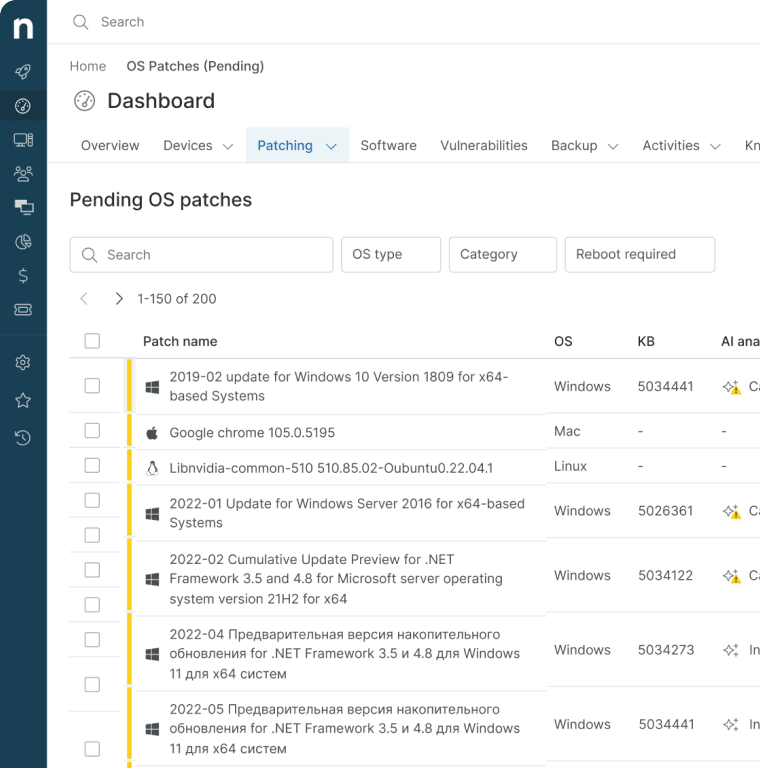
Strengths of NinjaOne
- Multi-platform support: With NinjaOne, you can deploy patches across Windows, macOS, and Linux devices as well as over multiple third-party applications.
- Intelligent automation: NinjaOne’s Patch Intelligence AI makes it so that the most pressing vulnerabilities are addressed, and the most important updates are deployed.
- Intuitive dashboard: NinjaOne Autonomous Patch Management comes with an easy-to-navigate dashboard that displays pertinent patching data and enables you to quickly send updates across your endpoints at scale.
- Cloud-first solution: As NinjaOne’s patch management software is a cloud-first, agent-based solution, you won’t need a company network, domain, or VPN to use it.
- Preemptive patch approvals: NinjaOne also enables you to automate and expedite patch approvals to aid proactive patching operations and to prevent devices from remaining unpatched for longer periods.
- Third-party software patching: NinjaOne supports third-party patching on multiple applications.
What users say
Chris Amalfi, VP of Operations at ERGOS, praised NinjaOne for helping him and his team migrate 40,000+ endpoints with zero migration downtime and reduce their patching time from several hours to under 60 minutes.
“Our patch compliance has significantly improved, and we trust the data. That means fewer sleepless nights wondering if we’re really protected,” Amalfi said. “Whether we have 50 agents or 40,000, navigating the NinjaOne portal stays fast and responsive. Our team is much more efficient now. When they run an action during the support process, they can see it taking effect immediately.”
Amalfi ended by saying that the NinjaOne platform allowed him to unify five tools into one platform as it gave him the confidence to scale ERGOS’ IT environment with ease.
Read more NinjaOne customer stories or check out NinjaOne Reviews.
| NinjaOne Microsoft Windows Patch Management Software |
| NinjaOne macOS Patch Management Software |
| NinjaOne Linux Patch Management Software |
NinjaOne reviews on G2
| Category | NinjaOne Rating |
| Overall | 4.7 out of 5 (4,302) |
| Has the product been a good partner in doing business? | 9.4 |
| Quality of Support | 9.1 |
| Ease of Admin | 9.1 |
| Ease of Use | 9.1 |
NinjaOne reviews on Capterra
| Category | NinjaOne Rating |
| Overall | 4.7 out of 5 (288) |
| Ease of Use | 4.7 |
| Customer Service | 4.7 |
| Features | 4.5 |
| Value for Money | 4.6 |
Start a free trial of the #1 endpoint management software on G2
No credit card required, full access to all features.
2. LogMeIn Resolve
LogMeIn Resolve, formerly known as GoTo Resolve, offers a patch management solution designed primarily for small- to medium-sized organizations focusing on IT support and customer service. This platform streamlines IT operations with automation features and by consolidating remote management, help desk, and remote access functionalities into a single dashboard.
See how LogMeIn compares with NinjaOne or read a more in-depth review on LogMeIn alternatives.
Features:
- Patch management: LogMeIn Resolve allows IT teams to detect new or missing patches and deploy them at scale to all their endpoint devices.
- Automation: Users can utilize LogMeIn Resolve to automate repeatable tasks such as distributing patches and updates.
- Remote support: LogMeIn Resolve allows technicians to establish a connection and control devices remotely to troubleshoot issues.
Shortcomings:
- Slow performance: The LogMeIn Resolve software uses up a lot of the device’s resources, which leads to slow response times or causes the platform to freeze. (Verified G2 Review) (Verified G2 Review)
- Remote connection issues: According to reviews, LogMeIn Resolve’s remote control of macOS devices and devices with multiple monitors can be unstable. (Verified G2 Review) (Verified G2 Review)
- Limited reporting: Users say that LogMeIn Resolve’s reporting lacks customization options, limiting the types of reports they can generate. (Verified G2 Review)
LogMeIn Resolve reviews on G2
| Category | LogMeIn Resolve Rating |
| Overall Rating | 4.4 out of 5 (443) |
| Has the product been a good partner in doing business? | 8.7 |
| Quality of Support | 8.7 |
| Ease of Admin | 8.8 |
| Ease of Use | 9.0 |
LogMeIn Resolve reviews on Capterra
| Category | LogMeIn Resolve Rating |
| Overall | 4.4 out of 5 (214) |
| Ease of Use | 4.5 |
| Customer Service | 4.2 |
| Features | 4.4 |
| Value for Money | 4.3 |
3. Datto
Datto, a Kaseya company, is an IT management business that offers RMM, network management, PSA, and data protection solutions. Datto allows IT departments and MSPs to manage their businesses and provide IT services from a single platform. Additionally, Datto solutions are scalable and customizable to adapt to IT environments.
See how Datto compares with NinjaOne or read a more in-depth review on Datto alternatives.
Features:
- Patch management: With Datto, IT administrators can automate patch deployment across their Windows endpoints.
- Backup: Datto allows IT teams to secure sensitive data and ensure fast restoration in case of cyberattacks or other disasters.
- RMM: IT teams can monitor, manage, and secure their endpoint devices from anywhere in the world.
Shortcomings:
- Unintuitive interface: Some reviewers find that navigating Datto’s platform is difficult. (Verified G2 Review)
- Customer service: Users say that customer support can be inconsistent, as the support specialists often can’t provide answers. (Verified G2 Review)
- Lack of non-Windows support: Datto’s patch management focuses on Windows devices, so technicians will have to use workarounds through their component scripts to patch macOS and Linux devices. (Verified G2 Review) (Verified G2 Review)
Datto reviews on G2
| Category | Datto Rating |
| Overall | 4.5 out of 5 (757) |
| Has the product been a good partner in doing business? | 9.0 |
| Quality of Support | 8.4 |
| Ease of Admin | 8.9 |
| Ease of Use | 8.8 |
Datto reviews on Capterra
| Category | Datto Rating |
| Overall | 4.3 out of 5 (41) |
| Ease of Use | 4.2 |
| Customer Service | 4.0 |
| Features | 4.2 |
| Value for Money | 4.0 |
4. Atera
Atera is an RMM platform designed to help IT teams automate and customize their workflows for greater IT efficiency. With Atera, users gain access to RMM, remote access, helpdesk and ticketing, patch management, and network discovery. The software also enables IT professionals to gain insight and control over their digital environments.
See how Atera compares with NinjaOne or read a more in-depth review on Atera alternatives.
Features:
- Patch management: Atera allows users to distribute patches and updates with automation tools that speed up workflows.
- Help desk: Atera allows technicians to provide remote support with a ticketing system that leverages automation to boost efficiency.
- RMM: Users can keep track of remote endpoint devices from anywhere and easily manage them from a single hub.
Shortcomings:
- Customer service: Reviews state that customer support can take some time to respond, which can be frustrating for users. (Verified G2 Review)
- Ticketing system: According to reviews, Atera’s ticketing system lacks customization compared to competitors. (Verified G2 Review)
- Patching needs improvement: Some users find that Atera’s patch management needs improvement to make it easier to deploy patches. (Verified G2 Review)
Atera reviews on G2
| Category | Atera Rating |
| Overall | 4.6 out of 5 (1,136) |
| Has the product been a good partner in doing business? | 9.2 |
| Quality of Support | 9.0 |
| Ease of Admin | 9.0 |
| Ease of Use | 9.2 |
Atera reviews on Capterra
| Category | Atera Rating |
| Overall | 4.5 out of 5 (448) |
| Ease of Use | 4.6 |
| Customer Service | 4.5 |
| Features | 4.3 |
| Value for Money | 4.6 |
5. N-able N-central
N-able N-central is an IT management solution by N-able that allows organizations to manage, monitor, and secure their endpoints. N-able N-central provides RMM, patch management, data backup, and IT automation features that enable IT professionals to streamline processes and gain control over their entire IT infrastructures. From the N-able N-central platform, users can integrate their PSA solutions to manage both their businesses and IT environments.
See how N-able N-central compares with NinjaOne or read a more in-depth review on N-able N-central alternatives.
Features:
- Remote support: N-able N-central offers remote access capabilities, allowing users to troubleshoot and resolve issues quickly.
- RMM: With N-able N-central, users can manage and monitor their endpoint devices remotely.
- Automation: N-able N-central’s automation tools allow users to streamline processes to reduce manual workloads.
Shortcomings:
- Documentation: N-able N-central’s steep learning curve is compounded by how the documentation can be unclear for some users. (Verified G2 Review) (Verified G2 Review)
- Integrations: N-able N-central has few integrations available, and it can be challenging to remove them. (Verified G2 Review)
- Lacks Apple support: According to reviews, N-able N-central lacks support for iOS and macOS devices. (Verified G2 Review)
N-able N-central reviews on G2
| Category | N-able N-central Rating |
| Overall | 4.4 out of 5 (554) |
| Has the product been a good partner in doing business? | 8.6 |
| Quality of Support | 8.0 |
| Ease of Admin | 7.9 |
| Ease of Use | 7.9 |
N-able N-central reviews on Capterra
| Category | N-able N-central Rating |
| Overall | 4.2 out of 5 (253) |
| Ease of Use | 4.0 |
| Customer Service | 3.9 |
| Features | 4.2 |
| Value for Money | 3.9 |
6. Kaseya VSA
Kaseya Virtual System Administrator (VSA) is a cloud-based and on-prem RMM designed with technicians in mind. It helps IT teams and MSPs manage endpoint devices from anywhere and protect them from security threats. Automation capabilities allow users to set up repeatable IT processes, auto-remediation of issues, and software patches.
See how Kaseya VSA compares with NinjaOne or read a more in-depth review on Kaseya VSA alternatives.
Features:
- Patch management: Kaseya VSA allows users to keep their Windows and macOS devices consistently updated with the latest security patches.
- Remote monitoring: Users get real-time information on the managed devices within their IT environment, allowing them to quickly resolve issues.
- IT automation: Kaseya VSA frees up IT administrators to work on strategic projects by automating patch management and other IT operations.
Shortcomings:
- macOS and Linux support: Managing and patching macOS devices can be more difficult. Linux devices receive less support, and there are no patch management functions for them. (Verified G2 Review) (Verified G2 Review)
- Steep learning curve: Reviewers find that the initial setup can be challenging, and the platform demands extensive time and resources from users to fully understand it. (Verified G2 Review) (Verified G2 Review)
- User-friendliness: Users have said that Kaseya VSA’s user interface is complex and that it can be difficult to navigate the platform. (Verified G2 Review) (Verified G2 Review)
Kaseya VSA reviews on G2
| Category | Kaseya VSA Rating |
| Overall | 4.0 out of 5 (323) |
| Has the product been a good partner in doing business? | 7.7 |
| Quality of Support | 7.4 |
| Ease of Admin | 7.9 |
| Ease of Use | 7.6 |
Kaseya VSA reviews on Capterra
| Category | Kaseya VSA Rating |
| Overall | 4.0 out of 5 (206) |
| Ease of Use | 3.6 |
| Customer Service | 3.6 |
| Features | 4.1 |
| Value for Money | 3.7 |
Watch a free demo of the #1 Unified IT Management Platform
See how organizations simplify endpoint management, strengthen security and scale IT operations with NinjaOne.
7. Microsoft Intune
Microsoft Intune offers cloud-based endpoint management with comprehensive support for Microsoft product integration, allowing IT teams to set up laptops and mobile devices, manage corporate devices, and enforce security policies. It also offers features such as app management, data protection, and device configuration, all from a single cloud-based platform. With Intune, customers can also remotely ensure device compliance with company security policies.
See how Microsoft Intune compares with NinjaOne or read a more in-depth review on Intune alternatives.
Features:
- Centralized endpoint management: Intune consolidates all the tools that IT administrators need to configure, monitor, and manage their devices.
- Integrations: Since Intune is part of the Microsoft ecosystem, it seamlessly integrates with other Microsoft products, such as Microsoft Entra ID.
- Mobile device management (MDM): Intune allows users to manage and monitor their mobile fleet.
Shortcomings:
- Slow performance: Reviewers on G2 have said that Intune struggles with slow response times, which can frustrate users. (Verified G2 Review)
- Cross-platform support: Intune offers fewer features for non-Windows devices, and reviews say that macOS devices are particularly challenging to configure. (Verified G2 Review) (Verified G2 Review)
- Learning curve: According to users, Intune’s advanced configurations take a lot of time and resources to fully learn and understand. (Verified G2 Review)
Microsoft Intune reviews on G2
| Category | Intune Rating |
| Overall | 4.5 out of 5 (266) |
| Has the product been a good partner in doing business? | 8.9 |
| Quality of Support | 8.4 |
| Ease of Admin | 8.6 |
| Ease of Use | 8.6 |
Microsoft Intune reviews on Capterra
| Category | Intune Rating |
| Overall | 4.5 out of 5 (41) |
| Ease of Use | 4.2 |
| Customer Service | 3.7 |
| Features | 4.4 |
| Value for Money | 4.0 |
8. ManageEngine Patch Manager Plus
ManageEngine Patch Manager Plus offers vulnerability assessment as well as operating system and third-party patch management for 1,100+ applications. This platform centralizes patch management for Windows, macOS, and Linux endpoint devices, and its automation capabilities allow IT administrators to automate repetitive tasks and streamline workflows.
Read a more in-depth review of ManageEngine Patch Manager Plus alternatives.
Features:
- Patch management: ManageEngine Patch Manager Plus enables IT teams to identify and distribute any missing security patches and updates across multiple operating systems.
- IT automation: With automation, users can streamline patch management workflows by automating scanning for missing patches and scheduling patch deployment.
- Reporting: ManageEngine Patch Manager Plus can generate reports that provide detailed information on patch deployment status and allow organizations to prove patch compliance.
Shortcomings:
- Agent issues: Users have reported challenges with ManageEngine Patch Manager Plus’s agent, such as difficulties with configurations and uninstalling it. (Verified G2 Review)
- Custom patching: ManageEngine Patch Manager Plus can only patch third-party applications that are part of its catalogue, and users can’t deploy custom files for patching. (Verified G2 Review) (Verified G2 Review)
- Patching issues: According to reviews, ManageEngine Patch Manager Plus has issues with patching, such as delayed deployments and limited information on failed patches. Users have also said that they can’t use the platform to distribute custom installation files. (Verified G2 Review) (Verified G2 Review)
ManageEngine Patch Manager Plus reviews on G2
| Category | ManageEngine Patch Manager Plus Rating |
| Overall | 4.5 out of 5 (193) |
| Has the product been a good partner in doing business? | 8.9 |
| Quality of Support | 8.5 |
| Ease of Admin | 9.1 |
| Ease of Use | 8.8 |
ManageEngine Patch Manager Plus reviews on Capterra
| Category | ManageEngine Patch Manager Plus Rating |
| Overall | 4.6 out of 5 (393) |
| Ease of Use | 4.4 |
| Customer Service | 4.5 |
| Features | 4.5 |
| Value for Money | 4.7 |
9. Pulseway
Pulseway is an RMM platform that provides IT teams and MSPs with real-time data on devices, servers, VMs, and networks. Technicians can utilize Pulseway’s automation to push out regular patch updates and multi-level auto-remediation workflows, as well as generate custom reports. Pulseway’s remote control and remediation capabilities also make it easy to resolve any issues.
See how Pulseway compares with NinjaOne or read a more in-depth review on Pulseway alternatives.
Features:
- Patch management: Pulseway offers automated patching for operating systems and third-party applications, enabling IT teams to schedule and push out updates.
- Real-time monitoring: Users gain comprehensive visibility over their endpoint devices, servers, and networks.
- Remote support: Pulseway consolidates RMM with helpdesk and remote control, allowing technicians to troubleshoot and resolve issues remotely.
Shortcomings:
- Support for non-Windows endpoints: Users have stated that Pulseway offers fewer features for managing and patching their Linux and macOS endpoints. (Verified G2 Review) (Verified G2 Review)
- Remote access performance: According to reviews, Pulseway’s remote control features struggle with connectivity and interface speed issues. (Verified G2 Review)
- Automation: Learning how to fully use Pulseway’s automation can take some time. Some users have said that the platform could use more pre-built scripts to simplify processes. (Verified G2 Review)
Pulseway reviews on G2
| Category | Pulseway Rating |
| Overall | 4.6 out of 5 (123) |
| Has the product been a good partner in doing business? | 9.3 |
| Quality of Support | 9.0 |
| Ease of Admin | 9.2 |
| Ease of Use | 9.1 |
Pulseway reviews on Capterra
| Category | Pulseway Rating |
| Overall | 4.7 out of 5 (310) |
| Ease of Use | 4.7 |
| Customer Service | 4.7 |
| Features | 4.5 |
| Value for Money | 4.7 |
10. Automox
Automox is a cloud-native endpoint management solution that offers automated patch management and configuration of endpoints across multiple operating systems. It also provides MSPs and IT teams with visibility of all endpoints and allows organizations to automate software patch deployment, create custom scripts for Windows, macOS, and Linux endpoints, and support third-party software.
See how Automox compares with NinjaOne or read a more in-depth review on Automox alternatives.
Features:
- Patch management: Automox centralizes patch management for Windows, macOS, and Linux endpoint devices.
- Automation: With automation tools, Automox reduces the need for manual intervention and frees up IT teams to focus on more strategic tasks.
- Third-party patching: Automox streamlines the deployment of security patches and updates for 580+ third-party software.
Shortcomings:
- Limited reporting: Reviews have said that Automox’s reporting features are lacking, as they don’t provide enough insight into patch compliance and status. (Verified G2 Review) (Verified G2 Review)
- Slow performance: For rapidly growing businesses, Automox’s slow loading times when managing several devices simultaneously can become an issue as more devices are added. (Verified G2 Review)
- Stability: According to reviews, users struggle with devices being disconnected from the platform. (Verified G2 Review)
Automox reviews on G2
| Category | Automox Rating |
| Overall | 4.5 out of 5 (288) |
| Has the product been a good partner in doing business? | 9.0 |
| Quality of Support | 8.8 |
| Ease of Admin | 8.8 |
| Ease of Use | 8.9 |
Automox reviews on Capterra
| Category | Automox Rating |
| Overall | 4.7 out of 5 (153) |
| Ease of Use | 4.8 |
| Customer Service | 4.7 |
| Features | 4.5 |
| Value for Money | 4.6 |
11. Patch My PC
Patch My PC makes it easier for IT teams to manage, update, and deploy third-party applications within Microsoft Configuration Manager and Intune. It automates software updates across devices, ensuring that applications remain up to date with the latest security patches and features. Patch My PC also enables IT administrators to manage application updates efficiently, reducing the risk of vulnerabilities caused by outdated software.
Read a more in-depth review of Patch My PC alternatives.
Features:
- Windows patch management: Patch My PC enhances the patch management of Intune and Microsoft System Center Configuration Manager (SCCM), making it easier to deploy updates for third-party applications.
- Automation: Automation tools simplify the patching process by allowing users to schedule updates and even scan devices to determine if they have any missing patches.
- Security: Patch My PC sends users real-time updates on new patches, especially those containing critical security fixes, so they can apply these to endpoints without delay.
Shortcomings:
- Linux support: Patch My PC focuses on Windows patching, so it doesn’t offer support for Linux patching. This means that IT teams with diverse infrastructures may have to add another tool to their tech stack. (Verified G2 Review)
- Limited reporting: According to reviews, Patch My PC’s reporting functions can be lacking and may not be as detailed. (Verified G2 Review) (Verified G2 Review)
- User interface: Users have said that Patch My PC’s user interface could use some improvement. (Verified G2 Review)
Patch My PC reviews on G2
| Category | Patch My PC Rating |
| Overall | 4.8 out of 5 (730) |
| Has the product been a good partner in doing business? | 9.7 |
| Quality of Support | 9.7 |
| Ease of Admin | 9.3 |
| Ease of Use | 9.3 |
Patch My PC reviews on Capterra
| Category | Patch My PC Rating |
| Overall | 4.9 out of 5 (216) |
| Ease of Use | 4.8 |
| Customer Service | 4.9 |
| Features | 4.7 |
| Value for Money | 4.9 |
Comparison of patch management software solutions (G2)
Category | NinjaOne | LogMeIn Resolve | Datto | Atera | N-Able N-Central | Kaseya VSA | Microsoft Intune | ManageEngine Patch Manager Plus | Pulseway | Automox | Patch My PC |
| Overall | 4.7 out of 5 (4,302) | 4.4 out of 5 (443) | 4.5 out of 5 (757) | 4.6 out of 5 (1,136) | 4.4 out of 5 (554) | 4.0 out of 5 (323) | 4.5 out of 5 (266) | 4.5 out of 5 (193) | 4.6 out of 5 (123) | 4.5 out of 5 (288) | 4.8 out of 5 (730) |
| Has the product been a good partner in doing business? | 9.4 | 8.7 | 9.0 | 9.2 | 8.6 | 7.8 | 8.9 | 8.9 | 9.3 | 9.0 | 9.7 |
| Quality of Support | 9.1 | 8.8 | 8.4 | 9.0 | 8.0 | 7.4 | 8.4 | 8.5 | 9.0 | 8.8 | 9.7 |
| Ease of Admin | 9.1 | 8.9 | 8.9 | 9.0 | 7.9 | 7.9 | 8.6 | 9.1 | 9.2 | 8.8 | 9.3 |
| Ease of Use | 9.1 | 9.0 | 8.8 | 9.2 | 7.9 | 7.7 | 8.6 | 8.8 | 9.1 | 8.9 | 9.3 |
Comparison of patch management software solutions (Capterra)
| Category | NinjaOne | LogMeIn Resolve | Datto | Atera | N-Able N-Central | Kaseya VSA | Microsoft Intune | ManageEngine Patch Manager Plus | Pulseway | Automox | Patch My PC |
| Overall | 4.7 out of 5 (288) | 4.4 out of 5 (214) | 4.3 out of 5 (40) | 4.5 out of 5 (448) | 4.2 out of 5 (253) | 4.0 out of 5 (206) | 4.5 out of 5 (41) | 4.6 out of 5 (393) | 4.7 out of 5 (310) | 4.7 out of 5 (153) | 4.9 out of 5 (216) |
| Ease of Use | 4.7 | 4.5 | 4.2 | 4.6 | 4.0 | 3.6 | 4.2 | 4.4 | 4.7 | 4.8 | 4.8 |
| Customer Service | 4.7 | 4.2 | 4.0 | 4.5 | 3.9 | 3.6 | 3.7 | 4.5 | 4.7 | 4.7 | 4.9 |
| Features | 4.5 | 4.4 | 4.2 | 4.3 | 4.2 | 4.1 | 4.4 | 4.5 | 4.5 | 4.5 | 4.7 |
| Value for Money | 4.6 | 4.3 | 4.0 | 4.6 | 3.9 | 3.7 | 4.0 | 4.7 | 4.7 | 4.6 | 4.9 |
Final scores and summaries of patch management solutions
As we conclude this comprehensive guide on the best patch management tools, let’s take a moment to delve into the metrics that shaped the final vendor rankings you’re about to see. These aren’t just arbitrary numbers; they’re calculated based on a variety of factors that matter most to IT professionals and MSPs. To help you evaluate patch management software comparisons, we’ve sourced data from trusted platforms like G2 and Capterra, focusing on key aspects such as overall star ratings, ease of use, and customer service.
To add another layer of reliability, we’ve factored in the total number of reviews each vendor has received. After all, a high rating coupled with a high review count often signifies a tried-and-true solution.
Best patch management software for MSPs and IT teams
| Vendor | Final Score | Summary |
| NinjaOne | 1.380 | NinjaOne leads across all key metrics, including quality of support and business partnership, making it a trusted choice for enterprise IT teams. The solution is a solid choice for those who want a tried-and-true solution. |
| Patch My PC | 1.052 | Extends the patch management capabilities of Intune and SCCM, making it easier to patch third-party applications. However, it may be lacking in reporting and cross-platform compatibility. |
| Atera | 1.063 | Performs exceptionally well in ease of use and customer support. Though it has fewer reviews, its high scores make it a strong contender in the market. |
| Pulseway | 0.965 | Automation in patching, remediation, and report generation workflows makes this solution a standout. Still, this feature could take some time to fully learn. |
| Automox | 0.952 | Scores high in ease of use and overall ratings, though a lower number of reviews slightly dampens its score. Still a strong option for those prioritizing user-friendly solutions. |
| ManageEngine Patch Manager Plus | 0.952 | A robust solution known for its ease of admin and overall value. The high number of reviews adds weight to its already strong performance. |
| LogMeIn Resolve | 0.943 | Offers a balanced performance across most metrics, and its high number of reviews indicates a fairly reliable solution. |
| Datto | 0.928 | Offers a moderate overall rating but needs improvement in ease of use. A decent number of reviews adds some credibility. |
| N-able N-central | 0.885 | Similar to Kaseya VSA, this vendor falls short in overall ratings and support for Apple devices. |
| Microsoft Intune | 0.869 | Offers seamless and comprehensive integration with other Microsoft products, though it could benefit further from improved cross-platform support. |
| Kaseya VSA | 0.813 | Lower ratings in key metrics and a moderate number of reviews make this option less favorable than others on the list. |
Our top patch management comparison and ranking methodology
This review and ranking of the best patch management solutions software in 2026 is based on a transparent, structured methodology. The process includes:
- Data Sources: Aggregated ratings and review counts from G2 and Capterra as of May 2026.
- Metrics Considered: Star ratings, review volume, quality of support, business partnership feedback, ease of use, and customer service ratings
- Weighting: Each metric is weighted based on importance to MSPs, detailed as follows:
Final Score = w1 * G2 Good Partner in Doing Business + w2 * G2 Quality of Support + w3 * G2 Ease of Admin + w4 * G2 Ease of Use + w5 * Capterra Ease of Use + w6 * Capterra Customer Service + w7 * Capterra Features + w8 * Capterra Value for Money + w9 * G2 Total Number of Reviews (Scaled) + w10 * Capterra Total Number of Reviews (Scaled), where:
- w1 = 0.125 (Weight for G2 Good Partner in Doing Business)
- w2 = 0.125 (Weight for G2 Quality of Support)
- w3 = 0.125 (Weight for G2 Ease of Admin)
- w4 = 0.125 (Weight for G2 Ease of Use)
- w5 = 0.125 (Weight for Capterra Ease of Use)
- w6 = 0.125 (Weight for Capterra Customer Service)
- w7 = 0.125 (Weight for Capterra Features)
- w8 = 0.125 (Weight for Capterra Value for Money)
- w9 = 0.1 (Weight for G2 Total Number of Reviews, Scaled)
- w10 = 0.1 (Weight for Capterra Total Number of Reviews, Scaled)
- Data Freshness: All data was collected and last validated on May 25, 2026.
- Process: Products were evaluated for both core and advanced IT management features, customer feedback, and recent security incidents.
Choosing the best patch management software for large enterprises
Large enterprises operate in a fundamentally different environment than small or mid-sized businesses. Their patch management requirements go beyond basic automation and OS coverage, demanding solutions that can scale across thousands of endpoints and enforce compliance across multiple regulatory frameworks.
In the sections that follow, we’ll dive into key considerations that should be on your radar as you make your patch management software comparisons. These will help you identify patching software that’s not just compatible with but also truly effective for your IT environment.
1. Device mix and endpoint scale
Enterprise environments span thousands of devices across multiple offices, data centers, and remote locations, often running a mix of Windows, macOS, and Linux. Make sure that the patch management software you choose has the ability to apply patches to all devices in your organization’s IT environment.
2. Remote and distributed workforce
Large enterprises often have employees spread across regions, time zones, and remote locations. If you only have an on-prem patching solution, it’s not as ideal for remote and distributed employees compared to a remote patching solution. Enable patching to all devices, no matter their location, by choosing a remote patch management software solution that’s agent-based and doesn’t require a VPN.
3. Third-party application patching
Enterprise environments run hundreds of applications beyond the operating system. Unfortunately, bugs or vulnerabilities aren’t limited to the operating system and original manufacturer apps. They can also occur in third-party applications that are installed on your endpoints.
At enterprise scale, it’s essential to find patch management software with broad third-party patching capabilities, ideally covering thousands of applications, to meaningfully reduce your attack surface.
4. Reliability
At enterprise scale, a patch deployment failure or vendor outage can affect thousands of users simultaneously. It’s important that your chosen patch management vendor is viewed as a reliable business partner. The vendor’s capability to provide timely and effective software updates is a key factor to consider. Additionally, the vendor’s reputation, their commitment to customer service, and their ability to adapt to the changing technological landscape shouldn’t be overlooked. This approach will ensure that your selected vendor isn’t just a provider but also a partner in maintaining the security and efficiency of your IT infrastructure.
5. Quality of support
The selection of a patch management vendor ought to be approached with a comprehensive evaluation of the support offered. Research has highlighted that the capability of a vendor to distribute software updates promptly and efficiently is of paramount importance.
At the enterprise level, look for vendors that offer a dedicated support tier with clear SLA commitments, as delays in resolving patching issues can have an organization-wide impact. The degree of responsiveness and communication concerning vulnerabilities from the vendor also plays a significant role in risk management comprehension. Vendors who have shown progress in the quality of their patches ought to be considered favorably.
6. Ease of administration, compliance, and audit readiness
When evaluating patch management software, it’s important to weigh the ease of administration against your specific operational requirements. For large enterprises, this also means assessing support for role-based access controls (RBAC), so IT teams can delegate patching responsibilities across departments without granting unnecessary system-wide access. Software with a user-friendly interface, automation capabilities, and strong support can streamline the task of maintaining system security.
Since patch management is an ongoing, often urgent activity, a straightforward administrative process can accelerate the deployment of patches across various systems, minimizing vulnerabilities. Enterprises operating in regulated industries should additionally prioritize tools that generate audit-ready compliance reports and maintain detailed patch activity logs.
Explore NinjaOne Autonomous Patch Management
Accelerate vulnerability remediation with intelligent automation powered by Patch Intelligence AI to prevent bad updates and ensure reliable compliance.
Learn morePatch vulnerabilities in your IT environment
With the right patching software, your business can take the proper actions to secure its software and systems. Using the best patch management software actively monitors and enhances the security of your organization’s IT environment. Consider the unique needs of your IT environment to select which of the top 11 patch management software is right for you.
NinjaOne Autonomous Patch Management offers 100% cloud-based Windows, macOS, and Linux operating system patching. Users can automatically patch hundreds of applications and devices across different OSs from NinjaOne’s unified dashboard. As one of the top patch management software solutions on the market, NinjaOne provides full automation with identification, approval, and deployment, which gives peace of mind and assurance that the software is actively working to protect your IT environment around the clock.
Sign up for a free trial or watch a free demo to find out if NinjaOne is right for you.