Third-party patch management with NinjaOne Autonomous Patch Management
NinjaOne Autonomous Patch Management discovers, approves, schedules, and deploys third-party application patches across Windows and macOS endpoints from one console.
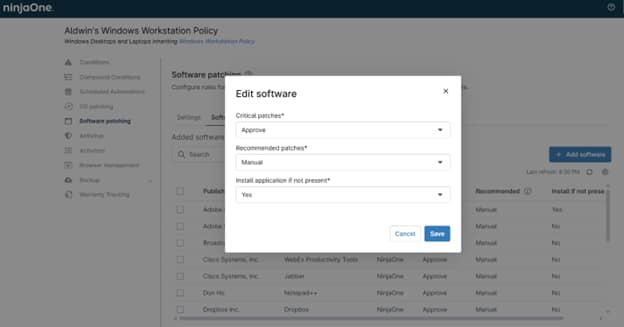
NinjaOne Autonomous Patch Management discovers, approves, schedules, and deploys third-party application patches across Windows and macOS endpoints from one console.
Problem | How NinjaOne resolves it |
| Third-party applications like Adobe Reader, Chrome, and Java update on their own schedules, leaving vulnerabilities open between operating system patch cycles. | NinjaOne scans managed endpoints for outdated third-party software and applies vendor updates automatically through patch policies. |
| Tracking and updating dozens of third-party applications by hand consumes technician time. | Default Approvals automatically approve critical updates for NinjaOne-supported third-party applications, so routine patches deploy without manual review. |
| Third-party updates that install during business hours interrupt end users and force unplanned restarts. | Administrators set scan and deployment schedules so third-party patches apply inside approved maintenance windows. |
| IT has no single view of which third-party applications are current across the fleet. | The dashboard reports third-party patch status and compliance across managed endpoints. |
Known third-party vulnerabilities are closed sooner, because updates deploy automatically instead of waiting on manual effort.
End users face fewer interruptions, since third-party updates and restarts run inside scheduled maintenance windows.
Technicians spend less time chasing application updates across devices, because approvals and deployment run by policy.
Audit preparation is faster, since third-party patch activity is recorded across managed endpoints.
IT sees third-party patch compliance across the fleet in one view, instead of checking applications device by device.

NinjaOne scans managed endpoints for supported third-party applications and applies approved vendor updates according to patch policies. Automation covers common applications such as Adobe Reader, Chrome, and Java without requiring separate packaging workflows.

Administrators can approve, defer, or reject third-party updates by policy. Default Approvals can automatically approve relevant critical updates for NinjaOne-supported software, while other updates stay under manual control.

Teams define when NinjaOne scans for and installs third-party updates. Scheduling keeps updates and restarts inside approved maintenance hours and limits disruption during business hours.

Third-party software patch management runs on Windows and macOS endpoints. Each platform is configured and monitored through patch policies from the same console.

NinjaOne records the third-party patch state of managed endpoints and reports it centrally. Teams identify outdated applications and document patch history for security reviews and audits.
Organizations with remote staff patch third-party applications over the internet with no VPN required. Administrators confirm update status for off-site and on-premises devices from the same dashboard, so remote machines follow the same patch policies as those in the office. Third-party patch status appears next to operating system patch status, so no separate tool is required.
IT teams in healthcare, finance, and education standardize third-party application versions and record every patch action. When an audit begins, the team pulls third-party patch history from the console instead of collecting evidence device by device.
Managed service providers apply third-party patch policies to every customer tenant and align schedules to each customer’s business hours. Technicians manage separate customer environments from one console, which reduces application version drift across organizations. Each customer keeps a consistent third-party software baseline without a per-organization packaging process.
Administrators turn on third-party software patching in a patch policy for the target device groups.
Teams choose the NinjaOne-supported applications to manage and set approval rules, or use Default Approvals for critical updates.
NinjaOne scans for outdated third-party software and installs approved updates during the defined maintenance windows.
The dashboard shows third-party patch status and flags failed installations for remediation. See the NinjaOne documentation for step-by-step configuration.
The City of Sarnia cut patch time by 90 percent with NinjaOne automated patching.
"NinjaOne's automated patching reduced our patch time by 90%."
- Shawn Southern, City of Sarnia
Source: City of Sarnia story
Discover how NinjaOne Patch Management helps organizations monitor patch compliance across remote offices, standardize patching policies, and maintain compliance across distributed environments.
Automatically evaluate updates, deploy trusted patches faster, and keep every endpoint secure without operational disruption.

AI-powered vulnerability intelligence delivered in real time, including Known Exploited Vulnerability (KEV) insights, so IT teams can prioritize and remediate faster.
NinjaOne Patching allows you to create patching policies that automatically scan for and apply new software patches for your Microsoft Windows endpoints.
It is the capability within NinjaOne Autonomous Patch Management that scans managed endpoints for outdated third-party applications and applies approved vendor updates according to settings defined in agent policies. IT teams manage the discovery, approval, scheduling, and deployment of third-party patches for endpoints from one console.
NinjaOne patches a catalog of supported third-party applications, including common titles such as Adobe Reader, Chrome, and Java. Administrators select which applications to manage from the Software Patching tab in each agent policy. Select Add Software to open the Software Library and view the full catalog.
Yes. Third-party software patch management is available for Windows and macOS endpoints, and each platform is configured and monitored through agent policies. Coverage depends on the applications supported for each operating system.
Yes. After third-party software patching and approval settings are enabled, NinjaOne approves critical updates by default, while recommended updates require manual approval. Administrators can change the approval action for each update category to Approve, Manual, or Reject.
Enable third-party patching in an agent policy, then select which applications to manage. The policy sets the approval rules and the scan and deployment schedule that apply across all selected applications. Once assigned to a device group, the policy runs automatically, and routine updates deploy on schedule without manual steps.
Third-party patching is one capability within NinjaOne Autonomous Patch Management, which also handles operating system and Microsoft application updates. The same policies, schedules, and dashboard cover operating system and third-party patches together.