


Key Points
- Audit Reports Prove Compliance with Policy: Patches need to be documented as applied on time and in line with policy, not just installed.
- Scope Determines Report Reliability: Devices left out become blind spots that a high compliance rate can hide.
- Exceptions Need a Justification and a Review Date: Without both, they can become permanent gaps that will not hold up under audit review.
- Remediation Evidence Must Prove a Finding was Closed: A patch marked as deployed does not confirm the device is no longer vulnerable.
A patch management audit report does more than list installed updates. It shows auditors that patches were identified, deployed, validated, and documented consistently across the environment. IT teams need it to interpret raw data, like whether patches were applied on time or otherwise, and whether failures were resolved or not.
This guide covers ways to create a patch management audit report, covering its inclusions and how to structure evidence for internal and external security audits.
What is a patch report vs a patch management audit report?
A patch report gives a summary of the update status in a managed environment. Typically, it covers elements like installed patches, missing updates, failed deployments, and devices that are waiting on a reboot to complete an update.
Meanwhile, a patch management audit report goes deeper than that. It shows whether an organization followed its patch policy and met its remediation timelines. Furthermore, it determines whether it handled exceptions in a proper manner and closed known vulnerabilities during the period.
In short, raw patch status tells you what happened, while an audit report explains whether it met a standard.
What should a patch management audit report include?
A patch management audit report, or a patch compliance report, should give auditors enough evidence to understand patch coverage, compliance status, and remaining risk. It needs to contain:
- Reporting period
- Audit scope
- Endpoint server coverage
- Operating systems included
- Third-party applications included
- Patch policy or SLA being measured
- Patch compliance summary
- Missing patches by severity
- Failed or pending deployments
- Reboot-required systems
- High-risk vulnerabilities tied to missing patches
- Exceptions and risk acceptance
- Remediation and actions completed
- Open remediation items
- Owners and next steps
Define audit scope and reporting period
Before generating a patch compliance report, it is important to define what the report is measuring. The scope should clarify:
- The included groups and systems, including:
- Endpoint groups
- Server groups
- Operating systems
- Third-party applications
- Business units or regions
- The systems that are excluded and why
- Whether unmanaged, offline, or inactive devices are listed separately
Reporting periods have to be consistent; they can be done on a monthly or quarterly basis. Teams can also align them with internal audit cycles. Consistent periods show trends over time and give you a better look at your environment than a single compliance snapshot.
Document patch compliance status
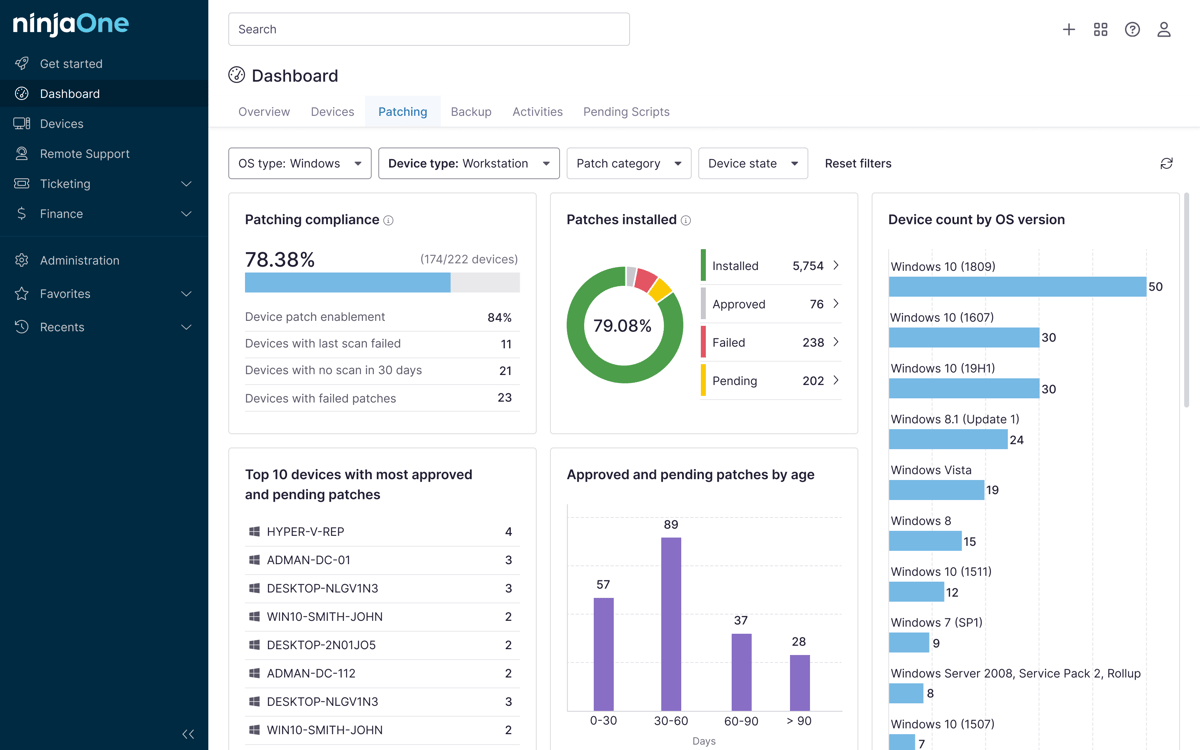
A patch compliance report needs to show whether systems meet the organization’s patching requirements.
Compliance data may include total devices in scope, and devices that are:
- Reporting patch status
- Fully compliant
- Missing critical patches
- Missing high-severity patches
- With failed patch installations
- Awaiting reboot
- Outside patch SLA
- With approved exceptions
- Not recently reporting
For enterprise environments, it is crucial to group results by business unit, device type, operating system, and asset importance. Having grouped results gives remediation teams something to act on right away.
Add vulnerability and risk context in the patch management audit report
A security audit needs more than patch installation status. The report has to show which missing patches lead to risk.
Risk context may include:
- Vulnerability severity
- Known exploit activity
- Common Vulnerabilities and Exposures (CVE)
- Asset importance
- Internet exposure
- Sensitive data access
- Business impact
- Regulatory relevance
- Patch availability
- Compensating controls
It is crucial to note that missing patches have different levels of risk, which depend on the device, its exposure, and whether an exploit is actively being used. If auditors and security teams connect patch gaps to those factors, they will have a clearer picture of what to focus on.
Document exceptions and risk acceptance
Patch exceptions have to be clearly documented. After all, auditors will want to know why glaring vulnerabilities are still around and have not been fixed yet.
Exception details should include:
- Affected system or application
- Missing patch or vulnerability
- Reason why patching was deferred
- Business or technical justification
- Risk owner
- Approval date
- Review or expiration date
- Temporary or compensating controls
- Long-term remediation plan
⚠️Important: Vague labels like “business exception” without supporting information won’t hold up well under audit review. They need to be reviewed on a set schedule and not be permanent workarounds without renewal.
Include remediation evidence and next steps
The report needs to show what was done during the reporting period. Deployment records, along with validation reports, will give auditors the proof they need to confirm that findings were actually closed.
Remediation evidence may include:
- Patch deployment logs
- Success and failure timestamps
- Change records
- Vulnerability scan results
- Remediation tickets
- Rollback records
- Reboot confirmation
- Validation results
- Owner assignments
- Target completion dates
How patch reports, vulnerability reports, and compliance reports differ
These report types overlap, but serve different purposes in patch management audit:
| Report type | What it covers |
| Patch report | Shows update status across managed devices, including stalled, missing, and failed patches |
| Patch compliance report | Compares patch status against policy requirements, SLAs, timelines, and regulatory expectations |
| Vulnerability report | Identifies security weaknesses, including missing patches, exposed services, outdated software, and misconfigurations. |
| Software update compliance report | Covers OS updates, third-party application versions, and unsupported software across the environment |
| Patch management audit report | Combines outputs from the above, but separates raw findings from audit conclusions and compliance evidence |
Tools for patch reporting in enterprise environments
Enterprise patch reporting tools can help teams collect, validate, export, and retain patch evidence across large environments. With this in mind, tools need to have the following capabilities:
| Capability | What it does |
| Centralized patch status dashboards | Shows patch compliance across all managed devices in one place |
| Automated patch compliance reports | Generates compliance reports on a set schedule without manual data collection |
| Vulnerability-to-patch correlation | Links missing patches to known vulnerabilities so teams can prioritize by risk |
| OS and third-party patch coverage | Tracks patch status across operating systems and third-party applications in the same tool |
| Custom report filters | Enables teams to filter results by device group, severity, location, or business unit |
| Patch failure tracking | Groups patch results by team, department, or device type so remediation owners know what they are responsible for |
| Business unit or device group reporting | Surfaces failed deployments so that teams can follow up without manual checks |
| Exception documentation | Stores exception records and approvals alongside patch data for audit review |
| Exportable audit records | Produces reports in formats that can be shared with auditors or stored for evidence retention |
| Scheduled report delivery | Sends reports automatically to the right people on a defined schedule |
| Role-based access controls | Limits report access and actions based on team role or responsibility |
| Historical trend reporting | Tracks patch compliance over time so teams can show improvement or identify recurring gaps |
Tool selection should prioritize environment compatibility, reporting reliability, data coverage, and evidence retention.
Common mistakes in creating a patch management audit report
These mistakes weaken a patch compliance report while making it harder to prove that patching controls are working.
| Mistake | What it can lead to |
| Exporting raw patch data without audit context | Auditors get the numbers with no way to judge whether the patching met the standard. |
| Not defining the report scope | Coverage gaps go unnoticed, and the report cannot be trusted as complete |
| Ignoring offline or unmanaged devices | Devices outside the report become blind spots that carry untracked risk. |
| Reporting only patched vs unpatched status | The report does not indicate whether patches were applied within required timelines. |
| Failing to show whether patches meet SLA timelines | A device can appear compliant while still being patched too late. |
| Omitting failed deployments | Patches assumed to be installed may have silently failed on a device. |
| Leaving reboot-required systems unresolved | Updates that need a reboot stay incomplete until the device restarts. |
| Not documenting exceptions and risk acceptance | Auditors can’t tell whether unresolved vulnerabilities were approved or overlooked. |
| Treating vulnerability reports and patch reports as the same thing | Findings are confusing, and the report loses accuracy. |
| Failing to retain historical reports | Teams cannot show patch trends or prove consistent reporting over time. |
| Reporting compliance percentages without asset coverage data | A high compliance rate can hide the fact that many devices were never counted. |
| Not validating that remediation actually closed the finding | A finding marked as resolved may still be open on the device. |
Building audit reports that hold up under review
A patch management audit report should prove that patching controls work across the environment. The strongest reports define their scope clearly, measure patch status against policy, document what failed and what remains open, while connecting findings to actual risk.
Getting this right means treating the report as evidence, giving auditors and IT security teams a reliable picture of where patching stands and what needs attention.
Related topics: