


Key Points
- Unified Policy, Platform-Specific Execution: Patch SLAs and compliance standards should apply equally to Windows and macOS devices, even when the underlying workflows differ between platforms.
- Neither Platform’s Native Tools Cover Third-Party Applications: OS update tools on both Windows and macOS leave third-party applications unpatched unless a separate process explicitly covers them.
- Disconnected Patch Programs Produce Inconsistent Outcomes: Managing Windows and Mac patching separately makes unified compliance reporting harder and increases the chance of gaps building up unnoticed.
- Test Patch Tools Against Both Platforms Before Deploying: Claimed macOS support varies significantly across tools, increasing the need to validate first, prior to wide-scale deployment.
Windows and macOS endpoints in enterprise organizations need timely patching, but follow different processes. For example, Windows relies on tools like Intune and Windows Server Update Services (WSUS), while having predictable update cycles. Meanwhile, Apple macOS environments use Apple update controls, mobile device management (MDM) enforcement, user prompts, and behavior unique to macOS.
This guide covers how to standardize Windows and Mac patch management across enterprise environments. It covers the needs of each platform and what to look for in tools that support both without creating separate workflows.
Why do Windows and Apple macOS patching differ?
Windows and macOS patching differ in a lot of ways. These include release cadence, enforcement options, restart behavior, third-party application coverage, and available management tools.
- Update schedule: Windows follows a very consistent monthly release cycle. Meanwhile, macOS updates arrive on a less consistent schedule.
- Update scope: Windows patching covers quality updates, feature updates, drivers, and Microsoft application updates. macOS patching is scoped differently and may require separate workflows for third-party applications.
- Enforcement and user prompts: macOS patching often needs MDM policies, user notifications, and deferral controls that are different from Windows update behavior.
- Restart behavior: How each platform handles restarts and user experience during updates is different and needs to be accounted for in deployment planning.
- Reporting fragmentation: Using separate tools for Windows and macOS patching makes it harder to maintain consistent compliance visibility across the environment.
The goal is to make Windows and Apple macOS patching have consistent outcomes across platforms.
Windows Patch Management considerations
Patch management tools for Windows should support predictable deployment, testing, approval, and validation workflows.
| Factor | What to consider |
| Patch Tuesday planning | Windows follows a monthly update cycle, so patch workflows should be built around that cadence with defined testing and approval steps. |
| Critical security update escalation | High-severity patches should have a separate fast-track process outside the normal monthly cycle. |
| Business and Intune | Both Windows and macOS support update ring management and policy enforcement. Although patch management with Intune works well for cloud-managed environments, it should be further evaluated in terms of reporting depth and patching coverage. |
| WSUS and System Center Configuration Manager (SCCM) dependencies | Legacy environments may still rely on these tools. Teams should account for how they interact with newer management platforms. |
| Restart scheduling | Restart behavior needs to be controlled to avoid disruptions during business hours. |
| Update rings and phased rollouts | Staged deployment groups help catch issues before patches reach the full environment. |
| Failed update remediation | Patch tools should surface failed updates and support remediation without manual device-by-device intervention. |
| Third-party application patching | Native Windows update tools do not cover third-party applications. This needs to be handled separately or through a unified patch platform. |
| Compliance reporting by device group | Teams need patch status visibility broken down by department, region, or device group to meet audit and governance requirements. |
Patch management with Intune works well for cloud-managed environments. Before treating it as a complete solution, evaluate it against your reporting, third-party patching, and remediation requirements.
MacOS patch management considerations
Apple macOS patching software should account for how Apple devices receive, install, and enforce updates.
| Factor | What to consider |
| Apple OS update policies | macOS update behavior is controlled through MDM-enforced policies. Without them, devices may defer updates indefinitely based on user preference. |
| MDM enrollment and supervision status | Full patch enforcement on Apple devices requires MDM enrollment, ideally through Automated Device Enrollment (ADE). Devices not enrolled through ADE have limited policy control |
| User notification and restart behavior | macOS handles restart prompts differently from Windows. Notification settings and deferral limits need to be configured deliberately. |
| macOS version compatibility | Not all macOS hardware supports the latest macOS release. Patch workflows should account for devices running older supported versions. |
| Rapid security updates | Apple ships out-of-cycle security fixes for critical vulnerabilities. Teams should confirm whether their tools detect and deploy these automatically. |
| App Store and third-party application patching | macOS native update tools do not cover third-party applications. These need separate coverage through a patch platform or MDM app management. |
| Local administrator and user approval issues | Devices where users have local administrator rights can interfere with patch enforcement. This needs to be addressed at the policy level. |
| Remote and off-network Apple macOS endpoints | Macs that rarely connect to corporate networks need a patching path that does not depend on on-premises infrastructure. |
Mac computers should not be treated as exceptions in enterprise patch governance. They also require the same outcome standards as Windows devices, like timely updates, compliance, and documented remediation.
Cross-platform patch management strategy
A cross-platform patch strategy needs to define standards while allowing OS-specific implementation. The same policy framework should govern both macOS patching software and patch management tools for Windows, even if the two have vastly different workflows.
- One patch policy for enterprise risk levels: Teams need to define patch service-level agreements (SLAs) by severity that apply to both Windows and macOS devices, regardless of platform.
- Separate technical workflows where needed: Windows and macOS handle updates differently. The policy is unified, but the implementation can vary by platform.
- Pilot groups for each OS: Try to test patches on controlled groups of Windows and Mac devices before wide-scale deployment.
- Maintenance windows by region and business unit: Schedule patching outside working hours. This ensures work will not be disrupted during the middle of the shift.
- Third-party application patch coverage: OS update tools do not cover third-party applications on either platform. This needs explicit coverage in the strategy.
- Unified patch compliance reporting: Centralized reporting across both platforms is what makes cross-platform governance work in practice.
- Exception handling and risk acceptance: Define a process for devices that cannot be patched on schedule. Be sure to include documentation and risk sign-off.
- Remediation workflows for failed patches: Failed patches on either platform need a defined path to resolution, not just a flag in a dashboard.
Cross-platform patching works best when reporting is centralized, even if deployment controls differ by platform.
What should organizations look for in mixed OS patch tools?
Patch tools for mixed Windows and macOS environments should bring both platforms under one workflow, not create another disconnected process.
- Windows and macOS patch support
- Third-party application patching
- OS-specific scheduling controls
- Patch rings or phased deployment groups
- Restart and user notification settings
- Remote endpoint patching
- Failed patch detection
- Vulnerability context
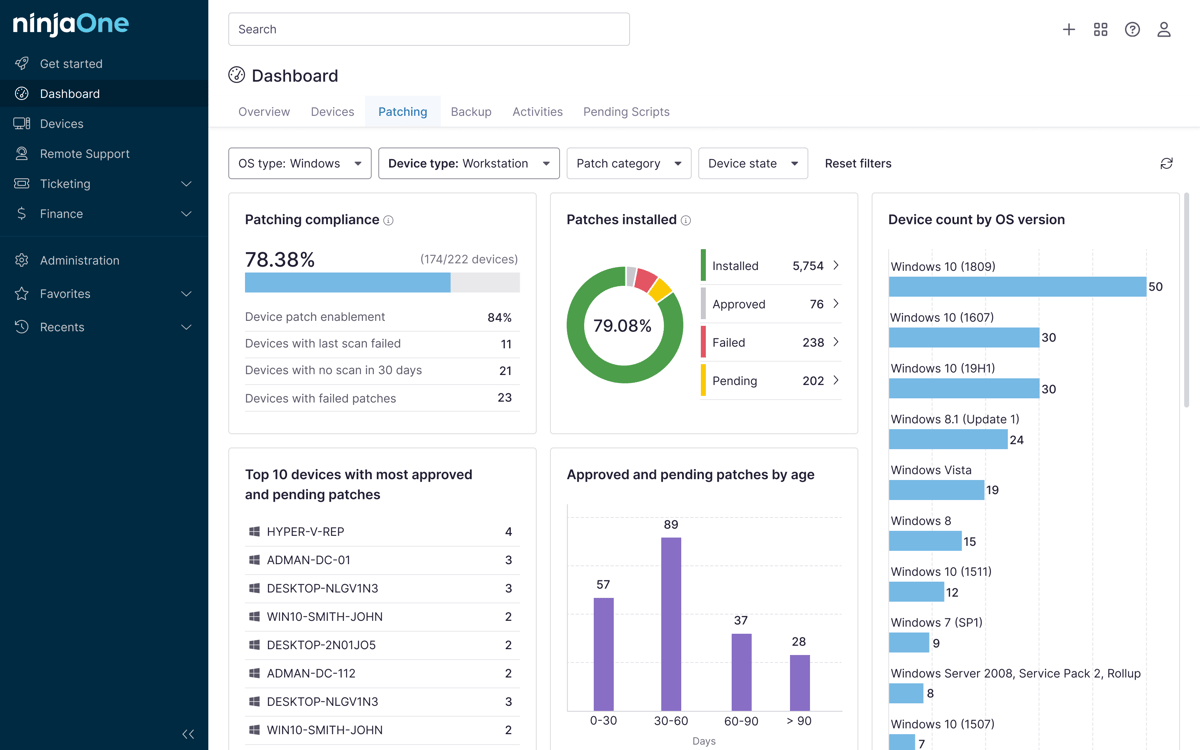
- Compliance dashboards
- Exportable reports
- Integration with endpoint management, MDM, and ITSM workflows
A strong tool should give IT teams visibility across both platforms without removing the visibility each one needs.
Common mistakes in standardizing Windows and Mac patch management
The following mistakes are relatively common in mixed OS environments. They lead to outcomes like incomplete coverage and inconsistent compliance reporting.
- Managing Windows and Mac patching as separate programs: Disconnected workflows produce inconsistent patch outcomes and make unified compliance reporting harder to maintain.
- Assuming macOS needs less patch governance: Mac devices carry the same vulnerability risk as Windows and need the same outcome standards.
- Relying only on native OS update tools: Neither platform’s native tools provide the centralized visibility and reporting enterprise patch governance requires.
- Overlooking third-party application patching: OS update tools on both platforms leave third-party applications unpatched unless a separate process covers them.
- Applying Windows patching assumptions to macOS: The two platforms handle updates and enforcement differently. Note that what works well on Windows may not work well on Mac devices.
- Skipping macOS enforcement testing: Not all tools that claim macOS support enforce updates at the same level. Teams need to perform testing before deployment to confirm coverage.
- Treating Intune as a complete cross-platform solution: Intune handles many Windows workflows, but should be evaluated carefully for macOS enforcement, third-party patching, and reporting before being relied on across both platforms.
- Reporting deployment without validating success: A patch marked as deployed in the dashboard does not mean it was installed correctly on the device.
- Leaving remote devices outside patch workflows: Devices that rarely connect to the corporate network need a patching path that works without on-premises infrastructure.
A unified patch strategy for Windows and macOS environments
Windows and Apple macOS patch management requires a unified strategy with platform-specific execution. Patch SLAs, compliance reporting, third-party application coverage, and remediation workflows should be standardized across both platforms, even when the technical implementation differs.
The tools and policies that work well for Windows may not always translate directly to macOS. Evaluating patch tools against both platforms before deployment and maintaining visibility across environments will keep patch management consistent even as they grow.
Related topics: