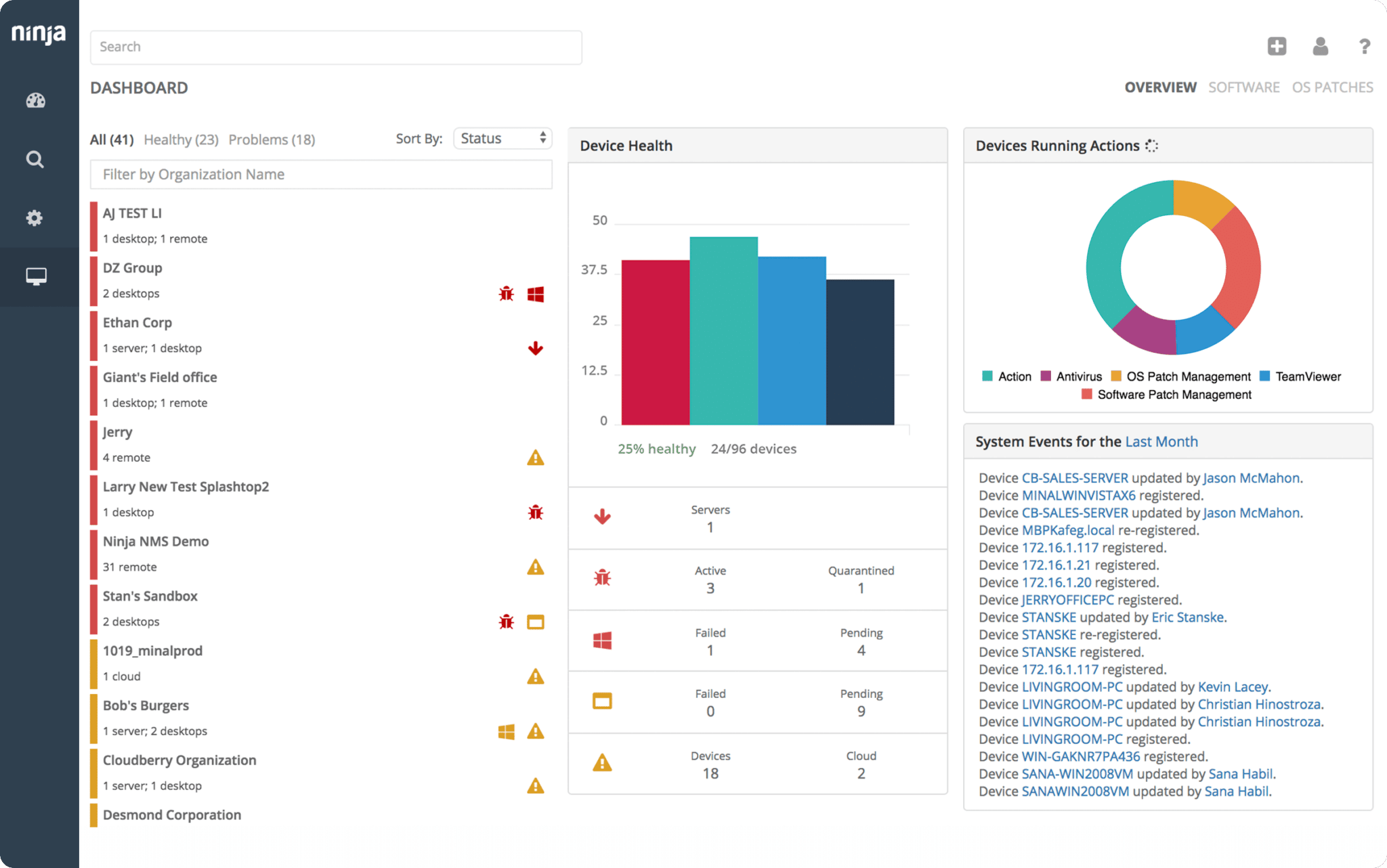
Built for Technicians, Unified for Scale.
Unified endpoint management
NinjaOne brings patching, backup, automation, and remote management into one platform. Technicians manage Windows, macOS, and Linux endpoints consistently from a single console, with real depth in every area. No juggling extra tools or shallow add-ons.
Native remote access
NinjaOne includes native remote access alongside a full suite of background tools: shell, file browser, service manager, process manager, and registry editor. Technicians troubleshoot and resolve issues, often without disrupting users, fixing problems in minutes from the same console.
Reliable automation at scale
NinjaOne policies automate patching, software deployment, service restarts, and cleanups across every client site. Workflows run consistently without manual oversight, reducing repetitive work so technicians fix more with less effort.
NinjaOne vs. SuperOps Reviews
| Criteria |  | SuperOps |
|---|---|---|
| Overall Rating | 4.7 out of 5 (4,313) | 4.5 out of 5 (133) |
| Meets Requirements | 9.0 | 8.7 |
| Ease of Use | 9.1 | 9.0 |
| Ease of Setup | 9.1 | 9.0 |
| Ease of Admin | 9.1 | 9.0 |
| Quality of Support | 9.1 | 9.4 |
| Ease of Doing Business With | 9.4 | 9.2 |
| Product Direction (% positive) | 9.7 | 9.6 |
Based on G2 Summer 2026
SuperOps
PRODUCT SUMMARY
SuperOps is a unified, AI-powered platform that merges PSA, RMM, automation, and documentation for MSPs and internal IT teams — delivering operational efficiency, scalability, and simplified tool consolidation.
Use Cases:
Unified PSA and RMM: SuperOps builds its PSA and RMM on a shared database, meaning alerts, tickets, assets, and client records live in one place without requiring a separate sync between tools.
Modern interface: SuperOps offers a clean, fast UI that is consistently noted by users as intuitive and easy to navigate, reducing onboarding time for new technicians.
AI-assisted ticketing: SuperOps includes Monica AI, which assists with ticket summarization, triage, and basic workflow automation for service desk teams.
Competitor Shortcomings:
No native remote access: SuperOps does not include its own remote access technology. Remote desktop access is delivered through third-party integrations such as ISL Online and Splashtop, each requiring separate configuration and licensing.
No native backup: SuperOps does not include built-in endpoint backup. Backup and recovery workflows require third-party integrations, adding separate setup, billing, and vendor management to the IT environment.
No background remote sessions: SuperOps does not support background remote sessions, meaning technicians cannot open an independent session on an endpoint without affecting the user’s active session. Remediation and troubleshooting work requires interrupting the end user, adding friction and disruption to routine fixes.
NinjaOne
Why IT teams choose NinjaOne over SuperOps
NinjaOne brings endpoint management, patching, automation, remote access, backup, ticketing, and documentation into a single, native platform, so technicians stay in one console from alert to resolution. Background remote sessions let techs manage files, services, processes, and registry without opening a visible session or interrupting end users. Policies automate patching, deployments, and cleanups across every client site, consistently and without manual oversight. And every customer gets unlimited onboarding and support from real product experts, included. No upsells, no time limits.
As a Leader in the 2026 Gartner Magic Quadrant for Endpoint Management Tools and the #1-rated RMM on G2, NinjaOne is trusted by nearly 40,000 customers to run leaner, resolve issues faster, and prove IT’s value to the business. 93% saved time on software deployment, and 71% replaced more than four tools after switching.
“Remote lets us perform actions in the background without disrupting customers. Other tools that aren’t as feature-rich ran out of options, so we had to dispatch an on-site team. With NinjaOne Remote, we can do far more remotely and only send someone on-site when absolutely critical.”
Chris Amalfim, VP of Operations at ERGOS
Why GSDSolutions Switched to NinjaOne from Atera
with Andres, director of IT services
NinjaOne is Trusted by nearly 40,000 MSPs & IT Pros Across the Globe







Here’s What Our Customers Say About Us

As we grew, we started looking for tools that would help us support more clients more efficiently. We wanted something that gave us more control over endpoints and systematically keep tabs on devices. We needed a tool that would notify us when something was wrong, let us customize those alerts, and help us automate tasks…What really set NinjaOne apart for us was the great design, modern technology, and the new features that come out all the time.”
Brian Roemen,
Principal and CTO,
Brave North Technology
NinjaOne is incredibly easy to use, combining a fluid interface with powerful back-end features. There’s no complicated setup, or difficult to manage interface. All options and tools are clearly labeled, easy to understand, and the interface is… easy to navigate.
Reiffenberger.NET Technology Solutions
Deliver Remarkable IT Services

Get insights at-a-glance

Improve end-user support

Do more with less

Complete tasks faster
Unlike legacy, on-premise solutions, NinjaOne is cloud native. Everything in NinjaOne can be done in fewer clicks with a quick, responsive UI so you can complete tasks faster

Focus on growth
Strong 3rd Party Integrations for a Single-Pane-of-Glass Experience

Slack

Promys

Accelo

Webroot

SentinelOne

Splashtop

Malwarebytes

RepairShopr

ConnectWise

ScalePad

Bitdefender


Computicate

Autotask
NinjaOne vs. SuperOps FAQs
How does SuperOps compare to NinjaOne?
SuperOps is a cloud-native PSA and RMM platform built for MSPs, combining ticketing, billing, and endpoint management in one interface. NinjaOne takes a different approach, built around deep endpoint management with native remote access, built-in backup, patch management across OS and thousands of third-party applications, native MDM, and unlimited onboarding and support included at no extra cost. For MSPs that need operational depth across their entire device fleet, NinjaOne is purpose-built for that work.
Does SuperOps offer third-party integrations?
SuperOps offers integrations with a number of commonly used MSP tools. NinjaOne’s integration library is broader, with connections across security, documentation, PSA, and business tools.
What RMM capabilities does SuperOps offer?
SuperOps combines RMM and PSA capabilities in one platform, which works well for MSPs prioritizing service desk workflows alongside basic endpoint management. NinjaOne is built around the full depth of endpoint operations: native remote access, policy-driven patching, built-in backup, native MDM, and real-time monitoring, all from a single console without third-party dependencies.
Watch a Free Demo of the #1 RMM on G2