Key Points
- Best Google Workspace backup solutions based on final scoring: 1) NinjaOne, 2) Acronis Cyber Protect Cloud, 3) HYCU, 4) SysCloud, 5) Afi Backup for Microsoft 365 and Google Workspace, 6) Cove Data Protection, 7) Keepit, 8) Barracuda Cloud-to-Cloud Backup, 9) Axcient x360Cloud, 10) Spanning Backup, 11) Backupify
- Solutions range from Google Workspace–focused backup tools for SMBs to multi-cloud data protection platforms for enterprise environments.
- Key evaluation factors include backup automation, granular recovery, security features like immutable storage, and administrative complexity.
- The best solution depends on your environment, compliance requirements, and the level of operational overhead your team can support.
This comparison guide lists the top Google Workspace backup solutions for this year using real scores from G2 and Capterra, genuine user feedback from these reviews sites, and then calculating them based on our unique scoring system. We’ve also included the suggested use case for each competitor so you can find the most suitable solution for your specific business goals and IT budget.
Best Google Workspace backup software at a glance
| Cloud backup for Google Workspace | Software Type | Key Features | Best For | Free Trial? |
| NinjaOne | Native backup included in overall IT management platform(SaaS) | Automated backups, immutable storage, consolidated dashboard | MSPs managing multiple clients & enterprise IT | 14 days |
| Backupify | Cloud-to-cloud SaaS backup | Automated backups, point-in-time restore, | SMBs needing simple, automated protection | 15 days |
| Acronis Cyber Protect Cloud | Unified backup + cybersecurity | Backup + endpoint security in one console, immutable storage, | Enterprises wanting backup & cybersecurity consolidated | 30 days |
| Afi Backup for Microsoft 365 and Google Workspace | Cloud-to-cloud SaaS backup | Multi-daily backups, AI anomaly detection, full-text search | MSPs & orgs prioritizing fast, AI-driven recovery | Users can request one |
| Spanning Backup | Cloud-to-cloud SaaS backup | Automated daily backups, AI deletion trend monitoring, item-level restore | SMBs using Google Workspace only | 14 days |
| Cove Data Protection | Cloud-to-cloud SaaS backup | Cloud-first backup, M365 + GWS coverage, immutable storage, multi-tenant dashboard | MSPs & multi-client IT teams needing cloud-first backup | 30 days |
| HYCU | Multi-cloud DPaaS | SaaS integrations, agentless API backup, one-click recovery | Multi-cloud & multi-SaaS orgs needing unified agentless protection | Users can request one |
| SysCloud | Cloud-to-cloud SaaS backup | Automated daily backups, ransomware detection, compliance monitoring (FERPA/HIPAA/GDPR), granular restore | Education & compliance-focused orgs on Google Workspace or M365 | 30 days |
| Keepit | Cloud-to-cloud SaaS backup | Immutable storage on independent cloud, AI indexing, long-term retention | Enterprises needing vendor-independent long-term retention | 15 days |
| Barracuda Cloud-to-Cloud Backup | Cloud-native SaaS | Unlimited retention, malware-scan-on-restore, | SMBs & MSPs standardized on Microsoft 365 | 30 days |
| Axcient x360Cloud | Cloud-to-cloud SaaS backup | AirGap ransomware protection, 3x daily backups, multi-tenant MSP dashboard | MSPs managing M365 & Google Workspace across multiple clients | 14 days |
Protect cloud productivity with confidence.
See how NinjaOne SaaS Backup works in this free demo.
Why Google Workspace backup is important
Google’s Shared Responsibility Model makes it abundantly clear that while it protects the infrastructure, you are responsible for your own data protection. The platform’s built-in trash retention is capped and mostly designed for compliance archiving, not rapid, granular recovery.
This obviously presents a problem for enterprises, especially for those in highly regulated industries that need a robust backup tool. Data loss affecting your Google Workspace can easily become a compliance failure or a business continuity crisis.
A Forrester report (download) on the total economic impact of Google Workspace found that the platform optimized workflows and decreased application development time by up to 80%. However, this report did not account for the rising threat of cyber threats in 2026. The 2026 Global Digital Trust Insights by PwC found that only 6% of enterprises have fully implemented data risk measures (covering both SaaS and traditional).
This confirms that while, yes, Google Workspace is important and is rapidly becoming integral in enterprise environments, it must also be supplemented with the right backup software.
What are the must-have features for Google Workspace backup software solutions
Not every Google Workspace backup solution is built the same. Even so, there are five critical features that the best platforms have:
1. Automated, policy-driven backups
Manual backup routines are error-prone and unsustainable at scale. A great Google Workspace cloud backup is automated, and can schedule backups across all Google Workspace services, such as Gmail, Drive, Shared Drives, Calendar, and Contacts, with customizable retention policies. Automation reduces the chance of human error and ensures no user or dataset falls through the cracks.
2. Granular restore
The best solutions offer item-level restores without requiring a full account rollback. Point-in-time recovery lets you restore data to its state at any past moment, which is critical when dealing with ransomware or accidental overwrites.
3. Immutable storage
Look for immutable storage (often called object lock or write-once storage) backed by AES-256 encryption both at rest and in transit. This is a baseline requirement for ransomware resilience and meeting compliance frameworks like HIPAA, GDPR, and SOC 2.
4. Multi-tenant management for MSPs
If you manage multiple clients or organizational units, your backup platform needs a multi-tenant dashboard that provides centralized visibility and control. Features like role-based access control (RBAC), per-client reporting, and bulk user management are essential for MSPs delivering Google Workspace backup as a managed service.
5. Compliance support
Many industries operate under strict data retention regulations. Your backup solution should support configurable retention periods, audit logging, legal hold, and eDiscovery search capabilities. The ability to export data on demand or locate a specific email thread for a legal inquiry can make the difference between a smooth audit and a serious liability.
11 Best Google Workspace backup software solutions
All G2 & Capterra data as of April 2026.
1. NinjaOne SaaS Backup
NinjaOne, an enterprise-ready IT management platform trusted by 40,000+ clients worldwide, is our top choice for the best Google Workspace backup. The NinjaOne Platform offers a consolidated tool, combining endpoint monitoring and management, patch management, remote control, and SaaS Backup, among others, in a single dashboard, effectively reducing tool sprawl and improving IT efficiency by 95%.
For this guide specifically, the NinjaOne SaaS Backup (powered by Dropsuite) offers a powerful Google Workspace backup solution with automated, cloud-native protection. The platform offers instant, granular recovery with point-in-time and item-level recovery options across mailboxes, files, and identities. Users can also set up retention policies that apply to both backup and long-term archiving to support various regulatory compliance frameworks.
Explore NinjaOne Device and SaaS Backup
Simplify protection with one secure platform for endpoint, server, and SaaS backup, plus built-in compliance support for Microsoft 365 and Google Workspace.
Learn more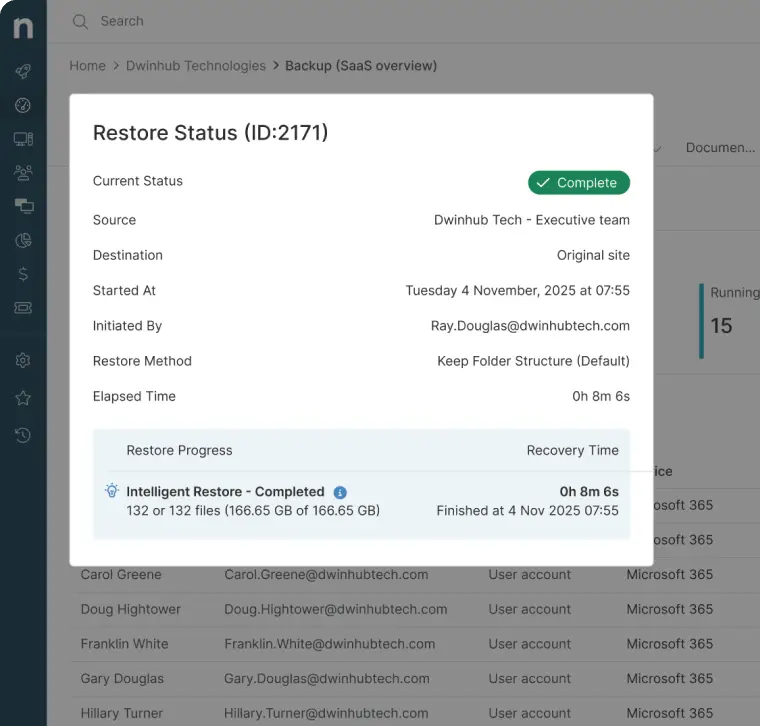
Strengths of NinjaOne
- Unified IT dashboard: NinjaOne users can manage SaaS backup alongside endpoint management, patching, and remote access from a single pane of glass.
- Compliance-ready features: The platform offers consistent retention rules, audit logs, eDiscovery saved searches, and legal hold support so you can meet governance requirements and respond to data requests without added admin overhead.
- Immutable, encrypted storage: All backups are secured with military-grade AES-256 encryption in transit and at rest, providing a strong line of defense against ransomware and insider threats.
- Intuitive dashboard: NinjaOne is known for its easy-to-use dashboard that can be mastered in hours, whether you’re a beginner IT professional or an experienced IT admin.
- Unlimited training, support, and onboarding: Enterprises that need additional help can request unlimited training or assistance from the NinjaOne team.
What users say
Bill Tyndall, CEO of Techver, used to be overwhelmed with tool sprawl – a result of rapid acquisitions and hypergrowth. With fragmented endpoint management across platforms, Tyndall needed a solution that would consolidate his processes and make his team more efficient. Since implementing NinjaOne, he has not only centralized his device management, but he has also scaled operations without additional headcounts.
“NinjaOne SaaS Backup protects our cloud data without adding operational overhead,” said Tyndall. “It works quietly in the background, so our team is not tied up checking backups. They can stay focused on higher-value work. That efficiency matters as we scale.”
Read more NinjaOne customer stories or check out NinjaOne Reviews.
NinjaOne reviews on G2
| Category | NinjaOne Rating |
| Overall | 4.7 out of 5 (4,184) |
| Has the product been a good partner in doing business? | 9.4 |
| Quality of Support | 9.1 |
| Ease of Admin | 9.1 |
| Ease of Use | 9.1 |
NinjaOne reviews on Capterra
| Category | NinjaOne Rating |
| Overall | 4.7 out of 5 (284) |
| Ease of Use | 4.7 |
| Customer Service | 4.7 |
| Features | 4.5 |
| Value for Money | 4.6 |
Sign up for your free 14-day trial of NinjaOne.
2. Backupify
Backupify, a Datto/Kaseya company, is arguably one of the longest-standing names in Google Workspace backup. The software offers a low-maintenance cloud-to-cloud backup service that stores data in Datto’s private cloud infrastructure, separate from the production Google environment. It also has a good track record of offering reliable daily backups and point-in-time restores.
See how Backupify compares with NinjaOne or read a more in-depth review on Backupify alternatives.
Best for
Small to mid-sized businesses that want a low-maintenance, fully managed Google Workspace backup with no infrastructure to configure.
Features
- Automated daily backups: Backupify performs scheduled backups of Google Workspace data without requiring manual intervention.
- Point-in-time restore: The platform allows users to recover data from specific historical snapshots.
- Isolated cloud storage: Stores backups in Datto’s private cloud, separate from the production environment.
Shortcomings
- User-friendliness: Users have stated that the platform, while robust, is not intuitive to use. (Verified G2 review)
- Customer support: Backupify could improve its customer service, so tickets are resolved faster. (Verified Capterra review)
- Performance: According to G2 users, the platform can slow down when managing large amount of data. (Verified G2 review)
Backupify reviews on G2
| Category | Backupify Rating |
| Overall | 4.2 out of 5 (190) |
| Has the product been a good partner in doing business? | 8.5 |
| Quality of Support | 8.0 |
| Ease of Admin | 8.6 |
| Ease of Use | 8.5 |
Backupify reviews on Capterra
| Category | Backupify Rating |
| Overall | 4.1 out of 5 (31) |
| Ease of Use | 4.0 |
| Customer Service | 3.9 |
| Features | 3.8 |
| Value for Money | 3.8 |
3. Acronis Cyber Protect Cloud
Acronis Cyber Protect Cloud extends the company’s unified cyber-protection platform to include Google Workspace backup alongside endpoint security, patch management, and disaster recovery in a single platform, making it a solid alternative in this list of the best Google Workspace solutions.
See how Acronis compares with NinjaOne or read a more in-depth review on Acronis alternatives.
Best for
Mid-to-large enterprises already using Acronis for endpoint security or server backup that want to consolidate Google Workspace protection under the same management console.
Features
- Integrated backup and security: Acronis Cyber Protect Cloud combines data protection with anti-malware and endpoint security controls.
- Granular recovery options: This solution enables item-level and full-system restores across workloads.
- Immutable storage support: Acronis protects backup data from modification or deletion.
Shortcomings
- Random errors: On occasion, users can experience random bugs or errors or have the dashboard slow down or not load. (Verified G2 review)
- Reporting: Several G2 users have expressed concern over the customizability and user-friendliness of the platform’s reporting function. (Verified G2 review)
- Resource-heavy: The platform may be better suited for larger enterprises with larger amounts of resources. (Verified G2 review)
Acronis Cyber Protect Cloud reviews on G2
| Category | Acronis Cyber Protect Cloud Rating |
| Overall | 4.7 out of 5 (1,323) |
| Has the product been a good partner in doing business? | 9.3 |
| Quality of Support | 8.8 |
| Ease of Admin | 9.1 |
| Ease of Use | 9.1 |
Acronis Cyber Protect Cloud reviews on Capterra
| Category | Acronis Cyber Protect Cloud Rating |
| Overall | 4.1 out of 5 (77) |
| Ease of Use | 4.1 |
| Customer Service | 3.6 |
| Features | 4.2 |
| Value for Money | 4.0 |
4. Afi Backup for Microsoft 365 and Google Workspace
Afi Backup is a cloud-to-cloud SaaS backup platform that is recognized for its strong performance benchmarks, particularly in backup speed and restore accuracy. It earns a place on this list because of its AI-driven anomaly detection, which flags unusual deletion patterns before they become data loss events, which some competitors reserve for higher tiers.
See how Afi Backup compares with NinjaOne or read a more in-depth review on Afi alternatives.
Best for
MSPs and IT teams that prioritize backup speed, restore accuracy, and AI-assisted anomaly detection across Google Workspace environments.
Features
- Multi-daily backups: Afi Backup runs backups multiple times per day to reduce potential data loss windows.
- AI anomaly detection: This Google Workspace cloud backup identifies unusual deletion or activity patterns in backup data.
- Full-text search: The platform enables fast retrieval of emails and files across backups.
Shortcomings
- Customer support: Afi Backup could improve its customer support, which G2 users have claimed to be “unresponsive” and “ineffective.” (Verified G2 review)
- User-friendliness: According to users, the platform is difficult to use, even for experienced IT professionals. (Verified G2 review)
- Out-of-box functionality: More advanced features are locked behind higher tiers. (Verified G2 review)
Afi Backup for Microsoft 365 and Google Workspace reviews on G2
| Category | Afi Backup for Microsoft 365 and Google Workspace Rating |
| Overall | 4.7 out of 5 (56) |
| Has the product been a good partner in doing business? | 9.8 |
| Quality of Support | 9.6 |
| Ease of Admin | 9.9 |
| Ease of Use | 9.6 |
Afi SaaS Backup Software reviews on Capterra
| Category | Afi SaaS Backup Software Rating |
| Overall | 4.7 out of 5 (23) |
| Ease of Use | 4.7 |
| Customer Service | 4.7 |
| Features | 4.6 |
| Value for Money | 4.6 |
5. Spanning Backup
Spanning Backup by Kaseya is a purpose-built SaaS backup solution that supports automated daily backups and unlimited on-demand backups for Gmail, Drive, Shared Drives, Calendars, Contacts, and Sites. Recent platform updates have added AI-driven deletion trend monitoring to help administrators detect unusual data loss activity early. The platform also features AI-driven trend monitoring, making it easy to use for many users, even those without technical expertise.
Best for
SMBs and IT generalists looking for a simple, automated Google Workspace backup with minimal setup.
Features
- Automated daily backups: The platform ensures consistent protection of Google Workspace data.
- Unlimited on-demand backups: Allows additional manual backups outside scheduled intervals.
- Item-level restore: Spanning Backup supports recovery of individual files, emails, or records.
Shortcomings
- Reporting tool: The platform’s reporting function could be more detailed and easier to read. (Verified G2 review)
- NAS storage: According to a G2 review, Spanning Backup is a cloud-only solution and does not support backing up M365 data directly to on-premises storage. (Verified G2 review)
- Ripple effect: A G2 user has stated that if a single fragment is damaged, the entire backup is affected. (Verified G2 review)
Spanning Backup reviews on G2
| Category | Spanning Backup Rating |
| Overall | 4.2 out of 5 (225) |
| Has the product been a good partner in doing business? | 8.7 |
| Quality of Support | 8.4 |
| Ease of Admin | 9.0 |
| Ease of Use | 8.9 |
Spanning Backup reviews on Capterra
| Category | Spanning Backup Rating |
| Overall | 3.8 out of 5 (29) |
| Ease of Use | 3.9 |
| Customer Service | 3.4 |
| Features | 3.9 |
| Value for Money | 3.6 |
6. Cove Data Protection
Cove Data Protection, from N-able, is a cloud-first backup and disaster recovery platform purpose-built for MSPs managing multiple tenants. The platform, which we also included in our top SaaS backup solutions, protects servers, workstations, and Microsoft 365 data from a single multitenant dashboard, and includes support for Google Workspace backup. Its TrueDelta technology makes incremental backups up to 60 times smaller than traditional image backups, enabling more frequent protection with less storage overhead.
See how Cove Data Protection compares with NinjaOne or read a more in-depth review on Cove Data Protection alternatives.
Best for
MSPs and IT teams managing multiple client environments that need a cloud-first, centrally managed backup solution covering both endpoint and SaaS workloads without on-premises storage requirements.
Features
- Cloud-first architecture: The platform eliminates the need for on-premises backup infrastructure.
- Multi-tenant management: It enables centralized control across multiple client environments.
- Incremental backup technology: Cove Data Protection reduces storage usage through smaller, frequent backups.
Shortcomings
- Account management: The platform’s account management could improve so that it focuses more on user’s needs rather than just “selling” the platform. (Verified Capterra review)
- Functionality: Capterra users have said that certain features are locked behind hidden tiers. (Verified Capterra review)
- Initial set up: Cove Data Protection can be complex to initially understand and master. (Verified G2 review)
Cove Data Protection reviews on G2
| Category | Cove Data Protection Rating |
| Overall | 4.5 out of 5 (427) |
| Has the product been a good partner in doing business? | 8.9 |
| Quality of Support | 8.5 |
| Ease of Admin | 8.9 |
| Ease of Use | 9.0 |
Cove Data Protection reviews on Capterra
| Category | Cove Data Protection Rating |
| Overall | 4.7 out of 5 (217) |
| Ease of Use | 4.7 |
| Customer Service | 4.5 |
| Features | 4.5 |
| Value for Money | 4.4 |
7. HYCU
HYCU is a fast-growing Data Protection as a Service (DPaaS) platform providing agentless, API-based backup and recovery across on-premises, cloud, and SaaS environments. Its R-Cloud platform covers hundreds of cloud services and SaaS integrations, including Google Workspace, Microsoft 365, Okta, Salesforce, Atlassian, GitHub, and more, from a single management console. This level of unified coverage earns the platform a place in this list, as it reduces the risk of tool sprawl.
See how HYCU compares with NinjaOne or read a more in-depth review on HYCU alternatives.
Best for
Organizations managing multi-cloud and multi-SaaS environments that want a single platform to protect every workload, without deploying agents or managing separate backup tools for each service.
Features
- Agentless API-based backup: HYCU protects SaaS applications without installing additional agents.
- Broad SaaS coverage: It also supports multiple platforms including Google Workspace and beyond.
- One-click recovery: The platform simplifies restoration processes across workloads.
Shortcomings
- Pricing model: A G2 user has said that HYCU uses consumption-based pricing, which can become overwhelming for smaller businesses. (Verified G2 review)
- Physical server backup: HYCU users have stated that the platform may function differently when backing up physical servers. (Verified G2 review)
- Administration center for O365 and Azure: A G2 review mentioned that currently, HYCU has no single unified administration center for O365 and Azure. (Verified G2 review)
HYCU reviews on G2
| Category | HYCURating |
| Overall | 4.7 out of 5 (127) |
| Has the product been a good partner in doing business? | 9.6 |
| Quality of Support | 9.4 |
| Ease of Admin | 9.4 |
| Ease of Use | 9.5 |
HYCUon Capterra
| Category | HYCURating |
| Overall | 4.9 out of 5 (28) |
| Ease of Use | 4.9 |
| Customer Service | 4.9 |
| Features | 4.6 |
| Value for Money | 4.9 |
8. SysCloud
SysCloud is a Backup-as-a-Service (BaaS) platform offering a unified dashboard for backing up Google Workspace, Microsoft 365, Slack, QuickBooks Online, HubSpot, Salesforce, and Box. Originally built to address backup and compliance challenges in educational and regulated organizations, SysCloud has expanded to serve businesses, non-profits, and enterprises. It is SSAE18/SOC 2 certified and complies with GDPR standards.
See how SysCloud compares with NinjaOne or read a more in-depth review on SysCloud alternatives.
Best for
Educational institutions, compliance-focused SMBs, and non-profit organizations using Google Workspace or Microsoft 365 that need automated backup with built-in compliance monitoring for FERPA, HIPAA, and GDPR.
Features
- Automated backup scheduling: SysCloud performs regular backups across supported SaaS platforms.
- Compliance monitoring: Users can also track data against frameworks like GDPR, HIPAA, and FERPA.
- Granular restore options: The platform enables recovery of specific files or user data.
Shortcomings
- Navigation: Users of the platform have stated that the navigation “takes some getting used to.” (Verified G2 review)
- Help desk and documentation: SysCloud’s help desk can be confusing to navigate at first. (Verified G2 review)
- Restoration time: According to a G2 review, restoring older files can take up to 24 hours to restore. (Verified G2 review)
SysCloud reviews on G2
| Category | SysCloud Rating |
| Overall | 4.8 out of 5 (37) |
| Has the product been a good partner in doing business? | 9.5 |
| Quality of Support | 9.5 |
| Ease of Admin | 9.5 |
| Ease of Use | 9.6 |
SysCloud on Capterra
| Category | SysCloud Rating |
| Overall | 4.7 out of 5 (7) |
| Ease of Use | 4.9 |
| Customer Service | 5.0 |
| Features | 4.6 |
| Value for Money | 4.7 |
9. Keepit
Keepit is a dedicated cloud-to-cloud backup vendor that offers immutable, long-term data protection for Google Workspace, Microsoft 365, Salesforce, and other SaaS applications. It runs its own independent cloud infrastructure, which provides true vendor independence and strong data sovereignty options for international organizations. This may be especially beneficial for European organizations or any company with strict data residency requirements.
See how Keepit compares with NinjaOne or read a more in-depth review on Keepit alternatives.
Best for
Mid-size and enterprise organizations, especially in Europe, that require vendor-independent, long-term backup storage with strong data residency and sovereignty controls.
Features
- Independent cloud infrastructure: Keepit stores backups outside of vendor ecosystems.
- Immutable data storage: It prevents alteration or deletion of backup data.
- Long-term retention: The platform supports extended data retention for compliance and archiving.
Shortcomings
- Navigation: Multiple G2 reviews have stated that it can be difficult to find or search for specific emails or mailboxes. (Verified G2 review)
- Performance: The platform can slow down when searching for older data or backing up larger files. (Verified G2 review)
- Initial setup: Keepit requires careful planning for large tenants. (Verified G2 review)
Keepit reviews on G2
| Category | Keepit Rating |
| Overall | 4.7 out of 5 (141) |
| Has the product been a good partner in doing business? | 9.3 |
| Quality of Support | 9.2 |
| Ease of Admin | 9.1 |
| Ease of Use | 9.1 |
Keepit on Capterra
| Category | Keepit Rating |
| Overall | 4.8 out of 5 (55) |
| Ease of Use | 4.7 |
| Customer Service | 4.8 |
| Features | 4.6 |
| Value for Money | 4.7 |
10. Barracuda Cloud-to-Cloud Backup
Barracuda Cloud-to-Cloud Backup is a dedicated SaaS backup solution from Barracuda Networks that protects Microsoft 365 data. We included this platform in our list on the strength of its simplicity. Users across G2 and Capterra have also said the platform features a fast setup process and decent out-of-the-box features.
See how Barracuda compares with NinjaOne or read a more in-depth review on Barracuda alternatives.
Best for
SMBs, educational institutions, and MSPs heavily standardized on Microsoft 365 that want a simple all-inclusive cloud backup.
Features
- Unlimited retention: Allows long-term storage of backup data without time limits.
- Malware scan on restore: Checks files for threats during recovery.
- Simple deployment model: Enables quick setup with minimal configuration.
Shortcomings
- Restoration process: G2 reviews have said that the interface for the restore functionality can be complex. (Verified G2 review)
- Logging: A G2 user has expressed their desire for more detailed logging and to be able to see the progress of backups or restores. (Verified G2 review)
- User-friendliness: Multiple reviews have alleged that the platform could be more intuitive. (Verified G2 review)
Barracuda Cloud-to-Cloud Backup reviews on G2
| Category | Barracuda Cloud-to-Cloud Backup Rating |
| Overall | 4.5 out of 5 (165) |
| Has the product been a good partner in doing business? | 9.1 |
| Quality of Support | 8.8 |
| Ease of Admin | 9.1 |
| Ease of Use | 8.8 |
Barracuda Cloud-to-Cloud Backup on Capterra
| Category | Barracuda Cloud-to-Cloud Backup Rating |
| Overall | 4.7 out of 5 (3) |
| Ease of Use | 4.7 |
| Customer Service | 4.0 |
| Features | 4.3 |
| Value for Money | 4.3 |
11. Axcient x360Cloud
Axcient x360Cloud is a cloud-to-cloud backup and recovery solution built specifically for MSPs, protecting Microsoft 365 and Google Workspace data by backing it up to the Axcient Cloud. It is part of the broader Axcient x360 unified platform, which covers BCDR, SaaS backup, and secure sync from a single MSP-focused console.
The platform’s SmartSearch capability, which can query over 100 million objects in under five seconds, including email attachments, addresses one of the most time-consuming parts of MSP backup work: finding the specific item a client needs restored, quickly, under pressure.
See how Axcient compares with NinjaOne.
Best for
MSPs managing multiple client environments that need a single platform for Microsoft 365 and Google Workspace backup with multi-tenant management.
Features
- Multi-tenant dashboard: Provides centralized management across clients.
- AirGap ransomware protection: Isolates backup data from production environments.
- Advanced search capability: Enables fast querying across large backup datasets.
Shortcomings
- Better suited for larger enterprises: G2 users have said that the platform requires larger amounts of resources that may be unavailable for smaller MSPs. (Verified G2 review)
- Navigation: Less experienced IT professionals may find navigation not as intuitive as expected. (Verified G2 review)
- Functionality: According to users, the reporting, monitoring, and alert customization features could be further enhanced for user-friendliness. (Verified G2 review)
Axcient x360Cloudreviews on G2
| Category | Axcient x360CloudRating |
| Overall | 4.4 out of 5 (89) |
| Has the product been a good partner in doing business? | 9.0 |
| Quality of Support | 8.5 |
| Ease of Admin | 8.7 |
| Ease of Use | 8.8 |
Axcient x360Cloudon Capterra
| Category | Axcient x360CloudRating |
| Overall | 4.0 out of 5 (12) |
| Ease of Use | 4.0 |
| Customer Service | 4.0 |
| Features | 4.0 |
| Value for Money | 4.3 |
Comparison of top Google Workspace backup solutions (G2)
| Category | NinjaOne | Backupify | Acronis Cyber Protect Cloud | Afi Backup for Microsoft 365 and Google Workspace | Spanning Backup | Cove Data Protection | HYCU | SysCloud | Keepit | Barracuda Cloud-to-Cloud Backup | Axcient x360Cloud |
| Overall | 4.7 out of 5 (4,184) | 4.2 out of 5 (190) | 4.7 out of 5 (1,323) | 4.7 out of 5 (56) | 4.2 out of 5 (225) | 4.5 out of 5 (427) | 4.7 out of 5 (127) | 4.8 out of 5 (37) | 4.7 out of 5 (141) | 4.5 out of 5 (165) | 4.4 out of 5 (89) |
| Ease of Use | 9.4 | 8.5 | 9.3 | 9.8 | 8.7 | 8.9 | 9.6 | 9.5 | 9.3 | 9.1 | 9.0 |
| Customer Service | 9.1 | 8.0 | 8.8 | 9.6 | 8.4 | 8.5 | 9.4 | 9.5 | 9.2 | 8.8 | 8.5 |
| Features | 9.1 | 8.6 | 9.1 | 9.9 | 9.0 | 8.9 | 9.4 | 9.5 | 9.1 | 9.1 | 8.7 |
| Value for Money | 9.1 | 8.5 | 9.1 | 9.6 | 8.9 | 9.0 | 9.5 | 9.6 | 9.1 | 8.8 | 8.8 |
Comparison of top Google Workspace backup solutions (Capterra)
| Category | NinjaOne | Backupify | Acronis Cyber Protect Cloud | Afi SaaS Backup Software | Spanning Backup | Cove Data Protection | HYCU | SysCloud | Keepit | Barracuda Cloud-to-Cloud Backup | Axcient x360Cloud |
| Overall | 4.7 out of 5 (284) | 4.1 out of 5 (31) | 4.1 out of 5 (77) | 4.7 out of 5 (23) | 3.8 out of 5 (29) | 4.7 out of 5 (217) | 4.9 out of 5 (28) | 4.7 out of 5 (7) | 4.8 out of 5 (55) | 4.7 out of 5 (3) | 4.0 out of 5 (12) |
| Ease of Use | 4.7 | 4.0 | 4.1 | 4.7 | 3.9 | 4.7 | 4.9 | 4.9 | 4.7 | 4.7 | 4.0 |
| Customer Service | 4.7 | 3.9 | 3.6 | 4.7 | 3.4 | 4.5 | 4.9 | 5.0 | 4.8 | 4.0 | 4.0 |
| Features | 4.5 | 3.8 | 4.2 | 4.6 | 3.9 | 4.5 | 4.6 | 4.6 | 4.6 | 4.3 | 4.0 |
| Value for Money | 4.6 | 3.8 | 4.0 | 4.6 | 3.6 | 4.4 | 4.9 | 4.7 | 4.7 | 4.3 | 4.3 |
Final scores and summaries of top Google Workspace backup solutions
| Vendor | Final Score | Summary |
| NinjaOne | 1.368 | Ranks highest overall due to its combination of usability, support quality, and strong performance across both G2 and Capterra metrics. Its unified platform approach also contributes to higher scores in administrative efficiency. |
| Acronis Cyber Protect Cloud | 0.991 | Scores highly due to its integrated approach to backup and cybersecurity, making it a strong option for organizations seeking consolidation across IT and security functions. |
| HYCU | 0.972 | Performs well in environments requiring broad SaaS and multi-cloud coverage, with strong ratings reflecting its flexibility and agentless architecture. |
| SysCloud | 0.961 | Earns high marks for compliance-focused features and ease of use, particularly among organizations in regulated industries. |
| Afi Backup for Microsoft 365 and Google Workspace | 0.959 | Stands out for its backup frequency and AI-driven monitoring, contributing to strong usability and feature ratings. |
| Cove Data Protection | 0.958 | Balances performance and usability, with consistent ratings across categories, particularly for MSP-focused environments. |
| Keepit | 0.948 | Scores well due to its independent infrastructure model and strong data governance capabilities, especially for enterprises with strict compliance needs. |
| Barracuda Cloud-to-Cloud Backup | 0.897 | Maintains solid ratings driven by simplicity and predictable pricing, though its scope is more limited compared to broader platforms. |
| Axcient x360Cloud | 0.855 | Delivers consistent performance in MSP environments, with strengths in multi-tenant management and recovery speed. |
| Spanning Backup | 0.833 | Provides reliable core backup functionality with strong ease-of-use scores, though it is more focused on simpler use cases. |
| Backupify | 0.830 | Offers stable, entry-level SaaS backup capabilities with moderate scores reflecting its positioning in SMB-focused deployments. |
Protect your SaaS data.
Discover NinjaOne SaaS Backup.
Our top Google Workspace backup software comparison and ranking methodology
This review and ranking of the best Google Workspace backup solutions software in 2026 is based on a transparent, structured methodology. The process includes:
- Data Sources: Aggregated ratings and review counts from G2 and Capterra as of April 2026.
- Metrics Considered: Star ratings, review volume, quality of support, business partnership feedback, ease of use, and customer service ratings
- Weighting: Each metric is weighted based on importance to MSPs, detailed as:
- Final Score = w1 * G2 Good Partner in Doing Business + w2 * G2 Quality of Support + w3 * G2 Ease of Admin + w4 * G2 Ease of Use + w5 * Capterra Ease of Use + w6 * Capterra Customer Service + w7 * Capterra Features + w8 * Capterra Value for Money + w9 * G2 Total Number of Reviews (Scaled) + w10 * Capterra Total Number of Reviews (Scaled), where:
- w1 = 0.125 (Weight for G2 Good Partner in Doing Business)
- w2 = 0.125 (Weight for G2 Quality of Support)
- w3 = 0.125 (Weight for G2 Ease of Admin)
- w4 = 0.125 (Weight for G2 Ease of Use)
- w5 = 0.125 (Weight for Capterra Ease of Use)
- w6 = 0.125 (Weight for Capterra Customer Service)
- w7 = 0.125 (Weight for Capterra Features)
- w8 = 0.125 (Weight for Capterra Value for Money)
- w9 = 0.1 (Weight for G2 Total Number of Reviews, Scaled)
- w10 = 0.1 (Weight for Capterra Total Number of Reviews, Scaled)
- Data Freshness: All data was collected and last validated on April 28, 2026.
- Process: Products were evaluated for both core and advanced IT management features, customer feedback, recent security incidents, and breadth of integrations, with sources referenced where relevant.
What to consider before choosing a Google Workspace backup tool
Choosing the right Google Workspace backup solution requires careful evaluation. With the market offering a wide range of approaches, from fully managed SaaS to self-hosted, it’s important that you consider certain factors first. We also highly recommend that you conduct a vendor assessment and sign up for free trials, if you can.
1. Scope of protection
Confirm that the solution covers every Google Workspace service your organization relies on: Gmail, Drive, Shared Drives, Calendar, and Contacts at minimum. Some platforms also cover Google Sites and Chat. If your environment includes Microsoft 365, Salesforce, or other SaaS applications, a multi-platform solution may reduce tool sprawl.
2. Recovery capabilities
Evaluate not just whether backups run successfully, but how recovery actually works under pressure. Can you restore a single email without rolling back an entire mailbox? Can you recover a deleted Shared Drive to a specific point in time? It is good practice to test the restore interface during any free trial.
3. Compliance and data residency requirements
Industries subject to HIPAA, GDPR, FERPA, or SOC 2 requirements need backup solutions that support configurable retention policies, audit logging, and legal hold. Organizations with European data residency obligations should look at vendors that run their own independent infrastructure with regional storage options.
4. MSP and multi-tenant readiness
Look for centralized dashboards, role-based access control, per-client reporting, and PSA/RMM integrations. Platforms like NinjaOne are purpose-built for MSP delivery at scale.
5. Total cost of ownership
Look beyond the per-user license fee. Factor in storage costs (unlimited vs. per-GB), the administrative time each platform demands, and whether advanced features like compliance tooling or eDiscovery are included or gated behind higher tiers. We recommend reading this guide, “Cloud Backup Pricing” for additional information.
Finding the best Google Workspace backup software
Google Workspace has become mission-critical infrastructure for organizations of all sizes. Yet many businesses continue to operate without a proper safety net for their data, often relying on Google’s native retention tools that were designed for compliance archiving, not rapid point-in-time recovery.
The 11 solutions reviewed here cover a wide range of use cases, from lightweight Google-only backup for SMBs to enterprise-grade, multi-cloud data protection platforms. The right choice depends on your environment, your clients’ requirements, and how much administrative overhead your team can absorb.