Key Points
- Top backup and recovery software based on final scoring: 1) NinjaOne, 2) Druva Data Security Cloud, 3) Acronis Cyber Protect Cloud, 4) Veeam Data Platform, 5) HYCU, 6) Cove Data Protection, 7) Rubrik, 8) Datto SIRIS, 9) Cohesity, 10) Axcient x360Recover, 11) Commvault Cloud, 12) BDRShield, 13) Arcserve UDP
- Key features to prioritize include immutable storage, ransomware protection, chainless/incremental backups, SaaS data recovery, centralized management, and granular restore options across Windows, macOS, Linux, and Microsoft 365.
- Choose your data backup and recovery platform based on reputation, scalability, IT environment compatibility (on-prem, cloud, hybrid), ease of use, customer support quality, and ability to support remote and hybrid workforces.
- Most vendors offer tiered or custom pricing based on data volume, number of endpoints, or cloud storage usage, so requesting a demo or trial before committing is strongly recommended.
Data loss or theft can easily destroy a business, but thanks to data backup and recovery solutions, IT teams can rest easy knowing that their data is secure and protected.
That said, no data backup recovery plan is complete without the right software. There are numerous solutions on the market; however, businesses don’t trust just any software solution or provider to access and protect their precious data. They want top-of-the-line tools to keep their information safe, and we’ve gathered top-of-the-line tools here for you: a list of the best data backup and recovery software for businesses in 2026.
This comparison is independently researched and regularly updated following market changes and peer review for accuracy.
Best backup and recovery tools at a glance
| Software | Use Case | Free Trial |
| NinjaOne | MSPs and enterprise IT teams needing unified platform for endpoint and SaaS backup, chainless image recovery, and ransomware protection, that is also scalable from lean IT departments to organizations managing 100,000+ endpoints. | 14 days |
| Veeam Data Platform | Enterprises and hybrid IT environments requiring continuous data protection, deep automation, and flexible restore options across physical, virtual, and cloud workloads. | 30 days |
| Axcient x360Recover | MSPs focused on business continuity and disaster recovery, with chain-free backups and both cloud and appliance deployment. | 14 days |
| Acronis Cyber Protect Cloud | MSPs and enterprises wanting an all-in-one platform that combines backup, disaster recovery, and cybersecurity with centralized multi-tenant management. | 30 days |
| Druva Data Security Cloud | Cloud-first companies seeking a fully SaaS-managed data resilience platform with immutable backups and centralized management. | 30 days |
| Rubrik | Enterprises prioritizing data security, policy-based automation, and cyber recovery with strong compliance and immutability. | 30 days |
| Datto SIRIS | MSPs seeking an all-in-one BCDR appliance that combines local backup, cloud replication, and instant virtualization to minimize client downtime. | 14 days |
| Cove Data Protection | MSPs needing cloud-first, multi-tenant backup for servers, workstations, and Microsoft 365 with efficient incremental backups. | 30 days |
| Arcserve UDP | SMBs and enterprises seeking image-based backup, ransomware protection, and policy-driven automation in hybrid setups. | 30 days |
| Commvault Cloud | Large enterprises needing a unified cyber resilience platform, combining data security, identity resilience, and cyber recovery, across hybrid, multi-cloud, and on-premises environments. | 30 days |
| Cohesity | Fortune 500 companies, including existing Veritas NetBackup customers, seeking a unified, AI-powered platform for data protection, cyber vaulting, and threat detection across hybrid and multi-cloud environments. | 30 days |
| BDRShield | Organizations aiming to safeguard data across on-premises and cloud environments through various storage options. | 30 days |
| HYCU | Organizations of all sizes looking for a hybrid and multi-cloud data recovery solution with SaaS backup capabilities. | Available (trial length depends on the application/workload being protected) |
13 best data backup and data recovery software in 2026
All G2 & Capterra data as of May 2026.
1) NinjaOne
NinjaOne is a unified IT operations platform that stands out for its user-friendly interface and world-class customer support. Named a Leader in the 2026 Gartner Magic Quadrant for Endpoint Management Tools, NinjaOne is trusted by enterprise organizations including Lyft, Cintas, and Porsche, as well as MSPs managing hundreds of clients, for a total of 35,000+ customers (and growing) worldwide.
Built for enterprise IT
For enterprise IT teams managing complex, distributed environments, NinjaOne eliminates tool sprawl by consolidating endpoint management, backup, and recovery into a single, scalable platform, giving large teams the visibility and control they need across thousands of devices.
Protect critical information with NinjaOne’s secure backup and rapid data recovery.
Strengths of NinjaOne
- Comprehensive device coverage: NinjaOne Backup is built into the trusted endpoint management dashboard, allowing IT teams to protect laptops, desktops, servers, and SaaS data from a single console.
- Flexible and granular backup options: NinjaOne Backup offers chainless image backupfor servers, allowing businesses to quickly recover from disasters and ensure operational continuity.
- Ransomware and data protection: NinjaOne Backup also offers ransomware protection by protecting data with end-to-end encryption and immutable backupstorage, providing strong defenses against ransomware and unauthorized access.
- SaaS backup for Microsoft 365 and Google Workspace: NinjaOne offers SaaS backup for Microsoft 365and Google Workspace, allowing organizations to protect data created or saved on collaborative cloud-hosted applications.
- Regulatory compliance support: NinjaOne allows businesses to stay compliant with various regulations like GDPR, PCI-DSS, and HIPAA.
Customer story
Steve Park, IT manager at Snyder Langston, was looking for a backup solution for its mostly remote workforce. After trying another vendor, he switched to NinjaOne and was able to remotely manage and back up his team’s Windows and Mac endpoints in a single dashboard.
“We needed something cloud-based that could account for the 70% of our remote workforce,” said Park. “NinjaOne Backup is ‘set and forget’ while being easy to use. It’s critical for our lean IT department to easily back up endpoints for remote workers and executives and helps us be more efficient with our time.”
Read more NinjaOne customer stories or check out NinjaOne reviews.
Explore NinjaOne Device and SaaS Backup
Simplify protection with one secure platform for endpoint, server, and SaaS backup, plus built-in compliance support for Microsoft 365 and Google Workspace.
Learn more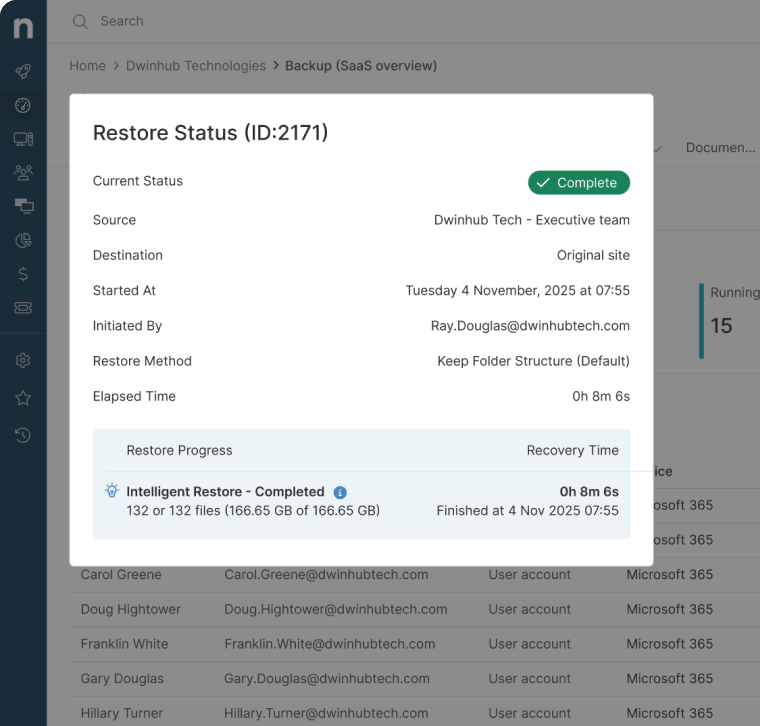
NinjaOne reviews on G2
| Category | NinjaOne Rating |
| Overall | 4.7 out of 5 (4,275) |
| Has the product been a good partner in doing business? | 9.4 |
| Quality of Support | 9.1 |
| Ease of Admin | 9.1 |
| Ease of Use | 9.1 |
NinjaOne reviews on Capterra
| Category | NinjaOne Rating |
| Overall | 4.7 out of 5 (284) |
| Ease of Use | 4.7 |
| Customer Service | 4.7 |
| Functionality | 4.5 |
| Value for Money | 4.6 |
2) Veeam
Veeam Data Platform is another strong choice as it offers continuous, comprehensive data protection as well as management capabilities for physical, virtualized, and cloud environments.
It centralizes all the backup tools users need to back up critical data. The solution includes ransomware protection through immutable backup storage, consistent backup schedules through automation, and comprehensive reporting capabilities that help organizations maintain compliance with various regulatory requirements.
Read this article on Veeam alternatives or check out NinjaOne vs. Veeam.
Best for:
Veeam Data Platform is best for organizations seeking a dedicated platform that offers features catering to backup and recovery.
Features:
- Automation: IT administrators can automate repetitive tasks, such as scheduling backups or resolving common backup issues. Veeam’s automation tools essentially free up IT teams to focus on more strategic tasks.
- Compliance: Veeam helps IT teams protect sensitive data with real-time monitoring and access control to ensure compliance with regulatory standards like GDPR or HIPAA.
- SaaS backup: With Veeam, users can back up and rapidly restore their Microsoft 365 data through Veeam Data Cloud (formerly Veeam Backup for Microsoft 365). (Note: Support for Google Workspace backup is limited and may require third-party integration.)
Shortcomings:
- Interface: According to G2 reviews, Veeam’s feature-rich interface can require a learning curve, particularly for users managing large or multi-site environments. (Verified G2 review)
- Initial setup: Deploying and configuring Veeam may take additional time, especially for organizations integrating advanced automation or custom storage repositories. (Verified G2 review)
- Customer support: While many users praise Veeam’s reliability, feedback indicates that technical support responsiveness and depth can vary depending on the complexity of the issue. (Verified G2 review)
Veeam reviews on G2
| Category | Veeam Rating |
| Overall | 4.6 out of 5 (717) |
| Has the product been a good partner in doing business? | 9.0 |
| Quality of Support | 8.9 |
| Ease of Admin | 9.0 |
| Ease of Use | 9.1 |
Veeam reviews on Capterra
| Category | Veeam Rating |
| Overall | 4.8 out of 5 (77) |
| Ease of Use | 4.6 |
| Customer Service | 4.5 |
| Functionality | 4.7 |
| Value for Money | 4.6 |
3) Axcient x360Recover
Axcient x360Recover is a robust business continuity and disaster recovery (BCDR) solution designed primarily for MSPs. The platform covers most modern backup use cases, including appliances, servers, and cloud-to-cloud. It can be delivered and deployed either direct-to-cloud or appliance-based deployment.
Axcient combines backup, disaster recovery, and business continuity features into a single solution, offering both local and cloud-based recovery options. It’s also known for its proprietary chain-free backup technology, which eliminates the inefficiencies of chain management and enables organizations to easily comply with HIPAA and GDPR requirements.
Best for:
Axcient suits best for small to medium businesses and managed service providers looking for a BCDR solution to protect data across their entire fleet.
Features:
- Granular recovery: Axcient offers multiple options for restoring lost or corrupted data, giving IT teams greater control and flexibility over their data backup and restoration operations.
- Ransomware protection: With its immutable cloud storage and AirGap recovery, Axcient defends backup copies of vital data from ransomware attacks and allows users to restore the data.
- Real-time monitoring: Axcient provides full visibility of backup health and backup history, allowing IT teams to swiftly remediate issues and keep track of all their backups.
Shortcomings:
- User interface: Reviewers often mention that some tools can be difficult to use and that navigation may feel unintuitive due to Axcient’s complex interface. (Verified G2 review)
- Centralized dashboard: While Axcient provides the x360 Portal for multi-product management, some users note that x360Recover’s controls are separate from those of other Axcient products, requiring additional navigation. (Verified G2 review)
- Customization: Axcient offers strong policy management overall, but some users report limited flexibility in assigning backup policies to individual users or endpoints. (Verified G2 review)
Axcient reviews on G2
| Category | Axcient Rating |
| Overall | 4.6 out of 5 (131) |
| Has the product been a good partner in doing business? | 9.0 |
| Quality of Support | 8.7 |
| Ease of Admin | 8.6 |
| Ease of Use | 8.7 |
Axcient reviews on Capterra
| Category | Axcient Rating |
| Overall | 4.8 out of 5 (14) |
| Ease of Use | 4.7 |
| Customer Service | 4.8 |
| Functionality | 4.6 |
| Value for Money | 4.7 |
4) Acronis Cyber Protect Cloud
Acronis Cyber Protect Cloud is designed for MSPs and enterprises that need to protect physical servers, virtual machines, and cloud workloads from a single multitenant platform. The solution combines backup, disaster recovery, and AI-based cybersecurity into one console, offering features such as bare metal restores, automated backup scheduling, and flexible data retention policies. It is compatible with most mainstream operating systems and hypervisors, allowing IT teams to safeguard diverse infrastructures without juggling multiple tools.
Read this article on Acronis alternatives or compare NinjaOne vs. Acronis.
Best for:
Acronis Cyber Protect Cloud is a good fit for MSPs and multi-site enterprises seeking a centralized platform that integrates backup, disaster recovery, and endpoint security for managing multiple clients or environments from a single console.
Features:
- Ransomware protection: Users can protect data from ransomware attacks with Acronis’s integrated Active Protection technology, secure storage options, and both self-recovery and one-click mass recovery capabilities.
- IT automation: IT teams can automate repeatable tasks such as backup scheduling to prevent issues like missed backups due to human error. This allows users to focus on more critical tasks.
- SaaS backup: Acronis Cyber Protect Cloud includes support for Microsoft 365 and Google Workspace (available as an add-on), allowing users to quickly restore files, emails, and contacts.
Shortcomings:
- Random bugs: Several G2 reviews have stated that there are occasional bugs, especially when managing multiple client tenants across different tabs. (Verified G2 review)
- DLP functionality: One user said that the data loss protection functionality of Acronis Cyber Protect Cloud can be difficult to manage and operate around, especially for beginners. (Verified G2 review)
- Learning curve: There is a steep learning curve to this solution. (Verified G2 review)
Acronis Cyber Protect Cloud reviews on G2
| Category | Acronis Cyber Protect Cloud Rating |
| Overall | 4.7 out of 5 (1,323) |
| Has the product been a good partner in doing business? | 9.3 |
| Quality of Support | 8.8 |
| Ease of Admin | 9.1 |
| Ease of Use | 9.1 |
Acronis Cyber Protect Cloud reviews on Capterra
| Category | Acronis Cyber Protect Cloud Rating |
| Overall | 4.1 out of 5 (77) |
| Ease of Use | 4.1 |
| Customer Service | 3.6 |
| Functionality | 4.2 |
| Value for Money | 4.0 |
5) Druva Data Security Cloud
Druva Data Security Cloud is a fully managed cloud platform that secures and recovers data from a wide range of threats. It’s suitable for hybrid environments as it ensures secure recovery through immutable backups. Because its platform is entirely on the cloud, it requires no hardware, software, or appliances to deploy. Instead, IT leaders can easily manage their networks from a single console and experience a scalable solution powered by Amazon Web Services.
Read this article on the top Druva alternatives or check out NinjaOne vs. Druva.
Best for:
Druva Data Security Cloud is best for mid-markets and enterprise teams that want to reduce on-premises backup infrastructure and protect cloud-first environments.
Features:
- Ransomware recovery: All backup copies are stored in Druva’s immutable, air-gapped backup storage, ensuring that data is safe from being lost, corrupted, or accessed by unauthorized parties.
- Centralized management: Druva allows users to keep track of backup status, manage backup copies, and restore data from a single console, removing the need to swap tools frequently.
- Secure backups: By utilizing AES 256-bit encryption, Druva ensures that data in transit and at rest is protected from attempts to intercept it.
Shortcomings:
- Storage flexibility: Some users mention that storage capacity can feel limited and that they would like more flexibility or visibility into available storage tiers. (Verified G2 review)
- Resource-intensive: Backup and recovery operations may take longer for large datasets or resource-intensive workloads. (Verified G2 review)
- Steep learning curve: While Druva’s cloud console is comprehensive, it can take time for new users to become familiar with its full range of capabilities. (Verified G2 review)
Druva reviews on G2
| Category | Druva Rating |
| Overall | 4.7 out of 5 (727) |
| Has the product been a good partner in doing business? | 9.4 |
| Quality of Support | 9.4 |
| Ease of Admin | 9.3 |
| Ease of Use | 9.4 |
Druva reviews on Capterra
| Category | Druva Rating |
| Overall | 4.7 out of 5 (17) |
| Ease of Use | 4.5 |
| Customer Service | 4.7 |
| Functionality | 4.6 |
| Value for Money | 4.5 |
6) Rubrik
Rubrik allows IT teams to protect their data, monitor data risk, and recover data and applications to maintain operational efficiency. IT teams can use Rubrik to back up endpoint devices, operating systems, virtual machines, and SaaS data.
Rubrik’s policy-driven automation frees up IT professionals from manually working on repetitive backup tasks, allowing them to focus on more complex or critical tasks. In addition, Rubrik allows businesses to recover from cyberattacks, ransomware, disasters, or even human error thanks to its quick recovery capabilities.
Read this article on Rubrik alternatives.
Best for:
Rubrik is useful for organizations looking for a recovery solution that focuses on protecting their fleet against cyber threats.
Features:
- Policy enforcement: Thanks to Rubrik’s policy enforcement tools, users have complete control over backup frequency and data retention.
- SaaS backup: The platform offers data backup capabilities for SaaS applications, such as Microsoft 365. Rubrik can recover data, files, and mailboxes, minimizing disruptions from cyberattacks.
- Remote monitoring: Rubrik highlights its risk monitoring feature, which can detect potential ransomware infections and indicators of data integrity being compromised.
Shortcomings:
- Granular recovery: Reviewers report that Rubrik could offer more granular restore options. (Verified G2 review)
- Ease of use: Rubrik users say that the platform’s GUI could be more user-friendly, and that using advanced features can be difficult. (Verified G2 review)
- Reporting: While Rubrik provides built-in reporting, several users would like more customization options to tailor reports to specific compliance or audit requirements. (Verified G2 review)
Rubrik reviews on G2
| Category | Rubrik Rating |
| Overall | 4.5 out of 5 (148) |
| Has the product been a good partner in doing business? | 9.1 |
| Quality of Support | 8.9 |
| Ease of Admin | 9.1 |
| Ease of Use | 9.1 |
Rubrik reviews on Capterra
| Category | Rubrik Rating |
| Overall | 4.8 out of 5 (74) |
| Ease of Use | 4.7 |
| Customer Service | 4.7 |
| Functionality | 4.6 |
| Value for Money | 4.5 |
7) Datto SIRIS
Datto SIRIS is an all-in-one business continuity and disaster recovery (BCDR) solution built for MSPs. It combines on-site backup with replication to the immutable Datto Cloud, providing reliable protection for physical servers, virtual machines, and cloud workloads.
The platform offers rapid recovery options including instant virtualization, bare metal restores, and file-level recovery, all managed through a centralized multi-tenant web portal that allows MSPs to monitor and restore data across client environments from a single interface.
Read this article on the top Datto alternatives or check out NinjaOne vs. Datto.
Best for:
Datto SIRIS is best matched to MSPs that need a purpose-built, hardware-based BCDR solution to ensure business continuity and protect client data across multiple environments.
Features:
- Rapid data recovery: Datto SIRIS offers multiple recovery options, from file-level restores to full instant virtualization.
- Ransomware protection: The platform uses patented ransomware scanning to continuously monitor backups for threats.
- Centralized management: Datto SIRIS provides a multi-tenant cloud portal where MSPs can monitor backup status, manage recovery points, and restore data across all client environments from a single dashboard.
Shortcomings:
- Granular reporting: Datto SIRIS could provide more granular reporting and alerting, according to G2 users. (Verified G2 review)
- Initial setup: While robust, the current Datto SIRIS 6 can be initially complex to set up. (Verified G2 review)
- Cost: Reviewers across multiple platforms note that Datto SIRIS is one of the more expensive BCDR options on the market. (Verified G2 review)
Datto SIRIS reviews on G2
| Category | Datto SIRIS Rating |
| Overall | 4.6 out of 5 (272) |
| Has the product been a good partner in doing business? | 9.1 |
| Quality of Support | 8.6 |
| Ease of Admin | 9.3 |
| Ease of Use | 9.3 |
Datto reviews on Capterra
| Category | Datto SIRIS Rating |
| Overall | 4.5 out of 5 (91) |
| Ease of Use | 4.5 |
| Customer Service | 4.4 |
| Functionality | 4.6 |
| Value for Money | 4.2 |
8) Cove Data Protection
Cove Data Protection by N-able is a cloud-first data-as-a-service tool. Business leaders use it for its ease of management and efficiency in backing up various workloads.
It also offers recovery services for servers, workstations, and Microsoft 365 from a multi-tenant web-based dashboard. Cove highlights its incremental backups to minimize resource usage, which are sixty times smaller than image backups, freeing up resources for more frequent backups.
Read this article on Cove Data Protection alternatives or check out NinjaOne vs. Cove Data Protection.
Best for:
MSPs and internal IT teams can benefit from Cove Data Protection’s optimal features for archiving of business-critical data.
Features:
- Multitenant management: Designed to secure data in multitenant environments, Cove allows MSPs to manage multiple clients at once.
- Secure storage: Cove Data Protection offers end-to-end encryption, protecting data in transit and at rest with robust AES 256-bit encryption.
- Ransomware recovery: To ensure that data is always recoverable, backups are encrypted and isolated in immutable cloud storage.
Shortcomings:
- User interface: Users have expressed that the user experience when using Cove could be improved. (Verified G2 review)
- Storage: Companies with large amounts of data to back up may need to purchase higher tiers. (Verified Capterra review)
- Performance: Restoring large datasets or operating in low-bandwidth environments can take longer than expected, depending on connection speed and data volume. (Verified G2 review)
Cove Data Protection reviews on G2
| Category | Cove Data Protection Rating |
| Overall | 4.5 out of 5 (427) |
| Has the product been a good partner in doing business? | 8.9 |
| Quality of Support | 8.5 |
| Ease of Admin | 8.9 |
| Ease of Use | 9.0 |
Cove Data Protection reviews on Capterra
| Category | Cove Data Protection Rating |
| Overall | 4.7 out of 5 (267) |
| Ease of Use | 4.7 |
| Customer Service | 4.5 |
| Features | 4.5 |
| Value for Money | 4.4 |
9) Arcserve UDP
Arcserve UDP is a data resilience platform that offers backup and recovery features to safeguard vital data from cyberattacks and loss. With features like image-based backups and granular file recovery, IT teams can reduce downtime and ensure business continuity.
By centralizing all the tools IT administrators need to monitor backup statuses, manage retention policies, and perform data restore operations into a single console, Arcserve helps improve an organization’s security posture by protecting data in transit and at rest with end-to-end encryption.
Read this article on Arcserve alternatives or check out NinjaOne vs. Arcserve.
Best for:
Arcserve is a preferred choice for small to mid-sized businesses seeking backup and recovery software that can cater to complex hybrid IT environments.
Features:
- Granular restore options: Arcserve provides IT administrators with multiple options for data restoration, allowing users to recover single files or entire systems.
- Policy enforcement: Users can determine and enforce policies for consistent data protection. This feature also makes Arcserve a highly scalable solution.
- Ransomware protection: By encrypting data and storing backup copies in secure storage, Arcserve ensures that users always have a copy of important data.
Shortcomings:
- Customer support: According to G2 reviews, Arcserve’s customer service can be inconsistent, and users often wait some time to get a response from the support team. (Verified G2 review)
- Interface: Arcserve’s GUI contains multiple management windows, which can make navigation less intuitive for new users. (Verified G2 review)
- Backup reliability: Some customers have noted that automated backups may occasionally fail due to licensing or configuration issues, requiring manual intervention to resolve. (Verified G2 review)
Arcserve UDP reviews on G2
| Category | Arcserve UDP Rating |
| Overall | 4.2 out of 5 (136) |
| Has the product been a good partner in doing business? | 8.4 |
| Quality of Support | 8.2 |
| Ease of Admin | 8.0 |
| Ease of Use | 8.0 |
Arcserve UDP reviews on Capterra
| Category | Arcserve UDP Rating |
| Overall | 4.7 out of 5 (9) |
| Ease of Use | 4.6 |
| Customer Service | 3.6 |
| Features | 4.2 |
| Value for Money | 3.9 |
10) Commvault Cloud
Commvault Cloud is an enterprise-grade cyber resilience platform built for organizations that need to protect data across complex hybrid, multi-cloud, and on-premises environments. Its November 2025 Cloud Unity platform release consolidated data security, cyber recovery, and identity resilience into a single AI-enabled console, making it one of the most significant platform updates in the company’s history.F
Commvault allows users to automate their backup and recovery processes to ensure consistent backups. Features such as policy management and advanced analytics for compliance reporting allow organizations to remain compliant with regulatory standards.
Read this article on Commvault alternatives or check out NinjaOne vs. Commvault.
Best for:
Commvault Cloud is best suited for large enterprises and heavily regulated organizations managing complex, distributed IT environments across on-premises, cloud, and hybrid infrastructure
Features:
- AI-enabled unified resilience: The Cloud Unity platform brings data security, cyber recovery, and identity resilience together in one console across cloud, SaaS, hybrid, and on-premises environments.
- SaaS and cloud-native backup: Protects Microsoft 365, Google Workspace, and cloud-native workloads on AWS and Azure, with automated discovery and plan assignment.
- Cyber recovery and clean-room testing: Commvault’s Cleanroom Recovery lets organizations run isolated, self-service cyber recovery tests.
Shortcomings:
- Steep learning curve: Commvault offers deep functionality, but mastering its full feature set can take time, particularly for smaller teams or new users. (Verified G2 review)
- Customer support: Feedback suggests that resolution times can vary, and more complex support requests may take longer to close. (Verified G2 review)
- Setup: According to reviews, Commvault’s initial setup and configuration can require detailed planning, especially in multi-environment or enterprise-scale deployments. (Verified G2 review)
Commvault Cloud reviews on G2
| Category | Commvault Cloud Rating |
| Overall | 4.3 out of 5 (181) |
| Has the product been a good partner in doing business? | 8.5 |
| Quality of Support | 8.7 |
| Ease of Admin | 8.2 |
| Ease of Use | 7.9 |
Commvault Cloud reviews on Capterra
| Category | Commvault Cloud Rating |
| Overall | 4.6 out of 5 (48) |
| Ease of Use | 4.4 |
| Customer Service | 4.6 |
| Features | 4.5 |
| Value for Money | 4.5 |
11) Cohesity
Cohesity is an AI-powered data security and management platform that, following its December 2024 acquisition of Veritas’ enterprise data protection business, became the world’s largest data protection software provider. Its capabilities include immutable backups, AI-based threat detection, and rapid recovery at scale.
In terms of simplicity and security, users of Cohesity benefit from not only a single UI for all environments but also instant mass restore and zero-trust principles such as MFA and encryption.
Read this article on Cohesity alternatives or check out NinjaOne vs. Cohesity.
Best for:
Cohesity is well-suited for large enterprises that need a unified platform to protect, secure, and manage data across on-premises, cloud, and hybrid environments, particularly those already running Veritas NetBackup.
Features:
- Single platform: Cohesity provides a unified platform for data isolation, protection, backup, and recovery.
- Data recovery: The platform’s accelerated data recovery capabilities mean reduced business impact during an outage or ransomware attack.
- Backup scheduling: Users of Cohesity can schedule and determine the frequency of automatic data backups.
Shortcomings:
- Complex setup: According to some G2 reviews, Cohesity can take some time to set up and requires careful planning before executing tasks. (Verified G2 review)
- Agent installation: Some users of Cohesity have suggested that the platform could benefit from the installation of agents straight from its interface. (Verified G2 review)
- Data exfiltration: Reviews of the software have mentioned that for clusters which aren’t set to “read only,” it would be very easy for anyone to exfiltrate data from them, sparking some security concerns. (Verified G2 review)
Cohesity reviews on G2
| Category | Cohesity Rating |
| Overall | 4.4 out of 5 (52) |
| Has the product been a good partner in doing business? | 9.1 |
| Quality of Support | 9.0 |
| Ease of Admin | 8.9 |
| Ease of Use | 9.1 |
Cohesity reviews on Capterra
| Category | Cohesity Rating |
| Overall | 4.6 out of 5 (54) |
| Ease of Use | 4.7 |
| Customer Service | 4.7 |
| Features | 4.6 |
| Value for Money | 4.6 |
12) BDRShield
From Vembu Technologies, BDRShield is a comprehensive data backup and recovery software marketed toward various businesses and MSPs. It supports an extensive range of workloads, from virtual machines and endpoints to SaaS applications and databases.
With flexible storage options and centralized management, BDRShield enables organizations to safeguard data across on-premises and cloud environments.
Read this article on BDRShield alternatives or check out NinjaOne vs. BDRShield.
Best for:
BDRShield is an ideal choice for service providers and IT teams looking for a backup solution that caters to diverse IT workloads.
Features:
- Real-time reports: With BDRShield, users can gain instant visibility via reports and alerts on backup health and storage usage.
- Compliance: BDRShield incorporates security practices that help businesses meet data regulations such as SOC2, HIPAA, and GDPR.
- Centralized management: Users of BDRShield can manage their backups through a single console, whether it’s cloud-hosted or self-hosted.
Shortcomings:
- Steep learning curve: Some reviews have mentioned that familiarizing oneself with BDRShield’s console and features can take some considerable time. (Verified Capterra Review)
- Mobile notifications: According to a few users, the software can benefit from a mobile app to remotely monitor alerts apart from emails. (Verified Capterra Review)
- Unclear menus: Users have remarked that BDRShield’s menus aren’t as clear or intuitive as they expect them to be. (Verified Capterra Review)
BDRShield reviews on G2
| Category | BDRShield Rating |
| Overall | 4.3 out of 5 (155) |
| Has the product been a good partner in doing business? | 8.9 |
| Quality of Support | 8.8 |
| Ease of Admin | 8.6 |
| Ease of Use | 8.6 |
BDRShield reviews on Capterra
| Category | BDRShield Rating |
| Overall | 4.4 out of 5 (22) |
| Ease of Use | 4.0 |
| Customer Service | 4.4 |
| Features | 4.4 |
| Value for Money | 4.4 |
13) HYCU
HYCU is a data-protection-as-a-service (DPaaS) solution that offers ransomware protection on top of data migration and disaster recovery. With an emphasis on fully automated protection, this software enables organizations of all sizes to quickly restore data and configurations in the event of human error, corruption, or cyberattacks.
By maintaining full control of their backups in secure offsite locations, users of HYCU gain confidence in their ability to safeguard data and ensure resilient operations.
Read this article on HYCU alternatives or check out NinjaOne vs. HYCU.
Best for:
HYCU is best for organizations that need optimal, SaaS-based backup and recovery for hybrid and multi-cloud environments.
Features:
- Cloud protection: HYCU provides protection for cloud-native workloads running in such platforms as AWS, Google Cloud, and Microsoft Azure.
- Incremental backup: By supporting incremental backups, HYCU enables IT teams to save new changes to existing data more efficiently.
- Visualization: HYCU offers the user complete visualization of their network, including all apps and whether these apps lack native protection and/or compliance capabilities.
Shortcomings:
- Cost: HYCU may be pricier than other alternatives in this list, especially for organizations with large amounts of data to back up. (Verified G2 Review)
- On-premises storage: G2 users have said that backing up to on-premises environments can be time-consuming. (Verified G2 Review)
- Less detailed notifications: According to reviews, HYCU’s alerts and notifications can be more detailed and provide more significant information. (Verified G2 Review)
HYCU reviews on G2
| Category | HYCU Rating |
| Overall | 4.7 out of 5 (127) |
| Has the product been a good partner in doing business? | 9.6 |
| Quality of Support | 9.4 |
| Ease of Admin | 9.4 |
| Ease of Use | 9.5 |
HYCU reviews on Capterra
| Category | HYCU Rating |
| Overall | 4.9 out of 5 (28) |
| Ease of Use | 4.9 |
| Customer Service | 4.9 |
| Features | 4.6 |
| Value for Money | 4.9 |
Comparison of the best data backup and data recovery software (G2)
Category | NinjaOne | Veeam | Axcient | Acronis Cyber Protect Cloud | Druva | Rubrik | Datto SIRIS | Cove Data Protection | Arcserve UDP | Commvault Cloud | Cohesity | BDRShield | HYCU |
| Overall | 4.7 out of 5 (3,435) | 4.6 out of 5 (695) | 4.6 out of 5 (131) | 4.7 out of 5 (1,323) | 4.7 out of 5 (714) | 4.6 out of 5 (106) | 4.6 out of 5 (271) | 4.5 out of 5 (410) | 4.2 out of 5 (135) | 4.3 out of 5 (181) | 4.4 out of 5 (50) | 4.3 out of 5 (155) | 4.7 out of 5 (116) |
| Has the product been a good partner in doing business? | 9.4 | 9.0 | 9.0 | 9.3 | 9.4 | 9.2 | 9.0 | 8.9 | 8.4 | 8.5 | 9.2 | 8.9 | 9.5 |
| Quality of support | 9.1 | 8.9 | 8.7 | 8.8 | 9.4 | 8.9 | 8.6 | 8.5 | 8.2 | 8.7 | 9.1 | 8.8 | 9.4 |
| Ease of Admin | 9.1 | 9.0 | 8.6 | 9.1 | 9.3 | 9.2 | 9.3 | 8.9 | 8.0 | 8.2 | 9.0 | 8.6 | 9.4 |
| Ease of Use | 9.1 | 9.1 | 8.7 | 9.1 | 9.4 | 9.3 | 9.3 | 9.0 | 7.9 | 7.9 | 9.1 | 8.6 | 9.5 |
Comparison of the best data backup and data recovery software (Capterra)
| Category | NinjaOne | Veeam | Axcient | Acronis Cyber Protect Cloud | Druva | Rubrik | Datto SIRIS | Cove Data Protection | Arcserve UDP | Commvault Cloud | Cohesity | BDRShield | HYCU |
| Overall | 4.7 out of 5 (276) | 4.8 out of 5 (77) | 4.0 out of 5 (14) | 4.1 out of 5 (77) | 4.7 out of 5 (17) | 4.8 out of 5 (74) | 4.5 out of 5 (91) | 4.7 out of 5 (216) | 4.7 out of 5 (9) | 4.6 out of 5 (48) | 4.6 out of 5 (53) | 4.4 out of 5 (22) | 4.9 out of 5 (28) |
| Ease of Use | 4.7 | 4.6 | 4.7 | 4.1 | 4.5 | 4.7 | 4.5 | 4.7 | 4.6 | 4.4 | 4.7 | 4.0 | 4.9 |
| Customer Support | 4.7 | 4.5 | 4.8 | 3.6 | 4.7 | 4.7 | 4.4 | 4.5 | 3.6 | 4.6 | 4.6 | 4.4 | 4.9 |
| Functionality | 4.5 | 4.7 | 4.6 | 4.2 | 4.6 | 4.6 | 4.6 | 4.5 | 4.2 | 4,5 | 4.5 | 4.4 | 4.6 |
| Value for Money | 4.6 | 4.6 | 4.7 | 4.0 | 4.5 | 4.5 | 4.2 | 4.4 | 3.9 | 4.5 | 4.5 | 4.4 | 4.9 |
Final scores and summaries of IT automation software for IT professionals
| Vendor | Final Score | Summary |
| NinjaOne | 1.377 | NinjaOne is our choice as the best data backup and recovery software for both MSPs and enterprise IT teams. As a 2026 Gartner Magic Quadrant™ Leader for Endpoint Management Tools, NinjaOne Backup delivers chainless image backup, immutable cloud storage, end-to-end encryption, and SaaS backup for Microsoft 365 and Google Workspace, all within a single unified IT operations platform trusted by 35,000+ organizations worldwide. |
| Druva Data Security Cloud | 1.001 | Druva is a cloud-based platform that secures and recovers data from a wide range of threats and that’s most suitable for hybrid environments. |
| Acronis Cyber Protect Cloud | 0.991 | Acronis Cyber Protect Cloud protects data across physical, virtual, and cloud workloads by combining backup, disaster recovery, and AI-based cybersecurity into a single, MSP-friendly platform. |
| Veeam Data Platform | 0.990 | Veeam Data Platform provides comprehensive data protection with ransomware protection, immutable backups, automation, and reporting. |
| HYCU | 0.972 | HYCU is a data-protection-as-a-service (DPaaS) solution that offers ransomware protection on top of data migration and disaster recovery. |
| Cove Data Protection | 0.963 | N-able’s Cove Data Protection offers data backup services for servers, workstations, and Microsoft 365 from a multi-tenant web-based dashboard. |
| Rubrik | 0.937 | Rubrik is a software solution that allows IT teams to protect business-critical data, monitor data risk, and recover data and applications to ensure business continuity. |
| Datto SIRIS | 0.933 | Datto SIRIS is an all-in-one BCDR solution for MSPs that combines on-site backup with secure cloud replication, offering instant virtualization and ransomware protection to minimize downtime. |
| Cohesity | 0.930 | Cohesity is an AI-powered, multi-cloud data security solution that aims to streamline how IT teams protect and manage their data on-premises and in the cloud. |
| Axcient x360Recover | 0.922 | Axcient x360Recover combines backup, disaster recovery, and business continuity features into a single solution, offering both local and cloud-based recovery options. |
| Commvault Cloud | 0.890 | Commvault Cloud is an enterprise-grade cyber resilience platform that unifies data security, identity resilience, and cyber recovery across cloud, SaaS, hybrid, and on-premises environments. |
| BDRShield | 0.884 | BDRShield is a comprehensive data backup and recovery software marketed toward various businesses and MSPs. |
| Arcserve UDP | 0.830 | Arcserve UDP is a data resilience platform that offers features to safeguard vital data from cyberattacks and data loss. |
Our top data backup and recovery software comparison and ranking methodology
This review and ranking of data backup and recovery software in 2026 is based on a transparent, structured methodology. The process includes:
- Data Sources: Aggregated ratings and review counts from G2 and Capterra as of May 2026.
- Metrics Considered: Star ratings, review volume, quality of support, business partnership feedback, ease of use, and customer service ratings
- Weighting: Each metric is weighted based on importance to MSPs, detailed as:
- Final Score = w1 * G2 Good Partner in Doing Business + w2 * G2 Quality of Support + w3 * G2 Ease of Admin + w4 * G2 Ease of Use + w5 * Capterra Ease of Use + w6 * Capterra Customer Service + w7 * Capterra Features + w8 * Capterra Value for Money + w9 * G2 Total Number of Reviews (Scaled) + w10 * Capterra Total Number of Reviews (Scaled), where:
- w1 = 0.125 (Weight for G2 Good Partner in Doing Business)
- w2 = 0.125 (Weight for G2 Quality of Support)
- w3 = 0.125 (Weight for G2 Ease of Admin)
- w4 = 0.125 (Weight for G2 Ease of Use)
- w5 = 0.125 (Weight for Capterra Ease of Use)
- w6 = 0.125 (Weight for Capterra Customer Service)
- w7 = 0.125 (Weight for Capterra Features)
- w8 = 0.125 (Weight for Capterra Value for Money)
- w9 = 0.1 (Weight for G2 Total Number of Reviews, Scaled)
- w10 = 0.1 (Weight for Capterra Total Number of Reviews, Scaled)
- Final Score = w1 * G2 Good Partner in Doing Business + w2 * G2 Quality of Support + w3 * G2 Ease of Admin + w4 * G2 Ease of Use + w5 * Capterra Ease of Use + w6 * Capterra Customer Service + w7 * Capterra Features + w8 * Capterra Value for Money + w9 * G2 Total Number of Reviews (Scaled) + w10 * Capterra Total Number of Reviews (Scaled), where:
- Data Freshness: All data was collected and last validated on May 6, 2026.
- Process: Products were evaluated for both core and advanced IT management features, customer feedback, recent security incidents, and breadth of integrations, with sources referenced where relevant.
Data backup and recovery emerging trends for 2026
Taking the right steps to choosing the most suitable software solution for your organization involves being aware of the latest global trends in data backup and recovery in 2026. Some of the most notable ones include the following:
- AI in cyberthreats. Data from the Global Cybersecurity Outlook 2026 indicates that “nearly 90% of industry experts view AI-driven threats as the most rapidly accelerating security challenge faced in the past year”.
- Vibe recovery. According to a Forbes Technology Council article, 2026 marks the era of “vibe recovery,” a strategic shift toward automated “recovery-as-code” and isolated cleanrooms to counter machine-speed AI attacks.
- Growing reliance on cloud backup. As for cloud backup adoption on a global level, Backupify’s “2025 State of SaaS Backup and Recovery Report” stated that “organizations worldwide are increasingly relying on hybrid cloud environments, with 54% of workloads and applications already cloud-hosted,” and “businesses anticipate growing this figure to 61% by 2026.”
- Greater resistance against paying ransomware groups. According to a Morrison Foerster report, global cyber incidents are expected to rise in 2026, yet fewer organizations will choose to pay extortion demands following data thefts.
Tips for choosing the best data backup and data recovery software
Out of all the data backup software options listed above and with additional insight on emerging global trends in data backup and recovery, how do organizations choose the right tool? When evaluating this type of software, here are some factors to consider:
1. See what other users and IT professionals are saying
Even if the provider you’re considering is well-known, always check the company’s reputation and reviews. There are many ways to use peer-review websites for software to gather additional information about a provider and its services.
2. Understand the features offered by each provider
When comparing two similar software solutions, note their backup and recovery capabilities, specifically the features that will benefit your organization. Some examples of features to look for include disaster recovery plans, RTO and RPO, backup frequency, and granularity of restored data.
3. Ensure compatibility with current systems
Unless your IT team plans to alter all their current systems, ensure that the software that you select is compatible with your IT environment. Your new software solution should solve problems, not create them due to compatibility issues.
4. Verify your preferred solution is scalable
If you’re a growing MSP or IT team, purchase a software solution that offers multiple scalability options. This way, the software can grow with your company during times of success, and you can also revert it if needed.
5. Determine if you need on-site, remote, or hybrid support
A 2025 Gallup poll found that 28% of U.S. companies are now exclusively remote, 21% are on-site, and 51% work under a hybrid model. The software provider you partner with should provide their services and support for the business model you follow, including on-site, remote, or hybrid environments.
7 qualities to look for in data backup and data recovery software
In general, seven qualities determine great software. However, since we’re talking specifically about data backup and recovery tools, we need to discuss how these qualities must also be found in any backup platform you eventually decide on.
1. User experience (UX)
Arguably the most important quality of any software, user experience describes a person’s overall feeling when using the platform. This includes loading time and how visually appealing the software is. According to the Baymard Institute, 40% of people will leave a site if it takes more than three seconds to load, and 32% of customers will leave a brand (even one they loved) after just one bad experience.
✅ Application to data backup and recovery software: More IT experts recommend regularly backing up data (it would be better if you can automate this procedure) so that in the event of a ransomware attack, your IT team has fail-safes in place to minimize any organizational impact.
2. Availability
Availability measures the probability that a system is operational. In other words, how often does the software work? If the software crashes regularly or is inaccessible for whatever reason, it’ll rate poorly for availability.
✅ Application to data backup and recovery software: Ideally, you shouldn’t be using your data recovery tool a lot. Nevertheless, it’s important that when you need to, your software works efficiently and effectively.
3. Performance
As the name suggests, performance determines how effective the software is compared to the expected workload, estimated IT budget, and other variables.
✅ Application to data backup and recovery software: This works hand-in-hand with availability. It’s important to ensure that your tool can successfully handle backing up data when it needs to.
4. Scalability
Good software remains functional and efficient even as it handles more processes. If you’re an MSP, MSSP, or IT enterprise, you must consider software proven to remain fast and reliable even as you grow.
✅ Application to data backup and recovery software: As your company grows, it’s likely that you’ll have large amounts of data to back up and recover. Make sure that you work with a software vendor that’s known to remain fast and reliable, even when managing heavier backup loads.
5. Adaptability
Software adaptability describes the ease with which the solution can adapt to changing requirements. Given the ever-evolving IT landscape, this is particularly important in data backup and data recovery tools.
✅ Application to data backup and recovery software: Unlike other types of software, data backup and recovery tools are not often changed or modified. That said, it’s still worth considering how well your desired tool can adapt to your business needs.
6. Security
It’s vital that your software can mitigate threats, such as ransomware. This includes implementing authentication protocols, such as MFA, and complying with various regulations like SOC.
✅ Application to data backup and recovery software: Look for a data backup software vendor that has a proven track record of safeguarding data and its endpoints. Companies that integrate with antivirus software, like NinjaOne, are also worth considering.
7. Economy
This measures the total cost of ownership of the software and includes how much you spend on it during deployment and maintenance. Ideally, your software should offer a decent ROI compared to the other six qualities.
✅ Application to data backup and recovery software: Your chosen platform should not cost you an arm and a leg to manage. Find software that not only efficient is to manage but also contributes to your overall bottom line.
Key backup architecture and redundancy features to look for
Another important aspect of determining which backup and recovery solution works best for your organization is understanding how well the software’s architecture supports or ensures business continuity. After all, how a system collects, stores, and replicates data determines recovery speed, reliability, and resilience against cyber threats and information loss caused by sudden outages. This entails answering the following questions:
- Does the software utilize agent-based or agentless backups?
- Does the solution support immutable or air-gapped storage?
- Would the business benefit from incremental, full, or chainless backups?
- Can the solution meet the business’s RTO and RPO requirements?
- Does the software offer geographical (and/or other kinds of) redundancy?
Agent-based vs. agentless architecture
An agent-based backup architecture involves the installation of software agents on endpoints for more fine-grained control, while an agentless one uses APIs or OS-level tools for easier deployment. For modern hybrid environments, the latter often delivers simpler scalability, but the former offers deeper integration for mission-critical workloads.
Immutable vs. air-gapped storage
While backups in immutable storage can’t be altered or deleted within a set retention period, those in air-gapped storage are isolated copies usually stored offline. It’s ideal to find a solution that supports both kinds of storage as this ensures backup integrity even as systems are compromised.
Incremental vs. full vs. chainless backups
The differences among these types of backups are as follows:
- full backups copy all the data each time,
- incremental backups capture the changes made since the last backup, and
- chainless backups merge increments automatically into a current full image.
Despite their reliability and efficiency, full and incremental backups are storage/bandwidth-heavy and require full chains for recovery, respectively. In this case, chainless backups both reduce restore time and eliminate single points of failure.
RTO and RPO metrics
For any business, the recovery time objective (RTO) determines how quickly systems should be restored after downtime, while the recovery point objective (RPO) dictates how much data loss is “acceptable” between backups. Needless to say, you should choose a solution whose architecture can meet your organization’s RTO and RPO requirements.
Redundancy features
Lastly, redundancy can be invaluable in the case of data backup and recovery. In particular, geographical redundancy involves the creation and storage of data copies in multiple physical or cloud locations to ensure continuity if one site fails. While this protects data from loss caused by localized disasters, the tradeoffs are heavy storage and replication fees as well as compliance considerations. As such, you should carefully consider whether such redundancy is worth achieving for your business despite the steep costs.
Other types of redundancy include the following:
- Replication frequency: Continuous vs. scheduled replication
- Cross-cloud redundancy: Using multiple cloud vendors to reduce vendor lock-in
- Version retention: The ability to keep multiple historical restore points for flexibility
Windows vs. Mac backup and data recovery software
You may wonder if there’s a difference between Windows and Mac data backup and recovery, aside from the obvious distinction of the types of devices they manage.
While all types of backup software perform essential tasks, they usually differ in ease of use and the amount of data that can be stored in the cloud or on-premises.
This is where it can get tricky. Some users have stated that Windows backup software is generally slower and more prone to glitches than Mac backup software. However, some groups state the opposite and claim Mac software is less reliable than its Windows counterpart.
Ultimately, it boils down to personal choice. All vendors offer the same core functions but shine in specific areas, including device type management. This point is worth emphasizing: always look at the types of devices your intended vendor can back up. To mitigate risks, it’s best to find a solution that can back up multiple devices across several operating systems.
Bounce back from any disaster, cyberattack, system failure, or even accidental deletion with reliable, secure backup and recovery.
Evaluating backup and recovery solutions
Now that you have a better idea of the best data backup and recovery software on the market, you’ll have an easier time finding the top platform for your organization. Consider your business’s pain points and list important features, such as ransomware protection, and compare these factors against each software’s features. In the end, the best software is the one that meets your organization’s specific requirements.