
Key points
- Know the Open Source Landscape: Open source patch management tools remain limited but include Opsi, Foreman/Katello, Uyuni, Rudder, SaltStack, and Ansible, best suited to skilled IT teams comfortable with self-hosted infrastructure.
- Weigh the Security Trade-Off: Active, well-maintained projects can be secure and reliable; abandoned or infrequently updated codebases raise supply chain and compliance risks as attacks accelerate.
- Compare Capabilities: Open source tools win on customization and transparency; commercial solutions offer autonomous and agentic patch remediation, AI-driven prioritization, and native cloud/container support.
- Match to Scale and Compliance Needs: Open source fits smaller, cost-conscious teams with in-house expertise; commercial tools better serve enterprises needing automation, audit-ready compliance reporting, and vendor-backed support.
- Consider a Hybrid Approach: Pair open source automation with commercial governance and reporting tools to balance flexibility with the visibility needed for audits and regulatory windows.
Outdated software and applications are some of the top entry points for cyber-criminals, making patch management one of the most critical parts of cybersecurity hygiene.
With that said, IT pros have access to a mix of commercial and open source patch management tools, but truly dedicated open source solutions remain limited compared to vendor-backed commercial options, especially for enterprise use.
The stakes for getting this right keep rising. CISA’s Binding Operational Directive 22-01 calls for remediating known exploited vulnerabilities within 7–21 days, and as AI-assisted exploit development shrinks the gap between patch release and active attack, a 48-hour deployment delay can already be too late for high-risk, internet-facing systems.
In this post, we’ll review some key considerations when deciding on a patching solution and discuss whether open source patch management software is a good choice.
Identify missing patches and automatically deploy updates with NinjaOne.
What is open source software?
Open source is a paradigm that allows a community of developers to work together and share their expertise to solve a problem. Their combined effort is “open” and “sourced” to the general public, and users can continuously improve and modify it for the collective benefit.
A common misconception about open source software is that it means everything is “free.” However, open source software provides unfettered access to the source code, which anyone can download, copy, and distribute, typically without royalties and licensing fees.
Today’s IT teams also need to consider the security posture of open source projects. According to Action1’s analysis of open source patch management, self-hosted platforms become a core part of the infrastructure once deployed, and if they aren’t actively maintained, their data can become outdated or inconsistent, undermining trust in patch status reporting and compliance audits.
Features of open source software
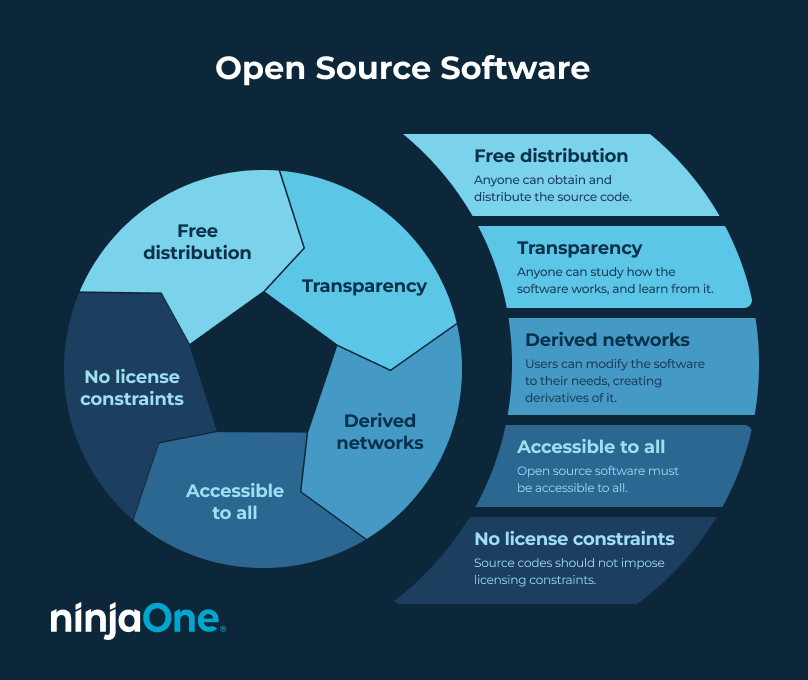
As mentioned, having free access to a source code isn’t the only requirement for open source software. It must also meet the following criteria:
- Free distribution. Anyone should be able to obtain and distribute the source code without any restrictive barriers.
- Transparency. Anyone has the right to study the source code and learn from it. This encourages community involvement and fosters innovation.
- Derived networks. Users can create modified versions or derivatives of the software.
- Accessible to all. Open source software is accessible to all, regardless of factors such as type of employment or level of technical experience.
- No license constraints. Users can distribute the original source code, their modified versions, or parts of the software without any license constraints.
What is open source patch management software?
Open source patch management software is software whose source code is freely available for IT teams to inspect, modify, and deploy without licensing fees.
When searching on GitHub, you’ll find limited examples of this type of software. Beyond Opsi and Foreman/Katello, Uyuni (the open source upstream project for SUSE Manager) and Rudder are widely used for Linux-heavy environments that need centralized visibility rather than just script-based automation. Still, when combined with other free tools like PowerShell, the command-line tool, or free-tiered versions of vendor products, even limited solutions can be effective for a skilled technician and keep costs low.
Benefits of open source patch management software
1. Open source is free (for the most part)
In general, open source software is free. However, some vendors reserve the right to charge for software aggregation and other support services. That said, even if some open source software charges fees, it’s usually much more affordable than its commercial counterparts.
2. You can modify it to your needs
You can make open source software your own and develop a tailor-made solution. While this may require time and skill, building your own product can improve your operational efficiency while keeping costs down.
3. They’re made by end users and IT experts
More than likely, open source software developers are end users themselves who are trying to address a specific pain point. This means that you’ll likely find well-thought-out software that addresses some of the limitations found in commercial tools.
4. It’s (almost) always available
Commercial tools may not always be available for various reasons, from the publisher deciding to stop development to the company dissolving. Either way, you’re at the vendor’s mercy. Alternatively, open source software is nearly always available because it has an online community that supports it and is continuously working on it.
5. It’s transparent and auditable
Because the source code is open, administrators can inspect exactly how a patching tool behaves rather than trusting a vendor’s black box. This also makes open source tools a strong fit for environments with data sovereignty, connectivity, or internal security policy constraints that make cloud-based commercial tools harder to adopt.
Patch with confidence, even when challenges strike. NinjaOne’s stellar service and support can make it possible.
Disadvantages of open source patch management software
1. Lack of support
One notable disadvantage of open source patch management software is the lack of dedicated customer support. While a community of developers may post on forums and offer detailed documentation of a specific source code, it may not be as tailored to your needs.
It’s also worth noting that open source project maintainers do their best to respond to user feedback and answer questions. However, unless it’s a big project with many engaged users and frequent updates, you could be waiting hours or days for an answer, which means less time spent solving a client’s problem.
2. It may not be compatible with your current system
Open source software requires some coding knowledge to ensure compatibility with your current system. Integrating open source software may require additional effort, which may take time.
3. Learning curve
As with any software, open source tools require time to learn. This is especially true if you’re more accustomed to commercial software with different interfaces and functionalities.
4. Not regularly maintained
Many open source software solutions are maintained by a single person or a small team, most of whom can’t devote full-time commitment to the project. It is normal for some projects to be completely untouched for months or years between updates. This could increase your risk of security vulnerabilities.
5. Automation isn’t the same as governance
Many open source tools can execute a patch job reliably but only confirm that an action was triggered, not that your entire environment is actually compliant or up to date. Without built-in visibility into what ran, what succeeded, what failed, and what’s overdue, IT teams can struggle to verify patch status across all endpoints or produce evidence during a compliance audit. Patch execution and patch governance are two different problems, and open source tools generally solve the first one better than the second.
Open source patch management software vs. commercial alternatives
Deciding between open source patch management software and their commercial alternatives depends on your needs and current IT budget. It’s a misconception to assume that just because open source software is “free,” it’s only meant for beginners or smaller MSPs. In fact, many open source software tools are used by experienced IT professionals who value flexibility and customization.
Commercial platforms have widened the gap by offering autonomous and agentic remediation, not just AI-assisted prioritization but also workflows that detect, prioritize, and deploy patches with minimal human intervention. These features help enterprises handle complex, hybrid IT environments more effectively than open source alone.
At the same time, several commercial vendors now provide free or limited endpoint tiers, blurring the line between open source and vendor-managed solutions. Open source tools remain attractive for smaller, cost-conscious teams or for IT pros who value flexibility and customization.
📊 Comparison table: Open source vs. commercial patch management
As a rule of thumb, if your team manages fewer than 50 endpoints and has in-house Linux or scripting expertise, open source tools like Ansible, Opsi, or Uyuni are usually sufficient. If you need built-in compliance reporting, AI-driven or autonomous remediation, or native cloud/container support, a commercial platform is generally the better fit.
| Feature/Factor | Open Source Patch Management | Commercial Patch Management |
| Cost | Free or very low cost (may require paid add-ons for enterprise support) | Subscription-based; costs scale with endpoints and features |
| Support | Community forums, documentation, and volunteer support; response times may vary | Dedicated 24/7 vendor support, SLAs, and professional services |
| Update Frequency | Varies widely; some projects are updated regularly, while others stagnate for years | Frequent updates and patches guaranteed by the vendor |
| Automation and AI Features | Limited automation; little to no AI-driven prioritization | Advanced automation, patch prioritization with AI/ML, compliance-based patch scheduling |
| Customization | Highly customizable with coding/technical skills | Limited customization but easier to configure out of the box |
| Compliance Readiness | Often not compliant with CIS, HIPAA, PCI-DSS, and ISO 27001 without heavy customization | Built-in compliance reporting and auditing support |
| Cloud and Container Support | Rare; requires combining with other tools (e.g., Ansible, Foreman) | Native support for cloud workloads, virtual machines, and containers |
| Scalability | Can scale if heavily customized, but management overhead increases | Designed to scale easily across thousands of endpoints |
Stay ahead of vulnerabilities with NinjaOne Patch Management.
Open source software alternative: NinjaOne
NinjaOne, the #1 patch management software on the market today, improves network security by identifying, evaluating, and deploying patches to any device, anywhere. The platform supports Windows, macOS, and Linux patching as well as provides flexible patching schedules to ensure all endpoints are updated.
When you’re ready, request a free quote, sign up for a 14-day free trial, or take an interactive tour of the software.