

Key Points
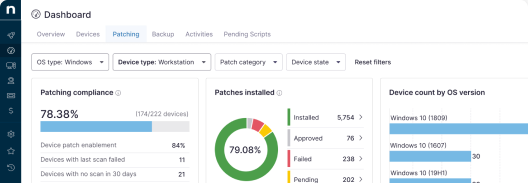
- A patch compliance report should answer whether systems are patched, which have failed or fallen outside policy, and what remediation steps have been taken.
- Effective patch compliance reporting connects software updates to security policies and SLAs.
- The most important reporting features are risk context, SLA integration, exportability, remediation tracking, and automated generation.
- Auditing patch management requires reviewing policy documentation, checking patch status across all assets, flagging non-reporting endpoints, and documenting all exceptions.
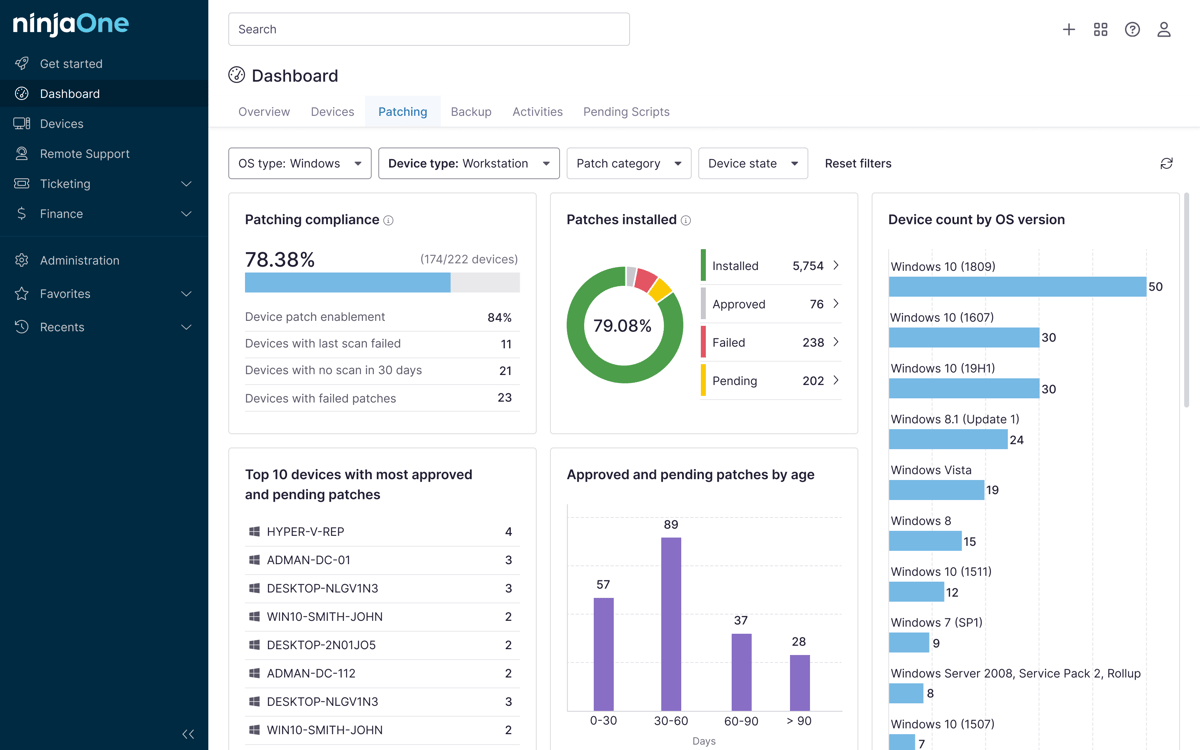
Your patch compliance report tools should be able to highlight whether important endpoints like servers and desktops were updated according to your security policy. This also rings true for enterprises, where operational accountability, cybersecurity governance, and spotting compliance gaps are key.
Find the best tools for automated patch compliance
Patch compliance needs scale as your enterprise grows, making the search for robust reporting tools all the more crucial.
What a patch compliance report should prove
Effective patch compliance links software updates with your organization’s own security policies and configuration baselines as a way of verifying that systems are remediated within accepted risk thresholds.
Your patch compliance report should answer the following questions:
- Which systems are patched?
- Which systems are missing critical updates?
- Which systems failed patch installation?
- Which assets are outside the patch policy?
- Which vulnerabilities remain open past SLA?
- Which endpoints are unmanaged or not reporting?
- Which business units, regions, or device groups have the highest risk?
- What remediation actions were taken?
Reporting features to evaluate
Optimal, well-rounded compliance reports should include risk context, remediation details, and patch trends while tracking exposure. This can be done through device groups, which can simplify rollouts.
Missing updates are equally important to catch. Critical vulnerabilities can arise from a lack of visibility, and this can impact multiple business units and asset types.
Manually redeploying software updates takes time and effort that could be spent on more important projects.
Learn how to automate the process with NinjaOne.
Service contracts should also be integrated into your reporting workflows. Weaving your Service Level Agreements (SLAs) into compliance reporting helps prioritize patches by urgency and risk. But the one reporting feature you’ll always look for is exportability.
Being able to download and save reports enhances auditability. Pair this with consolidated endpoint monitoring and automated report generation to reduce complexity.
How to audit the patch management process
Systems must be continuously audited to discover if critical security gaps are being closed fast enough. At the very least, your patch compliance report tool needs to have automated alerts for these checks.
- Define the scope of your audit.
- Review your patch policy documentation.
- Pull a full asset inventory.
- Check patch status across your fleet.
- Measure compliance against defined SLAs.
- Review your exceptions and accepted risk.
- Confirm that open vulnerabilities are being addressed.
- Flag any endpoints that haven’t checked in as non-compliant.
- Assess corrective actions taken based on previous audit findings.
- Document your current security posture, identified gaps, SLA breaches, and next steps for full transparency.
Your patch management checklist should also consider the following:
- Which systems are missing critical updates?
- Which systems failed patch installation?
- Which vulnerabilities remain open?
- Which endpoints are unmanaged?
- Which business units have the most risk?
Patch compliance metrics for large organizations
| Metric | What it measures | Why it matters |
| Critical asset compliance rate | Patch status for high-value systems | Prevents the overall compliance score from covering up crucial gaps |
| Critical vulnerabilities past SLA | Urgent gaps that remain unpatched past their due date | Directly measures SLA compliance and unresolved exposures |
| Mean time to patch | Average time between a patch being available and being fully deployed | Indicates how efficiently your patching process operates |
| Patch failure rate | Percentage of rollouts that weren’t fully applied | Surfaces systems where patch deployments didn’t complete successfully |
| Unmanaged or stale endpoints | Devices outside patch management that weren’t reported on time | Counts your operational blind spots |
Common procurement mistakes you should avoid
Treating patch reporting as a compliance checkbox
Gearing patch reports towards actionable insights is essential. Patch reports that exist just to satisfy a checklist won’t provide operational value. Use your findings as a guide to improve your security posture.
Ignoring failed patches and stale endpoints
Failed rollouts and stale endpoints create the same danger that unpatched systems do. Highlight any bad deployments, standardize remediations, and automate alerts to streamline technician work.
Not documenting exceptions or accepted risk
Unpatched systems without justification, an assigned owner, and a review date can create liability. Leverage your endpoint manager’s documentation and device health scan features for full transparency.
Producing executive reports without a remediation context
While highlighting wins in your patch compliance report is well and good, your platform needs to simultaneously present real, concrete steps towards total SLA compliance.
Choose patch compliance report tools that maximize visibility
Your patch compliance report tool should help prove that systems are being updated, risk is being reduced, and audit-readiness is being maintained. The strongest reporting tools centralize patch automation, backup validation, and remote access, streamlining IT management for your technicians.
Related topics: