Custom reporting analytics in NinjaOne RMM
NinjaOne RMM reporting and analytics lets IT teams and MSPs create custom reports, filter device data, and schedule delivery to stakeholders.
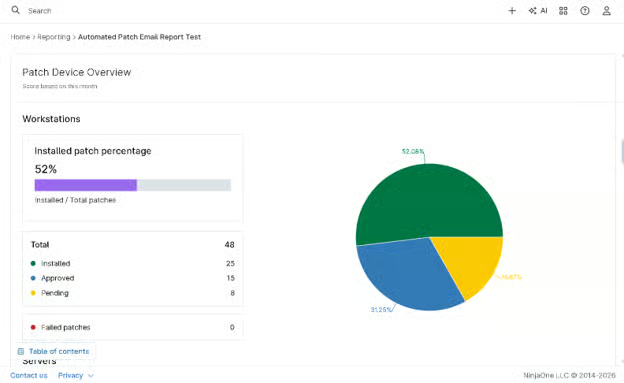
NinjaOne RMM reporting and analytics lets IT teams and MSPs create custom reports, filter device data, and schedule delivery to stakeholders.






| Problem | How NinjaOne resolves it |
IT teams need to report on endpoint health, patch status, and software inventory, but standard reports may not include all the information relevant to their organization or clients. | NinjaOne lets administrators customize summary reports by selecting report templates and adding, removing, or rearranging sections. Data table reports also allow teams to choose specific columns for more targeted device-level reporting. |
Administrators need to report on specific organizations, device groups, locations, or reporting periods without including irrelevant data. | NinjaOne supports report filtering by criteria such as location, device group, and timeframe, helping IT teams focus reports on the devices and data relevant to their reporting needs. |
IT teams and MSPs spend time preparing recurring reports for managers, clients, and other stakeholders. | NinjaOne allows administrators to schedule reports for daily, weekly, or monthly delivery, helping teams distribute regular updates without manually generating and sending each report. |
IT teams need to present endpoint data in a format that is easy for different audiences to understand, from technical staff to business stakeholders. | NinjaOne offers summary reports with visual charts and data table reports for more detailed information. Teams can also export data tables to CSV and download summary reports as PDFs for sharing and further review. |
Reports focus on relevant IT data by allowing administrators to select report templates, add or remove sections, and organize information around specific reporting requirements. This helps teams present the data most relevant to their operational needs.
Device and organizational data is easier to review by filtering reports according to available criteria, such as organization, location, device group, and timeframe. This helps administrators narrow reports to the endpoints or business areas they need to assess.
IT status is easier to communicate through Summary Reports that present selected information using charts and report sections, helping technicians explain endpoint health, patch compliance, backup status, and other supported metrics to stakeholders.
Device information is easier to organize and analyze by creating Data Table Reports with selected columns and sorting or filtering device records. Administrators can include up to 20 data columns to build reports that match specific inventory and operational reporting needs.
Recurring reporting requires less manual effort by scheduling reports for daily, weekly, or monthly delivery. Administrators can configure report distribution so stakeholders receive regular updates without having to manually generate and send each report.
Custom reporting requirements are easier to accommodate by incorporating supported custom fields into report columns. This allows IT teams to include organization-specific device information alongside standard reporting data where applicable.

NinjaOne allows administrators to create report templates using predefined report types and customize the sections included in summary reports. Teams can add, remove, and rearrange sections to focus on relevant information about managed devices and IT operations, tailoring reports to their reporting requirements.

NinjaOne lets administrators build custom data tables using available device data fields. Teams can select a device group, apply filters, choose the columns to include, and arrange their order to create reports that show the information they need, such as device details and inventory data.

NinjaOne provides report filters that help administrators narrow results to specific organizations, locations, device groups, and reporting periods, depending on the report type. This allows IT teams to focus on relevant subsets of their environment rather than reviewing every available record.

NinjaOne supports daily, weekly, and monthly report schedules. Administrators and technicians with the appropriate permissions can select report templates, configure the reporting scope, add recipients, and customize the email subject and message. This helps teams distribute recurring reports to stakeholders without manually generating and sending each one.

NinjaOne lets IT teams view and refresh reports, save frequently used reports as favorites, and export summary reports as PDFs or data tables as CSV files. The Report History tab also provides access to copies of reports distributed through scheduled emails, making it easier to review previously shared information.
IT teams use NinjaOne custom reporting to compile relevant device information into reports tailored to their operational needs. By selecting appropriate report sections, data fields, and filters, administrators can review endpoint details across an organization or focus on specific device groups. This helps them assess the state of their managed environment and identify information that may require follow-up without manually compiling data from individual devices.
IT teams and managed service providers (MSPs) use scheduled reports to share regular updates on managed devices and IT operations. By configuring report templates, selecting relevant information, and scheduling delivery, administrators can provide stakeholders with consistent updates on a daily, weekly, or monthly basis. This reduces the need to prepare the same reports manually for each reporting cycle and helps keep clients informed about the services being delivered.
Administrators use custom report templates, data tables, and filters to present the information most relevant to a particular team, organization, or business requirement. For example, an IT team can build a report around selected device fields or use a custom data table to organize per-device information. This makes reports more relevant to their intended audience and helps administrators find the details they need for routine reviews, troubleshooting, and IT planning.
100,000
Endpoints managed
“NinjaOne is a scalable solution. It’s built on a modern SaaS architecture and it’s future-proof.”

40%
More Cost Effective
“NinjaOne’s price point is 40% less than any other endpoint management tool on the market, while being more powerful and easy to use.”

10-15
Tools Replaced
“Before, I needed 10-15 different tools to execute what NinjaOne does in its centralized, single pane of glass.”

30%
Less time for patching
“We observed a 30% reduction in the time taken for patch deployments compared to our previous solution.”

2,000
Endpoints managed
“NinjaOne gives me much more flexibility and security in my work”

30%
Annual ROI
“[NinjaOne] has already shown its value in ROI…it’s at least a hundred thousand dollars annually.”

24x
Faster Endpoint Management
“Our processes have become 24x faster with NinjaOne.”

20-40
Hours Saved Each Week
“Leveraging the automations feature within NinjaOne has enabled me to save upwards of what would likely be 20 to 30 to even 40 hours per week.”

The NinjaOne Report Library tracks data across features for organizations and devices. Teams choose a summary report type, then customize its data modules to match the question the report needs to answer.
Summary reports can be created, viewed, and downloaded on demand, so teams can review the output and share a copy when needed.
Administrators and permitted technicians can schedule reports for daily, weekly, or monthly distribution, so recurring reports do not depend on manual runs.
Reports can be shared globally or with specific technician roles, and sharing applies to both summary reports and data tables, so each audience receives the reporting it needs.
Reducing time spent preparing IT reports
Having access to relevant endpoint information in one place can help IT teams reduce the time spent gathering data for security reporting. For Seraphine, NinjaOne provides centralized visibility into endpoint information, making it easier to access the data needed to prepare security reports.
“With NinjaOne, we can find all endpoint information easily without leaving the dashboard, which reduced the time we spend on security reports by 30%.”
Darwish Baganian, Infrastructure and IT Security Manager, Seraphine
Create customized reports in NinjaOne to highlight relevant device information, organize data into tables, and tailor report sections to your reporting needs. Filter results by organization, device group, or timeframe, then schedule reports for regular distribution to keep stakeholders informed without repeatedly preparing reports manually.
NinjaOne custom reporting is a reporting and analytics capability within NinjaOne RMM that helps IT teams create summary reports and custom data tables using information from managed devices. It allows teams to monitor endpoint health, review patch status and inventory data, and share relevant information with stakeholders.
In NinjaOne RMM, customizable reports help IT teams organize endpoint information and share relevant updates with stakeholders.
Reporting analytics improves IT management by centralizing device and system data, helping IT teams identify issues, monitor patch and backup status, review relevant IT information, and make informed decisions. It also reduces manual reporting work and makes it easier to share IT performance updates with stakeholders.
NinjaOne RMM reporting analytics lets IT teams generate reports on endpoint health, patch compliance, hardware and software inventory, antivirus protection, disk encryption, backup status, and IT ticketing. Depending on the available report templates and data, teams can customize report sections, filter results, and schedule report distribution to monitor their IT environment and share relevant information with stakeholders.
Yes, NinjaOne RMM lets you customize reports by selecting report templates, adding or removing sections, rearranging data, and creating custom data tables with selected columns. You can also filter reports by organization, device group, or timeframe, and schedule reports for regular distribution to stakeholders.
Yes, NinjaOne RMM supports automated reporting through scheduled reports that can be delivered daily, weekly, or monthly. You can choose report templates, customize the included data, set filters, and specify email recipients, reducing the need to generate and distribute reports manually.