MSP remote access software with NinjaOne Remote
NinjaOne Remote, built into the NinjaOne platform, gives MSPs fast, secure remote access to Windows, macOS, Linux, and mobile endpoints from one console.
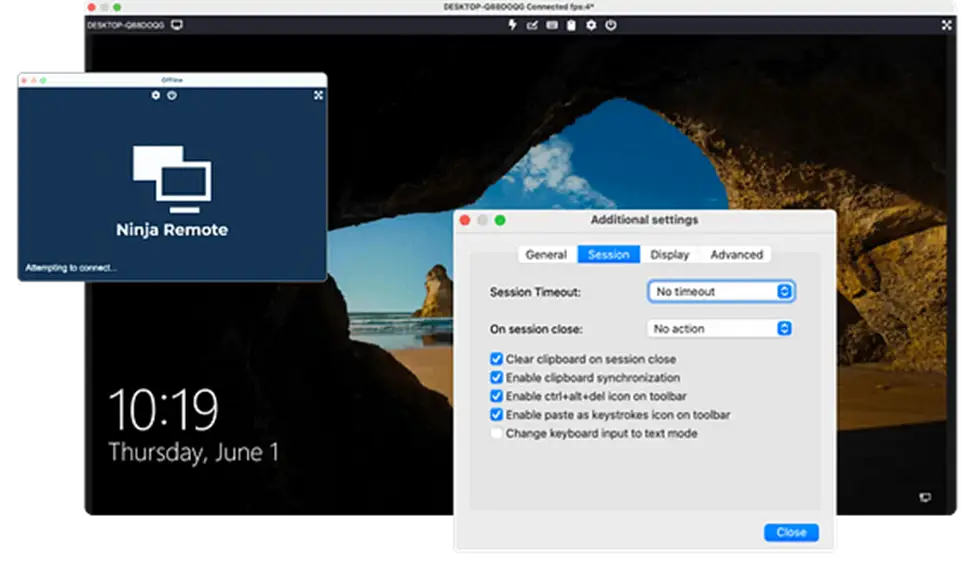
NinjaOne Remote, built into the NinjaOne platform, gives MSPs fast, secure remote access to Windows, macOS, Linux, and mobile endpoints from one console.



| Problem | How NinjaOne resolves it |
| MSPs need to support devices across multiple client environments without creating separate remote-access workflows for each customer. | NinjaOne gives technicians one-click remote access to client endpoints directly from the NinjaOne console, helping MSPs connect to and support devices without switching between separate remote-access tools. |
| MSPs can lose valuable technician time when remote access requires switching between RMM, remote-control, and support tools. | NinjaOne Remote is built directly into the NinjaOne platform, allowing technicians to launch remote sessions from the device page or tickets and use remote support capabilities without leaving the platform. |
| Client devices may need support when users are unavailable, especially for maintenance, troubleshooting, and after-hours issues. | NinjaOne supports unattended remote access, allowing authorized technicians to connect to managed endpoints without requiring the end user to approve each session. Background Mode also lets technicians troubleshoot issues without interrupting the user’s workflow. |
| MSPs need to maintain secure separation between client environments while giving technicians the access required to support their assigned endpoints. | NinjaOne provides tenant-based access controls and role-based remote access controls to help MSPs limit technicians to the client environments and endpoints they are authorized to access. |
Technicians can connect to supported client devices directly from the NinjaOne console, giving them remote access without switching to a separate remote-access application. This helps MSPs keep remote support within the same workflow they use to manage client endpoints.
NinjaOne is designed for MSP environments, allowing technicians to work across different client organizations while using role-based access controls and tenant separation to help limit access to the appropriate devices and environments.
Technicians can connect to managed devices without requiring the end user to approve the connection, making it possible to perform maintenance, troubleshooting, and other support tasks when users are unavailable.
Technicians can use features such as multi-monitor support, file transfer, live chat, command-line access, and other remote-control capabilities to troubleshoot client devices without relying on multiple separate tools.
Quick Connect allows MSP technicians to provide on-demand remote support for devices that aren’t already managed through NinjaOne. Technicians can generate an invitation with a connection link or PIN, making it useful for BYOD devices, vendors, and other temporary support scenarios.

Launch remote sessions directly from the NinjaOne console to quickly access client devices without switching between separate remote support tools. Technicians can connect from device pages or tickets to troubleshoot issues faster.

Support BYOD devices, vendor systems, and other unmanaged endpoints with secure, ad hoc remote sessions. Generate remote access invitations with a unique connection link or PIN when a temporary connection is needed.

Protect remote sessions with encrypted connections, session logging, optional recording, and role-based access controls. Tenant-based controls help MSP technicians access only the client environments and endpoints they are authorized to support.

Access Windows, macOS, Android, and iOS devices from one remote support solution. Technicians can use capabilities such as file transfers, device shortcuts, reboots, and terminal access based on the supported operating system and device type.

Resolve client issues with built-in tools such as multi-monitor control, command-line access, file transfer, live chat, clipboard controls, and session recording. These capabilities help technicians troubleshoot without relying on separate support applications.
MSPs can remotely connect to managed Windows and macOS endpoints to troubleshoot user issues without requiring a technician to travel to the client’s location. Technicians can investigate application problems, device configuration issues, and other endpoint issues directly from the NinjaOne console, helping resolve more tickets remotely and reducing unnecessary onsite visits.
When a client reports an issue, technicians can start a remote session directly from the device page or a support ticket in NinjaOne. This gives technicians direct access to the affected endpoint without switching to a separate remote access application, helping them move from ticket review to hands-on troubleshooting more efficiently.
MSPs often support devices across multiple organizations, locations, and operating systems. NinjaOne Remote provides tenant-based access controls so technicians can work within the appropriate client environment while maintaining separation between customers. This allows MSP teams to support multiple clients from a centralized platform without exposing devices across client environments.
100,000
Endpoints managed
“NinjaOne is a scalable solution. It’s built on a modern SaaS architecture and it’s future-proof.”
40%
More Cost Effective
“NinjaOne’s price point is 40% less than any other endpoint management tool on the market, while being more powerful and easy to use.”
10-15
Tools Replaced
“Before, I needed 10-15 different tools to execute what NinjaOne does in its centralized, single pane of glass.”

30%
Less time for patching
“We observed a 30% reduction in the time taken for patch deployments compared to our previous solution.”

2,000
Endpoints managed
“NinjaOne gives me much more flexibility and security in my work”
30%
Annual ROI
“[NinjaOne] has already shown its value in ROI…it’s at least a hundred thousand dollars annually.”
24x
Faster Endpoint Management
“Our processes have become 24x faster with NinjaOne.”

20-40
Hours Saved Each Week
“Leveraging the automations feature within NinjaOne has enabled me to save upwards of what would likely be 20 to 30 to even 40 hours per week.”
An administrator enables NinjaOne Remote within the NinjaOne platform and configures session settings. For support on devices that aren’t enrolled in the RMM, such as contractor laptops or endpoints awaiting onboarding, Quick Connect provides an option for ad hoc sessions.
Role-based access controls define which technicians can start remote sessions and which devices they can access. This helps align technician permissions with their assigned clients and responsibilities.
Technicians choose the connection method that fits the situation:
Once connected, technicians can use tools such as file transfer, command-line access, and Background Mode to troubleshoot issues. Up to three technicians can also join the same session when additional support is needed.
Service managers review session logs and recordings to monitor remote access activity and support accountability as the MSP adds technicians and clients.
One remote access tool for the whole MSP team
NinjaOne Remote gives MSP technicians one-click access to Windows and macOS endpoints directly from the NinjaOne platform. Technicians can connect from the device page or tickets, troubleshoot client issues remotely, and use built-in tools such as multi-monitor control, command-line access, file transfer, and session recording without switching between separate applications.
Babble, a UK-based MSP, consolidated five major tools—including Splashtop and TeamViewer—when it unified its IT operations with NinjaOne. With NinjaOne Remote, engineers can work from a single dashboard and connect directly to devices from alerts or tickets, reducing the need to switch between remote-support tools.
“NinjaOne Remote gives us one tool across the board.”
Chris Baker, Infrastructure and Systems Lead, Babble
Source: NinjaOne customer story – Babble
Give technicians a practical way to access and troubleshoot client devices remotely. NinjaOne Remote helps MSPs connect to managed Windows and Mac endpoints for hands-on troubleshooting, maintenance, and user support without requiring an onsite visit. Technicians can also use Quick Connect to provide on-demand support for devices that aren’t already managed in NinjaOne.
MSP remote access software lets managed service providers (MSPs) securely connect to and troubleshoot client devices remotely. With NinjaOne Remote, technicians can support managed endpoints, troubleshoot IT issues, transfer files, and perform maintenance without needing to be onsite.
MSP software helps managed service providers monitor, manage, and support multiple clients’ IT environments from a centralized platform. NinjaOne combines remote monitoring and management (RMM) capabilities with remote access, helping technicians monitor endpoints, manage patches, automate tasks, and resolve issues remotely.
The best remote access software for MSPs depends on their clients’ environments, security requirements, and support workflows. NinjaOne Remote integrates with the NinjaOne platform, allowing technicians to access and troubleshoot client endpoints as part of their broader IT management workflow.
Yes, depending on the remote access solution. NinjaOne Quick Connect allows technicians to establish remote sessions with devices that are not enrolled in NinjaOne RMM, making it useful for providing support before onboarding a client’s endpoints or assisting with other devices outside the managed environment.
Yes, depending on the remote access solution. NinjaOne Quick Connect allows technicians to establish remote sessions with devices that are not enrolled in NinjaOne RMM, making it useful for providing support before onboarding a client’s endpoints or assisting with other devices outside the managed environment.