NinjaOne MDM helps IT teams enroll, configure, secure, monitor, and support rugged Android devices used in warehouses, field operations, and other demanding environments.
Problem | How NinjaOne resolves it |
Rugged devices often support specialized workflows that depend on specific applications, scanners, and hardware functions. Standard device policies can interfere with the tools workers need to complete tasks. | NinjaOne lets IT teams manage rugged Android devices through centralized MDM policies, helping administrators apply device, application, and security controls while accounting for the device’s operational role.This allows rugged devices to remain managed without treating every endpoint like a standard smartphone. |
Rugged devices are often deployed in warehouses, field operations, and other environments where downtime can directly interrupt business operations. Sending a device back to IT for every issue is impractical. | NinjaOne provides centralized device visibility and remote management capabilities, allowing IT teams to monitor device status, apply updates, and troubleshoot supported issues remotely. This reduces the need for hands-on intervention when devices are deployed away from the office. |
Rugged fleets can contain different device models and configurations across locations or business functions.Managing each device individually makes it harder to maintain consistent policies and configurations. | NinjaOne allows IT teams to manage rugged Android devices through centralized policies and device groups, providing a consistent way to apply configurations and management controls across the fleet. |
Rugged devices may remain in service for years and cannot always follow the same update and restart schedule as office devices. An untimely update or reboot can interrupt an active warehouse, retail, or field workflow. | NinjaOne gives IT teams centralized control over device updates and maintenance, helping them manage changes according to the operational requirements of the rugged-device fleet rather than applying the same approach used for standard endpoints. |
Fewer disruptions to frontline workflows by helping IT teams identify device issues early and resolve problems remotely, reducing the need to take rugged devices out of service or bring them back to IT.
More consistent device performance across locations by keeping rugged devices aligned with approved configurations, applications, and updates, even when fleets are deployed across warehouses, retail sites, manufacturing floors, or field operations.
Less hands-on maintenance for distributed fleets by allowing IT teams to manage device configurations, applications, and updates remotely instead of relying on physical access to devices in demanding or remote environments.
Stronger protection for business data and devices by applying security policies and controls consistently across rugged endpoints, helping reduce the risk associated with lost, stolen, or unauthorized devices.
Longer-lasting value from rugged hardware by maintaining device health, keeping software current, and addressing issues before they contribute to unnecessary downtime or premature device replacement.
saved time on manual tasks through automation
reduced ticket volumes and resolution times
replaced 3-4 tools with NinjaOne
Lock rugged handhelds and tablets to the single-app or multi-app kiosk mode a role requires, so a scanner or route app stays the only thing on screen.
Enroll rugged Android hardware, including Samsung Knox devices, with little to no manual setup at the dock or in the field.
Warehouses and distribution centers can use NinjaOne to manage rugged Android handhelds used for barcode scanning, inventory checks, receiving, and picking. IT teams can apply device and application policies appropriate to these workflows while monitoring device status and remotely troubleshooting issues when a scanner or business application stops working. This helps warehouse teams keep devices available across shifts and reduce disruptions to inventory workflows.
Organizations can manage rugged Android devices assigned to technicians, delivery personnel, and other mobile workers operating outside the office. NinjaOne provides visibility into device status and enables remote support when users encounter device or application issues, reducing the need to bring devices back to an IT team for routine troubleshooting. This helps field teams resolve device issues faster and stay productive while working away from corporate facilities.
MSPs can manage rugged Android devices for multiple customers from NinjaOne while keeping each customer’s devices and policies organized within their respective environments. Technicians can apply customer-specific configurations, monitor device health and inventory, and support devices deployed across warehouses, retail locations, or field operations. This gives MSPs a repeatable way to manage distributed rugged fleets without relying on the same policy or workflow for every customer.
Rugged Android hardware, including Samsung Knox devices, enrolls through zero-touch enrollment or Knox Mobile Enrollment, so a scanner or handset can register straight out of the box.
Kiosk mode restricts a device to the app or apps a role requires, and Android restrictions layer on top to control device settings and network access.
Field and warehouse apps are assigned through policy, so administrators decide whether an app is optional, removable, or permanently installed.
IT teams get device status, policy enforcement, and remote actions such as a passcode reset or a remote lock, plus GPS location tracking for hardware that moves between sites.
NinjaOne MDM must be bound to Android Enterprise, a free Google service set up with a managed Google or Gmail account, before any rugged Android device can enroll. This binding is what makes fleet-wide enrollment and policy possible in the first place.
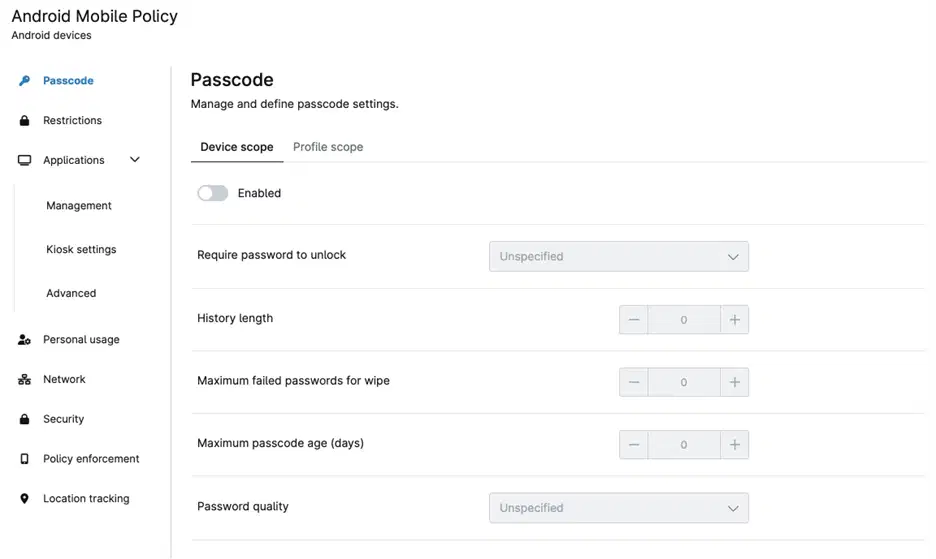
Field and warehouse apps, including web apps, are added to a rugged device’s policy straight from the Google Play Store’s managed catalog through the Android Mobile Policy editor, so a scanner or POS app reaches the device the same way any other managed app does.
For rugged hardware built on Samsung Knox, KME gives an additional enrollment path using a NinjaOne-generated token, letting Knox-based devices register into the fleet without manual per-device setup.
Managing rugged devices across distributed operations
IT teams use NinjaOne MDM to manage rugged Android devices alongside their broader device fleet, applying consistent security policies, configurations, and application controls to devices used in demanding field and frontline environments.
“As mobile devices became a bigger part of the employee ecosystem, [we] turned to NinjaOne MDM to manage the tablets used by [our] marketing and recruiting teams.”
— Turner, Vetcor
Source: NinjaOne
Keep rugged Android devices secure, configured, and ready for use across warehouses, field operations, retail, and other demanding environments. NinjaOne MDM gives IT teams centralized control over device policies, applications, settings, and security, helping them manage rugged device fleets alongside their broader endpoint environment.
Manage mobile, desktop, and networking devices in one place.
This article discusses setting up and using Kiosk Mode on Android Devices in NinjaOne MDM.
This article contains resources for managing Android devices with NinjaOne MDM.
Rugged device management lets IT teams centrally manage company-owned Android devices such as handheld scanners, warehouse tablets, and field service devices. NinjaOne MDM supports enrollment, device policies, application management, kiosk modes, and remote actions such as locking, passcode resets, and GPS location tracking.
A rugged device is a phone, tablet, or handheld computer built to withstand drops, dust, moisture, vibration, and extreme temperatures. They’re commonly used in warehousing, logistics, manufacturing, field service, healthcare, and retail.
Rugged devices keep frontline workflows like scanning, dispatch, and inventory running in warehouses, vehicles, and job sites where downtime is costly. Managing them centrally lets IT teams enforce policies, lock devices to the apps a role require, and remotely troubleshoot or locate a device instead of pulling it out of service.
NinjaOne MDM helps IT teams centrally manage rugged Android devices, enforce consistent policies and approved applications, simplify enrollment, and remotely lock devices, reset passcodes, or track device locations. This makes rugged device fleets easier to deploy, secure, and support at scale.