Automated Patch Deployment with NinjaOne Patch Management
NinjaOne Patch Management provides automated patch deployment, scheduling, approvals, and patch compliance monitoring for Windows, macOS, and Linux devices.
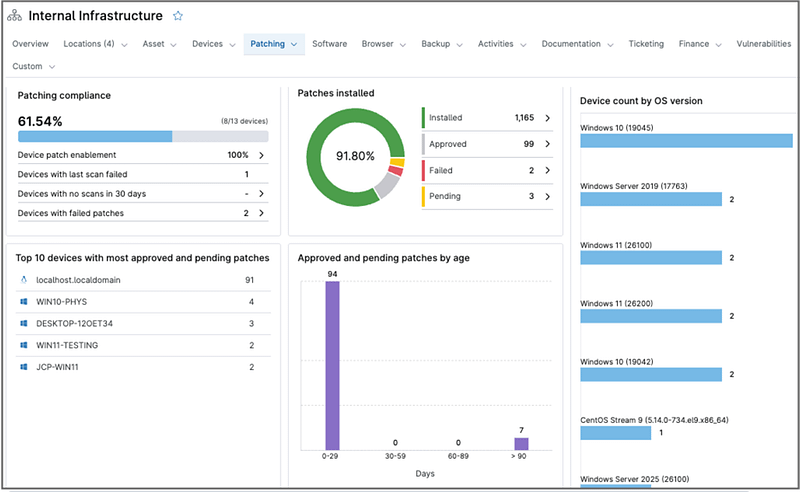
NinjaOne Patch Management provides automated patch deployment, scheduling, approvals, and patch compliance monitoring for Windows, macOS, and Linux devices.
The following table outlines common challenges IT teams and MSPs face when deploying patches across their environment and how NinjaOne Patch Management addresses them.
Problem | How NinjaOne resolves it |
| Manually scheduling, approving, and deploying patches across many devices is time-consuming and inconsistent. | NinjaOne provides policy-based patch management, letting administrators configure scan schedules, approval rules, and deployment timing across managed devices. |
| Automatically approving all patches risks deploying updates that introduce compatibility, stability, or security issues. | NinjaOne’s Patch Intelligence AI uses sentiment analysis and user feedback to flag potentially problematic patches for review before deployment. |
| IT teams lack visibility into whether devices across the environment are current on required patches. | NinjaOne provides patch compliance monitoring, giving centralized visibility into patch status and known vulnerabilities across managed endpoints. |
| Approving or rejecting patches individually across a large device fleet doesn’t scale for growing organizations. | NinjaOne supports global patch approval and rejection across the entire tenant, allowing consistent, automated deployment of updates at scale. |
| Patch deployments that require reboots can disrupt end users if not scheduled carefully. | NinjaOne provides reboot management, allowing administrators to schedule and control reboots after patch deployment to minimize disruption. |
Policy-based scheduling and deployment reduce the window between a patch’s release and its application across managed devices, lowering exposure to known vulnerabilities.
Patch Intelligence AI flags potentially problematic patches before they’re widely deployed, helping administrators avoid rolling out updates that introduce compatibility or stability issues.
Centralized patch compliance monitoring gives administrators visibility into patch status and known vulnerabilities across the environment, supporting internal reporting and audit requests.
Global tenant-wide patch approval lets administrators manage updates for large device fleets without approving patches individually on each device.
Reboot management lets administrators schedule and control reboots after patch deployment, minimizing unexpected interruptions during work hours.

Administrators can configure patch policies, including scan schedules, approval rules, and deployment timing, allowing patches to be deployed automatically according to organizational requirements.

NinjaOne’s Patch Intelligence AI uses sentiment analysis and user feedback to flag potentially problematic patches, helping administrators avoid deploying updates that could introduce compatibility or stability issues.

NinjaOne continuously tracks whether operating systems and applications across managed endpoints are up to date with available security and stability updates, giving administrators centralized visibility into patch status and known vulnerabilities.

Administrators can approve or reject patches across their entire tenant rather than managing approvals device by device, supporting consistent patch deployment at scale.

NinjaOne allows administrators to schedule and control device reboots required after patch deployment, helping reduce disruption to end users.

NinjaOne supports OS patch management for Windows, macOS, and Linux endpoints, along with third-party application patching, each with dedicated policy configuration and activity views.

NinjaOne generates patch reports and activity views that track update availability, deployment status, and patch history across managed devices.
An organization with employees working from home or across multiple office locations can’t rely on physically accessing devices to keep them patched. Using policy-based scheduling and reboot management, IT teams can deploy patches automatically regardless of device location, with reboots scheduled to avoid disrupting remote employees during work hours.
A mid-sized organization with different departments running varied hardware and software configurations can struggle to keep every team equally current on security updates. Patch compliance monitoring gives IT a single view of patch status across all departments, letting them identify and remediate gaps in specific teams rather than relying on department-by-department manual checks.
An MSP managing patch deployment for dozens of client organizations can’t approve updates one device or one client at a time without it becoming a full-time job. Global tenant-wide patch approval lets an MSP technician approve or reject a patch once and apply that decision consistently across every client tenant they manage, freeing technicians to handle escalations instead of routine approvals.
Managing macOS Sonoma with NinjaOne Mac Management follows four high-level phases, from initial configuration through ongoing administration and maintenance.
Administrators set up patch policies for each operating system separately, including scan schedules and approval rules. For example, administrators can automatically approve critical patches while requiring manual review for others. Administrators can also apply different policies to different device groups, allowing patches to be rolled out incrementally rather than to all devices at once.
Administrators deploy the NinjaOne agent to bring Windows, macOS, and Linux devices into management, applying the pre-configured patch policies automatically at enrollment time.
NinjaOne continuously scans for available OS and third-party patches, applies Patch Intelligence AI to flag potentially problematic updates for manual review, and tracks patch compliance across managed devices.
Administrators review AI-flagged patches requiring manual approval, manage global tenant-wide approvals or rejections for the rest, and control reboot timing to minimize disruption when patches require a restart.
ServiceNow is a cloud-based IT service management (ITSM) platform used for incident management, configuration management (CMDB), and IT workflow automation.
NinjaOne integrates with ServiceNow to update configuration management data, patch logs, and device status directly within ServiceNow. Alerts detected in NinjaOne, including patch-related issues, can automatically trigger an incident in ServiceNow, and technicians can view NinjaOne Patch Scanning and Application actions directly from the Configuration Item Actions button without switching platforms.
"NinjaOne's automated patching reduced our patch time by 90%,"
said Shawn Southern, IT Infrastructure & Security Architect at the City of Sarnia.
Automate patch deployment across Windows, macOS, and Linux devices with policy-based scheduling, approvals, and compliance monitoring.
NinjaOne Automated Patch Deployment refers to the capabilities within NinjaOne Patch Management that allow administrators to schedule, approve, and deploy OS and third-party patches across Windows, macOS, and Linux devices, with AI-assisted patch review, compliance monitoring, and reboot management, all from a centralized console.
Look for policy-based scheduling and approval, AI-assisted review of patch stability before deployment, centralized compliance visibility across the device fleet, support across Windows, macOS, and Linux, and control over reboot timing to avoid disrupting end users.
NinjaOne’s Patch Intelligence AI uses sentiment analysis and user feedback to flag potentially problematic patches for administrator review before deployment, helping reduce the risk of rolling out updates that introduce compatibility or stability issues.
No. NinjaOne provides patch compliance monitoring, which tracks whether devices are up to date on required patches. This supports broader compliance efforts but is not a replacement for a dedicated regulatory compliance program.
Yes. NinjaOne supports global tenant-wide patch approval and rejection, allowing administrators and MSPs to apply consistent patch decisions across all managed devices without approving them individually.
Yes. NinjaOne integrates with ServiceNow to update configuration and patch data directly within ServiceNow, and alerts detected in NinjaOne, including patch-related issues, can automatically trigger a ServiceNow incident.
Yes. NinjaOne provides reboot management, letting administrators schedule and control device reboots required after patch deployment to minimize disruption to end users.