Configuration management with NinjaOne RMM
NinjaOne RMM applies centralized policies and automation to standardize settings on managed Windows, macOS, and Linux endpoints.
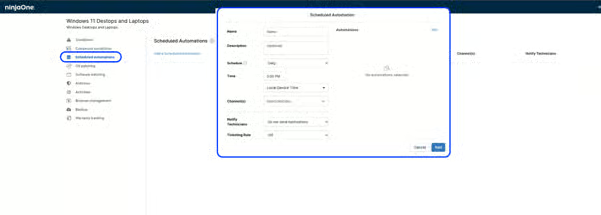
NinjaOne RMM applies centralized policies and automation to standardize settings on managed Windows, macOS, and Linux endpoints.






Managing endpoint configurations across different devices can create challenges for IT teams.
| Problem | How NinjaOne RMM addresses it |
Configuration tools differ by operating system, so Windows, macOS, and Linux endpoints end up managed separately. | NinjaOne RMM applies policies and runs scripts on Windows, macOS, and Linux endpoints from one console. Available capabilities vary by operating system. |
Remote and hybrid devices fall out of line with standard settings. | Once the agent is installed and the device is connected, administrators apply policies and run configuration scripts remotely. |
Settings change after setup and no one notices until something breaks. | Policy conditions watch endpoints and trigger an automation when a device meets a defined condition, such as a stopped process. |
Each client needs different settings, and rebuilding them per client slows onboarding. | MSPs create an organization and assign policies to it, so each client gets its required settings without per-device setup. |
Too many technicians can run scripts or change settings. | Role-based permissions control which technicians can access management functions, including script access. |
Policies, scripts, and scheduled automations reduce repeat configuration work and keep device settings consistent across managed endpoints.
Policies and scheduled automations apply the same settings to many endpoints, so technicians stop repeating changes device by device.
Windows, macOS, and Linux endpoints are managed from one console instead of separate tools, though capabilities vary by operating system.
MSPs create an organization, assign policies, and start managing a new client without configuring each endpoint by hand.
Policy conditions alert technicians when a device meets a defined condition, so they can act before users report an issue.
NinjaOne RMM provides centralized tools to help IT teams manage endpoint configurations, automate routine tasks, and maintain consistent settings across managed devices, including:

NinjaOne RMM allows IT teams to manage endpoint configurations from a single console. Administrators can organize devices and apply policies based on organizational requirements.

Administrators assign policies to managed endpoints to standardize device settings across environments.

NinjaOne RMM runs prebuilt Automation Library scripts or custom scripts on a schedule, on demand, or when a policy condition is met, on Windows, macOS, and Linux endpoints.

NinjaOne RMM provides centralized visibility into managed endpoints, including system information and monitored conditions. Technicians can use this information to identify devices that require configuration changes or additional attention.

NinjaOne RMM supports role-based permissions that help administrators control technician access to management functions. This helps organizations manage who can perform configuration-related tasks.
NinjaOne RMM helps IT teams and MSPs maintain consistent endpoint configurations across different environments. Common applications include:
Administrators apply standardized policies across managed devices and configure settings to match organizational requirements.
IT teams can use NinjaOne RMM to manage endpoint configurations regardless of where employees work. Once the NinjaOne agent is installed and the device is connected, administrators can apply policies and execute configuration scripts remotely, reducing the need for onsite intervention.
MSPs can use NinjaOne RMM to manage endpoint configurations across multiple client environments from one platform. Administrators can assign policies based on each client’s requirements, helping standardize configurations while accommodating different organizational needs.
100,000
Endpoints managed
“NinjaOne is a scalable solution. It’s built on a modern SaaS architecture and it’s future-proof.”

40%
More Cost Effective
“NinjaOne’s price point is 40% less than any other endpoint management tool on the market, while being more powerful and easy to use.”

10-15
Tools Replaced
“Before, I needed 10-15 different tools to execute what NinjaOne does in its centralized, single pane of glass.”

30%
Less time for patching
“We observed a 30% reduction in the time taken for patch deployments compared to our previous solution.”

2,000
Endpoints managed
“NinjaOne gives me much more flexibility and security in my work”

30%
Annual ROI
“[NinjaOne] has already shown its value in ROI…it’s at least a hundred thousand dollars annually.”

24x
Faster Endpoint Management
“Our processes have become 24x faster with NinjaOne.”

20-40
Hours Saved Each Week
“Leveraging the automations feature within NinjaOne has enabled me to save upwards of what would likely be 20 to 30 to even 40 hours per week.”

Identify organizational configuration requirements, then create and configure policies for the appropriate device groups.
Install the NinjaOne agent on supported endpoints to enable centralized management and automatic policy assignment based on organization and location.
Use NinjaOne scripting and automation capabilities to apply supported configuration changes and perform routine maintenance tasks across managed endpoints.
Review endpoint information, monitor configured conditions, and identify devices that require attention or additional configuration changes.
GSDSolutions uses NinjaOne to manage client configuration requirements and assign policies to each new client organization.
"With NinjaOne, I can create a new organization, make a few minor adjustments, assign a few policies, and be good to go. For a standard client, this could take as little as five minutes."
Mark Andres, Director of IT Services, GSDSolutions
Standardize endpoint configurations, automate routine tasks, and manage device policies from a centralized platform with NinjaOne RMM.
Configuration management in NinjaOne RMM involves using centralized agent policies and automations to configure and maintain consistent settings across managed Windows, macOS, and Linux endpoints. Administrators can deploy scripts and run automations manually, on a schedule, or in response to specified conditions, reducing manual configuration tasks and helping maintain consistency across devices.
NinjaOne RMM provides centralized policy management, scripting, scheduled tasks and automation tools. These tools help IT teams maintain consistent device configurations and reduce manual work.
IT teams can automate configuration tasks using scripts and policy-based automations. NinjaOne RMM supports scheduled actions and automations triggered by monitored conditions, reducing the need for manual intervention.
Administrators control access with role-based permissions. NinjaOne separates accounts into system administrators, technicians, and end users, and script access can be restricted or assigned to specific technicians.
NinjaOne RMM supports endpoint management, monitoring, and scripting across Windows, macOS, and Linux. Available configuration capabilities vary by operating system.
Yes. NinjaOne RMM allows MSPs to manage endpoint policies and automate configuration tasks across multiple client organizations from a centralized console.