Apple MDM with NinjaOne Mobile Device Management
NinjaOne Mobile Device Management (MDM) helps IT teams enroll, secure, and manage iPhones, iPads, and Macs with device policies, apps, and monitoring from one console.
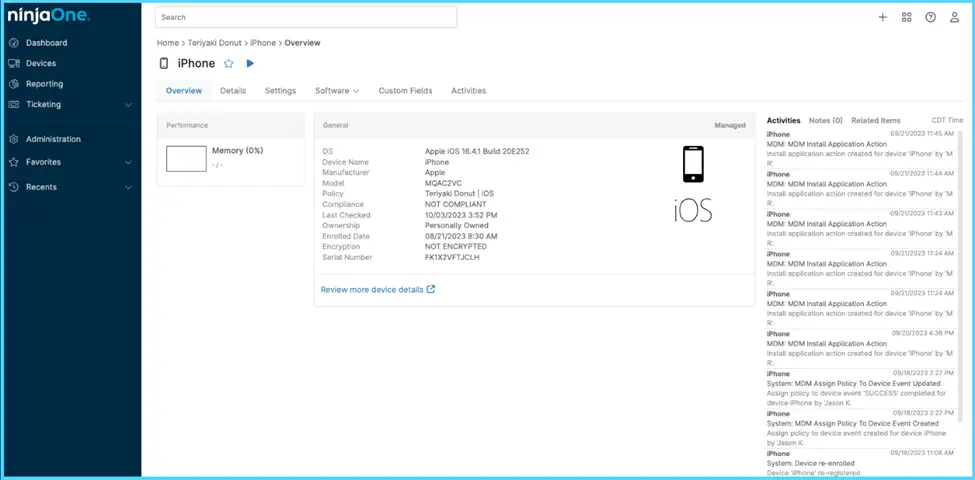
NinjaOne Mobile Device Management (MDM) helps IT teams enroll, secure, and manage iPhones, iPads, and Macs with device policies, apps, and monitoring from one console.






Managing Apple devices across an organization can make enrollment, security, configuration, and app management difficult to maintain consistently. The table below shows common Apple MDM challenges and how NinjaOne Mobile Device Management resolves them.
| Problem | How NinjaOne Mobile Device Management resolves it |
Enrolling Apple devices can require manual IT setup | NinjaOne MDM works with Apple Business Manager to support zero-touch enrollment, bringing company-owned Apple devices under management with less hands-on configuration. |
Lost or stolen Apple devices can put company data at risk | NinjaOne MDM provides remote lock and wipe capabilities, along with passcode policies, to help IT teams protect organizational data on managed Apple devices. |
Maintaining consistent configurations across Apple devices is difficult | NinjaOne MDM lets IT teams apply policies across managed iPhones, iPads, and Macs from a centralized console. |
Deploying and managing apps across Apple fleets can become time-consuming | NinjaOne MDM supports centralized app provisioning so IT teams can distribute and manage applications across enrolled Apple devices. |
These benefits show how NinjaOne Mobile Device Management (MDM) helps IT teams manage Apple devices more efficiently across key device management workflows.
Automated Device Enrollment helps IT teams bring company-owned Apple devices under management through zero-touch deployment. This reduces the need to configure each device individually before it can be managed.
Centralized MDM policies give IT teams a repeatable way to manage passcodes, restrictions, applications, networks, OS updates, and other device settings across managed Apple devices.
Managing applications through MDM policies gives IT teams centralized control over which apps are available or blocked on managed devices. Apple Apps and Books also provides visibility into assigned apps and available and in-use licenses.
IT teams can approve specific OS updates and define when updates are enforced on supported iOS, iPadOS, and macOS devices. This provides greater administrative control over when managed Apple devices move to approved OS versions.
Custom payloads give IT teams additional flexibility to apply specialized Apple configurations through NinjaOne MDM policies. This helps organizations address device requirements that go beyond standard policy settings.
The following capabilities show how NinjaOne Mobile Device Management (MDM) helps IT teams enroll, configure, and manage Apple devices through centralized policies and workflows.

Connect Apple Business Manager or Apple School Manager with NinjaOne MDM to automatically enroll company-owned Apple devices. ADE supports zero-touch deployment and supervised enrollment, reducing the need for manual device setup.

Create MDM policies to manage passcodes, restrictions, applications, networks, OS updates, and other settings on enrolled Apple devices. IT teams can apply configurations based on organizational requirements from the NinjaOne console.

Manage applications on enrolled Apple devices through MDM policies. IT teams can control available and blocked applications and manage apps from the App Store or those assigned through Apple Apps and Books.

Connect Apple Apps and Books content tokens with NinjaOne MDM to assign applications and manage available licenses. IT teams can synchronize applications from Apple Business Manager or Apple School Manager and deploy them through MDM policies.

Create custom payloads for Apple devices and apply them through NinjaOne MDM policies, giving IT teams additional control over device configurations.

Use MDM policies to define approved OS versions and update deadlines for supported Apple devices. NinjaOne MDM works with Apple update capabilities to help IT teams manage operating system updates through centralized policies.
The following examples show how IT teams can apply NinjaOne Mobile Device Management (MDM) to common Apple device management scenarios.
IT teams can use Zero Touch Enrollment with Apple Business Manager or Apple School Manager to bring company-owned devices under management with less hands-on setup. Once enrolled, MDM policies help maintain required configurations, applications, and device settings as Apple fleets grow.
IT teams can manage OS updates for supported iOS, iPadOS, and macOS devices by approving specific versions and defining enforcement deadlines. This gives administrators greater control over how and when managed Apple devices move to approved OS versions.
MSPs can manage Apple devices alongside other supported endpoints across customer environments with NinjaOne MDM. Technicians can apply policies and perform device management tasks from the NinjaOne platform, helping keep Apple administration within existing endpoint management workflows.
100,000
Endpoints managed
“NinjaOne is a scalable solution. It’s built on a modern SaaS architecture and it’s future-proof.”

40%
More Cost Effective
“NinjaOne’s price point is 40% less than any other endpoint management tool on the market, while being more powerful and easy to use.”

10-15
Tools Replaced
“Before, I needed 10-15 different tools to execute what NinjaOne does in its centralized, single pane of glass.”

30%
Less time for patching
“We observed a 30% reduction in the time taken for patch deployments compared to our previous solution.”

2,000
Endpoints managed
“NinjaOne gives me much more flexibility and security in my work”

30%
Annual ROI
“[NinjaOne] has already shown its value in ROI…it’s at least a hundred thousand dollars annually.”

24x
Faster Endpoint Management
“Our processes have become 24x faster with NinjaOne.”

20-40
Hours Saved Each Week
“Leveraging the automations feature within NinjaOne has enabled me to save upwards of what would likely be 20 to 30 to even 40 hours per week.”

The following workflow outlines how administrators configure, apply, and monitor remote site patch compliance using NinjaOne Patch Management. Each phase highlights the administrator’s actions and how the platform helps maintain patch compliance across managed endpoints.
Configure NinjaOne Mobile Device Management (MDM) with Apple Push Notification service (APNs) and, when applicable, Apple Business Manager or Apple School Manager to prepare the environment for device enrollment.
Add supported Apple devices using the enrollment method that fits the organization, including Automated Device Enrollment (ADE) for eligible organization-owned devices.
Apply MDM policies to enrolled devices to manage settings, restrictions, applications, networks, OS updates, and other supported configurations based on organizational requirements.
Review managed devices and update assigned policies, applications, configurations, and OS update requirements as organizational needs and Apple environments change.
Bringing Apple management into one centralized view
Everest uses NinjaOne macOS MDM to monitor and manage Apple devices from the same centralized platform, giving its IT team a consistent place to oversee its Apple environment.
“My favorite feature is NinjaOne macOS MDM because my goal is to secure all our Mac devices — not the easiest device to secure. However, with NinjaOne, we bring security profiles and deploy configurations to all our Macs fast and easily,”
Yann Bialecki - Everest
See how NinjaOne Mobile Device Management (MDM) helps IT teams enroll, configure, and manage supported iPhones, iPads, and Mac devices from the NinjaOne platform.
NinjaOne Apple MDM is part of NinjaOne Mobile Device Management (MDM) and helps IT teams manage supported iPhones, iPads, and Mac devices. IT teams can enroll devices, apply policies, manage applications, and control supported device settings from the NinjaOne platform.
NinjaOne MDM uses enrollment methods and centralized policies to manage supported Apple devices. IT teams can configure passcode requirements, restrictions, applications, networks, OS updates, and other supported settings based on device and organizational requirements.
NinjaOne MDM gives IT teams a centralized way to enroll, configure, and manage Apple devices. This can reduce hands-on administration, maintain more consistent device configurations, and make application and OS update management easier across supported Apple devices.
NinjaOne MDM supports Automated Device Enrollment (ADE) through Apple Business Manager or Apple School Manager for eligible organization-owned devices. This supports zero-touch deployment and places enrolled devices under supervision, giving IT teams access to additional management capabilities and device controls.
IT teams can manage applications on enrolled Apple devices through MDM policies. NinjaOne MDM also supports Apple Apps and Books content tokens for assigning applications and managing available license information.
NinjaOne MDM supports OS update management for enrolled iOS, iPadOS, and macOS devices. On supported devices, IT teams can approve OS versions, set enforcement deadlines, and manage update behavior through MDM policies.
NinjaOne supports macOS management alongside other supported endpoint types within the NinjaOne platform. This helps IT teams incorporate Mac management into broader endpoint management workflows.
Yes. For eligible company-owned devices using Automated Device Enrollment through Apple Business Manager or Apple School Manager, NinjaOne Apple MDM supports migration from another MDM without a full device wipe on iOS 26 or later, iPadOS 26 or later, and macOS 26 or later.