MDM asset management with NinjaOne Mobile Device Management
NinjaOne Mobile Device Management (MDM) gives IT teams inventory visibility across enrolled Android and Apple devices, including OS versions and installed software.
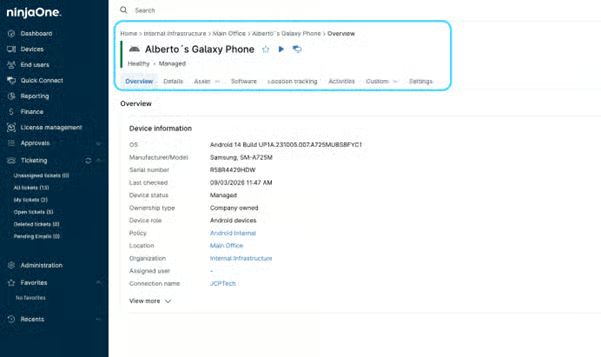
NinjaOne Mobile Device Management (MDM) gives IT teams inventory visibility across enrolled Android and Apple devices, including OS versions and installed software.






Managing mobile devices can make it difficult to maintain accurate inventory and device information. The table below shows common MDM asset management challenges and how NinjaOne MDM resolves them.
Problem | How NinjaOne Mobile Device Management resolves it |
Mobile asset records are fragmented or difficult to maintain | NinjaOne MDM centralizes inventory information for enrolled Android and Apple devices, including hardware details, OS versions, installed software, and ownership. |
IT teams lack accurate data for device lifecycle decisions | NinjaOne MDM provides current device and system information that teams can use to assess their enrolled mobile inventory and identify devices that may require attention. |
Installed software is difficult to account for across mobile assets | NinjaOne MDM provides visibility into installed software, helping IT teams understand which applications are present across enrolled devices. |
Device ownership is difficult to maintain as mobile fleets grow | NinjaOne MDM records ownership alongside device inventory, giving IT teams clearer context about the mobile assets under management. |
IT teams can maintain device, hardware, software, and ownership information in one place, reducing the need to piece together mobile asset records across separate sources.
Current hardware, operating system, and device information gives IT teams more context when assessing mobile assets and determining which devices may require attention.
Software inventory helps IT teams understand which applications are installed across enrolled devices, providing additional context for managing the organization’s mobile software environment.
Ownership, enrollment information, and Custom Fields help IT teams organize mobile device records according to the information and processes relevant to their organization.
Device details and activity history give technicians additional context when reviewing individual mobile assets, helping them make informed decisions without relying on disconnected records.

View enrolled Android and Apple devices from the NinjaOne device inventory and filter records by device type. IT teams can open individual device records to review more detailed information about each mobile asset.

Access hardware, system, memory, network, security, and enrollment information associated with enrolled devices. Available information can include model, serial number, OS version, storage, RAM, and enrollment type.

View applications installed on enrolled mobile devices through Software Inventory. Available application information varies based on factors such as operating system, device ownership, and how the application is installed or managed.

Identify whether enrolled devices are personally or company owned as part of their device records. Ownership and enrollment type provide additional context for managing mobile assets and affect the information and management options available to IT.

Add organization-specific information to device records with Custom Fields. IT teams can use these fields to capture additional asset information relevant to their inventory and internal processes.

Review chronological NinjaOne activity associated with an enrolled device, including timestamps and technician information. IT teams can use this history to maintain additional operational context for individual mobile assets.
The following examples show how IT teams can use NinjaOne Mobile Device Management to maintain accurate mobile asset information and apply that data to common inventory and lifecycle workflows.
As organizations add Android and Apple devices, IT teams can maintain hardware, system, ownership, and enrollment information in centralized device records. Teams can use this information to understand which mobile assets are enrolled and the characteristics of each device.
IT teams can review model, OS version, storage, memory, and other available device details to assess individual mobile assets. This information provides additional context when determining which devices may need further evaluation or action.
MSPs managing mobile devices across multiple customers can use device records, ownership information, and Custom Fields to maintain relevant asset context. Technicians can keep mobile inventory information associated with the appropriate managed environment as devices are added or changed.
100,000
Endpoints managed
“NinjaOne is a scalable solution. It’s built on a modern SaaS architecture and it’s future-proof.”

40%
More Cost Effective
“NinjaOne’s price point is 40% less than any other endpoint management tool on the market, while being more powerful and easy to use.”

10-15
Tools Replaced
“Before, I needed 10-15 different tools to execute what NinjaOne does in its centralized, single pane of glass.”

30%
Less time for patching
“We observed a 30% reduction in the time taken for patch deployments compared to our previous solution.”

2,000
Endpoints managed
“NinjaOne gives me much more flexibility and security in my work”

30%
Annual ROI
“[NinjaOne] has already shown its value in ROI…it’s at least a hundred thousand dollars annually.”

24x
Faster Endpoint Management
“Our processes have become 24x faster with NinjaOne.”

20-40
Hours Saved Each Week
“Leveraging the automations feature within NinjaOne has enabled me to save upwards of what would likely be 20 to 30 to even 40 hours per week.”

Add supported Android and Apple devices to NinjaOne MDM so they become part of the managed mobile device inventory.
NinjaOne MDM captures available hardware, system, enrollment, ownership, and software information to build a centralized record for each enrolled device.
Use device details, ownership information, and Custom Fields to maintain additional context and organize mobile assets according to organizational needs.
Monitor device records, software inventory, and available activity information as the mobile environment changes, giving IT teams current context for ongoing asset management.
Connect MDM asset management with your existing tools
NinjaOne connects with endpoint management platforms to bring additional device information into the NinjaOne platform, helping IT teams maintain asset context across their environment.
Managing mobile devices from a single pane of glass
Kinex Medical Company uses NinjaOne MDM to manage mobile devices alongside other endpoints from a centralized platform, giving its IT team a unified approach to device management.
“NinjaOne MDM brings simplicity and efficiency to our lives. We manage our mobile devices and other endpoints, all from the same pane of glass.”
Paul Jebe, Vice President of IT, Kinex Medical Company
Source: NinjaOne
See how NinjaOne Mobile Device Management helps IT teams maintain centralized inventory information for enrolled Android and Apple devices, including hardware details, OS versions, installed software, and ownership.
NinjaOne MDM asset management provides inventory visibility for enrolled mobile devices. IT teams can view hardware details, OS versions, installed software, ownership, and enrollment information for supported Android and Apple devices.
NinjaOne MDM provides hardware, system, memory, network, security, and enrollment information. Available details can include model, serial number, OS version, storage, RAM, ownership, and enrollment type.
NinjaOne MDM centralizes enrolled Android and Apple devices in the device inventory. IT teams can review device details, ownership, installed software, and Custom Fields from individual device records.
Yes. Software Inventory shows applications installed on enrolled mobile devices. Available information varies by operating system, ownership, enrollment type, and how applications are installed or managed.
NinjaOne MDM records ownership and enrollment information for mobile devices. These factors can affect which device information and management options are available to IT teams.
Yes. Custom Fields let IT teams add organization-specific information to device records, helping maintain additional asset context relevant to internal inventory and operational processes.