Key points
- Action1 is a cloud-native IT management platform that offers many essential features you can find in most endpoint management solutions. The platform highlights its patching capabilities, allowing organizations to maintain compliance and security.
- While Action1 excels in patch management, user reviews state that some of its otherfeatures need improvement, like remote access, RMM, dashboard customization, and more. This prompts users to look for Action1 alternatives.
- Top alternatives to Action1 include NinjaOne, Atera, and ManageEngine.
- NinjaOne tops the best Action1 alternative because of its equally robust patch management capabilities alongside a more comprehensive suite of tools.
Have you been considering Action1 for your organization? Choosing the best remote endpoint management platform to answer your enterprise’s needs requires thorough research and you might want to compare Action1 alternatives before making your decision.
After all, endpoint management solutions can set your business up for success by boosting operational productivity and strengthening your endpoint security fundamentals. Narrowing your options down can be difficult as different providers offer a wide variety of functionalities at varying price ranges.
What is Action1?
Action1 is a cloud-native autonomous endpoint management platform that is marketed to organizations, from small businesses, Managed Service Providers (MSPs), to enterprises. The endpoint management solution offers functionalities that you can find in many endpoint management systems.
However, Action1 puts its patching capabilities at the forefront of its core features. They aim to deliver enterprise-grade patch management, enabling users to automate the discovery and remediation of vulnerabilities in both OS and third-party software to mitigate security risks.
Action1 key features
Endpoint management
Action1 is known for its endpoint management solutions that help organizations manage desktops, laptops, networked endpoints, and servers.
- Remote monitoring and management: Action1 offers RMM tools for teams to execute remote administration and maintenance of endpoints.
- Potential limitation: Some users pointed out that the platform’s RMM may need maturing and development for them to fully maximize Action1’s RMM capabilities rather than using other platforms for this purpose. (Source).
- Centralized dashboard: Users of Action1 can get insights about the status, health, and security posture of their endpoint fleet with the platform’s centralized dashboard.
- Potential limitation: Some users mention that the platform’s dashboard customization capabilities can be improved. One pointed out that one must still manually run Reports or check Data Sources to view specific metrics, which can take time. (Source)
- Multi-platform support: Action1 supports major operating systems and platforms such as Windows, macOS, and Linux.
- Potential limitation: While performance in Windows endpoints is commended, users highlighted that using Action1 for mixed-OS environments can be a challenge because of its limited macOS and Linux coverage. (Source)
Vulnerability management
Action1 offers tools that help with delivering updates by identifying which systems are missing security patches and automating their deployment across the network.
- Patch management: Action1 highlights its patch management features that aim to address security and vulnerability gaps and also reduce risks of downtime.
Remote access
Action1 has tools that enable IT teams and technicians to connect and access remote endpoints for real-time management, maintenance, or troubleshooting.
- Support session: Action1’s remote access allows IT teams to initiate support sessions to expedite issue resolution by connecting to the user’s computer.
- Remote access tools: Action1’s remote access capabilities are aided by tools that streamline IT operations like remote troubleshooting, unattended access, remote command execution, and more.
Action1 usability & experience
Action1 is an IT management platform marketed to managed service providers (MSPs) and IT teams looking for a cloud-native endpoint management solution. Since it is cloud-native, Action1 allows IT teams and administrators to manage devices from any location just by logging in through a web browser. This is also beneficial for organizations that require minimal setup and reduced hardware maintenance.
While it offers essential endpoint management features, Action1 puts the spotlight on its patch management capabilities. Its unified, cross-platform coverage allows IT administrators to streamline the distribution of OS and third-party updates across servers and endpoints running on major operating systems. This centralized approach helps organizations maintain compliance and security of their endpoint fleets.
User feedback & reviews for Action1
Here are some reviews and testimonials from Action1 users gathered from software review sites:
- According to a user, Action1 is easy to deploy and manage. It has been a strong patching management platform for their lean organization. (Source)
- A review pointed out that Action1’s setup and remote scripting tools are indispensable for streamlining updates. However, critical vulnerabilities might get overlooked amongst the backlog.(Source)
- One user said that they started using Action1 when they needed a patching solution and an RMM to allow them to remotely access devices for support and troubleshooting. (Source)
- A user noted that Action1 performs comprehensive scans to determine missing patches. However, they wished it could improve its remote access (Source)
- A review stated that Action1 is a simple but effective patch management solution with remarkable third-party application patch management capabilities. On the other hand, the user pointed out that the platform could work on some enhancements to filtering and workflows. (Source)
Why IT pros look for Action1 alternatives
As outlined, Action1 offers essential endpoint management functionalities while highlighting its strength in patch management. Since some user reviews state that Action1 is an evolving platform, and developments are still continuous, this may warrant a search for an alternative solution that can provide a robust patching solution along with other endpoint management features that Action1 may currently need improvement on.
If you are looking for a platform as a substitute for Action1, we’ve analyzed and compiled the Action1 alternatives in a comprehensive list so that you can assess the top endpoint management software providers.
1. NinjaOne
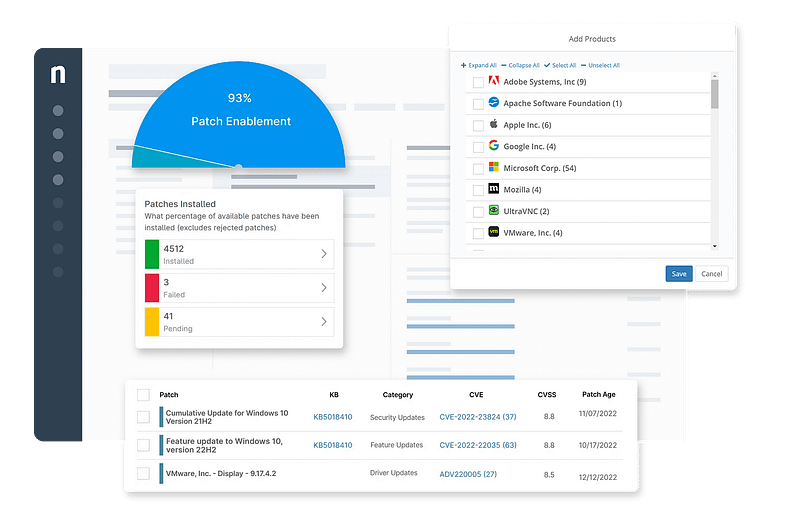
Established in 2003, NinjaOne has become an industry leader in IT solutions software. NinjaOne is a top-rated and security-oriented UEM platform geared towards providing IT teams and managed service providers (MSPs) with the tools they need to manage, patch, and support all the Windows, macOS, and Linux endpoints in their IT environment. NinjaOne’s RMM solution consolidates all of these robust features in one user-friendly hub.
5 key points that make NinjaOne an excellent Action 1 alternative.
1. Reliable remote access
According to user reviews, Action1’s remote interface has limited features, connectivity, and performance issues. NinjaOne’s remote access provides Windows remote connectivity that’s secure and seamless. It allows IT administrators to perform a wide array of tasks, from routine maintenance to more complex troubleshooting and remediation. NinjaOne also offers remote access software integration with leading remote control tools such as , ConnectWise, and Splashtop.
2. Real-time customizable reporting
Online reviews consider Action1’s reporting feature a downside of the solution. With NinjaOne’s live reporting, users can set custom fields and filter data by location, device group, or timeframe, making it easy to generate comprehensive reports. NinjaOne also makes it easy to customize reports to suit different audiences, from technical teams to executive leadership.
3. Robust patch management
Keeping device OS and third-party applications up-to-date keeps endpoint devices secure and functional. NinjaOne is ranked as the top patch management solution by G2, making it a great Action 1 alternative. NinjaOne’s automated patch deployment feature allows technicians to set policies to push out patches based on predefined criteria, ensuring that all devices remain secure without constant manual oversight.
4. Wide breadth of seamless integrations
Action1 integrations are lacking compared to NinjaOne’s extensive integration capabilities. With NinjaOne, MSPs and IT teams can streamline workflows by utilizing key IT management tools and services.
5. Centralized intuitive interface
NinjaOne’s user-friendly interface stands out by presenting a comprehensive overview of the system’s status at a glance, including active issues and system performance metrics.
Strengths of NinjaOne
- Exceptional customer support. NinjaOne’s proactive support team is easy to connect with. Tickets are resolved in a timely and efficient manner, minimizing downtime and potential disruptions to IT operations.
- Scalability. Built to answer the needs of small businesses as well as large enterprises, NinjaOne is a great option for IT decision-makers looking for a long-term platform that will scale with their business as they grow.
- Automation. Technicians can automate routine tasks and set policies with specific triggers to automate monitoring, management, patching, and software management
- Endpoint security. NinjaOne’s security integrations allow MSPs and IT teams to effectively protect devices and networks from vulnerabilities and threats.
- Easy setup and deployment. Setting up NinjaOne is effortless, and new users can even automate new device setups, saving time and costs when getting started.
Customer story
Nick, the Technical Manager at FOS.net, was looking for tools that could expedite operations due to the large volume of devices and tasks they had to keep up with. The RMM provider they had been working with had become difficult to communicate with. Furthermore, their former provider also kept rolling out new features that were irrelevant to FOS.net’s needs and led to bugs that broke functions that had previously worked perfectly.
“Every time we speak and deal with Ninja we’re left feeling like you really want to do business with us. It leaves us feeling quite intentionally, I am sure, like we do not want to do business with anyone else. So, it’s a great place to be.”
With NinjaOne, Nick seamlessly transitioned all 4,000 endpoint devices to Ninja in only two weeks, and it only took one technician to do all this, greatly freeing up the rest of the team to focus on other tasks and projects. Nick noted how NinjaOne’s rated #1 customer support was friendly and knowledgeable. Ticket resolution times were fast, allowing FOS.net to work faster and more efficiently.
Read more NinjaOne customer stories or check out NinjaOne reviews.
Pricing information
NinjaOne’s IT management software has no forced commitments and no hidden fees. You can request a free quote, schedule a 14-day free trial, or watch a demo.
Reviews
- 3,695 reviews (at the time of writing)
- 4.7 / 5 stars
- 278 reviews (at the time of writing)
- 4.87/ 5 stars
See how NinjaOne stacks up against the competition in the ESG Economic Validation Report—proof you can count on. Read now.
2. Atera
Atera is an RMM solution that consolidates PSA and remote access into one platform. MSPs and IT teams can monitor and provide support for endpoint users. The platform highlights its shift from automation to being autonomous, utilizing autonomous agents to handle proactive management. This allows for resolving certain issues automatically before a technician even has to step in.
Atera markets its RMM capabilities as built with security, data protection, and robust compliance maintenance in mind. Its centralized approach to endpoint management makes it even easier for IT teams to ensure consistent visibility and security across their entire network.
Best for
Atera is commonly used by small and medium enterprises and MSPs due to its accessible pricing model.
Pros
- Unified RMM. Atera centralizes device monitoring and management in a single hub.
- Patch management. Automate the deployment of patches for OS and third-party applications.
- Remote access. Atera can connect and control devices remotely to troubleshoot issues.
Cons
- Inconsistent support. Customer service can be inconsistent, and response times can take a while, making it difficult for MSPs to resolve critical issues quickly.
- Limited integrations. Atera’s range of integrations is smaller than its alternatives, making it difficult to execute specific workflow needs.
- Patch management issues. Some users have reported having issues with deploying Windows and third-party patches.
Check out Atera alternatives or see how Atera compares to NinjaOne.
3. ManageEngine
Formerly known as Desktop Central, ManageEngine Endpoint Central is Zoho Corp.’s cloud-native unified endpoint management and security solution that MSPs, sysadmins, and IT managers use to deploy, update, monitor, and troubleshoot devices. It offers patch management, software deployment, remote control, and asset management to keep their endpoints running smoothly and safe from vulnerabilities.
ManageEngine Endpoint Central supports a wide range of devices, including desktops, laptops, mobile devices, and servers. Along with the continuous improvement of the essential IT features it offers, the platform also focuses on providing security and reducing downtime by automating routine maintenance tasks and proactively identifying potential threats across the entire network.
Best for
ManageEngine is generally employed by larger organizations although reviews on G2 have reported device performance issues when using ManageEngine for large-scale IT environments.
Pros
- IT workflow automation. ManageEngine allows users to automate time-consuming workflow tasks for greater efficiency.
- Patch management. Automate or manually implement software and update patches on endpoints and servers.
- Device monitoring and management. ManageEngine displays real-time information and allows users to remotely resolve any issues.
Cons
- Mobile access limitations. Some functionalities are limited or unavailable on ManageEngine’s mobile app.
- Reporting tool issues. Presenting data in a specific reporting format can be difficult when using ManageEngine.
- Poor support. User reviews have said that customer service is difficult to contact and takes a while to resolve tickets.
Check out ManageEngine alternatives or see how ManageEngine compares to NinjaOne.
Evaluating and choosing from the best Action1 alternatives
Choosing the right endpoint management and security platform is critical for increasing productivity, streamlining routine tasks, and reducing vulnerabilities. While Action1 RMM offers a solid solution, other solutions may prove to be better suited to answer your business’s needs. An effective and robust endpoint management solution can significantly reduce time spent on routine tasks, thereby increasing overall operational efficiency and consistency in software updates and security policies.
Carefully consider any weak points in your current IT infrastructure and compare remote endpoint management software vendors who might fit your needs. Feedback from key stakeholders in your organization could also help give you a broader picture of your organization’s unique requirements. One of the best ways to determine if an endpoint management solution is the right one for you is to take advantage of free trials or demos. Getting hands-on experience with a specific solution can give you a better idea of its full capabilities.