Task Automation with NinjaOne RMM
NinjaOne RMM uses policies to automate IT tasks across managed devices based on predefined schedules and triggers, eliminating the need for manual intervention.
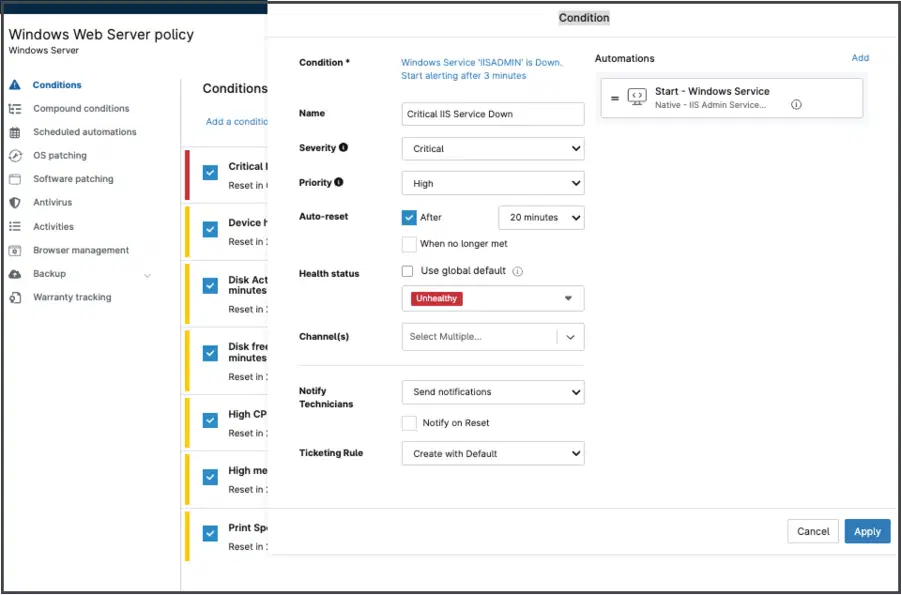
NinjaOne RMM uses policies to automate IT tasks across managed devices based on predefined schedules and triggers, eliminating the need for manual intervention.






Configuring and maintaining devices one at a time doesn’t scale. Here’s how NinjaOne task automation addresses the most common cases.
| Problem | How NinjaOne resolves it |
Applying the same configuration or performing routine maintenance across hundreds or thousands of endpoints individually is time-consuming, inefficient, and prone to inconsistencies. | NinjaOne RMM uses policies to apply consistent settings, schedules, and automations across managed devices, eliminating repetitive manual work and simplifying management at scale. |
Waiting for a device to connect to a VPN or check in before a policy or update can take effect delays routine maintenance. | A policy applies automatically as soon as a device checks in with NinjaOne, without requiring VPN access or a scheduled connection window. |
Watching for low disk space, a stopped service, or another common issue on every device isn’t practical for a technician to do manually. | A condition-based trigger detects the issue and runs a remediation workflow automatically, often before anyone reports it. |
Recurring maintenance tasks, such as clearing temporary files, running system checks, or removing outdated software, can be delayed or forgotten when technicians must perform them manually, leading to inconsistent device maintenance and potential performance issues. | NinjaOne RMM allows IT teams to schedule maintenance scripts through policies, ensuring routine tasks run automatically at predefined intervals across managed devices. This keeps endpoints consistently maintained without requiring technicians to initiate each task manually. |
Preparing newly enrolled endpoints for use often involves installing required applications, applying configuration settings, and running setup scripts. Performing these tasks manually on each device delays deployment and increases the risk of inconsistent configurations. | NinjaOne RMM uses policies to automatically execute setup scripts and apply configurations to newly enrolled devices. This helps IT teams standardize endpoint configurations, accelerate device provisioning, and reduce manual setup work. |
Endpoint issues often go unresolved because IT teams rely on users or technicians to notice and report them before taking action. | NinjaOne automatically detects issues based on conditions defined in policies and notifies technicians or creates tickets, enabling faster resolution without waiting for manual reporting. |
Apply a configuration, schedule, or automation to every device in a policy at once, instead of repeating the same steps device by device.
When a device checks in with NinjaOne, its assigned policies automatically apply the appropriate settings and automations, ensuring consistent configuration without manual intervention.
A condition-triggered remediation workflow can resolve a known issue automatically, often before a technician or end user notices it.
Routine maintenance scripts run automatically at scheduled intervals through policies, so tasks aren’t delayed or forgotten when technicians are busy.
New devices are automatically configured through policies when enrolled, reducing setup time and inconsistency across the fleet.
The following benefits highlight the operational improvements organizations gain by implementing remote site patch compliance in NinjaOne Patch Management.

Configure policies to automatically trigger scripts and remediation workflows when predefined conditions are met.

Automatically apply consistent software installations, security settings, and system configurations across managed devices using policies.

Run a script, patch scan, or maintenance task on a recurring schedule, without a technician starting it manually.

Combine multiple monitoring conditions, including script results, custom field values, OS versions, file existence, and running processes, to trigger targeted automations when specific criteria are met.

Create policies that inherit settings, schedules, and automations from a parent policy, overriding only what is needed to meet specific device requirements.

Automatically notify technicians via email or SMS, or create tickets when predefined monitoring conditions are met, enabling faster issue response.
The following practical applications describe how NinjaOne task automation gets used in day-to-day IT operations.
A technician updates a policy once, and every assigned device picks up the new schedule, automation, or setting the next time it checks in.
A condition-based trigger detects a device running low on disk space or a stopped service, and runs a remediation script before it becomes a help desk ticket.
A technician enrolls a new device, and its assigned policy automatically installs required software, applies configurations, and runs setup scripts without manual setup.
100,000
Endpoints managed
“NinjaOne is a scalable solution. It’s built on a modern SaaS architecture and it’s future-proof.”

40%
More Cost Effective
“NinjaOne’s price point is 40% less than any other endpoint management tool on the market, while being more powerful and easy to use.”

10-15
Tools Replaced
“Before, I needed 10-15 different tools to execute what NinjaOne does in its centralized, single pane of glass.”

30%
Less time for patching
“We observed a 30% reduction in the time taken for patch deployments compared to our previous solution.”

2,000
Endpoints managed
“NinjaOne gives me much more flexibility and security in my work”

30%
Annual ROI
“[NinjaOne] has already shown its value in ROI…it’s at least a hundred thousand dollars annually.”

24x
Faster Endpoint Management
“Our processes have become 24x faster with NinjaOne.”

20-40
Hours Saved Each Week
“Leveraging the automations feature within NinjaOne has enabled me to save upwards of what would likely be 20 to 30 to even 40 hours per week.”

From the console, create a new policy or edit an existing one to define the schedules, conditions, automations, and settings it should apply.
Assign policies to existing managed devices or enroll new devices. During enrollment, NinjaOne automatically assigns policies based on the device’s organization and location.
Review automation and script run history to confirm devices completed each task as expected, and adjust the policy as needed.
This overview covers the high-level flow only; full detail is covered in the Policies: Scheduled Automations documentation.
On replacing manual, VPN-dependent processes with policy-based automation:
"Our processes have become 24x faster with NinjaOne – we don't have to wait for policies to take effect or for a device to connect to a VPN to make sure it's updated."
IT systems administrator, Bonner County.
See how NinjaOne lets you apply schedules, triggers, and automations across your fleet with policies, without manual, repetitive work.
Monitor, protect, and manage all your endpoints on one platform. NinjaOne RMM software has been rated the #1 choice for 23 consecutive quarters, delivering powerful IT automation, remote monitoring, and best-in-class support.

One platform to manage, patch, secure and support every endpoint. NinjaOne delivers modern endpoint management with automated patching, monitoring, and remediation. Gain real-time visibility, reduce cost, and manage distributed environments at scale.
IT teams face mounting pressure to automate repetitive tasks while maintaining security, scalability, and performance. Traditional scripting tools often lack integration, require complex coding, or expose vulnerabilities.
Policies are the core mechanism that determines how endpoints are configured, monitored, secured, managed, and automated.
Task automation in NinjaOne uses policies to apply schedules, condition-based triggers, and automations across managed devices, so routine maintenance, patching, and remediation run without a technician repeating the same steps on each device.
A script automates a single action. A policy applies a combination of schedules, triggers, and automations, including scripts, to every device assigned to it, so the same configuration reaches the whole fleet.
Yes. Policies run on a schedule or trigger automatically when a monitored condition is met, such as low disk space or a stopped service.
No. A policy applies whenever a device checks in with NinjaOne, without requiring VPN access.
Yes. Compound conditions let a policy combine multiple criteria, such as script results, custom field values, OS version, file existence, or running processes, before triggering an automation.
Yes. A new policy can inherit settings, schedules, and automations from a parent policy, and override only what’s needed for specific devices.
Yes. Administrators can configure monitoring conditions in NinjaOne policies to automatically send email or SMS alerts to technicians and/or create tickets when specific conditions are met. This enables IT teams to identify and respond to endpoint issues without relying on users to report them.