NinjaOne Remote gives IT teams secure, one-click access to Windows devices from anywhere to troubleshoot issues and support end users.
The following table highlights common challenges IT teams face when providing remote support for Windows devices and how NinjaOne Remote Access helps resolve them.
| Problem | How NinjaOne Remote Access resolves it |
| IT teams need to troubleshoot Windows devices without being physically present. | NinjaOne Remote Access enables secure remote connections to Windows devices, allowing technicians to diagnose and resolve issues from anywhere. |
| Supporting remote or hybrid employees can be slow when technicians cannot quickly access Windows endpoints. | NinjaOne Remote Access provides fast, reliable remote sessions so IT teams can assist users, reduce downtime, and restore productivity more efficiently. |
| Many remote support tools require users to switch between multiple applications or workflows. | NinjaOne Remote Access centralizes remote support tools in a single interface, helping technicians support Windows devices more efficiently. |
| Unsecured or unreliable remote connections can increase operational and security risks. | NinjaOne Remote Access uses secure remote connections and role-based access controls to help protect Windows devices while enabling remote support. |
IT teams resolve Windows issues faster by launching secure remote sessions in seconds, reducing the need for onsite visits and accelerating troubleshooting.
End users experience less downtime because technicians can provide real-time remote support without delaying issue resolution or disrupting productivity.
Technicians stay productive from anywhere by securely accessing Windows devices through the NinjaOne console or mobile app, making on-call and remote support more efficient.
Organizations simplify Windows device support by managing remote access from a single platform, reducing tool switching while maintaining secure, centralized administration.
The following capabilities show how NinjaOne Remote Access enables secure, reliable remote access to Windows devices, helping IT teams troubleshoot issues, support end users, and manage endpoints from anywhere.
NinjaOne Remote Access enables technicians to launch secure remote sessions to Windows devices in seconds, directly from the NinjaOne console, making troubleshooting and end-user support faster and more efficient.
Technicians can securely access managed Windows devices without requiring end-user presence and use Background Mode to perform administrative tasks without interrupting the user’s desktop session.
NinjaOne Remote Access includes capabilities such as Quick Connect and multi-monitor support, helping technicians deliver fast, reliable remote support across Windows devices.
The following examples highlight common ways IT teams use NinjaOne Remote Access to securely support Windows devices.
IT teams use NinjaOne Remote Access to securely connect to Windows devices regardless of where employees are working. Technicians can launch remote sessions directly from the NinjaOne console to troubleshoot issues, provide real-time assistance, and restore productivity without requiring onsite support.
Administrators securely access managed Windows endpoints to perform troubleshooting and administrative tasks even when users are unavailable. Using Background Mode, technicians can complete many maintenance activities without interrupting the user’s desktop session, helping reduce disruptions during support.
Managed service providers use NinjaOne Remote Access to support Windows devices across multiple customer environments from a centralized console. Technicians can quickly launch remote sessions, resolve issues, and deliver consistent support without switching between multiple remote access tools.
The following steps outline how IT teams use NinjaOne Remote Access to securely connect to and support Windows devices.
Enable NinjaOne Remote for your organization and configure the client integration for the appropriate device roles. The NinjaOne agent automatically installs the NinjaOne Remote streamer on enrolled Windows devices, enabling secure remote connectivity.
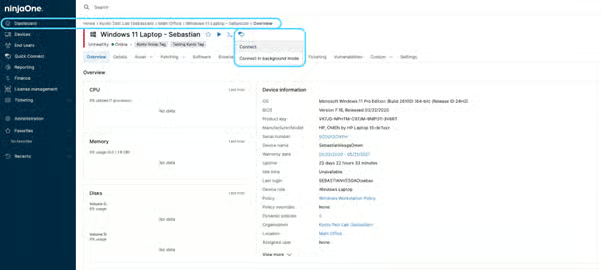
After installing the NinjaOne Remote Player on the controlling computer, technicians can initiate secure remote sessions directly from the NinjaOne console to troubleshoot issues and provide real-time support.
During a session, technicians can transfer files, synchronize the clipboard, use Background Mode when appropriate, and perform administrative tasks without switching between multiple tools.
Remote sessions are managed using built-in security controls and centralized administration to help maintain secure, reliable remote support.
100,000
Endpoints managed
“NinjaOne is a scalable solution. It’s built on a modern SaaS architecture and it’s future-proof.”
40%
More Cost Effective
“NinjaOne’s price point is 40% less than any other endpoint management tool on the market, while being more powerful and easy to use.”
10-15
Tools Replaced
“Before, I needed 10-15 different tools to execute what NinjaOne does in its centralized, single pane of glass.”
30%
Less time for patching
“We observed a 30% reduction in the time taken for patch deployments compared to our previous solution.”
2,000
Endpoints managed
“NinjaOne gives me much more flexibility and security in my work”
30%
Annual ROI
“[NinjaOne] has already shown its value in ROI…it’s at least a hundred thousand dollars annually.”
24x
Faster Endpoint Management
“Our processes have become 24x faster with NinjaOne.”
20-40
Hours Saved Each Week
“Leveraging the automations feature within NinjaOne has enabled me to save upwards of what would likely be 20 to 30 to even 40 hours per week.”
Organizations use NinjaOne Remote Access to simplify remote support with fast, secure connections, helping technicians resolve issues more efficiently while reducing the time spent assisting end users.
“NinjaOne Remote has transformed how we support our global operations. We’ve eliminated the patchwork of third-party tools, improved security, and gained fast, reliable access to every system whether it’s a shop-floor dashboard or a specialized workstation halfway around the world.”
-Matt Bloye, Corporate IT Administrator
Source: NinjaOne
Windows remote access software enables IT teams to securely connect to Windows devices from another location. It allows technicians to troubleshoot issues, perform administrative tasks, and provide end-user support without requiring physical access to the device.
NinjaOne Remote Access allows technicians to launch secure remote sessions directly from the NinjaOne console in just a few clicks. This helps IT teams quickly diagnose and resolve issues without switching between multiple remote support tools.
After a Windows device is enrolled in NinjaOne and NinjaOne Remote integration is enabled on the device, technicians can connect directly from the device dashboard in the NinjaOne console. Open the device, click the NinjaOne Remote icon, and select Connect to launch a secure remote session. Sessions typically start within seconds, allowing technicians to troubleshoot issues, perform maintenance, and support end users without leaving the NinjaOne console.
Windows remote access with NinjaOne Remote is secured using x25519 + XSalsa20 + Poly1305, an industry-leading encryption standard that helps protect remote sessions and data in transit. All remote sessions are encrypted, logged, and can be optionally recorded to provide greater visibility, auditing, and compliance for IT teams.
Yes. NinjaOne Remote Access supports multi-monitor environments and includes session controls that help technicians optimize the remote support experience while working on Windows devices.
Yes. NinjaOne Remote Access includes Background Mode, allowing technicians to perform many administrative tasks without interrupting the user’s desktop session. This helps reduce disruptions while maintaining productivity.
Yes. Quick Connect provides ad hoc remote access for devices that aren’t already enrolled in NinjaOne, making it easier to support remote and hybrid employees without a lengthy setup process.
Yes. NinjaOne Remote Access supports technician collaboration during remote sessions, allowing IT teams to work together to diagnose and resolve complex issues more efficiently.
Yes. NinjaOne Remote Access supports remote access from mobile devices, enabling technicians to connect to Windows endpoints, respond to support requests, and assist users while away from their desks.