Automate and enforce third-party software patching across all endpoints

NinjaOne provides clear visibility and control over the patching process. Technicians can track patch compliance across all managed devices, verify successful installations, and quickly identify systems that require attention.
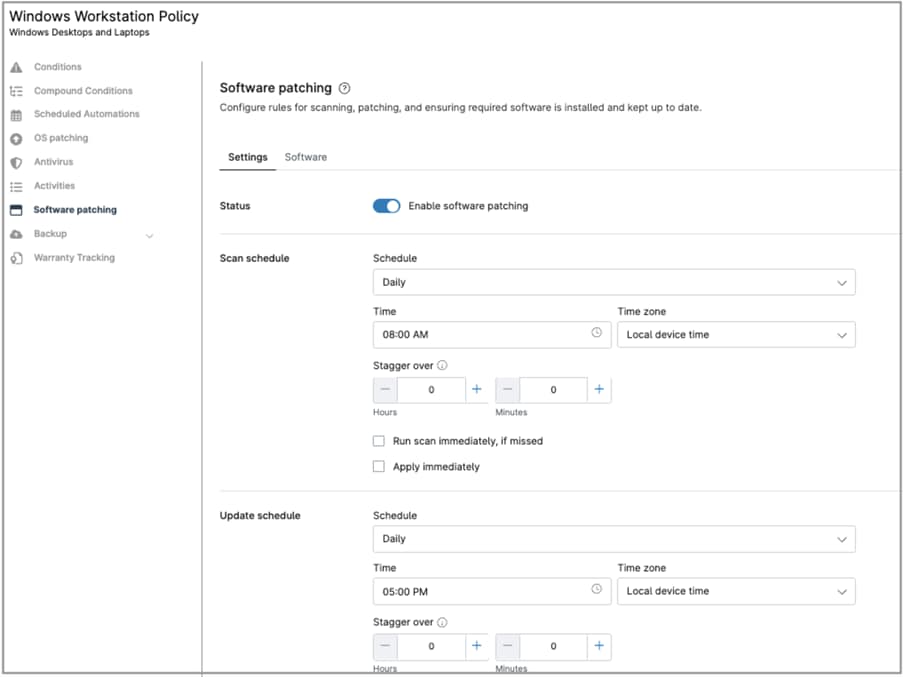

Third-party Software Patching Policies
IT business logo
Provide logo
Advantage Technologies logo
Dedicated IT logo
Alticap logo
Network Coverage logo

Deliver consistent, secure, and controlled third-party patching that keeps every endpoint aligned with your IT standards

Policy-driven automation

Define exactly which applications to patch, when updates should occur, and how deployments are handled. NinjaOne enforces these policies consistently across all endpoints, reducing manual effort and eliminating gaps caused by ad hoc processes.

Centralized visibility and control

Gain a single-pane view of third-party patch compliance across your entire environment. Track patch status, verify installations, and quickly identify endpoints that fall out of compliance, all from one platform.

Reliable, non-disruptive deployment

Schedule patching during maintenance windows and control reboot behavior to minimize user impact. NinjaOne ensures updates are applied in a predictable, repeatable way without interrupting business operations.

Scalable, multi-tenant management

Manage third-party patching across multiple organizations, locations, or device groups with ease. Apply policies at the appropriate level and scale patching operations without increasing administrative overhead.

Powerful third-party patching features that give you complete control over how updates are approved, scheduled, and deployed across every endpoint

Built better, from day one icon

Policy-based patch orchestration

NinjaOne configures and controls the native patching mechanisms on each endpoint, enforcing how and when third-party updates are applied. IT teams define policies once, and NinjaOne ensures those settings are consistently applied across all managed devices.

Simplicity by design icon

Granular patch policies and scheduling

Create detailed policies that specify which applications to update, deployment timing, approval rules, and reboot behavior. Schedule patching during maintenance windows or based on severity to balance security and user impact.

Lightning-fast icon

Real-time monitoring and alerting

Continuously monitor patch status across endpoints and receive alerts when devices fall out of compliance or when updates fail. This visibility allows technicians to quickly identify and resolve issues.

Instant visibility and control icon

Compliance reporting and audit visibility

Access detailed reports on patch status, deployment history, and endpoint compliance. These insights help IT teams validate patching performance and demonstrate consistent third-party software maintenance.

Here are some practical examples of how NinjaOne helps IT teams manage and automate third-party software patching across their environment

Closing vulnerabilities in widely used applications

Third-party applications like browsers, PDF readers, and collaboration tools are frequent attack vectors. NinjaOne helps IT teams ensure these applications are consistently updated by enforcing patch policies across all endpoints, reducing exposure to known vulnerabilities.

Maintaining compliance across distributed environments

For organizations with remote or multi-location teams, keeping third-party software compliant can be difficult. NinjaOne provides centralized visibility and control, allowing IT teams to monitor patch status, enforce standards, and quickly remediate non-compliant devices regardless of location.

Standardizing application versions across endpoints

Inconsistent application versions can lead to compatibility issues and support challenges. NinjaOne allows IT teams to define approved versions and ensure all managed devices stay aligned, improving stability and reducing troubleshooting time.

Reducing manual patching effort at scale

Manually updating third-party applications across dozens or hundreds of endpoints is time-consuming and error-prone. NinjaOne automates the process through policy-driven patching, freeing IT teams to focus on higher-value tasks while maintaining a secure and up-to-date environment.

Take control of third-party software patching

Related Resources

This is why customers love us

Ready to simplify the hardest parts of IT?

Third-Party Software Patching Policies FAQs

In NinjaOne, third-party software patching is managed through policies, specifically in the Software Patching section. Here, you select the applications you want to manage and define how they are updated, including scan schedules, patch windows, reboot behavior, approvals, and user notifications. This ensures consistent, automated patching across all managed endpoints.

Third-party applications are a common source of vulnerabilities because they are widely used and frequently targeted by attackers. If they are not kept up to date, they can expose endpoints to security risks even when the operating system is fully patched.

Managing updates ensures that security fixes are applied promptly and consistently, reducing the attack surface across your environment. It also helps maintain application stability, avoid compatibility issues, and enforce a standardized update process without relying on manual intervention.

In theory, any application supported by NinjaOne can be managed. In practice, only the applications listed in the policy can be selected and controlled. Within the policy, IT defines which applications are included in the software patching rule, along with scan and patch windows, while updates themselves depend on vendor releases.

Patching policies standardizes updates by defining a single set of rules that apply consistently across all managed endpoints. Instead of configuring updates per device, IT teams specify which applications to patch, when to scan and deploy updates, how reboots are handled, and how users are notified—all within the policy.

Once applied, these rules ensure that every endpoint follows the same update process, resulting in consistent patch levels, reduced configuration drift, and predictable maintenance behavior across the environment.

Yes. NinjaOne enables automated third-party patching through policy-driven configurations. Administrators can define scan schedules, deployment timing, reboot behavior, and patch approval rules to ensure updates are applied consistently without manual intervention.

Patching policies reduce risk by ensuring updates are applied consistently and on time. They automate the detection of missing patches and the deployment of approved updates, standardize patching across endpoints, and enforce scheduling and reboot rules to avoid delays. This minimizes exposure to known vulnerabilities and helps maintain a secure, compliant environment.

No. In NinjaOne, only one policy can be applied to a device at a time, although policies can be assigned at different levels (such as organization, location or individually) to control how they are applied.

NinjaOne does not perform patch testing; validation is a manual process handled by IT administrators. Once patches are approved, NinjaOne enables safe, controlled deployment through policy-driven settings. Administrators can define approval rules, schedule deployments during maintenance windows, and manage reboot behavior to minimize disruption. This ensures patches are deployed consistently and with reduced operational risk.

Yes. Patching policies in NinjaOne work alongside built-in monitoring and reporting to provide visibility into patch status and compliance. Administrators can track which devices are up to date, identify missing patches, and generate reports to support internal standards or regulatory requirements. This helps ensure patching is not only enforced, but also measurable and auditable.

Third-party patching improves security by closing vulnerabilities in commonly used applications that are often targeted by attackers. Many exploits focus on software like browsers, document readers, and runtimes, not just the operating system.

By keeping these applications up to date, IT teams reduce the number of exploitable entry points, minimize the attack surface, and ensure endpoints remain aligned with security policies. This leads to a more consistent and resilient overall security posture.