NinjaOne Silent App Installation enables zero-touch software deployment across supported managed platforms

From business apps to custom tools, deployments scale reliably across device fleets—reducing support workload, avoiding user disruption, and keeping every endpoint properly equipped with no pop-ups and no manual installs.
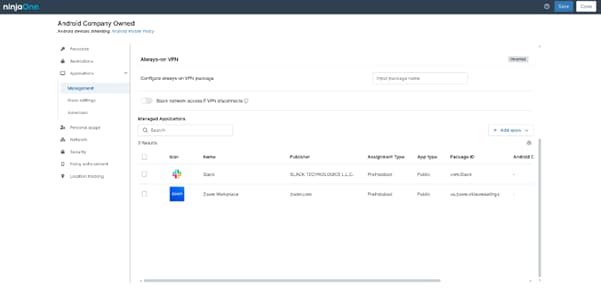
Silent App Installation
IT business logo
Provide logo
Advantage Technologies logo
Dedicated IT logo
Alticap logo
Network Coverage logo

Deliver software silently, reliably, and securely—so every endpoint gets what it needs without user disruption or manual effort, powered by NinjaOne

Zero-Touch Software Delivery

Enable fully unattended application installs across managed devices. Silent deployment removes prompts and user dependency, ensuring software is delivered consistently without interrupting productivity.

Automation-First Deployment

Replace manual installs with automated workflows. Silent installation packages run through scripts, automations, and scheduled tasks—reducing repetitive work and eliminating deployment gaps.

Consistent Endpoint Experience

Ensure every device receives the same approved applications with the same install behavior. Silent install parameters and standardized packages create predictable, repeatable results across environments.

Policy-Driven Silent Execution

Tie silent installs to policies, device groups, and conditions. Applications deploy automatically when rules are met—supporting smarter rollouts without technician intervention.

Uninterrupted User Productivity

Install and update software in the background with no pop-ups or prompts. Silent installs minimize disruption while keeping systems current and fully equipped.

Built to deliver secure, unattended software deployment at scale with NinjaOne

Built better, from day one icon

Unattended Silent Deployment

Install applications with no user prompts or interaction using silent install switches and background execution. Deliver software seamlessly without disrupting end users.

Simplicity by design icon

Automation & Script-Based Install Workflows

Trigger silent installations through automations, scripts, and scheduled tasks. Standardize deployment steps and reduce technician effort across repetitive software rollouts.

Cross-Platform Silent Install Support

Deploy applications silently across supported platforms—including macOS, and Android—using platform-appropriate installers and parameters from a unified console.

automation icon

Custom Installer & Parameter Control

Upload your own installers and define silent install arguments (such as /quiet, /qn, or equivalent flags). Fine-tune install behavior for each application package.

Policy & Group-Targeted Rollouts

Scope silent installs to device groups, roles, or environments. Ensure the right software installs quietly on the right endpoints without broad or manual deployments.

Real-life silent installation scenarios that highlight operational impact, automation value, and measurable outcomes

Enterprise Laptop Onboarding with Zero-Touch Software Setup

A company ships laptops directly from the vendor to remote employees nationwide. Instead of requiring IT to manually install required applications during first login, silent app installation automatically deploys security tools, VPN clients, productivity suites, and monitoring agents in the background during device enrollment. Employees receive a ready-to-use system without installation prompts, admin credentials, or setup delays. IT eliminates onboarding tickets and reduces new-hire setup time from hours to minutes while maintaining a standardized software stack.

Remote Workforce with Limited Technical Skills

A distributed workforce includes non-technical users who frequently skip or cancel installation prompts. Silent installation ensures critical applications install automatically without user approval dialogs or pop-ups. Even if users are offline during the initial deployment window, automation retries installation once the device reconnects. No instructions, no walkthrough calls, no failed installs due to user error.

Security Tool Emergency Rollout During Active Threat

A newly discovered vulnerability requires immediate deployment of a mitigation tool across all endpoints. IT pushes the security application silently across thousands of devices without interrupting users or waiting for approval prompts. Installations run quietly in the background while users continue working. Failed deployments can be configured to retry according to policy until successful.

Take Control of Application Deployment — Silently and at Scale

Deploy the software your devices need without prompts, interruptions, or manual installs. With NinjaOne’s silent app installation and automation capabilities, IT teams can push required applications in the background, enforce installs, and remediate failures automatically across every managed endpoint.

Standardize software, reduce user friction, and eliminate repetitive deployment work — all while maintaining full visibility and policy control from a single management console.

Stop chasing installs. Start enforcing them automatically.

Deliver apps quietly. Reliably. Everywhere.

Start streamlining silent deployments today.

Related Resources

This is why customers love us

Ready to simplify the hardest parts of IT?

Silent App Installation FAQs

Silent App Installation in NinjaOne MDM lets IT automatically deploy apps on managed devices without user interaction. Administrators define policies for target devices or groups, and the MDM agent installs apps in the background using silent switches. NinjaOne monitors status, retries failed installs, and ensures all devices stay compliant and up to date—ideal for security tools, productivity software, and field or kiosk devices—reducing errors and IT workload.

Silent app installation improves device onboarding and user experience by removing manual steps, prompts, and interruptions from the setup process. New devices can be fully configured with all required applications automatically during enrollment, so employees receive a ready-to-use system on their first day without needing to install anything themselves. Users don’t encounter installation pop-ups, password prompts, or complex setup instructions, allowing them to start working immediately. For IT teams, this reduces onboarding time, eliminates missed installs, and ensures every device has a consistent software environment. Overall, silent installation creates a seamless, efficient, and frustration-free experience for both users and IT staff while maintaining compliance and security.

Silent app installation in NinjaOne MDM is supported on Android and macOSdevices.

  • Android: Fully supported for managed devices using NinjaOne’s MDM, allowing apps to be pushed silently from managed Google Play or enterprise packages.
  • macOS: Administrators can silently deploy signed .pkg or .dmg applications to enrolled Macs without user interaction.

iOS has more restrictions due to Apple’s security model. Apps can be pushed silently only on supervised devices via Apple Business Manager or Apple School Manager, but standard iPhones and iPads may require user approval for some installations.

Yes, with NinjaOne MDM, apps can be installed completely silently—without any user interaction or approval—on fully managed and supervised devices where the operating system permits silent deployment. When a device is enrolled and targeted by a deployment policy, the MDM agent downloads and installs the application in the background using managed deployment methods. Users do not see prompts, pop-ups, or setup screens, and they don’t need to provide credentials. This ensures that critical or required applications are installed consistently, immediately, and reliably, maintaining compliance and a seamless user experience.

NinjaOne ensures secure and reliable silent app deployment through enrolled device management, policy enforcement, and automated monitoring. It verifies app packages, uses signed installers, and applies managed installation methods to prevent tampering. Failed or missing installs are automatically detected and retried, ensuring only authorized apps are installed and devices remain consistent, secure, and compliant.

Yes, NinjaOne lets IT teams silently deploy apps to specific groups, roles, departments, or device collections. Targeted policies ensure only intended devices receive installations automatically, maintaining consistency, enforcing compliance, and reducing unnecessary installs.

Silent app installation reduces IT workload and support tickets by automating software deployment in the background. Applications install without user interaction, and failed or missing installs are automatically retried. This ensures consistent configurations, minimizes troubleshooting, and lets IT focus on higher-value tasks while users enjoy a seamless experience.

If an app fails to install silently on a device managed by NinjaOne, the platform automatically detects the failure and retries the installation according to the deployment policy. NinjaOne monitors installation status in real time, so any missing, corrupted, or failed apps are identified without requiring user intervention. The system can attempt multiple retries, reinstall the app, or alert IT administrators if manual attention is needed. This ensures that devices eventually receive the correct software, maintains compliance, and prevents configuration drift, all while keeping the user experience uninterrupted.

Yes, silent app installation in NinjaOne can be integrated with policy templates and enrollment workflows, allowing devices—individually or in bulk—to automatically receive required apps silently. This ensures standardized configurations, streamlined onboarding, and reduced manual setup across roles, departments, or device types.

Silent app installation enables organizations to scale device management efficiently by automatically deploying required applications across all devices without user interaction. IT can apply policies to groups, roles, or departments, while NinjaOne monitors and remediates failed installs. This ensures consistent software, faster onboarding, and reduced manual effort, allowing large fleets to be managed reliably with minimal IT resources.













