NinjaOne Policy-Based App Distribution automates application delivery across all devices using smart, policy-driven logic

NinjaOne’s policy-based app distribution ensures every managed device has exactly the software it needs—automatically. Define policies once, and NinjaOne continuously handles deployment, updates, and remediation across all endpoints in real time. From day-to-day application management to enforcing consistency and compliance, NinjaOne keeps your environment secure, standardized, and always up to date—without manual installs or constant oversight.
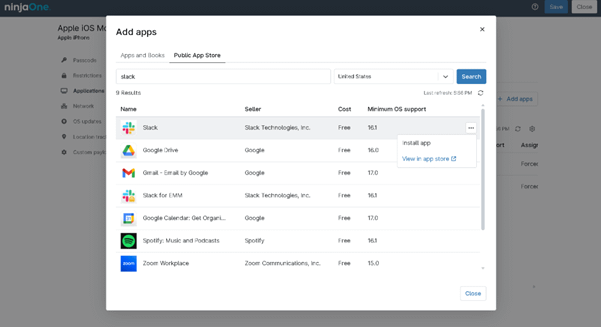

Policy-Based App Distribution
IT business logo
Provide logo
Advantage Technologies logo
Dedicated IT logo
Alticap logo
Network Coverage logo

Deliver the right applications to the right devices—automatically, securely, and without friction

Intelligent Application Governance

Standardize how mobile applications are delivered, updated, and managed across your environment. NinjaOne’s MDM capabilities allow IT teams to define mobile app distribution policies once and consistently enforce them across managed devices—ensuring a reliable, compliant app experience on iOS and Android endpoints, regardless of location.

Condition-Aware Software Deployment, Not Manual Installs

Eliminate one-off deployments and repetitive tasks. With policy-based app distribution, NinjaOne automatically installs, updates, or removes software based on predefined conditions—reducing human error and ensuring every endpoint stays aligned with organizational standards.

Continuous Compliance and Application Hygiene

Maintain a clean, compliant application landscape at all times. NinjaOne continuously evaluates installed software against policy, automatically correcting drift by deploying missing applications or removing unauthorized ones before issues arise.

Secure by Default Application Delivery

Protect endpoints through controlled, policy-enforced software distribution. By restricting installations to approved applications and trusted sources, NinjaOne helps reduce attack surface, prevent shadow IT, and support regulatory and security requirements.

Key Features

Built better, from day one icon

Policy-Driven Application Delivery at Scale

Deploy, update, or remove applications automatically using policy logic instead of manual tasks. Application delivery follows predefined rules, ensuring the right software reaches the right endpoints—consistently and without technician intervention.

Context-Aware App Assignment

Assign applications using predefined policy conditions such as device role, operating system, user group, or lifecycle stage. NinjaOne applies these policy settings consistently across endpoints, ensuring the right applications are deployed based on the conditions you define—without relying on automatic, real-time adjustments.

Centralized App Lifecycle Control

Manage installation, versioning, upgrades, and removal from a single policy framework. Eliminate application sprawl by enforcing standardized software sets across devices while maintaining flexibility for different teams or locations.

Simplicity by design icon

Targeted Distribution with Hierarchical Scoping

Apply application policies at the organization and site level to control how software is distributed across your environment. This hierarchical scoping provides clear separation in multi-tenant or distributed setups while reducing policy overlap and helping maintain consistent, predictable application management.

automation icon

Automated Drift Detection & Correction

Identify missing, outdated, or unauthorized applications in real time. When drift occurs, NinjaOne automatically reinstalls, updates, or removes software to restore compliance—no tickets required.


Instant visibility and control icon

Unified Monitoring, Auditing, & Insights

Track application deployment success, failures, and compliance status from a single dashboard. Generate audit-ready reports that clearly show what’s installed, where, and why—supporting security reviews and operational transparency.

Real-world scenarios where NinjaOne automates software delivery, ensures consistency, and reduces IT workload

MSP Managing Hundreds of Client Devices

A Managed Service Provider supports multiple customers with different software needs across laptops, desktops, and mobile devices. With NinjaOne, the MSP defines app deployment policies once and automatically delivers the correct applications to each customer’s managed endpoints. New devices are configured with required software immediately, missed installs are eliminated, and technicians no longer spend time manually deploying apps. This allows the MSP to scale services efficiently while maintaining consistent configurations across all clients.

Internal IT Team Standardizing Software Across the Organization

An internal IT department needs to ensure all company devices have approved applications installed and kept up to date. Using NinjaOne’s policy-based app deployment, IT assigns required software through predefined policies, ensuring every managed device receives the correct applications automatically. This approach removes manual installs, reduces configuration drift, and creates a predictable, well-controlled application environment—helping IT maintain consistency without constant hands-on management.

Organization Preventing Downtime from Failed or Missing Apps

A growing organization experiences productivity issues when critical applications fail to install, are removed, or fall out of date. NinjaOne continuously monitors application status across endpoints and automatically remediates issues by retrying failed installs or reinstalling missing software. Outdated applications are detected and updated automatically, keeping devices compliant with company standards, reducing security risks, and minimizing support tickets caused by missing or broken software.

Take Command of Software Delivery with NinjaOne

 Ensure managed mobile devices receive the right applications at the right time—automatically. NinjaOne’s MDM policy-based app distribution enables IT teams to deploy, update, and enforce mobile applications across their device fleet with consistent policies and minimal manual effort.


Eliminate deployment delays, reduce configuration errors, and maintain consistency across devices—all from a single, unified platform designed for modern IT management.


Experience effortless, automated software delivery today.

Related Resources

This is why customers love us

Ready to simplify the hardest parts of IT?

Policy-Based App Distribution FAQs

App distribution in Mobile Device Management (MDM) is the centralized delivery, installation, update, and removal of apps on managed devices. Tools like NinjaOne automate this process, letting IT teams deploy software based on policies, ensure compliance, and keep all endpoints up-to-date without manual intervention.

MDM simplifies enterprise app distribution by allowing IT to remotely deploy, update, and manage apps across all devices, enforce compliance, and automate updates—reducing manual work and ensuring consistency.

Yes — NinjaOne’s MDM can distribute apps silently to managed mobile devices, but the behavior differs by platform: apps can be silently installed on Android devices enrolled via Android Enterprise, and on supervised iOS devices integrated with Apple Business Manager. On iOS devices that aren’t supervised or aren’t properly configured with ABM, users may be prompted to approve app installations. Silent distribution helps ensure consistent deployment with minimal disruption for end users.

MDM can distribute a wide range of applications, including:

  1. Native mobile apps – Apps from the device’s app store (iOS App Store, Google Play) installed directly on smartphones or tablets.
  2. Line-of-business (LOB) apps – Custom or internal apps developed specifically for the organization.
  3. Web apps – Apps accessed via browsers or progressive web apps (PWAs) that can be pushed to the device home screen.
  4. Utility and productivity apps – Security tools, VPN clients, email clients, collaboration software, and other business-critical tools.

With NinjaOne, mobile apps can be deployed automatically according to policies. On Android devices enrolled via Android Enterprise, apps can be installed silently without user interaction. On iOS devices, silent installation is only possible on supervised devices enrolled through Apple Business Manager; otherwise, users may need to manually approve app installations. This ensures managed mobile devices have the right software while minimizing disruption, within platform limitations.

MDM manages app updates and version control by automatically deploying the latest versions, enforcing compliance to keep all devices secure and consistent.

Yes. App distribution via MDM is secure for corporate data because it enforces controlled, policy-driven installations, ensures only approved apps are deployed, and keeps corporate data separate from personal apps by using secure containers or app-level controls. MDM platforms can also encrypt data, require authentication, and prevent unauthorized app access, reducing the risk of data leaks or security breaches.

Yes. MDM allows IT to remotely remove or block apps on managed devices. Administrators can uninstall unauthorized or outdated apps, block access to risky applications, and enforce compliance policies—all without needing physical access to the device.

MDM supports app distribution across iOS and Android devices by using each platform’s native management frameworks—Apple MDM for iOS and Android Enterprise for Android—allowing IT to remotely install, update, or remove apps, target specific users or groups, enforce compliance, and automate updates. Tools like NinjaOne unify this process in a single dashboard, making it easy to manage app deployment across mixed-device environments while ensuring security and consistency.

MDM solves several challenges in large-scale app deployment by centralizing control and automating processes that would be difficult to manage manually. It ensures consistent app installation across thousands of devices, enforces compliance with corporate policies, handles version updates automatically, and allows IT to remotely remove or block unauthorized apps. Additionally, MDM reduces support workload, minimizes downtime for end users, and secures corporate data, making large-scale deployments faster, safer, and more efficient.

An effective MDM solution for app distribution should allow IT to remotely deploy apps and, where supported, silently install them—this works fully on Android devices enrolled via Android Enterprise, while iOS apps require supervised devices enrolled through Apple Business Manager for silent installation; otherwise, users may need to approve installs manually. It should enable IT to target specific users or device groups through policies, manage updates and version control, and block or remove unauthorized apps. The solution should support multiple mobile platforms, enforce compliance and security to protect corporate data, and provide reporting and analytics on deployment and policy enforcement. Solutions like NinjaOne integrate these capabilities into a centralized dashboard for streamlined mobile app management.