Mobile Device Remote Support Simplified
Support and troubleshoot mobile devices remotely with NinjaOne MDM, giving IT teams the visibility and tools they need to resolve issues faster from anywhere.
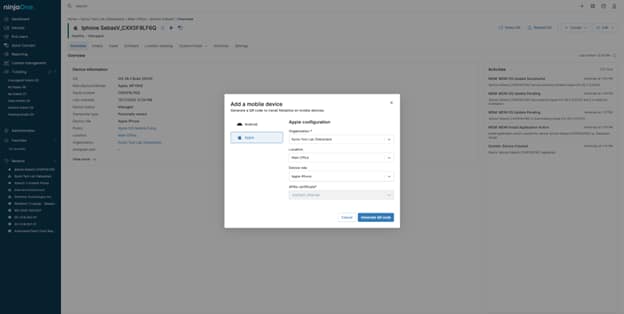
Support and troubleshoot mobile devices remotely with NinjaOne MDM, giving IT teams the visibility and tools they need to resolve issues faster from anywhere.






IT teams can quickly understand what’s happening on a mobile device and guide users through the next steps, reducing delays and avoiding unnecessary onsite support.
Technicians can assist users by viewing device activity, checking settings, and guiding them through changes, making support interactions clearer and easier for everyone involved.
Managing mobile devices from a single platform makes it easier to apply policies, secure devices, and keep mobile environments consistent as they grow.
NinjaOne includes a set of features designed to simplify remote support and day-to-day management of mobile devices.

NinjaOne provides a clear view of enrolled mobile devices, including device status and configuration details, helping IT teams quickly understand the state of each device from one console.

For supported Android devices, technicians can remotely interact with the screen to guide users, navigate the device, and assist with troubleshooting without needing physical access.

On iOS devices, technicians can use remote view to see device activity, confirm settings, and guide users through troubleshooting steps while managing the device from the console.

IT teams can remotely lock or wipe mobile devices, reset passcodes, and take action to protect company data if a device is lost, stolen, or compromised.

NinjaOne allows IT teams to apply and manage security policies and configurations across mobile devices, helping maintain consistency and compliance as environments grow.
Below are common scenarios where IT teams use mobile device remote control to support users and secure devices.
When users run into problems on their mobile devices, IT teams can step in without physical access. By viewing device activity and using management actions, technicians can understand the issue and guide users through a fix, reducing downtime and support delays.
If a mobile device is lost or unavailable, IT teams need to act quickly. NinjaOne allows technicians to lock or wipe devices remotely, helping protect company data and reduce security risk without needing the device in hand.
Misconfigured settings or policies can disrupt mobile users. With clear visibility into device configurations, IT teams can review settings, confirm compliance, and guide users through corrections to restore normal operation.
NinjaOne makes mobile device remote support simple and consistent, helping IT teams troubleshoot issues, secure devices, and manage mobile endpoints with confidence.
This article summarizes these differences and includes important considerations for your decision-making process.

Look below to dive into the details of MDM, including its importance, benefits in IT, and the advantages it provides for businesses.
The purpose of MDM is to ensure that team members’ mobile endpoints and the confidential data they contain are used in a safe and secure manner. It also supports BYOD practices, which have gained popularity in recent years.
100,000
Endpoints managed
“NinjaOne is a scalable solution. It’s built on a modern SaaS architecture and it’s future-proof.”

40%
More Cost Effective
“NinjaOne’s price point is 40% less than any other endpoint management tool on the market, while being more powerful and easy to use.”

10-15
Tools Replaced
“Before, I needed 10-15 different tools to execute what NinjaOne does in its centralized, single pane of glass.”

30%
Less time for patching
“We observed a 30% reduction in the time taken for patch deployments compared to our previous solution.”

2,000
Endpoints managed
“NinjaOne gives me much more flexibility and security in my work”

30%
Annual ROI
“[NinjaOne] has already shown its value in ROI…it’s at least a hundred thousand dollars annually.”

24x
Faster Endpoint Management
“Our processes have become 24x faster with NinjaOne.”

20-40
Hours Saved Each Week
“Leveraging the automations feature within NinjaOne has enabled me to save upwards of what would likely be 20 to 30 to even 40 hours per week.”

MDM remote control means giving IT teams a way to support mobile devices from a distance. Instead of touching the device, technicians use tools to see device information, guide users, and send management commands. What technicians can do depends on the device’s operating system.
Remote device management focuses on setting up, securing, and maintaining devices from a central system. IT teams use it to apply policies, manage apps, enforce security settings, and protect data, without interacting directly with the device or the user.
IT teams remotely troubleshoot mobile devices by checking device status and using remote support tools based on the operating system.