iOS Supervised Mode Management Simplified
Secure and manage company-owned iPhones and iPads using iOS supervised mode with NinjaOne MDM, giving IT teams the control and visibility they need to enforce policies and manage devices from day one.
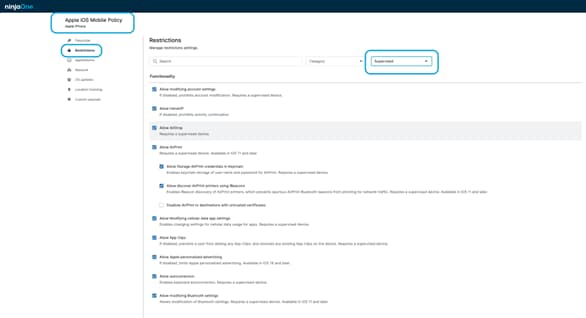
Secure and manage company-owned iPhones and iPads using iOS supervised mode with NinjaOne MDM, giving IT teams the control and visibility they need to enforce policies and manage devices from day one.






iOS supervised mode delivers greater security, consistency, and control for company-owned iPhones and iPads. By managing devices from the initial setup, IT teams can reduce risk, eliminate configuration gaps, and ensure corporate devices remain compliant and properly managed throughout their lifecycle.
Here are the key ways NinjaOne delivers value through iOS supervised mode management:
IT teams can enforce advanced restrictions and security settings that are only available on supervised devices, helping protect corporate data and prevent unauthorized changes.
With Automated Device Enrollment, devices are configured and managed from first boot, reducing manual effort, deployment errors, and ongoing support overhead.
Supervised mode prevents users from removing management profiles or bypassing policies, ensuring devices remain compliant and consistently configured as fleets scale.
NinjaOne provides a set of features designed to simplify the management of supervised iPhones and iPads, helping IT teams maintain control, security, and consistency across company-owned devices.

NinjaOne provides a clear, centralized view of supervised iOS devices, including device status, enrollment information, and configuration details, helping IT teams quickly understand the state of each device from one console.

NinjaOne allows IT teams to easily update and apply policies across supervised devices, keeping restrictions and settings aligned with business and security needs.

IT teams can take immediate action to protect supervised iOS devices by remotely restricting device functionality, or wiping the entire device if it is lost, stolen, or compromised.

NinjaOne simplifies device setup by automatically applying policies to supervised devices. This reduces manual work, speeds up deployment, and ensures devices are configured consistently from the start.

By enforcing required settings and preventing changes to management controls, NinjaOne helps ensure supervised iOS devices consistently follow company policies and compliance requirements.
Below are common scenarios where IT teams rely on supervised iOS devices to maintain control, security, and consistent configuration across company-owned hardware.
When new iPhones or iPads are issued to employees, IT teams can ensure devices are already configured with required settings, apps, and restrictions. This reduces setup time and allows users to start working almost immediately.
If a supervised device is lost or stolen, IT teams can quickly restrict access, secure managed corporate data, and prevent unauthorized use, reducing security risks without needing physical access to the device.
As policies change, IT teams can update configurations centrally and apply them across all supervised devices, ensuring consistency and reducing manual reconfiguration.
By limiting what users can change, supervised mode helps prevent accidental misconfigurations that could impact security, compliance, or device usability.
NinjaOne empowers IT teams to confidently manage supervised iPhones and iPads at scale. From zero-touch deployment to ongoing security and policy enforcement, NinjaOne brings clarity, control, and consistency to every stage of the iOS device lifecycle.

Managing iOS devices is crucial for ensuring security, protecting sensitive data, and maintaining IT compliance with regulatory requirements. In this article, we’ll discuss the basics of iOS device management profiles, elaborate on some best practices, tools and strategies for configuring and deploying these profiles, and explain why your business needs MDM.
The purpose of MDM is to ensure that team members’ mobile endpoints and the confidential data they contain are used in a safe and secure manner. It also supports BYOD practices, which have gained popularity in recent years.
100,000
Endpoints managed
“NinjaOne is a scalable solution. It’s built on a modern SaaS architecture and it’s future-proof.”

40%
More Cost Effective
“NinjaOne’s price point is 40% less than any other endpoint management tool on the market, while being more powerful and easy to use.”

10-15
Tools Replaced
“Before, I needed 10-15 different tools to execute what NinjaOne does in its centralized, single pane of glass.”

30%
Less time for patching
“We observed a 30% reduction in the time taken for patch deployments compared to our previous solution.”

2,000
Endpoints managed
“NinjaOne gives me much more flexibility and security in my work”

30%
Annual ROI
“[NinjaOne] has already shown its value in ROI…it’s at least a hundred thousand dollars annually.”

24x
Faster Endpoint Management
“Our processes have become 24x faster with NinjaOne.”

20-40
Hours Saved Each Week
“Leveraging the automations feature within NinjaOne has enabled me to save upwards of what would likely be 20 to 30 to even 40 hours per week.”

iOS supervised mode means an iPhone or iPad is set up as a fully managed, organization-owned device, allowing IT teams to enforce stronger policies, restrictions, and management controls.
Supervised mode applies to company-owned devices and gives IT full control from setup, while unsupervised mode is typically used for personal devices where management is limited and users retain more control. Further information can be found at Supervised vs Unsupervised devices – What is the difference?
Supervised mode unlocks additional controls that let IT teams apply stricter settings and prevent users from changing or removing management, such as:
It is enabled during the initial setup of an iPhone or iPad using Apple’s Automated Device Enrollment. The device’s serial number is registered to the organization in Apple Business Manager and assigned to an MDM platform. When the device is powered on and goes through Setup Assistant, it is automatically enrolled into MDM and placed into supervised mode.
No, supervised mode cannot be enabled without erasing the iOS device. Supervision can only be applied during the initial setup process, which means the device must be wiped before it can be enrolled and configured as supervised.
Supervised mode improves security by allowing IT teams to enforce stronger settings and prevent users from removing management controls, helping protect corporate data.
Automated Device Enrollment uses Apple services to associate an iPhone or iPad with an organization and enforce MDM enrollment and supervision during setup; ongoing device management is performed by the MDM platform using Apple’s communication services.
Supervised iOS devices allow IT teams to enforce restrictions that limit how the device can be used, such as:
Yes, supervised mode can improve compliance by ensuring that all company-owned iPhones and iPads follow the same required settings, restrictions, and security policies, making it easier for organizations to meet internal and regulatory requirements.
IT admins may face challenges such as the need to erase devices to enable supervision, managing user expectations on restricted devices, planning device deployment and enrollment ahead of time, and maintaining required Apple certificates and tokens to ensure uninterrupted device management.