NinjaOne SaaS Backup
Automated, cloud-native protection for Microsoft 365 and Google Workspace environments
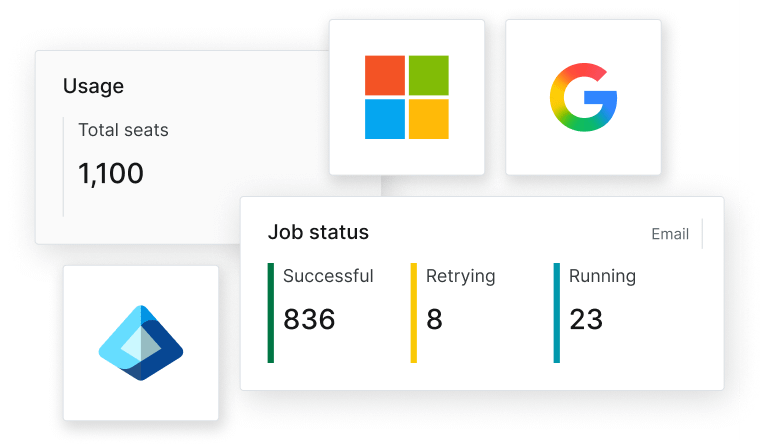
Automated, policy-driven, granular backup and recovery
Protect cloud productivity with confidence
Keep Microsoft 365, Google Workspace, and Microsoft Entra data safe from accidental deletion, misconfiguration, or ransomware with secure, automated backups and scalable storage options that ensure recoverability and operational continuity.
Instant, granular recovery
Quickly search, locate, and restore SaaS data with point-in-time and item-level recovery options across mailboxes, files, and identities. Tag, track, and audit backup and restore activity with full visibility into who did what and when.
Automate retention, simplify compliance
Set retention policies that apply to both backup and long-term archiving to support compliance, audits, and eDiscovery. Reduce manual effort while staying aligned to internal data lifecycle requirements.
Why NinjaOne SaaS Backup?
Unlike standalone tools, NinjaOne brings SaaS protection into the same console you use for day-to-day IT operations. Manage backup, archiving, and key identity data alongside patching, monitoring, and automation for fewer tools, faster response, and lower overhead.
Microsoft 365 Backup
Exchange Online
Full mailbox backup, including inbox, sent items, folders, attachments, calendar entries, and contacts
SharePoint
Protection for site collections, document libraries, and lists
OneDrive
Backup of files and folders stored in personal cloud storage
Teams
Backup of team structure, channel messages, and associated files
Microsoft Entra
Entra ID changes can break access fast. Native Entra tools provide limited recovery and audit visibility, but there is no simple “undo” or point-in-time rollback for identity and policy changes.
Admin mistakes, misconfigurations, or attacker activity can weaken MFA, change conditional access, or introduce backdoor apps.

Google Workspace
Google Workspace typically keeps deleted emails and files in Trash for up to 30 days. Tools like version history and Vault can help with governance, but they are not designed for fast, full restores. Backup closes the gap when you need to recover from accidental deletion, ransomware, or user error.
Gmail
Full backup of inbox, sent items, archived mail, and attachments
Drive
Calendar
Backup of event data and calendar metadata
Contacts
Backup of user contact information and directory entries
Email Archiving

Automated, cloud-native protection for Microsoft 365 and Google Workspace environments

Centralized management
Manage backup, retention, and recovery from a single console built for operational efficiency.

Zero data gaps

Powerful search

Granular recovery

Built-in compliance
Preserve mailbox history for compliance, search, and long-term retention with email archiving.

Identity protection
Protect identity and access for Microsoft 365 so you can recover quickly from misconfigurations or unwanted changes.
Customers love NinjaOne
saved time on manual tasks through automation
reduced ticket volumes and resolution times
replaced 3-4 tools with NinjaOne
Discover value in 5 minutes.
Switch backup providers without the hassle
Migrating to a new backup platform doesn’t have to be slow, costly, or disruptive. With NinjaOne, you can make the switch confidently and stay focused on your business.
Our team manages secure data extraction, transfer, and ingestion from start to finish. You get a smooth, efficient transition to modern SaaS backup—no months of manual work, and no downtime. Just a safer, more reliable way to protect your data.

NinjaOne and Vetcor partner to manage 15,000 endpoints across more than 850 clinics
This is why customers love us
100,000
Endpoints managed
“NinjaOne is a scalable solution. It’s built on a modern SaaS architecture and it’s future-proof.”

40%
More Cost Effective
“NinjaOne’s price point is 40% less than any other endpoint management tool on the market, while being more powerful and easy to use.”

10-15
Tools Replaced
“Before, I needed 10-15 different tools to execute what NinjaOne does in its centralized, single pane of glass.”

30%
Less time for patching
“We observed a 30% reduction in the time taken for patch deployments compared to our previous solution.”

2,000
Endpoints managed
“NinjaOne gives me much more flexibility and security in my work”

30%
Annual ROI
“[NinjaOne] has already shown its value in ROI…it’s at least a hundred thousand dollars annually.”

24x
Faster Endpoint Management
“Our processes have become 24x faster with NinjaOne.”

20-40
Hours Saved Each Week
“Leveraging the automations feature within NinjaOne has enabled me to save upwards of what would likely be 20 to 30 to even 40 hours per week.”

NinjaOne Integrations












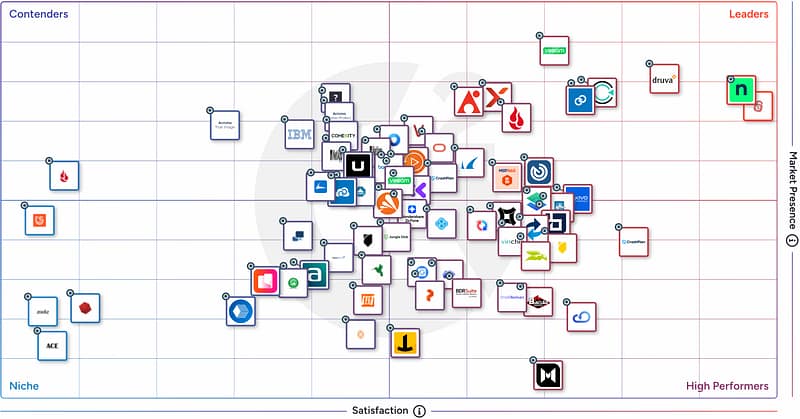
Rated #1 on G2
G2’s No.1-Rated Online Backup Software
Backup you can rely on
Customers grant NinjaOne Backup an Ease of Admin score of 94 and an Ease of Use score of 94. Both satisfaction scores indicate trust in NinjaOne to keep their data secure and appreciation for the simplicity of using one platform to manage backups for every workload.




| NinjaOne | Average Ratings | |
| Likelihood to Recommend | 9.6 | 8.7 |
| Product Going in the Right Direction? | 9.9 | 8.6 |
| Ease of Admin | 9.4 | 8.9 |
| Ease of Doing Business With | 9.7 | 9.0 |
| Quality of Support | 9.4 | 8.7 |
| Ease of Setup | 9.4 | 8.9 |
| Ease of Use | 9.4 | 8.9 |

Resources
What is SaaS backup?
What is SaaS recovery?
SaaS recovery is the process of restoring lost or compromised data from cloud applications after incidents like accidental deletion, ransomware, or outages. Since most SaaS platforms don’t fully protect your data, SaaS backup and recovery tools are essential. With SaaS backup software, businesses can quickly recover emails, files, or entire accounts. Modern SaaS backup solutions offer automated SaaS backup and easy recovery options to minimize downtime. SaaS cloud backup ensures data is stored safely offsite and ready when needed. For SaaS companies, having reliable backup and recovery for SaaS platforms helps maintain operations and customer trust. Simply put, SaaS recovery is your safety net in the cloud.
What is the difference between a backup and a SaaS backup?
The main difference between a backup and a SaaS backup lies in where the data resides and how it’s protected. Traditional backups involve copying data from local systems—such as servers, desktops, or on-premise applications—to another storage location like external drives or cloud/on-prem storage, providing protection against data loss. In contrast, a SaaS backup is specifically designed to protect data stored in cloud-based applications like Microsoft 365 or Google Workspace. Since these platforms typically offer limited data recovery options, businesses use SaaS backup software to automatically back up and recover their cloud data, ensuring it’s safe from accidental deletion, cyber threats, or service outages.
How does SaaS backup protect my data?
SaaS backup protects your data by automatically creating secure, independent copies of the information stored in your cloud applications—like Microsoft 365, Google Workspace. While these platforms store your data, they often don’t protect it from accidental deletion, user error, or malicious activity. SaaS backup software fills that gap by providing regular, automated SaaS backup, storing the data in a separate, secure location (often via SaaS cloud backup). This ensures that if anything goes wrong, you can quickly restore your files, emails, or entire accounts using SaaS backup and recovery tools. It’s an essential layer of protection and peace of mind for SaaS companies relying on cloud platforms.
What types of data can I back up with NinjaOne SaaS backup solution?
NinjaOne’s SaaS backup solution is designed to protect a wide range of data types across various platforms. Here’s what you can back up:
- Microsoft 365 Applications: This includes emails, calendars, contacts, and files from Exchange Online, OneDrive, SharePoint, and more.
NinjaOne also offers Endpoint Backup that can back up the following:
- Files and Folders: You can back up critical files and folders from endpoints, ensuring that important documents are securely stored and easily recoverable.
- System Images: NinjaOne allows for full system image backups, capturing the entire operating system, applications, and data. This is particularly useful for complete system restores.
- Applications and Server Data: Beyond files and system images, NinjaOne can back up application-specific data and server information, providing a comprehensive backup solution for various IT environments.
With these capabilities, NinjaOne ensures that your organization’s data is protected across multiple platforms and can be restored efficiently in case of data loss or system failures.
Which SaaS applications are supported?
NinjaOne’s SaaS backup solution primarily supports Microsoft 365, including Exchange Online, OneDrive, SharePoint, and Teams. This ensures protection for emails, calendars, contacts, and files across these services. For comprehensive protection, NinjaOne also offers backup solutions for endpoints, including Windows and macOS devices, supporting file and folder backups, as well as full system images for Windows.
How often are backups performed?
Backups are typically performed on a regular schedule, depending on the system or service in use. Here’s a general breakdown:
- Daily Backups – Common for businesses that need to safeguard critical data. It ensures that any data created during the day is backed up.
- Weekly Backups – Often used for less critical systems or data, or as a secondary backup method alongside daily backups.
- Hourly or Continuous Backups – Used in high-demand environments where data is constantly changing, such as financial institutions or cloud services. This ensures minimal data loss.
- Monthly Backups – Used for long-term storage and disaster recovery purposes, often for archiving older data.
The specific frequency depends on factors like the criticality of the data, available storage, and business continuity requirements.
Can I easily restore my data if needed?
Yes, with NinjaOne’s SaaS backup solution, you can easily restore your data when needed. It offers fast, one-click recovery options, allowing you to restore based on what was backed up. For Microsoft 365, this includes restoring data from Exchange, OneDrive, SharePoint, and Teams. The platform is designed for simplicity, so even non-technical users can initiate restores with minimal hassle. This ease of recovery is a core part of NinjaOne’s SaaS backup and recovery tools, helping reduce downtime and data loss in critical moments.
How long can I retain the backup data?
With NinjaOne’s SaaS backup solution, you can customize how long your backup data is retained based on your organization’s needs. The platform allows you to set flexible retention policies—whether you need to keep data for a few days, several years, or indefinitely. This is especially useful for meeting compliance standards or internal data governance requirements. You can also control how many backup versions to keep and whether to retain deleted files, giving you full control over storage and recovery options.