NinjaOne Entra Backup
Secure, recoverable identity protection for Microsoft Entra ID built into NinjaOne SaaS Backup
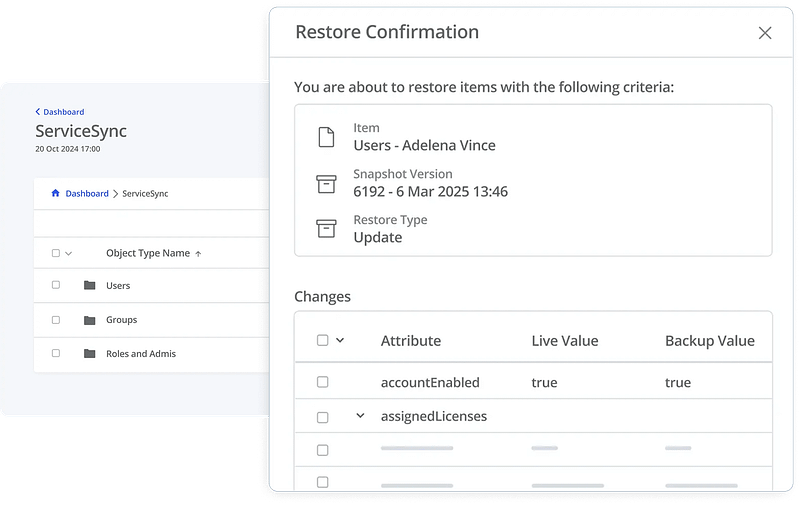
Identity protection starts with NinjaOne Entra Backup
Protect the identity that powers Microsoft 365
Prevent lockouts and configuration loss
Accidental deletions, sync errors, or malicious changes can permanently remove Entra ID objects after 30 days, and manual recovery can require extensive downtime. NinjaOne Entra Backup reduces that risk by enabling fast, granular recovery of users, groups, and permissions to keep your organization connected.
Built for identity security
Comprehensive Microsoft Entra ID protection



Protect the most critical elements of your Microsoft Entra ID environment that keep your Microsoft 365 ecosystem secure and connected. Maintain continuity of access and recover quickly from accidental misconfigurations or security incidents.
Customers love NinjaOne
saved time on manual tasks through automation
reduced ticket volumes and resolution times
replaced 3-4 tools with NinjaOne
Secure, automated protection for Microsoft Entra ID

Identity continuity

Access recovery made simple

Configuration integrity
Automatically capture updates to roles, applications, and conditional access policies to prevent configuration drift and maintain consistent security baselines.

Centralized visibility

Security you can trust

Cloud-native automation
Don’t leave identity recovery to chance
Discover value in 5 minutes.

Moda Experts creates a proactive, multi-layered cyber defense with Entra Backup
This is why customers love us
100,000
Endpoints managed
“NinjaOne is a scalable solution. It’s built on a modern SaaS architecture and it’s future-proof.”

40%
More Cost Effective
“NinjaOne’s price point is 40% less than any other endpoint management tool on the market, while being more powerful and easy to use.”

10-15
Tools Replaced
“Before, I needed 10-15 different tools to execute what NinjaOne does in its centralized, single pane of glass.”

30%
Less time for patching
“We observed a 30% reduction in the time taken for patch deployments compared to our previous solution.”

2,000
Endpoints managed
“NinjaOne gives me much more flexibility and security in my work”

30%
Annual ROI
“[NinjaOne] has already shown its value in ROI…it’s at least a hundred thousand dollars annually.”

24x
Faster Endpoint Management
“Our processes have become 24x faster with NinjaOne.”

20-40
Hours Saved Each Week
“Leveraging the automations feature within NinjaOne has enabled me to save upwards of what would likely be 20 to 30 to even 40 hours per week.”

NinjaOne Integrations










Rated #1 on G2
G2’s No.1-Rated Online Backup Software
Backup you can rely on
Customers grant NinjaOne Backup an Ease of Admin score of 94 and an Ease of Use score of 94. Both satisfaction scores indicate trust in NinjaOne to keep their data secure and appreciation for the simplicity of using one platform to manage backups for every workload.
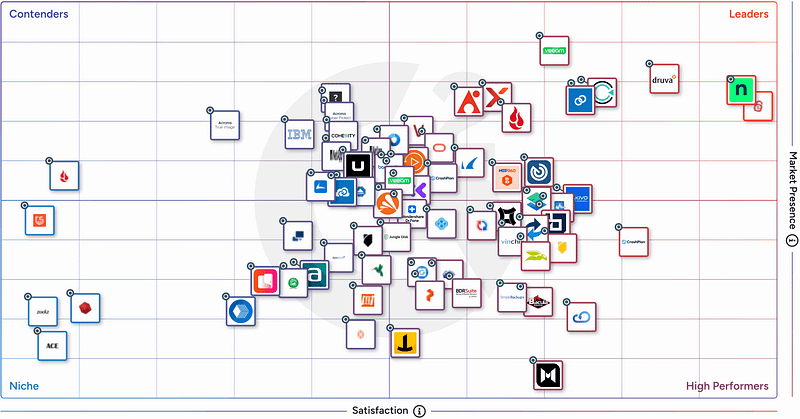




| NinjaOne | Average Ratings | |
| Likelihood to Recommend | 9.6 | 8.7 |
| Product Going in the Right Direction? | 9.9 | 8.6 |
| Ease of Admin | 9.4 | 8.9 |
| Ease of Doing Business With | 9.7 | 9.0 |
| Quality of Support | 9.4 | 8.7 |
| Ease of Setup | 9.4 | 8.9 |
| Ease of Use | 9.4 | 8.9 |

Resources
FAQs
What is Microsoft Entra ID?
Microsoft Entra ID is Microsoft’s identity and access management (IAM) solution. It secures authentication, access policies, and security configurations across Microsoft 365 and connected applications.
Why do I need to back up Entra ID in addition to Microsoft 365?
While M365 backup protects content like emails and files, Entra ID is the foundation of identity security — managing users, permissions, and policies. Knowing how to back up Entra ID separately is critical: without it, misconfigurations or malicious changes can disrupt entire IT environments.
What’s the ROI of offering Entra Backup?
What if I’m already backing up user data?
User data backups alone don’t protect identity settings. An Entra ID backup solution protects Users, M365 Groups, Roles and Admins to ensure seamless restoration after disruptions.
What’s the value of Entra Backup?
A common misconception is that Microsoft is protecting the Entra ID data and configuration state. This is not correct. Microsoft explicitly states that unintended deletions and misconfigurations will happen, and organizations must prepare for them. Understanding how to back up Entra ID before an incident occurs is what separates a fast recovery from hours of detective work.
Entra Backup:
- Protects against accidental and malicious data loss
- Saves hours of detective work and recovery time
- Helps meet compliance requirements