
Key Points
- NinjaOne allows scripts that can write organization-level custom fields, increasing the scope of automated IT documentation.
- Automated documentation can capture license keys, tenant IDs, and application configurations without manual entry.
- Extracted data can then power scripts, monitoring, and software deployment across the organization.
Since the addition of custom fields to NinjaOne, we’ve had the ability to read from and write to device-level custom fields via scripts and the terminal. Organization-level custom fields (available in NinjaOne Documentation®) have always been readable via scripts, but until now, they have not been writable.
With the NinjaOne 5.3.5 release, we’ve added the ability to write to organization-level custom fields via scripts or the terminal for automatic documentation.
Save yourself hours of manual documentation and automate IT documentation
Frequently, some data would be useful for scripting across all or many endpoints in an organization. This information can be collected and added to NinjaOne manually, but allowing organization-level custom fields to be written via script allows for almost unlimited possibilities for automated documentation.
A few real-world use cases for writing to organization custom fields include:
- Extracting license keys from existing endpoint setups and documenting those license keys automatically.
- Extracting and documenting tenant IDs for applications like Azure, Printix, Keeper, and other multi-tenant solutions.
- Extracting and documenting application, tool, and hardware configurations as an XML, YAML, or JSON blob from the endpoint.
The most critical benefit of this new feature is users’ ability to automate tasks like these and spare their team hours of manual documentation. For more advanced users, these extracted license keys, tenant IDs, and configurations can then be referenced in a script or used with conditions to monitor and alert on changes, deploy software, or automatically join a device to a tenant.
How to write to organization custom fields in NinjaOne
1. Appoint a delegate machine
Writing to organization custom fields requires the use of a delegate. This stops multiple devices from writing to an organization-level field simultaneously, which could cause unintended outcomes. Delegates can be set up in the Organizations tab under Documentation.
2. Setup your custom field
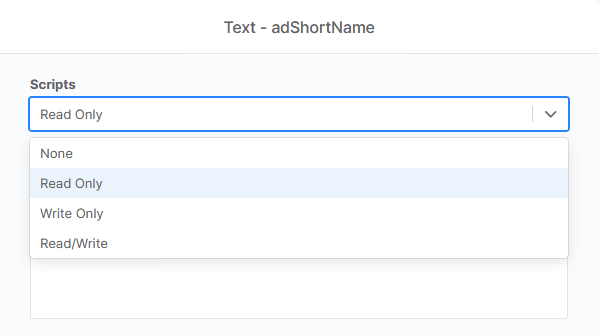
You’ll need an organization-level custom field to write to. These fields are set up as forms in the Documentation app. To write to a field via script or terminal, you’ll need to set the scripts field to ‘Write Only’ or ‘Read/Write’.
3. Write your script
This update added three new commands for scripting in NinjaOne:
- Ninja-Property-Docs-Set DocumentName” $AttributeName
- Ninja-Property-Docs-Set-Single “templateName” “fieldName” “new value”
To make this more real-world, let’s outline what it may look like to automatically document an Azure tenant ID with NinjaOne.
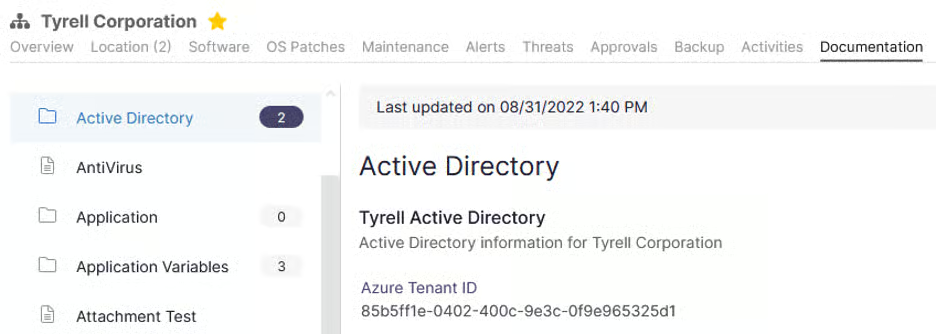
Let’s assume we’ve assigned our delegate and created the document below.
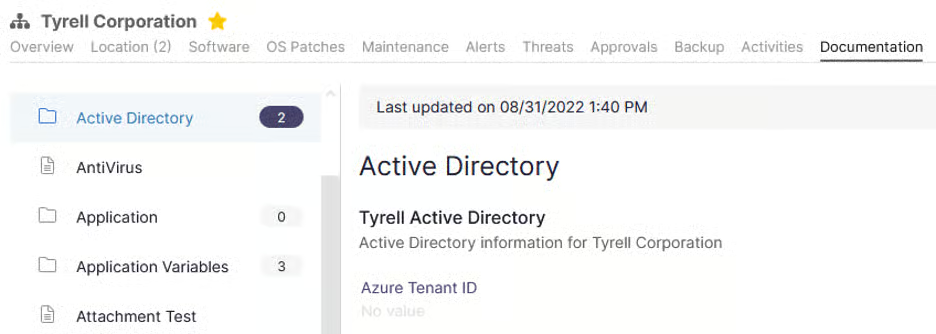
Let’s write our script:
- The Template ID / Name is “Active Directory”
- The Document Name is “Tyrell Active Directory”
- The Attribute Name is azureTenantID
$tenantId = (Get-AzureADTenantDetail).objectId

Ninja-Property-Docs-Set ‘Active Directory’ ‘Tyrell Active Directory’ azureTenantID $tenantId
4. Deploy your script
Finally, you need to deploy your script on the appropriate delegate endpoint. Once the script has been run, the script will write to the organization-level custom field and complete with success.
We then run this on our delegate machine to update the template.
Want to see NinjaOne in action?
Manual documentation is one of those workflows that always loses to urgent work, leaving configurations, license keys, and tenant IDs unrecorded until the knowledge walks out the door with whoever holds it. Automated documentation fixes this at the source, capturing data from endpoints as it changes and keeping records current without anyone typing a word.
Watch a short free demo, or try these NinjaOne features out for yourself by signing up for a no-obligation free trial.
Related topics: