

Key Points
- Factual Framing Builds Trust Faster Than Emotional Language: Using dates, patch IDs, and CVE references eliminates vagueness and helps stakeholders act rather than react.
- Structured Templates Make Risk Easier to Process: A consistent format for risk, impact, action, and recommendation reduces misinterpretation between MSPs and clients.
- Presenting Options Side by Side Builds Trust: Comparing outcomes enables clients to choose their own path, positioning MSPs as advisors rather than enforcers.
- Regular Briefings Keep Risk Reviews Predictable: Logged decisions and a consistent timeframe help make risk communication predictable.
Every endpoint that connects to the network, runs scripts, or executes files carries some risk of compromise. MSPs typically perform a risk management assessment to identify these device risks, but taking action can prove more challenging. Detecting device risks before they escalate requires collaboration and swift alignment with business needs. This guide aims to fill that gap by providing MSPs with tools and ideas on communicating IT risks to stakeholders.
For a visual breakdown of this topic, watch How MSPs Can Communicate Device Risk (EOL, Compliance, Vulnerability) with Clarity.
Creating an IT risk communication template for MSPs
A well-structured IT risk communication template ensures that business stakeholders understand the nature of the risk, its urgency, and the actions required.
Here are some key components to keep in mind when creating this template:
- Method of identifying device risks (e.g., EOL trackers, patching dashboards)
- Template tools for communication (e.g., email, memo, PDF, portal post, cloud)
- Awareness of risk communication principles (e.g., tone, clarity, audience context)
- Feedback mechanism to refine messaging over time
A working template should prevent misinterpretation between parties and promote timely decision-making across relevant departments.
1. Frame risks with factual precision
As far as principles go for this process, the reporting party (e.g., MSP) should always use factual framing rather than emotional qualifiers.
Here are some direct and actionable communication examples for common IT events:
- EOL Communication: “Device model reached end-of-support date; no security patches will be released.”
- Compliance Gap: “5 devices lack critical patch KB12345, which addresses CVE‐2025‐XXXX.”
- Vulnerability Exposure: “Device ABC is exposed to Log4Shell; mitigation currently in place pending update.”
Factual framing leans toward measurable attributes such as dates, patch identifiers, and CVE references. This approach eliminates blind spots and vagueness, which are tall hurdles when stakeholders have varying degrees of IT involvement.
It also organically builds trust and accountability between MSPs and IT leaders.
2. Use a structured communication template
When stakeholders receive information in a familiar, easy-to-process format, they spend less time interpreting and more time collaborating on a solution.
A good template should balance brevity with clarity when presenting IT and device risks. Here’s an example and an outline:
Subject line: Device Risk Summary – [Client] – [Date]
- EOL risk
- Devices: 3 desktops reached the end of life in June 2023.
- Impact: No new security patches available; devices are increasingly vulnerable.
- Recommendation: Plan device replacement or migration within 6 months to maintain compliance and supportability.
- Compliance gaps
- Devices affected: 5 laptops missing the KB12345 patch, which addresses CVE-2025-XXXX.
- Impact: Systems remain misaligned with internal and external compliance standards.
- Recommendation: Schedule automated patch deployment during the next maintenance window.
- Vulnerability exposures
- Issue: Device XYZ has an open RDP port that is exposed to the internet.
- Impact: Elevated risk of brute force attacks or unauthorized access.
- Recommendation: Restrict RDP exposure or enforce VPN access immediately.
Call to action: Please review and indicate your preferred remediation strategy.
By breaking information into clear, concise segments, MSPs reduce ambiguity and enable decision-makers to respond more effectively. Internally, a well-structured template should also create repeatable workflows that streamline reporting.
3. Back claims with real data visuals
Technical data, particularly numbers, can appear abstract to non-technical stakeholders. Visualization can bridge this gap, while RMM reporting can further showcase MSPs’ value by creating impactful analysis and reports.
Include charts or tables, or other visual context to reinforce the message, which should be concise and communicated in plain language.
4. Provide balanced options
Remediation paths are never straightforward, and a one-size-fits-all template that will satisfy everyone or every scenario simply doesn’t exist. However, as the subject-matter experts, the MSPs are responsible for helping stakeholders weigh costs, business disruptions, and long-term strategy.
When framing strategies, present options in a side-by-side format. This makes it easier for decision-makers to compare outcomes and choose the path that best suits their context. For example:
| Option | Impact | Risk and cost |
| Apply patch | Full fix with scheduled reboot | Minor downtime during update |
| Upgrade device | Long-term resolution; improved performance | Higher upfront hardware cost |
| Continue retry | Temporary workaround; defer major changes | Increasing risk over time; exposure persists |
In outlining balanced options, MSPs can positively position themselves as advisors rather than enforcers.
5. Maintain a regular risk briefing cadence
Consistent communication reduces urgency overload and keeps decision-making grounded. But this can’t be achieved without collaboration. Apart from assessing the client’s risk profile, a thorough effort should be made to align with business needs and reporting cycles.
Here are some key elements to include in each briefing:
- Updated risk summaries – Provide current snapshots of EOL devices, patch status, and vulnerabilities. Use structured templates for consistency.
- Decision points or thresholds – Ask clients to confirm whether they accept certain risks, prefer remediation, or want further investigation.
- Logged responses – Record decisions and acknowledgments to maintain accountability and provide an audit trail for compliance or later review.
Monthly briefings may be necessary for higher-risk clients or sectors, such as healthcare or finance. Quarterly reviews may suffice for others, supplemented with immediate alerts for critical exposures.
NinjaOne platform integration ideas
NinjaOne’s reporting and automation capabilities can serve as the backbone for structured risk management briefings. It can also pull live technical data and insights, then embed them directly into client-facing updates.
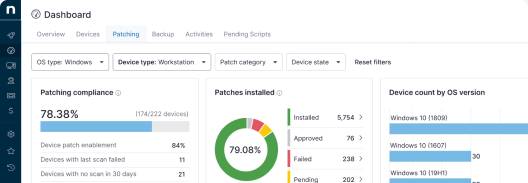
Pull compliance dashboards and patch summaries
Export data showing device compliance levels, system details report, recent patch deployments, and outstanding vulnerabilities. These on-demand, evidence-based, specialized reporting capabilities make the analysis more actionable for stakeholders.
Build report snapshots into your brief template
Copy or export NinjaOne snapshots into the structured template you provide to clients. This ensures consistency in both format and source of truth.
Tag affected assets for contextual clarity
Use NinjaOne’s asset tagging capabilities to highlight which devices are out of compliance, vulnerable, or approaching end of life. This feature adds context without clutter.
MSPs can leverage NinjaOne RMM® for reducing manual workflows while improving reporting coverage and transparency.
Quick-Start Guide
NinjaOne provides robust capabilities for communicating device risk to MSPs:
1. Vulnerability Management
- Integrates vulnerability scans from multiple vendors (Qualys, Rapid7, Tenable, CrowdStrike)
- Provides detailed vulnerability information including:
- CVE details
- CVSS (Common Vulnerability Scoring System) scores
- Impacted devices
- Remediation recommendations
2. Dashboard Risk Indicators
- Device health status indicators
- Risk level visualizations
- Ability to see number of devices affected by vulnerabilities
- Clickable links to drill down into specific vulnerability details
3. Patch Management Risk Tracking
- Shows patches with associated CVEs
- Displays vulnerability severity (Critical, High, etc.)
- Allows filtering and searching of patches by CVE number
- Provides context on patch release dates and potential system impacts
4. Compliance and End-of-Life Insights
- Device health sections that highlight potential risks
- Options to track and manage device statuses
Why choose quarterly network health checks
When MSPs consistently apply the principles discussed above, they not only earn the client’s trust but also empower their own stack and organizational resilience. Here’s an outline and quick summary:
- Rely on verifiable facts, not emotional qualifiers.
- Keep risk briefs predictable and easy to act on.
- Turn raw data into intuitive dashboards, charts, or snapshots.
- Present multiple options with clear trade-offs.
- Make risk review a habit with built-in accountability.
- Leverage NinjaOne data and IT documentation for scalability.
With data-driven, structured messaging, MSPs can make IT risk management reporting more collaborative and intuitive for all stakeholders. This process organically builds trust between parties and eliminates vagueness that can lead to oversight and poor communication.
Related topics: