
Key Points
- AI in Unified Endpoint Management (UEM) helps IT teams process large volumes of endpoint data and maintain visibility across growing endpoint environments.
- AI improves endpoint visibility by analyzing device health, security status, compliance data, and activity across managed endpoints.
- Machine learning can identify unusual behavior and help security teams focus on the devices and events that pose the highest risk.
- AI supports proactive endpoint management by identifying early signs of device failure and helping teams address issues before they affect users.
- AI-powered automation reduces manual workload by assisting with patching, remediation, policy management, and other routine endpoint tasks.
Many enterprises now manage hundreds, if not thousands, of endpoints. As endpoint environments grow, maintaining visibility and control becomes more difficult. Unified Endpoint Management (UEM) helps IT teams manage endpoints from a centralized platform, making day-to-day management more manageable.
However, UEM alone can only go so far. Managing endpoints at scale generates more telemetry than most teams can realistically process. That makes it harder to maintain clear visibility, prioritize tasks, and respond quickly to issues. That’s where AI in Unified Endpoint Management comes in.
This guide explains how AI supports UEM and where it can add practical value to endpoint management workflows.
What is Unified Endpoint Management?
Unified Endpoint Management (UEM) is a framework that empowers IT and security teams to manage and secure all endpoint devices (laptops, desktops, mobile devices, servers, and other connected systems) from a single platform, regardless of where they’re located or which operating system they run.
Instead of juggling multiple tools for different device types and management tasks, teams use UEM to bring those functions together in one place. That way, they can manage endpoints more efficiently across the environment.
How AI supports Unified Endpoint Management
About 135,000 endpoint devices were being managed by the average U.S. enterprise in 2022, and IT teams couldn’t fully see or monitor nearly half of them. Given the continued growth of endpoint environments since then, those numbers have likely increased even further today.
As endpoint environments grow and become more distributed, the volume of endpoint data quickly outpaces what teams can manually review and act on.
This is one of the main reasons AI is being added to UEM platforms. While traditional endpoint management relies on manual review and rule-based policies, AI can process large volumes of endpoint data continuously and help surface what needs attention. Here’s what that plays out in practice.
Endpoint visibility and asset discovery
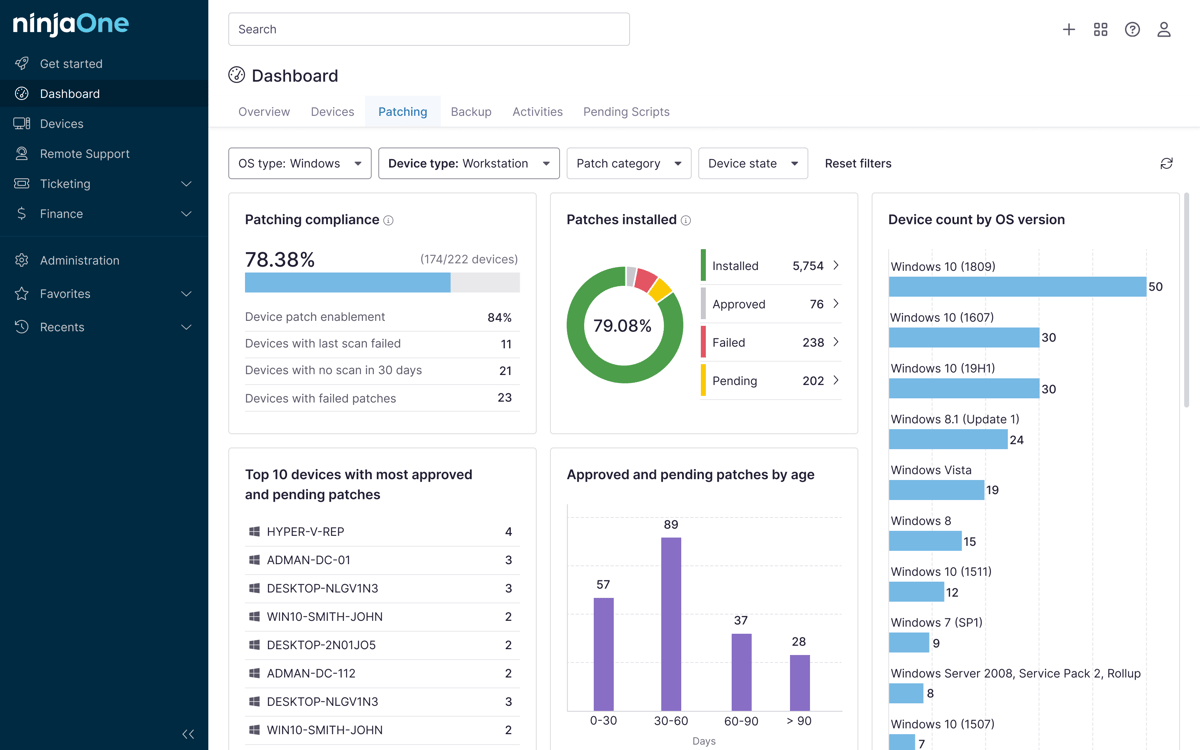
UEM gives IT teams an inventory of managed devices, but is simply knowing a device exists enough? Having a list of devices is useful, but it doesn’t tell teams what’s actually happening on those devices. AI helps fill in the gaps by providing ongoing insight into device health, security, compliance, and activity.
AI analyzes a variety of endpoint signals. These include patch and update status, endpoint protection coverage, configuration drift, device performance metrics, changes in ownership or location, and unmanaged or shadow devices.
Endpoint security and risk prioritization
AI also supports UEM by spotting patterns that may point to a threat, such as unusual process behavior, abnormal user activity, or early signs of ransomware.
And because not every alert is equally important, machine learning models analyze endpoint activity over time to identify deviations from normal behavior and assign risk levels to devices or events. AI endpoint security helps establish behavioral baselines and flag activity that warrants attention.
As a result, suspicious activity can be detected faster, alerts can be prioritized more effectively, and incident triage becomes more efficient.
Device health monitoring and predictive maintenance
AI in UEM also helps teams shift from reactive troubleshooting to proactive device management. Instead of waiting for something to break, AI can identify early signs of failure or degradation, giving teams time to address issues before they affect users.
This is especially valuable in large environments where IT teams may not have the visibility or capacity to track the health of every endpoint manually.
Workflow automation and remediation
Much of what occupies IT teams at the endpoint level is repetitive, such as pushing patches, enforcing configuration standards, resetting policy drift, and escalating alerts that follow predictable patterns. These tasks require consistent execution at scale, which is where AI-supported automation can help.
AI can recommend patch deployment sequences, trigger scripts to fix common issues, and suggest policy updates based on what’s happening across the environment. With AI handling routine tasks, manual effort is reduced, and IT teams can have more time to focus on higher-risk situations and strategic work.
Benefits of AI-powered Unified Endpoint Management
In short, AI helps UEM do more with the endpoint data they already collect. For IT and security teams, that means less time spent on manual, repetitive tasks. For the organization, it means a more efficient and scalable endpoint environment. Some of the most practical benefits include:
- Faster detection and response – AI highlights issues earlier, allowing teams to respond before they escalate.
- Reduced manual overload – Automation handles repetitive tasks, freeing teams to focus on higher-priority work.
- Improved visibility and decision-making – Better insight into device health and risk leads to more accurate decisions.
- Better prioritization of critical issues – AI surfaces the most important alerts, reducing noise and improving triage.
- More proactive endpoint management – Teams can address issues early instead of reacting after disruptions occur.
Challenges and governance considerations
AI used in UEM is not without its own limitations. Yes, it can improve how endpoint environments are managed, but without proper controls in place, it can also introduce new risks. What’s needed are clear boundaries around what it can analyze, recommend, and automate.
Here’s where enterprises need to pay close attention.
Data quality
AI is only as reliable as the data it works with. If endpoint telemetry is incomplete, outdated, inconsistent, or fragmented, the recommendations and insights will reflect that; worse, it can be misleading.
Human oversight
AI should help teams make decisions, not make decisions for them. Teams need to understand why a recommendation was made and stay in control of what actions are taken. This is especially important for high-impact actions, such as isolating devices or applying policy changes.
Compliance and privacy
Organizations need to make sure AI is used responsibly and in line with privacy requirements and internal policies because, keep in mind, endpoint data often contains sensitive information. To maintain accountability, the best practices are keeping audit logs, controlling access, and tracking automated actions.
Common mistakes when adopting AI in UEM
Here are some common mistakes IT teams should avoid when adopting AI in Unified Endpoint Management (UEM).
- Treating AI as a replacement for IT oversight
- Automating actions without approval controls
- Relying on insights without validating data quality
- Ignoring unmanaged or off-network devices
- Using disconnected tools that fragment visibility
- Overlooking compliance and audit requirements
AI in Unified Endpoint Management for scaling endpoint control
AI can make endpoint management more manageable by helping teams keep up with the growing volume of endpoint data. Instead of relying entirely on manual review, teams can use AI to better understand what’s happening across the environment and respond more efficiently when issues arise.
That said, AI should support decision-making rather than replace it. Remember that human oversight remains essential, especially when automated actions can affect users or security policies.
Related topics: