Patch automation with NinjaOne RMM
Patch automation software in NinjaOne RMM approves and schedules OS patching on Windows, macOS, and Linux and third-party software patching on Windows and macOS.
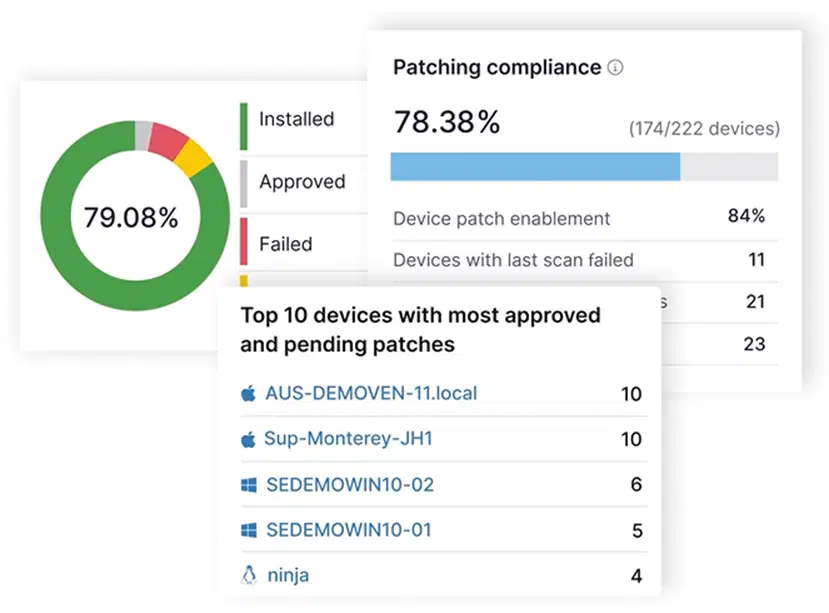
Patch automation software in NinjaOne RMM approves and schedules OS patching on Windows, macOS, and Linux and third-party software patching on Windows and macOS.






Keeping endpoints updated can become challenging when IT teams manage multiple operating systems, applications, and deployment schedules. NinjaOne RMM helps reduce manual patching tasks while giving technicians greater control over update approvals, deployments, and monitoring.
| Problem | How NinjaOne RMM addresses it |
Manually approving updates increases IT workloads. | NinjaOne RMM uses policy-based approval and rejection rules to automate routine patch decisions, reducing manual reviews. |
Problematic updates can introduce system instability. | NinjaOne RMM uses Patch Intelligence AI to flag Windows patches with known issues and, when configured, require manual approval or reject them. |
Different operating systems and applications require ongoing maintenance. | NinjaOne RMM schedules OS patching across supported endpoints and third-party software updates on Windows devices. |
Limited visibility makes it difficult to identify devices missing updates. | NinjaOne RMM provides centralized patch monitoring and reporting to help technicians identify missing updates and track deployment progress. |
NinjaOne RMM helps IT teams and MSPs reduce repetitive patching tasks, manage update risks, and maintain visibility across supported endpoints.
NinjaOne RMM automates routine patch approvals and scheduled deployments, helping technicians spend less time managing individual updates and more time addressing critical IT tasks.
NinjaOne RMM helps reduce exposure to known vulnerabilities by deploying approved security patches across managed endpoints according to configured policies.
NinjaOne RMM uses Patch Intelligence AI to flag Windows updates with known issues, helping administrators review or reject potentially disruptive patches before deployment.
NinjaOne RMM lets IT teams configure patch installation schedules and reboot settings to help minimize interruptions during business hours.
NinjaOne RMM provides centralized patch reporting to help teams identify missing updates, track deployment results, and document patch status for internal reviews and audits.

NinjaOne RMM lets administrators define approval and rejection rules for different patch categories. Teams can automate routine decisions while retaining the option to review specific updates manually.

NinjaOne RMM allows technicians to configure scanning and installation schedules for supported operating systems and third-party applications. Reboot settings can also be adjusted to accommodate maintenance requirements.

NinjaOne RMM uses Patch Intelligence AI to identify Windows updates with known issues or potential risks. When enabled and configured, approval overrides can change automatically approved patches to require manual approval or be rejected.

NinjaOne RMM automates updates for supported third-party applications across Windows and macOS endpoints. Administrators can select applications and configure patching schedules and approval settings through platform-specific policies.

NinjaOne RMM provides patch reports that show update availability and patch status across managed endpoints. Technicians can use them to find devices that need attention.
NinjaOne RMM helps IT teams and MSPs apply consistent patching practices across different environments. Common applications include:
IT teams can use NinjaOne RMM to schedule operating system and supported third-party software updates across managed devices. Configurable approval rules help prioritize security patches while allowing administrators to review or reject specific updates when necessary.
NinjaOne RMM allows administrators to coordinate supported server updates through scheduled maintenance windows and configurable reboot settings. Teams can control when approved patches are installed, helping reduce interruptions to critical business operations.
MSPs can use NinjaOne RMM to establish patching policies for different customer environments. Technicians can configure approval rules and deployment schedules according to each client’s requirements while monitoring patch status from a centralized platform.
100,000
Endpoints managed
“NinjaOne is a scalable solution. It’s built on a modern SaaS architecture and it’s future-proof.”

40%
More Cost Effective
“NinjaOne’s price point is 40% less than any other endpoint management tool on the market, while being more powerful and easy to use.”

10-15
Tools Replaced
“Before, I needed 10-15 different tools to execute what NinjaOne does in its centralized, single pane of glass.”

30%
Less time for patching
“We observed a 30% reduction in the time taken for patch deployments compared to our previous solution.”

2,000
Endpoints managed
“NinjaOne gives me much more flexibility and security in my work”

30%
Annual ROI
“[NinjaOne] has already shown its value in ROI…it’s at least a hundred thousand dollars annually.”

24x
Faster Endpoint Management
“Our processes have become 24x faster with NinjaOne.”

20-40
Hours Saved Each Week
“Leveraging the automations feature within NinjaOne has enabled me to save upwards of what would likely be 20 to 30 to even 40 hours per week.”

Enable patch management in NinjaOne RMM to activate automated patching capabilities.
Define patch approval rules, scanning and installation schedules, and reboot preferences in NinjaOne RMM.
Assign the configured NinjaOne RMM policies to the appropriate managed endpoints.
Track patch status, identify failed updates, and generate reports using NinjaOne RMM.
NinjaOne RMM works with supported tools to expand software update capabilities and simplify application maintenance across managed endpoints.
NWF Agriculture uses NinjaOne to automate server updates, eliminating a process that previously required four days of manual work and saving 32 hours each month.
"NinjaOne automations completely removed manual server updates that previously took four days – that’s 32 human-hours saved every month."
Ashley Watson IT Manager, NWF Agriculture
Automate patch approvals, schedule deployments, and monitor updates across managed endpoints with NinjaOne RMM.
NinjaOne RMM patch automation uses configurable policies to scan for, approve, and deploy operating system and third-party software updates across managed endpoints. IT teams can schedule installations, control patch approvals, and monitor update status from a centralized platform.
Yes. NinjaOne RMM allows administrators to automatically approve, reject, or require manual review of patches based on configured policies. For Windows OS updates, Patch Intelligence AI can also be enabled to flag known issues and override automatic approvals when configured.
NinjaOne RMM automates patching across supported Windows, macOS and Linux devices through configurable policies. Administrators can define approval rules, schedule patch scans and installations, configure reboot behavior, and monitor deployment results with capabilties varying by operating system.
Yes. NinjaOne RMM supports third-party software patching on Windows, macOS, and Linux endpoints, with capabilities varying by operating system. Administrators can configure patching policies and schedules for supported applications, helping maintain software updates alongside operating system patches.
Unlike WSUS, which requires dedicated server infrastructure, NinjaOne RMM provides cloud-based patch management without requiring an on-premises server. It supports OS and third-party application patching across Windows, macOS, and Linux endpoints, with configurable patch approvals, automated deployment schedules, and centralized reporting.