Command Line Tools That Power Modern IT With NinjaOne

Command line tools remain essential for IT teams who need speed, precision, and control. While graphical interfaces have evolved, the command line still delivers unmatched efficiency for automation, troubleshooting, and system management. NinjaOne brings command-line power into a modern unified IT platform. It allows teams to execute scripts, manage devices, and resolve issues faster without sacrificing security or visibility.
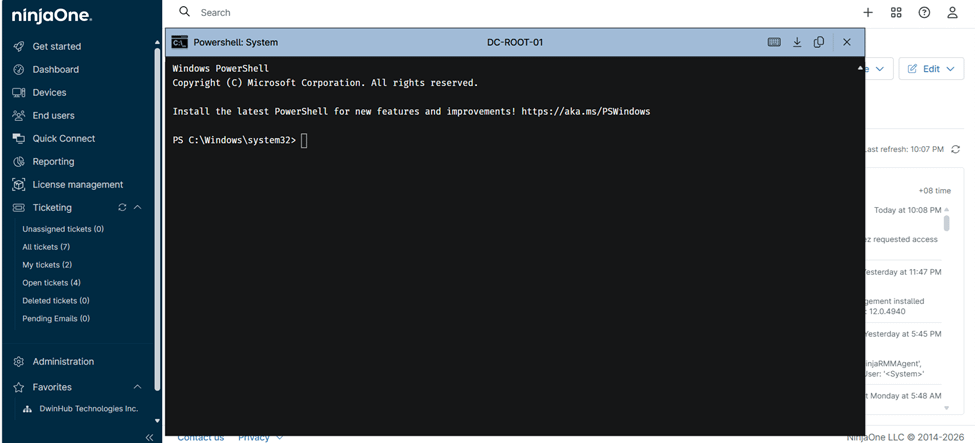

Command Line Tools
IT business logo
Provide logo
Advantage Technologies logo
Dedicated IT logo
Alticap logo
Network Coverage logo

Built for speed, control, and modern IT workflows

Centralized Command Line Management

NinjaOne allows IT teams to run command-line instructions across Windows, macOS, and Linux devices from a single dashboard. This eliminates the need to log into each system individually. Centralized execution improves consistency and reduces human error during maintenance and troubleshooting.

Faster Issue Resolution Through Automation

By combining command-line tools with automation policies, NinjaOne helps teams resolve recurring issues in seconds. Scripts can be triggered manually or automatically based on conditions. This dramatically reduces downtime and frees technicians to focus on higher-value work.

Secure Remote Execution at Scale

All command-line activity in NinjaOne is protected by role-based access controls and encrypted connections. Teams can confidently execute powerful commands without exposing systems to unnecessary risk. This balance of control and security is critical for distributed environments.

Cross-Platform Support Without Complexity

NinjaOne supports native command line execution across multiple operating systems. IT teams can use familiar tools like CMD or PowerShell on Windows, Bash on MacOS and Linux, directly from the NinjaOne console. This approach eliminates the need to switch platforms or use separate remote access tools, simplifying management in mixed device environments.

Improved Visibility and Accountability

NinjaOne logs all remote session access requests, creating a reliable audit trail for compliance and troubleshooting. Teams can see when a session was initiated and by whom, providing clear visibility into remote access activity.

Operational Efficiency for Growing IT Teams

As organizations scale, NinjaOne makes it easy to manage hundreds or thousands of endpoints with command-line tools. Bulk actions and automation reduce manual effort. IT teams stay efficient even as infrastructure grows.

Powerful command line capabilities designed for real-world IT teams

Built better, from day one icon

Remote Command Execution

Run command line instructions on remote devices without interrupting users. NinjaOne enables silent execution for background tasks and maintenance. This keeps end users productive while IT works behind the scenes.

Script Library and Reuse

Create, store, and reuse scripts through its built-in automation library. Teams can standardize everyday tasks like cleanup, updates, or configuration changes. This ensures consistent outcomes across all managed devices.

Automation Driven Command Triggers

Command-line scripts can be linked to monitoring checks, alerts, and policies. When an issue is detected, NinjaOne can automatically run corrective commands. This proactive approach reduces incidents before users even notice them.

Simplicity by design icon

Role-Based Access and Permissions

Use granular permissions to control access to remote tools and automations, ensuring sensitive capabilities are available only to authorized technicians.

Instant visibility and control icon

Cross OS Script Support

NinjaOne supports PowerShell for Windows and shell scripts for macOS and Linux. Teams can manage diverse environments without separate tools. This simplifies workflows and reduces tool sprawl.

legal holds icon

Execution Logging and Reporting

NinjaOne logs remote session access requests to provide an auditable record of technician activity. IT leaders can review when access was initiated and by whom to support audits, troubleshooting, and accountability.

Real-world ways teams rely on command-line tools every day

Remote Troubleshooting and Repair

IT technicians frequently need to diagnose issues that are not visible through a user interface. With NinjaOne command line tools, they can run diagnostics, check services, and modify configurations remotely. This eliminates the need for VPN sessions or user intervention. Problems are resolved faster with fewer disruptions. The result is improved user satisfaction and reduced support tickets.

Automated System Maintenance and Cleanup

Routine maintenance tasks such as disk cleanup, service restarts, and log management are ideal for command-line automation. NinjaOne allows teams to schedule or trigger these scripts across all devices. Maintenance happens consistently without manual effort. Systems stay healthy and performant over time. IT teams regain hours each week previously spent on repetitive work.

Managed Service Provider Operations

MSPs manage diverse client environments with strict security and efficiency requirements. NinjaOne command line tools enable MSPs to deploy fixes, updates, and configurations at scale. Scripts can be customized per client while managed centrally. Detailed logging supports compliance and client reporting. This helps MSPs deliver reliable service while protecting customer environments.

Related Resources

This is why customers love us

Ready to simplify the hardest parts of IT?

Command Line Tools FAQs

Command-line tools allow IT professionals to interact directly with operating systems using text-based commands. They are commonly used for automation, troubleshooting, configuration, and system maintenance. These tools provide speed, precision, and flexibility that graphical interfaces often cannot match.

NinjaOne enables command-line–based scripts to be used across its device management platform through remote actions, scheduled automations, and policy-based automations. IT teams can automate tasks, respond to alerts, and manage devices at scale, with access securely controlled and centrally managed.

When implemented correctly, command-line tools are safe and highly effective. NinjaOne protects remote command execution with encryption, role-based access, and audit logs. This ensures powerful capabilities are used responsibly.

Yes, NinjaOne allows command-line scripts to be automated through policies and scheduled automations. This enables proactive remediation and consistent maintenance across all managed devices. Automation reduces manual work and improves reliability.

Command-line tools are supported across Windows, macOS, and Linux environments. NinjaOne enables teams to use native scripting languages for each platform. This makes cross-platform management more straightforward and more efficient.