Discover Every Device on Your Network
Automatically find computers and other connected devices across your network and keep your IT asset inventory accurate with clear visibility into new and unmanaged systems.
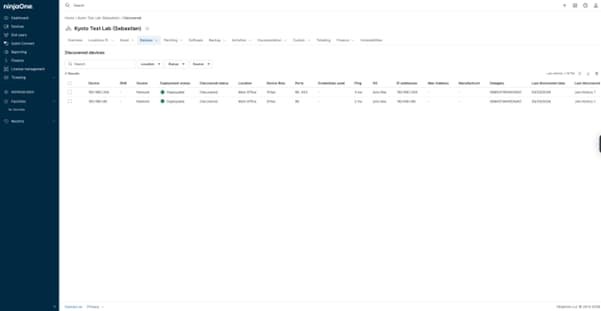
Automatically find computers and other connected devices across your network and keep your IT asset inventory accurate with clear visibility into new and unmanaged systems.






See all active devices on the network in one place, so IT always knows what is connected and what may need to be managed.
Identify unknown or unmanaged devices early to reduce blind spots and improve security oversight across the environment.
Quickly bring newly discovered devices into monitoring by deploying the NinjaOne agent, reducing manual work and speeding up setup.

Run network scans on demand or on a defined schedule to detect active devices within configured network ranges.

Define IP ranges to scan and identify reachable devices connected to the network.

View discovered devices in a centralized console list to review what was detected and assess management status.

Deploy the NinjaOne agent to selected discovered devices to bring them under monitoring and management.
Asset Discovery supports everyday IT operations by helping teams identify and manage devices across changing environments. Below are common scenarios where it delivers practical value:
When taking over a new network, IT teams can run a scan to quickly see what devices are connected. This helps build an initial asset inventory and identify which systems should be monitored.
If new computers are added without IT involvement, network scans help identify devices that do not yet have the NinjaOne agent installed, so they can be reviewed and managed.
In environments where devices frequently change, scheduled scans help ensure the asset inventory reflects what is actively connected to the network.
In this article, we’ll discuss common methods for identifying and securing undiscovered and unmanaged devices, as well as implementing policies that minimize this particular threat.

In this guide, we’ll cover the step-by-step process to identify missing network devices and standardize discovery practices across all client environments.
Today, we’ll show you how to manually audit and clean up orphaned devices without relying on scripts or automation.
100,000
Endpoints managed
“NinjaOne is a scalable solution. It’s built on a modern SaaS architecture and it’s future-proof.”

40%
More Cost Effective
“NinjaOne’s price point is 40% less than any other endpoint management tool on the market, while being more powerful and easy to use.”

10-15
Tools Replaced
“Before, I needed 10-15 different tools to execute what NinjaOne does in its centralized, single pane of glass.”

30%
Less time for patching
“We observed a 30% reduction in the time taken for patch deployments compared to our previous solution.”

2,000
Endpoints managed
“NinjaOne gives me much more flexibility and security in my work”

30%
Annual ROI
“[NinjaOne] has already shown its value in ROI…it’s at least a hundred thousand dollars annually.”

24x
Faster Endpoint Management
“Our processes have become 24x faster with NinjaOne.”

20-40
Hours Saved Each Week
“Leveraging the automations feature within NinjaOne has enabled me to save upwards of what would likely be 20 to 30 to even 40 hours per week.”

Asset Discovery in NinjaOne RMM automatically identifies devices connected to a managed network and provides visibility into endpoints that are not yet under monitoring. It is important because it helps IT teams maintain an accurate asset inventory, detect unknown or unmanaged devices, and ensure all critical systems are properly managed and secured.
NinjaOne automatically discovers devices by scanning managed networks and identifying active systems using multiple discovery methods. These include network protocols such as SNMP, Telnet, and SSH, as well as Active Directory discovery to identify domain-joined computers.
Yes. NinjaOne Asset Discovery can detect devices connected to a managed network that are not currently being monitored, allowing IT teams to quickly identify unmanaged or unknown systems and decide whether they should be brought under management.
NinjaOne can detect devices that respond to network discovery scans, including computers such as workstations and servers, as well as network devices that expose services like SNMP, SSH, or Telnet. This typically includes infrastructure such as printers, switches, and routers, helping IT teams maintain a more complete asset inventory.
Network scans can be scheduled within NinjaOne, allowing IT teams to define how often discovery runs to identify new or existing devices on the network.
Asset Discovery in NinjaOne uses network scanning to detect active devices on a managed network, which allows visibility into systems even if they do not yet have the NinjaOne agent installed.
Asset discovery improves security and compliance by identifying devices connected to the network that may not yet be included in the IT asset inventory. By regularly scanning the network, IT teams can detect unknown systems and decide which assets should be reviewed, monitored, or managed to maintain better visibility and control over their environment.
Discovered devices can be reviewed and then onboarded into monitoring by deploying the NinjaOne agent, allowing them to be fully managed within the platform.
NinjaOne shows discovered devices in a centralized view where IT teams can see which systems were detected and decide which ones should be managed.
Asset Discovery helps IT teams scale by automatically detecting devices across different networks, giving centralized visibility without manual tracking as the environment grows.