Ad-hoc remote support with NinjaOne Remote
NinjaOne Remote lets IT teams start attended remote sessions on Windows, macOS, and Linux devices for on-demand troubleshooting and end-user support.
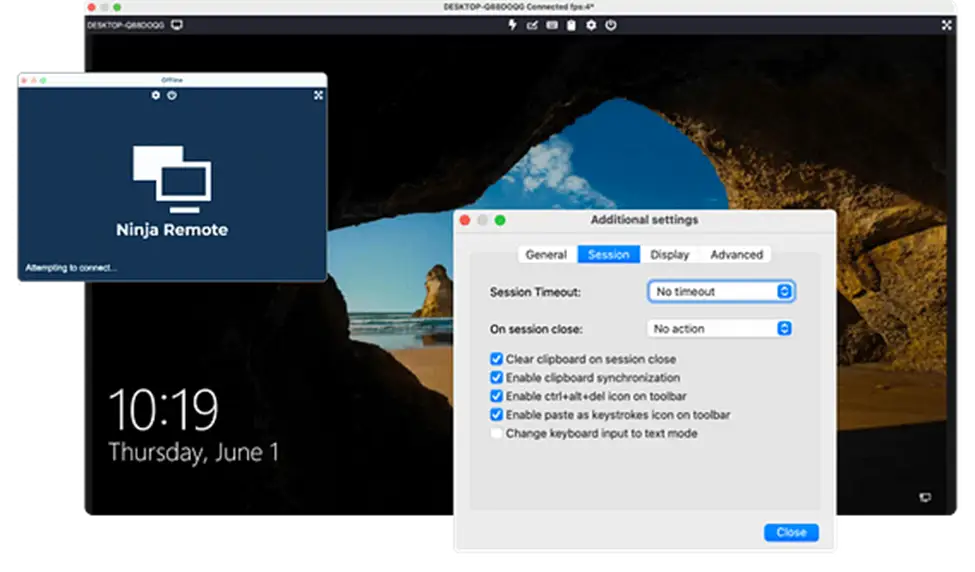
NinjaOne Remote lets IT teams start attended remote sessions on Windows, macOS, and Linux devices for on-demand troubleshooting and end-user support.






Providing immediate remote support can become difficult when technicians need to assist users across different devices, operating systems, and support scenarios. NinjaOne Remote addresses these challenges with ad-hoc remote access capabilities designed for real-time troubleshooting and end-user support.
| Problem | How NinjaOne Remote addresses it |
Users need immediate help with an issue | NinjaOne Remote lets technicians start attended remote sessions to troubleshoot issues directly with end users in real time. |
Unexpected issues require support as they arise | NinjaOne Remote lets technicians start attended remote sessions when users need assistance, providing direct access for on-demand troubleshooting. |
Some issues are difficult to diagnose without seeing the user’s screen | NinjaOne Remote provides live screen sharing, helping technicians see what the end user sees to identify and troubleshoot issues in real time. |
Complex issues may require help from another technician | NinjaOne Remote allows multiple technicians to join the same remote session, making it easier to collaborate when additional expertise is needed. |
NinjaOne Remote helps IT teams provide responsive, consistent support when users need immediate assistance, reducing the time and effort required to troubleshoot issues across distributed devices.
Technicians can connect directly with end users and troubleshoot issues in real time, helping reduce delays between a support request and resolution.
IT teams can provide attended remote assistance when users need direct help, giving technicians a way to address unexpected issues as they arise.
Technicians can diagnose and address issues remotely, reducing the need for onsite support and helping users return to work sooner.
Quick Connect lets technicians provide temporary remote assistance to devices that are not enrolled in NinjaOne, extending support to users and devices outside the managed environment.
NinjaOne Remote gives technicians the capabilities they need to respond to support requests as they arise, troubleshoot issues directly with end users, and provide attended assistance in real time.

NinjaOne Quick Connect lets technicians provide temporary remote support to devices that are not enrolled in NinjaOne through an invitation-based connection.

NinjaOne Remote lets technicians connect to and control remote devices, giving them direct visibility into the end user’s device for real-time troubleshooting and support.

NinjaOne Remote includes live chat during remote sessions, allowing technicians and end users to communicate while troubleshooting an issue.

NinjaOne Remote allows up to three technicians to remotely access the same device, supporting collaboration when an issue requires additional assistance or expertise.

NinjaOne Remote allows technicians to record remote sessions for later review when a record of the support interaction is needed.
NinjaOne Remote helps IT teams respond to support needs as they arise, giving technicians a direct way to assist end users and troubleshooting unexpected issues through attended remote sessions.
When an unexpected issue requires direct assistance, technicians can start an attended remote session to see what the user sees and troubleshoot the problem in real time.
MSPs can use Quick Connect to provide temporary remote assistance to devices that are not enrolled in NinjaOne, helping technicians respond to unexpected support needs across customer environments.
Technicians can record remote support sessions for later review, providing a record of the troubleshooting interaction when needed.
100,000
Endpoints managed
“NinjaOne is a scalable solution. It’s built on a modern SaaS architecture and it’s future-proof.”

40%
More Cost Effective
“NinjaOne’s price point is 40% less than any other endpoint management tool on the market, while being more powerful and easy to use.”

10-15
Tools Replaced
“Before, I needed 10-15 different tools to execute what NinjaOne does in its centralized, single pane of glass.”

30%
Less time for patching
“We observed a 30% reduction in the time taken for patch deployments compared to our previous solution.”

2,000
Endpoints managed
“NinjaOne gives me much more flexibility and security in my work”

30%
Annual ROI
“[NinjaOne] has already shown its value in ROI…it’s at least a hundred thousand dollars annually.”

24x
Faster Endpoint Management
“Our processes have become 24x faster with NinjaOne.”

20-40
Hours Saved Each Week
“Leveraging the automations feature within NinjaOne has enabled me to save upwards of what would likely be 20 to 30 to even 40 hours per week.”

Initiate an attended remote session to connect with the end user’s Windows, macOS, or Linux device when remote assistance is needed.
View and control the remote device and communicate with the end user during the session to diagnose and address the issue.
Communicate with the end user while viewing and controlling the remote device to work through the issue together.
End the remote session when support is complete, with the option to record sessions when a record is needed for later review.
Simplifying remote support for end users
Carahsoft uses NinjaOne Remote to connect directly to end-user devices without requiring additional applications, VPN connections, or lengthy phone-based troubleshooting. The streamlined workflow helps technicians provide remote assistance more efficiently and saves the team up to 15 hours per week.
“NinjaOne has enabled our team to operate the computer remotely as though it is right there in front of us.”
Rob Moore, Carahsoft
See how NinjaOne Remote helps IT teams provide immediate, attended remote support and troubleshoot end-user issues across Windows, macOS, and Linux devices.
NinjaOne Quick Connect provides ad-hoc remote support by allowing technicians to establish immediate, one-time connections to devices that are not already managed in NinjaOne. This helps IT teams respond to unexpected support needs without requiring a pre-installed NinjaOne agent.
NinjaOne Remote provides remote access to devices already managed in NinjaOne, while Quick Connect is designed for ad-hoc support of unmanaged devices through temporary, invitation-based access.
NinjaOne Remote supports attended remote sessions on Windows, macOS, and Linux devices. Some capabilities and requirements vary by operating system.
NinjaOne Remote supports up to three simultaneous connections to the same endpoint, allowing technicians to collaborate when additional assistance is needed.
NinjaOne Remote includes an in-session chat that technicians can use to communicate with the end user while providing remote assistance.
Technicians can record NinjaOne Remote sessions for later review. Recordings are saved on the technician’s device, and the recording directory can be changed in the session settings.