Patch Verification Reporting: Ensure Compliance and Control with NinjaOne

Whether you’re proving patch success to stakeholders, troubleshooting deployment issues, or maintaining security standards, NinjaOne gives you the clarity and control needed to ensure nothing slips through the cracks.
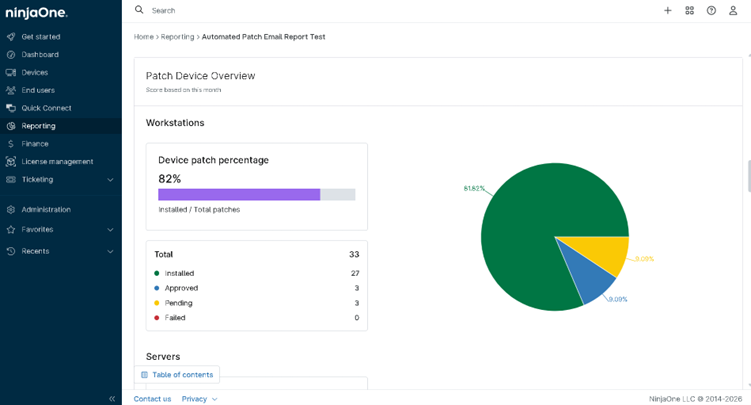
Patch Verification Reporting
IT business logo
Provide logo
Advantage Technologies logo
Dedicated IT logo
Alticap logo
Network Coverage logo

NinjaOne’s Patch Verification Reporting: Confidence Through Verified Compliance

End-to-End Patch Visibility

Gain complete clarity into patch deployment status across all endpoints. NinjaOne provides real-time and historical visibility into which patches are successfully installed, missing, failed, or pending, eliminating guesswork and ensuring full accountability.

Verified patch status aligned with compliance requirements

Move beyond deployment metrics to deeper verification. NinjaOne provides greater confidence that patches are not only deployed but properly applied, validated, and aligned with compliance requirements—supporting audit readiness and stronger security assurance.

Actionable Verification Insights

Turn patch data into clear, actionable insights. NinjaOne’s verification reporting highlights deployment outcomes, identifies failures or gaps, and helps teams quickly understand patch status across their environment, enabling reduced remediation time through faster detection and resolution of issues.

Audit-Ready Reporting

Generate clear, structured reports that demonstrate patch compliance and verification status. Whether for internal reviews or external audits, NinjaOne simplifies proof of patch management effectiveness.

What does this product do?

Real-Time Patch Verification Visibility

Instantly confirm whether patches are successfully deployed across all endpoints. Gain clear, up-to-date insight into patch status—including installed, missing, failed, or pending updates.

Installed Patch Status Breakdown

Drill down into detailed patch results by device, patch type, severity, or installation status. Quickly identify failed or incomplete updates and take targeted action to remediate issues.

legal holds icon

Automated Verification Reports & Scheduling

Reduce manual tracking with automated patch verification reports delivered on a schedule. Ensure stakeholders always have the latest patch status with minimal additional effort.

Customizable Patch Reporting Views

Tailor reports to highlight the most relevant patch data, whether by endpoint groups, operating systems, or critical updates. Focus on what matters most for visibility and accountability.

Exportable Patch Verification Reports

Export and share detailed patch verification data with ease. Generate clear records of patch deployment status, success rates, and remediation actions in formats that support operational workflows and stakeholder communication.

Transforming Patch Results into Strategic Security Actions

Proving Patch Compliance for Security Audits

Patch verification reports provide clear, timestamped evidence that critical updates have been successfully deployed across endpoints. During internal reviews or external audits, these reports reduce uncertainty by showing which devices are fully patched, partially compliant, or at risk. This helps organizations demonstrate compliance with requirements and better manage exposure related to unpatched vulnerabilities.

Identifying Failed or Missing Patches Before They Become Incidents

Instead of assuming patches were applied successfully, verification reports highlight endpoints where updates failed, were skipped, or remain pending. This allows teams to quickly isolate problematic devices, re-run deployments, or troubleshoot root causes before vulnerabilities can be exploited—reducing the risk of security breaches and downtime.

Validating Patch Rollouts Across Distributed Environments

For organizations managing remote or multi-site endpoints, patch verification reporting confirms that updates have reached every device regardless of location. Whether endpoints are on-premises, remote, or intermittently connected, these reports ensure no system is left behind, maintaining consistent security coverage across the entire environment.

Related Resources

This is why customers love us

Ready to simplify the hardest parts of IT?

Patch Verification Reporting FAQs

Patch Verification Reporting in NinjaOne is a feature that validates and reports the status of patch deployments across all managed devices. It provides visibility into whether patches have been successfully installed, are pending, or have failed, helping IT teams ensure systems remain secure and up to date. This reporting also highlights compliance levels and identifies any gaps in patching, allowing administrators to quickly address vulnerabilities and maintain a consistent security posture across their environment.

NinjaOne verifies that patches have been successfully applied by monitoring endpoint patch status and validating installation results through continuous patch compliance tracking and reporting. It collects data from managed devices to confirm whether updates were successfully installed, pending, or failed, and then aggregates this into patch status, compliance, and failure reports. These reports give IT teams visibility into which patches are properly applied across all endpoints and highlight any devices that still require remediation or reinstallation.

Patch verification reports in NinjaOne include key details that confirm whether patches have been successfully deployed across managed devices. These reports typically show overall patch compliance status, including how many devices are fully updated versus those that are non-compliant. They also provide installation results such as successful, failed, or pending patches, along with a breakdown of missing or required updates per endpoint. In addition, the reports highlight patch status details like reboot requirements and overall deployment outcomes, and may include patch enablement status to ensure devices are correctly configured for patching. Overall, patch verification reports give IT teams a clear view of what was patched, what failed, and what still needs attention to maintain security and compliance.

Patch verification strengthens compliance and audit readiness by helping teams confirm security patches are installed and validated across managed systems. It provides clear, documented proof of patch status, helping organizations meet regulatory requirements and easily demonstrate compliance during audits.

Yes. Failed or incomplete patch deployments can be identified through patch verification reports, which typically show installation status per device (successful, failed, pending, or partially completed), along with error codes and compliance summaries. This allows IT teams to quickly detect issues, investigate causes, and remediate unpatched endpoints.

IT teams can typically confirm patch deployment success quickly using automated tools, while full environment-wide verification depends on factors such as device connectivity, reporting intervals, and data synchronization across endpoints.

Yes, patch verification reports can be automated and scheduled using modern patch management tools. These systems automatically generate reports that show patch status, compliance levels, and deployment results without requiring manual effort. IT teams can configure the reports to run on a set schedule such as daily, weekly, or monthly and have them automatically sent to stakeholders via email or made available through dashboards. This ensures continuous visibility into patch compliance, helps quickly identify failed or missing updates, and improves efficiency by reducing the need for manual reporting and checks.

NinjaOne helps reduce risks from failed updates by automating key parts of the patch lifecycle, including scanning, approval workflows, deployment, and reporting, so IT teams can identify and address issues more efficiently. It provides centralized patch management with visibility into successful installs, pending updates, and failed patches, allowing teams to quickly detect and remediate problematic updates. It also includes alerts and notifications for failed or incomplete deployments, enabling faster response and helping minimize downtime or security exposure. In addition, reporting and compliance visibility support tracking and validation of patch activity across managed devices, helping reduce the likelihood of unpatched or partially applied systems remaining in production.

Yes, verification reporting can be integrated with other patch management features. In platforms like NinjaOne, it is built into the overall patch management workflow, allowing it to work alongside deployment, scheduling, compliance monitoring, and alerting. Once patches are deployed, verification reporting automatically confirms whether installations were successful, identifies any failures or missing updates, and updates compliance status in real time. This integration helps IT teams maintain continuous visibility across all endpoints and ensures that patching activities are properly tracked, validated, and documented for audit and security purposes without requiring manual verification.

Patch verification reporting improves IT visibility and control by showing which devices are fully patched, which ones failed, and what still needs attention. This helps IT teams quickly spot issues, ensure all systems stay updated, and maintain better security and compliance without manual checking.