NinjaOne Patch Reboot Coordination That Minimizes Disruption

NinjaOne helps IT teams coordinate patch-related restarts across Windows, macOS, and Linux endpoints through centralized, policy-driven controls that keep devices secure while minimizing user disruption.
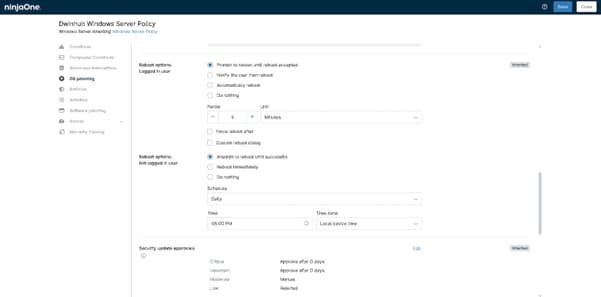
Patch Reboot Coordination
IT business logo
Provide logo
Logo Advantage Technologies
Logo Dedicated IT
Logo Alticap
Network Coverage logo

Gain Complete Control Over Patch Reboots Without Disrupting Productivity

Intelligent Reboot Scheduling That Aligns With Business Operations

NinjaOne enables IT teams to coordinate patch-related reboots around maintenance windows, business hours, and operational requirements. Schedule reboots during off-hours, stagger restart events across device groups, and reduce the risk of widespread disruptions while keeping systems secure and up to date.

Flexible User-Centric Restart Experiences

Minimize end-user frustration with configurable reboot notifications, countdown prompts, and deferral options. Administrators can balance security and compliance requirements with employee productivity by giving users visibility and control over impending restarts without sacrificing patching objectives.

Automated Reboot Enforcement for Critical Security Updates

Ensure critical patches are fully applied by automatically enforcing reboots when necessary. Policy-driven reboot controls help organizations close vulnerabilities faster, maintain compliance, and eliminate the security risks associated with postponed or incomplete patch deployments.

Coordinated Reboots Across Distributed Environments

Whether managing remote workforces, branch offices, servers, or hybrid infrastructure, NinjaOne provides centralized reboot coordination across Windows, macOS, and Linux devices. Standardized policies ensure consistent behavior while allowing exceptions for critical systems and operational priorities.

Granular Policy-Based Reboot Management

Create tailored reboot workflows for different device types, departments, and workloads. Configure separate restart behaviors for servers, workstations, and remote endpoints, ensuring every system follows the reboot strategy that best matches its business function and risk profile.

Reduced Downtime Through Maintenance Window Automation

Automate patch installation and reboot activities within designated maintenance windows to minimize service interruptions. NinjaOne can coordinate patch deployment, pre-patch automation, reboot execution, and post-update validation as part of a streamlined end-to-end patching workflow.

What does this product do?

Simplicity by design icon

Centralized Reboot Scheduling Across All Endpoints

Coordinate endpoint restarts around maintenance windows, business hours, or custom schedules. Automatically enforce reboots after patch installation while giving users enough notice to save work and avoid productivity interruptions.

automation icon

Configurable User Restart Prompts

Deliver customizable reboot notifications that allow end users to postpone restarts within IT-defined limits. Balance security requirements with user productivity by providing advance warning before mandatory system restarts.

legal holds icon

Automated Reboot Enforcement for Compliance

Ensure security updates are fully activated by automatically rebooting devices that exceed defined grace periods. Prevent endpoints from remaining indefinitely in a “pending reboot” state that leaves vulnerabilities unresolved.

Policy-Based Reboot Controls

Create different reboot behaviors for servers, workstations, kiosks, and remote devices. Define separate rules for logged-in users, unattended systems, maintenance windows, and critical infrastructure to match operational requirements.

Reboot Coordination for Offline Devices

Automatically apply reboot actions when previously disconnected endpoints come back online. Reduce administrative effort by ensuring patching workflows continue even when devices miss scheduled maintenance windows.

Built better, from day one icon

Pre- and Post-Patch Automation Workflows

Trigger custom scripts and automations before and after patch-related reboots. Stop critical services, notify stakeholders, validate application health, or perform post-restart checks to streamline patch deployment processes.

How IT teams use Patch Reboot Coordination to reduce disruption and maintain control over patch outcomes

Coordinating Reboots to Prevent User Disruption in Business-Critical Environments

In environments where endpoints are actively used during business hours—such as finance, healthcare, and customer support—uncontrolled reboots can cause data loss and workflow interruptions. IT teams use patch reboot coordination to enforce structured reboot windows tied to user activity, time zones, and device usage patterns.

Instead of forcing immediate restarts after patch installation, administrators configure reboot deferrals, user prompts, and escalation timers that adapt to endpoint status (idle vs. active users). Devices that miss their maintenance window are automatically queued for the next approved cycle, ensuring compliance without interrupting critical work.

Ensuring Patch Completion Through Managed Reboot Enforcement

A common failure point in patch management is not the patch itself, but the reboot required to finalize installation. Many endpoints remain “partially compliant” because users postpone restarts indefinitely. With coordinated reboot policies, IT teams enforce structured reboot behavior based on patch criticality. High-risk security updates can trigger mandatory reboot timers, while lower-priority updates allow flexible scheduling. Systems can be configured to escalate from soft prompts to enforced restarts if users repeatedly defer action.

Aligning Reboots with Global Maintenance Windows in Distributed Organizations

For organizations operating across multiple regions and time zones, reboot coordination prevents overlapping disruptions that could impact productivity. IT teams schedule patch deployments globally but stagger reboot execution based on local maintenance windows. Devices in different regions receive updates simultaneously, but reboot execution is deferred until predefined local hours (e.g., after business hours or during low utilization periods). Offline endpoints automatically inherit the next available reboot window once they reconnect.

How to Configure Patch Reboot Coordination in NinjaOne

Patch reboot coordination in NinjaOne is managed through OS patching policies, allowing you to control when updates install and how device restarts are handled to avoid disruption.


1. Access OS Patching Settings

Go to Administration > Policies, then open or create a Dynamic Policy and select OS Patching.


2. Configure Update Scheduling

Set when patches should be applied using the Update Schedule. You can schedule installs during maintenance windows, stagger deployments across devices, and define how missed or offline endpoints are handled.


3. Set Reboot Behavior

Under Reboot Options, configure restart behavior after patching. Choose automatic or user-prompted reboots, set warning intervals for logged-in users, and define rules for active vs. inactive sessions.


4. Save and Apply

Save the policy and assign it to the relevant device groups. Patch reboots will now follow your configured schedule and reboot rules automatically.

Avoid the chaos of unplanned reboots and disruptive patch cycles. With NinjaOne’s patch reboot coordination, your IT team can precisely control when and how endpoints restart after updates—minimizing downtime, preventing user disruption, and keeping business operations running smoothly.

From scheduled maintenance windows to user-aware reboot prompts and staggered restart policies, every reboot is coordinated with full visibility and policy-driven control. Whether you’re managing a small fleet or a global endpoint environment, you stay in control of every restart decision.

Stop reacting to unexpected reboots—start orchestrating them.

Related Resources

This is why customers love us

Ready to simplify the hardest parts of IT?

Patch Reboot Coordination FAQs

Patch Reboot Coordination in NinjaOne is the set of controls that lets IT teams manage when and how devices restart after patches are installed. It ensures reboots happen during approved maintenance windows, can be staggered across devices, and can be customized based on user activity to reduce disruption while still completing patch deployment.

Coordinated reboots are important after patch deployment because many patches only take full effect after a restart. They help ensure updates are properly activated, reduce user disruption by controlling restart timing, and prevent security gaps caused by devices that remain un-rebooted after patching.

NinjaOne manages endpoint restarts after updates through policy-based reboot controls that let IT teams schedule, delay, or enforce reboots based on maintenance windows and device activity. This ensures patches are fully applied while minimizing disruption by coordinating restart timing, sending user notifications when needed, and staggering reboots across devices to avoid widespread downtime.

Yes. In NinjaOne, reboot schedules can be customized per device or group using patching policies, allowing different maintenance windows and restarting rules based on role, priority, or environment.

Patch reboot coordination reduces user disruption by controlling when and how device restarts happen after updates are installed, instead of allowing immediate or unpredictable reboots. It batches updates into defined maintenance windows, staggers restarts across devices, and can delay reboots until users are idle or outside working hours. This prevents sudden interruptions during active work, avoids widespread simultaneous downtime in a single team, and helps IT maintain productivity while still ensuring systems are fully patched and secure.

Yes. Users can receive advance restart notifications, allowing them to save their work before the system automatically reboots.

Coordinated reboot management improves patch compliance by ensuring required restarts happen on schedule so updates can fully install across devices. It reduces user-driven reboot delays, helps reduce the number of devices that remain pending reboot, and helps keep compliance status accurate and up to date across the entire environment.

Yes. Reboot policies can be tied to maintenance windows so restarts only occur during approved time periods. This ensures updates are applied while minimizing user disruption, as devices are prevented from rebooting outside scheduled maintenance windows and are automatically restarted when the window opens or within its allowed timeframe.

In NinjaOne, devices that miss a scheduled restart are automatically marked as pending reboot and remain non-compliant until they restart. The system continues enforcing reboot requirements by re-notifying users and reattempting restarts during the next available maintenance window, based on policy settings. Administrators can also configure reboot enforcement settings to eventually require a restart if a device repeatedly misses scheduled reboot windows.

Patch reboot coordination improves IT efficiency by scheduling and automating restarts as part of the patch process, ensuring updates are fully applied without disrupting users. It reduces manual follow-ups, minimizes downtime, and prevents devices from remaining unpatched due to missed reboots. This leads to faster compliance, fewer support tickets, and a more predictable maintenance workflow.