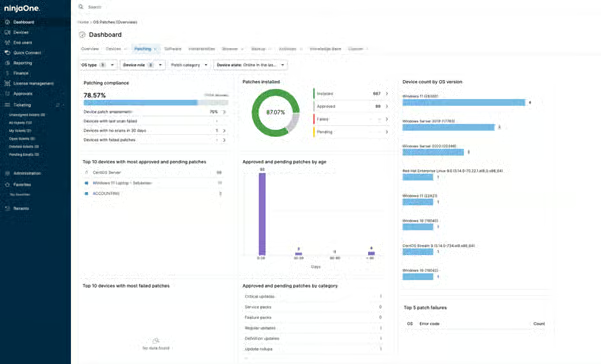
NinjaOne Patch Management dashboard for patch status and compliance visibility

NinjaOne Patch Management centralizes patch status across Windows, macOS, and Linux endpoints, with real-time visibility into installed, pending, and failed patches.

NinjaOne Patch Management dashboard for patch status and compliance visibility featured image
IT business logo
Provide logo
Advantage Technologies logo
Dedicated IT logo
Alticap logo
Network Coverage logo

How NinjaOne addresses patch management visibility challenges

IT teams need a clear way to understand patch activity across managed endpoints. Here is how the NinjaOne Patch Management dashboard addresses common visibility and tracking challenges.


Problem

How NinjaOne Patch Management resolves it

Hard to see patch status across all devices

The NinjaOne Patch Management dashboard brings patch status into one view across Windows, macOS, and Linux endpoints.

Difficult to find devices that need attention

The NinjaOne Patch Management dashboard helps IT teams identify endpoints with pending or failed patches that require follow-up.

Too much manual work to track patch compliance

The NinjaOne Patch Management dashboard centralizes patch data so IT teams can review compliance across managed endpoints.

Patch failures are easy to miss

The NinjaOne Patch Management dashboard surfaces patch results so technicians can identify failures and investigate affected endpoints.

Benefits of a centralized patch management dashboard

Improve patch visibility

See patch status across managed Windows, macOS, and Linux endpoints from a centralized dashboard, reducing the effort required to understand the overall state of patching.

Find patch issues faster

Identify pending and failed patches more easily so technicians can focus their attention on endpoints that may require investigation or follow-up.

Simplify compliance monitoring

Review centralized patch information to understand which managed endpoints are up to date and where gaps remain, without relying on manual tracking across devices.

Reduce manual oversight

Use consolidated patch data to spend less time checking endpoint status individually and more time addressing patching issues that need technician attention.

Support patching at scale

Maintain visibility as the number of managed endpoints grows, giving IT teams and MSPs a more practical way to oversee patch activity across larger environments.

Patch dashboard capabilities for greater visibility

The NinjaOne Patch Management dashboard gives IT teams a centralized view of patch activity, helping them monitor status, review compliance, and identify endpoints that need attention.

Target icon

Unified patch status view

View patch information across Windows, macOS, and Linux endpoints from a centralized dashboard. IT teams can see installed, pending, and failed patches without reviewing devices individually.

Settings icon

Patch compliance visibility

Review patch compliance across managed endpoints to identify devices that are missing updates. Centralized visibility helps technicians determine where follow-up or remediation may be needed.

Vulnerability Data icon

Patch failure monitoring

Identify failed patch activity and the endpoints affected by it. Technicians can use this information to investigate issues instead of relying on manual checks to uncover unsuccessful patching.

Settings icon

Endpoint patch insights

Access patch information at the endpoint level to better understand the update state of individual devices. This gives technicians additional context when investigating devices that require attention.

Cross-platform patch monitoring

Monitor patch activity for supported Windows, macOS, and Linux endpoints from the NinjaOne Patch Management dashboard. IT teams can oversee patching across different operating systems without maintaining separate views for each platform.

How IT teams use the patch management dashboard

The NinjaOne Patch Management dashboard helps IT teams and MSPs monitor patch activity across different endpoint environments. These examples show how centralized patch visibility supports common day-to-day workflows.

Monitoring patch status across distributed endpoints

IT teams managing endpoints across offices, remote locations, and hybrid environments can use the dashboard to review patch status from one place. Technicians can identify pending or failed patches and focus follow-up on devices that require attention.

Reviewing patch compliance across the environment

IT teams can use centralized patch information to review the update state of managed endpoints and identify gaps. This provides a clearer picture of patch compliance without checking devices individually.

Overseeing patch activity across MSP customers

MSPs can use the NinjaOne Patch Management dashboard to monitor patch activity across the endpoint environments they manage. Centralized visibility helps technicians identify patch issues and prioritize follow-up across customer environments.

This is why customers love us

How the patch management dashboard works in NinjaOne Patch Management

I. Open the dashboard

Review patch compliance, installed, pending, and failed patch counts as soon as endpoints report in.

II. Filter by context

Narrow the view by OS type, device role, patch category, or device state to focus on the environment that matters.

III. Drill into detail

Select a device count or patch list to see affected endpoints, CVE and CVSS context, and patch age.

IV. Act on findings

Approve, reject, or uninstall patches directly from the dashboard, or export the list for follow-up.

Why organizations trust NinjaOne

Reducing time spent on patch deployments

Al Abbar Group uses NinjaOne Patch Management to improve patch deployment efficiency, reporting a 30 percent reduction in patch deployment time compared with its previous solution.

“We observed a 30% reduction in the time taken for patch deployments compared to our previous solution.”

Source: NinjaOne

Take control of patch visibility

Get a centralized view of patch activity with NinjaOne Patch Management. Monitor patch status across managed endpoints and identify areas that need attention from one platform.

Ready to simplify work with unified IT?

Patch management dashboard FAQs

The NinjaOne Patch Management dashboard brings critical patching data into a centralized view. IT teams can use it to review patch status and patching activity across managed endpoints.

NinjaOne provides views for Pending, Approved, Rejected, Installed, and Failed patches. Technicians can use these status views to review patches throughout the patch management process.

NinjaOne technicians can approve or reject supported patches from dashboard patch views, with available actions depending on the patch’s current status. Windows patches that support rollback can also be uninstalled from the Installed patch list.

Patch lists include a Devices field showing the number of managed devices associated with a patch. The dashboard also provides device-level information for reviewing patch status across managed endpoints.

Patch lists can display CVE identifiers and CVSS scores for applicable patches. This gives technicians vulnerability context that can help them assess which patches should receive attention first.

NinjaOne allows technicians to export listed patch data as a CSV file from the Patch Management dashboard. This data can then be used outside the console for additional review or operational workflows.