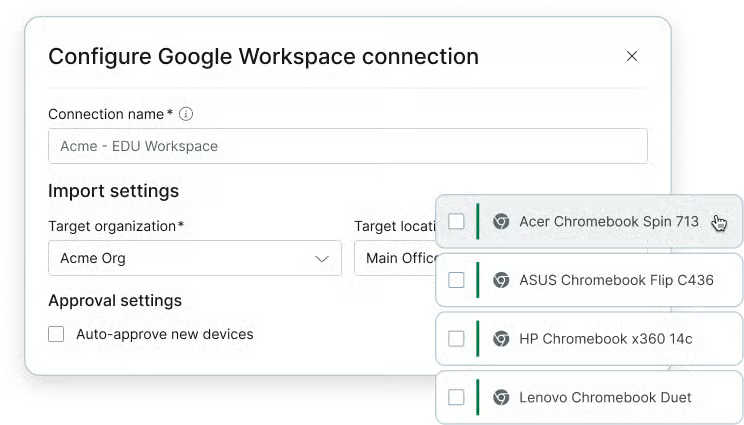
ChromeOS devices sync into the same inventory as every other managed endpoint, with online and offline status for each device.
Take action without the detour
Technicians can act on ChromeOS devices directly from NinjaOne without needing to detour back to the Google Workspace console.
Onboard without a new rollout
There’s no new agent, console, or credential set for technicians to utilize. ChromeOS devices appear within the NinjaOne instance you already use and onboarding a Chromebook fleet is just a configuration step.
Features and Solutions
One inventory for every endpoint
ChromeOS devices appear in the same inventory as every other managed device, with device details, OS version, and a Google Workspace deep link available for each device.
Multi-tenant reporting at scale
Connect as many Google Workspace tenants as you run and report across all of them from one NinjaOne view. MSPs can consolidate reporting across client environments without logging in to each Google console separately.
Flexible device approval
Auto-approve discovered devices to add them to your inventory right away, or require manual approval and merge a device into an existing record by serial number.
Direct device actions
Reboot a device, erase user data, or powerwash a Chromebook right from NinjaOne, without opening the Google Workspace console. When a device needs hands-on help, open a Chrome Remote Desktop session from the same place.
Asset and compliance tracking
Last logged-in user and inventory history live in the same system of record as the rest of your fleet, ready for audits and asset report pulls from one platform.
Available through the API
ChromeOS devices appear in the existing /v2/devices API routes allowing MSPs and IT teams that build their own reporting and tooling to pull information the same way they pull other devices in their inventory.
It extends the NinjaOne Google Workspace integration to sync ChromeOS and ChromeOS Flex devices into the same inventory as your other managed endpoints, with reporting and device actions.
What do I need to get started?
An active Google Workspace connection, which you purchase separately through Google. NinjaOne doesn’t sell it.
Which device actions are available?
Technicians can reboot a device, erase user data, and powerwash a Chromebook from NinjaOne.
Does it manage Google Workspace policies?
No. Policy configuration stays in the Google Admin console.
Can I connect more than one Google Workspace tenant?
Yes. You can connect multiple tenants and report across all of them from a single NinjaOne view.