Real-Time Endpoint Load Monitoring
Track CPU usage, memory consumption, and system load across all your managed devices with NinjaOne, and act before performance issues impact your team.
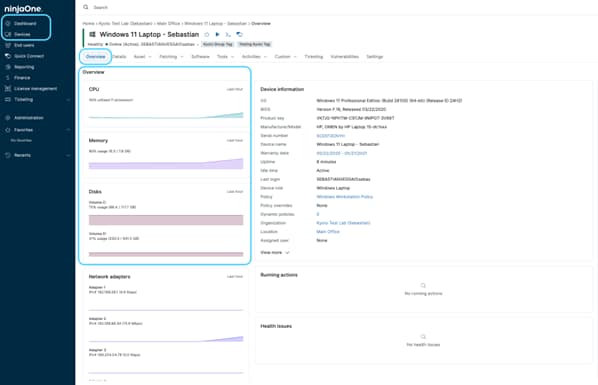
Track CPU usage, memory consumption, and system load across all your managed devices with NinjaOne, and act before performance issues impact your team.






Endpoint load monitoring helps IT teams reduce downtime, improve performance, and stay ahead of issues before they affect end users. Here are three practical ways it delivers value day to day:
Get an instant view of CPU usage, memory consumption, and system load across all managed devices, so IT always knows what is happening in the environment.
Identify devices that are struggling before users report problems, allowing IT teams to resolve performance issues faster and reduce unexpected downtime.
Set custom thresholds and let NinjaOne handle the rest, automatically notifying the right people and triggering remediation workflows when a device reaches a critical load.

Track CPU usage, memory consumption, and disk space across all managed endpoints from a single console, giving IT teams instant visibility into device performance at any given time.

Define specific limits for CPU, memory, along with duration, so NinjaOne can automatically detect when a device is operating outside of acceptable performance ranges.

Receive instant notifications when a device exceeds a defined threshold, ensuring the right people are notified before a performance issue escalates.

Access historical performance data to identify trends, plan for capacity needs, and detect recurring issues before they become critical.

Configure scripts or workflows that trigger automatically when a device reaches a critical load, allowing IT teams to respond to issues without manual intervention.

When an alert is triggered, NinjaOne can automatically create a ticket in your existing ticketing system, including platforms like Zendesk, ConnectWise, and others, ensuring that performance issues are tracked and assigned without any manual effort.
During high-demand periods, some devices may struggle to keep up. Load monitoring gives IT teams visibility into which endpoints are under the most stress, allowing them to take action before performance degrades.
When users report recurring slowdowns, IT teams can review historical performance data to identify patterns, pinpoint the root cause, and address the problem at its source rather than applying temporary fixes.
In environments with hundreds of managed devices, automated alerts and condition-based workflows allow IT teams to maintain consistent performance standards across the entire fleet without constant oversight.
In this article, we’ll look at how to remedy high CPU usage on your machine or machines.

This guide will walk you through identifying real memory pressure and effectively reducing high memory usage. Keep reading to learn more about assessing memory pressure on Windows systems.
Efficiency in IT is planned and measured. Scheduling major tasks during off-hours, maintaining patch health, avoiding monitoring anti-patterns, and optimizing devices using real data help make performance more consistent and reliable.
This brief turns those ideas into a program with KPIs, guardrails, and evidence.
100,000
Endpoints managed
“NinjaOne is a scalable solution. It’s built on a modern SaaS architecture and it’s future-proof.”

40%
More Cost Effective
“NinjaOne’s price point is 40% less than any other endpoint management tool on the market, while being more powerful and easy to use.”

10-15
Tools Replaced
“Before, I needed 10-15 different tools to execute what NinjaOne does in its centralized, single pane of glass.”

30%
Less time for patching
“We observed a 30% reduction in the time taken for patch deployments compared to our previous solution.”

2,000
Endpoints managed
“NinjaOne gives me much more flexibility and security in my work”

30%
Annual ROI
“[NinjaOne] has already shown its value in ROI…it’s at least a hundred thousand dollars annually.”

24x
Faster Endpoint Management
“Our processes have become 24x faster with NinjaOne.”

20-40
Hours Saved Each Week
“Leveraging the automations feature within NinjaOne has enabled me to save upwards of what would likely be 20 to 30 to even 40 hours per week.”

It is a feature that allows IT teams to track the performance and resource usage of all managed devices in real time, ensuring that potential issues are identified and addressed before they impact end users.
Endpoint load monitoring uses a lightweight agent to collect CPU and memory metrics directly from the operating system at regular intervals and send them to NinjaOne for evaluation.
It can monitor a wide range of metrics including CPU usage, memory consumption, disk space, and overall system load, giving IT teams a comprehensive view of device health across the entire environment.
By continuously tracking resource usage across all endpoints, IT teams can quickly identify which devices are consistently running at high capacity, making it easier to pinpoint the root cause of slowdowns before they affect productivity.
Yes, administrators can define custom thresholds for CPU, memory, and other performance metrics. When a device exceeds those limits during a configurable period of time, NinjaOne automatically triggers an alert, ensuring the right people are notified without requiring constant manual monitoring.
By giving IT teams real-time visibility into device performance, they can identify and resolve issues before users even notice them, shifting from a reactive support model to a proactive one that reduces downtime and improves overall efficiency.
Yes, NinjaOne stores historical performance data that allows IT teams to identify patterns and trends over time, making it easier to plan for capacity needs and address recurring issues before they become critical.
It gives IT teams instant visibility into what is consuming the most resources on a device, making it faster to diagnose and resolve the issue without guesswork.
Yes, when a device reaches a critical load threshold, NinjaOne can automatically trigger a script or remediation workflow configured in advance by the administrator.
By maintaining continuous visibility into device performance, IT teams can proactively address issues before they lead to failures, extending the lifespan of devices, and reducing unexpected downtime across the environment.