Real-time incident response with NinjaOne Endpoint Management

Support IT incident response on managed endpoints with monitoring, alerting, automated remediation, and remote access from one NinjaOne Endpoint Management console.

Real-time incident response with NinjaOne Endpoint Management featured image
IT business logo
Provide logo
Advantage Technologies logo
Dedicated IT logo
Alticap logo
Network Coverage logo

Common real time incident response challenges 

Problem

How NinjaOne resolves it

IT teams can lose valuable time identifying endpoint issues when alerts and device information are spread across different tools.

NinjaOne centralizes endpoint monitoring, alerts, and management in one platform, helping IT teams identify reported issues and investigate affected devices more efficiently.

IT teams need to respond quickly when a critical service fails or an endpoint develops a problem.

NinjaOne supports configurable alerting and automated remediation workflows that can trigger actions such as restarting services or running scripts when configured conditions are met.

Fixing endpoint issues in person delays resolution and interrupts end users.

NinjaOne provides remote access and scripting capabilities that allow technicians to investigate and troubleshoot managed endpoints without always needing physical access to the device.

Manually resolving the same issue across multiple endpoints can consume IT resources and increase response times.

NinjaOne lets IT teams deploy custom scripts to individual devices or multiple endpoints, helping them apply consistent fixes at scale when the appropriate remediation has been identified.

Benefits of real-time incident response with NinjaOne Endpoint Management

Faster identification of endpoint issues

Real-time monitoring and customizable alerts help IT teams identify device health issues, service failures, and other monitored conditions sooner, allowing technicians to investigate and respond before problems cause greater disruption.

Faster remediation across multiple endpoints

IT teams can deploy custom scripts and use remote management tools to troubleshoot and resolve issues on individual devices or across multiple endpoints, reducing repetitive manual work during incident response.

Less disruption during troubleshooting

Remote access and background remediation capabilities allow technicians to investigate and resolve supported endpoint issues without always requiring direct user interaction, helping minimize interruptions to employees.

Reduced recurrence of common IT incidents

Condition-based monitoring, scripting, and automation policies can detect recurring problems and trigger corrective actions, helping IT teams automatically respond to recurring issues and reduce repetitive manual troubleshooting.

Improved visibility for incident investigation

Centralized device monitoring, performance data, and management tools help technicians assess affected endpoints and determine appropriate remediation steps without switching between multiple endpoint management interfaces.

What does real time incident response do?

Simplicity by design icon

Real-time endpoint monitoring and alerting

NinjaOne monitors managed endpoints for configured conditions, such as performance issues, service interruptions, and hardware health concerns. Alerts help IT teams identify potential problems and investigate them before they cause further disruption.

Built better, from day one icon

Automated remediation through scripting

IT teams can use scripts and automation to respond to detected endpoint issues, such as restarting a service or correcting a configuration. Depending on the configured conditions and automation policies, these actions can reduce manual troubleshooting and speed up resolution.

Instant visibility and control icon

Remote troubleshooting and remediation

Technicians can access supported managed endpoints remotely and use available tools to investigate problems, run commands, manage processes, or transfer files. This allows them to troubleshoot and resolve many issues without needing physical access to the device.

Centralized endpoint visibility

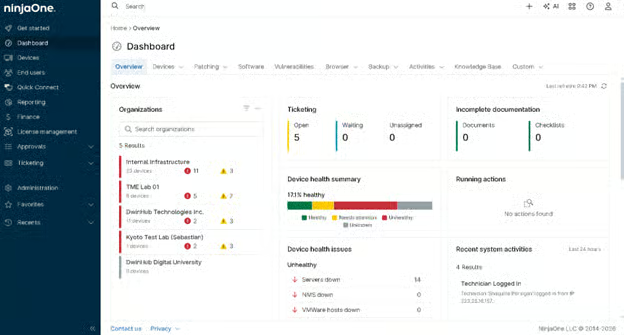
NinjaOne provides a centralized view of managed devices, monitoring alerts, and relevant endpoint information. This helps IT teams identify affected devices, assess their status, and coordinate troubleshooting from a single management platform.

Configurable monitoring conditions and alert thresholds

IT teams can configure monitoring conditions and alert thresholds to identify issues that require attention. Tailoring these settings to the environment helps technicians focus on relevant events and respond according to their operational priorities.

Designed to work across environments, teams, and industries

Identifying and resolving endpoint issues before they cause extended downtime

IT teams use NinjaOne Endpoint Management’s real-time monitoring and alerting to identify endpoint issues such as high resource usage, service failures, or hardware health concerns. Technicians can investigate alerts, review device status, and use available remote management tools to troubleshoot problems and restore normal operations, helping minimize disruption to end users.

Responding quickly to incidents across multiple endpoints

When an issue affects multiple devices, IT teams and managed service providers (MSPs) can use NinjaOne’s centralized endpoint visibility to identify affected devices and coordinate remediation. Technicians can deploy scripts, restart services, or apply relevant patches across selected endpoints, reducing repetitive manual work and helping teams respond consistently.

Automating remediation for recurring IT issues

IT teams can configure monitoring conditions and automation workflows to address recurring endpoint problems, such as a stopped service or a failed routine maintenance task. Depending on the configured conditions and available actions, NinjaOne can help initiate corrective scripts or other remediation steps, reducing the need for technicians to resolve every occurrence manually.

This is why customers love us

How to implement real-time incident response with NinjaOne

I. Define incident conditions and alert responsibilities

Configure policy conditions to monitor critical endpoint issues and notify the appropriate technicians when those conditions are met.

II. Automate initial responses and create tickets

Use automated scripts to address common, low-risk issues and configure ticketing automation to create and assign tickets when conditions are triggered, where supported by NinjaOne Ticketing or an integrated PSA.

III. Investigate and resolve the affected endpoint

Review the affected device’s status and use NinjaOne’s remote access and endpoint management capabilities to investigate issues and apply fixes without requiring an on-site visit.

IV. Restore from backup when recovery requires it

If other remediation efforts are unsuccessful, use available NinjaOne Backup recovery points to restore supported devices or data, depending on the configured backup plan.

Integrations

NinjaOne Endpoint Management works alongside supported security, ticketing, and alerting tools to help IT teams coordinate incident response. Available integrations can provide security alerts, device information, or ticketing workflows, depending on the connected service. Threat detection remains the responsibility of the integrated security tools.

Endpoint security tools

Ticketing and alerting

Security data and reporting

Why organizations trust NinjaOne

Resolving IT issues remotely and reducing downtime

Quality Network Solutions (QNS) deployed NinjaOne across 26,000 endpoints, enabling its IT team to resolve most issues remotely rather than sending technicians to rural schools. By addressing problems without waiting for on-site visits, QNS can resolve tickets faster, reduce travel time, and minimize disruption to school operations.

“Sometimes tickets are resolved within 10 to 30 minutes instead of waiting a day or two, maybe even three, for a technician to drive out. That’s a huge win for schools.”

Source: NinjaOne

Ready to simplify the hardest parts of IT?

Respond to IT incidents faster with NinjaOne

Identify endpoint issues, investigate alerts, and take action from a centralized platform. NinjaOne combines real-time monitoring, alerting, scripting, automation, and remote access to help IT teams troubleshoot problems, automate routine remediation, and reduce downtime across managed endpoints.

Related Resources

Real Time Incident Response FAQs

NinjaOne real-time incident response is how IT teams use NinjaOne Endpoint Management to detect endpoint issues, investigate affected devices, and resolve them from one console. It combines monitoring and alerts, automation and scripting, and remote access, so technicians can act on managed endpoints as incidents occur.

An incident management tool is software that helps IT teams log, prioritize, investigate, and resolve incidents that disrupt systems or services. NinjaOne Endpoint Management supports the endpoint side of that work with monitoring, alerting, automation, and remote access, and NinjaOne Ticketing tracks the resulting tickets.

NinjaOne Endpoint Management helps IT teams identify and respond to monitored endpoint issues such as high CPU or memory usage, service failures, low disk space, and other configured alert conditions. Security threats may require investigation and remediation through integrated security tools.

IT incident response typically involves detecting an issue, assessing its impact, investigating the affected systems, taking corrective action, and verifying recovery. NinjaOne Endpoint Management supports these activities through monitoring, alerts, scripting, automation, and remote management tools.

NinjaOne Endpoint Management supports IT incident response workflows through endpoint monitoring, alerts, scripting, automation, and remote access. IT teams can use these capabilities to identify, investigate, and resolve endpoint issues as part of their organization’s incident response process.

Capterra Shortlist 2026
G2 Leader - Fall 2026
TrustRadius Top Rated 2026
SourceForge Leader Fall 2026
GetApp Category Leaders 2025
G2 Best Relationship - Fall 2026