Effortless Mass Device Onboarding with NinjaOne Bulk Configuration Management

Simplify large-scale device setup with NinjaOne’s Bulk Configuration Management. This capability enables IT administrators to provision and configure multiple Windows, macOS, and mobile devices simultaneously, eliminating repetitive manual tasks. Built for scalability and precision, NinjaOne’s Bulk Configuration Management streamlines onboarding, enhances operational efficiency, and delivers a unified approach to managing endpoints across diverse environments. 
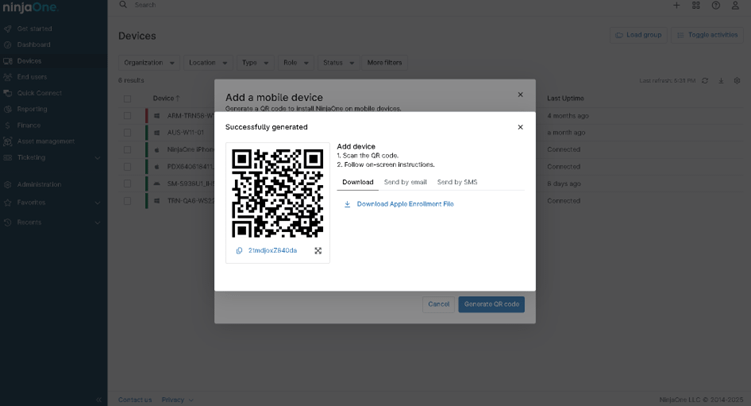
Bulk Configuration Management
IT business logo
Provide logo
Advantage Technologies logo
Dedicated IT logo
Alticap logo
Network Coverage logo

Effortless large-scale device provisioning built for today’s IT teams

Accelerated Endpoint Provisioning 

NinjaOne’s Bulk Configuration Management empowers IT teams to provision and configure multiple devices simultaneously—eliminating repetitive setup tasks and cutting deployment time from hours to minutes. Automated configuration ensures every device is consistently set up and ready for immediate use right out of the box. 

Unified Cross-Platform Management 

Whether deploying Windows, macOS, or mobile devices, NinjaOne simplifies large-scale onboarding with unified policies and configurations. IT administrators can apply consistent settings, security baselines, and software packages across diverse environments with a single action. 

Automated Configuration and Compliance 

NinjaOne’s Bulk Configuration Management streamlines policy deployment and script execution, ensuring every device aligns with organizational standards. From network settings to security controls, each endpoint is automatically assigned to the correct management group—maintaining compliance, consistency, and reducing the risk of human error. 

Operational Efficiency and IT Scalability 

By streamlining enrollment workflows, NinjaOne frees IT teams from repetitive manual processes. This efficiency allows organizations to scale faster, support growing device fleets, and maintain centralized control over distributed endpoints—all from one intuitive platform. 

Effortless large-scale device deployment with intelligent automation and enterprise-grade security

legal holds icon

Pre-Configured Policy Application 

Apply device policies, security settings, Wi-Fi, VPN, and application configurations automatically during enrollment. This ensures every endpoint aligns with organizational standards right out of the box. 

Cross-Platform Scalability 

Simplify onboarding across operating systems. Whether deploying Windows PCs, macOS, iOS, or Android devices, bulk enrollment streamlines setup for mixed environments through a unified workflow. 

Lightning-fast icon

Automated Group and Policy Assignment 

Devices are intelligently assigned to the correct organizational units or policy groups based on predefined rules, ensuring consistent configurations and minimizing human error. 

Empower IT with Hassle-Free Enrollment at Scale

Rapid Onboarding for New Offices or Departments 

When expanding to new locations or onboarding entire departments, administrators can preassign device configurations by role or team. As soon as devices are connected, they’re automatically enrolled and ready for use—ensuring consistent compliance, security, and user experience from day one. 

Centralized Control for Hybrid and Remote Workforces 

NinjaOne’s Bulk Configuration Management brings every endpoint—whether deployed on-site, remotely shipped, or user-provisioned—under unified management with a consistent security posture. IT teams gain centralized visibility, automated policy enforcement, and seamless updates across distributed environments, all without the need for physical device handling. 

Automated Provisioning for Large-Scale Deployments  

For IT teams managing large fleets of Windows, macOS, Android, or iOS devices, NinjaOne’s Bulk Configuration Management minimizes manual setup. Once devices are powered on and connected, they automatically receive predefined configurations, security policies, and applications—saving hours of repetitive work during mass rollouts or refresh cycles. 

Revolutionize Your Bulk Configuration Management Today

Simplify large-scale provisioning with NinjaOne’s Bulk Configuration Management. Automate setup, preassign configurations, and deploy hundreds of Windows, macOS, Android, or iOS devices in just a few clicks. Reduce onboarding time, eliminate repetitive tasks, and ensure every device meets your organization’s security and compliance standards from day one. 

Streamline. Secure. Scale. — All in One Platform. 

Related Resources

This is why customers love us

Ready to simplify the hardest parts of IT?

Bulk Configuration Management FAQs

Bulk Configuration Management in NinjaOne automates and centralizes bulk device configuration across multiple endpoints. It supports bulk enrollment for Windows devices, bulk enrollment for Linux devices, and Android bulk enrollment using a bulk enrollment provisioning package for fast remote endpoint setup. With endpoint configuration automation, configuration templates, and IT policy configuration, NinjaOne streamlines multi-device setup automation, configuration deployment, and mass configuration updates. This ensures consistent settings, endpoint compliance control, and efficient centralized configuration management across all devices. 

Bulk Configuration Management in NinjaOne allows IT teams to automate and deploy settings, policies, and configurations across multiple endpoints simultaneously. It simplifies IT operations by enabling mass configuration updates, endpoint configuration automation, and centralized management—reducing manual effort, ensuring endpoint compliance, and streamlining multi-device setup for Windows, macOS, Linux, and Android environments. 

IT teams can apply settings or policies to multiple devices at once in NinjaOne using Bulk Configuration Management. This feature lets them create and deploy configuration templates, automation policies, and scripts to groups of devices simultaneously—enabling mass configuration updates, ensuring endpoint compliance, and reducing repetitive setup tasks across Windows, macOS, Linux, and Android endpoints. 

NinjaOne enables bulk deployment of security, network, software, and system configurations across multiple devices. This includes installing or updating software, enforcing security and compliance policies, configuring firewalls, VPNs, and Wi-Fi settings, mapping network drives, running custom scripts, and automating device provisioning and MDM policies for consistent, secure endpoint management. 

NinjaOne ensures consistency across all endpoints by using centralized policies, automation, and grouping. Policies define standard configurations for security, network, and software settings, which are automatically applied to devices within assigned groups or locations. Automated scripts and bulk actions further enforce these standards, ensuring every endpoint remains compliant and uniformly configured across the organization. 

Yes. NinjaOne allows you to create reusable configuration templates through policies, scripts, and automation rules. These templates can be applied across multiple devices or organizations, making it easy to standardize recurring tasks such as software deployment, security enforcement, and network configuration. 

Bulk configuration management reduces human error by automating repetitive tasks and standardizing settings across all devices. Instead of manually configuring each endpoint, IT teams use centralized policies and scripts to apply consistent configurations, minimizing misconfigurations, omissions, and inconsistencies that often occur with manual processes. 

Yes. NinjaOne allows you to schedule and automate configuration changes across different device groups using automation policies, scripts, and scheduled tasks. IT teams can define when and how configurations are applied—such as during maintenance windows—ensuring consistent updates with minimal manual intervention. 

If a device is offline during a bulk configuration push, NinjaOne queues the changes and automatically applies them once the device comes back online. This ensures every endpoint eventually receives the intended updates, maintaining consistency and compliance across the organization. 

After configurations are deployed, NinjaOne provides detailed reporting and real-time visibility through its dashboard and audit logs. IT teams can track deployment status, success or failure rates, affected devices, and timestamps. Reports can also be exported for auditing and compliance to verify that configurations were applied consistently across all endpoints. 

Automating bulk configuration improves efficiency and scalability by eliminating manual setup, reducing configuration time, and ensuring uniform deployment across all devices. IT teams can apply updates or policies to hundreds of endpoints simultaneously, freeing up resources, minimizing errors, and enabling the organization to scale operations seamlessly as the environment grows.