Key Points
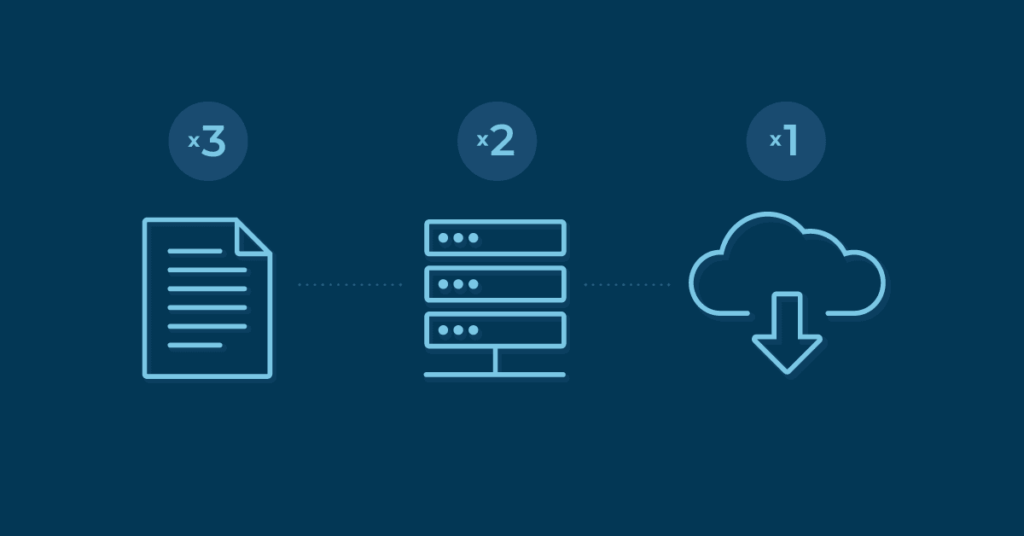
- What Is the 3-2-1 Backup Rule? It recommends 3 copies of data stored on 2 different media types, with 1 stored offsite.
- 3-2-1 Backup Rule Variations: The 3-2-1-1-0 rule adds 1 immutable copy and 0 backup errors, while the 3-2-3 rule centers on multi-zone cloud redundancy.
- How the 3-2-1 Backup Rule Strengthens Compliance: The 3-2-1 rule remains widely recommended by CISA and aligns with modern cybersecurity frameworks.
- How to Build a Strong Backup Strategy: Mix local, offsite, and cloud storage, ensure backups are stored in different failure domains, and avoid single points of failure.
Data disasters are practically inevitable, but a planned-out backup strategy can combat their damaging effects. The Cybersecurity and Infrastructure Security Agency (CISA) recommends sticking to a 3-2-1 backup strategy.
In 2026, 3-2-1 remains a baseline best practice, though enhanced models such as 3-2-1-1-0 and 3-2-3 are now increasingly adopted for ransomware resilience. Still, for any organization, it helps to follow the standard 3-2-1 backup rule to ensure that their data is kept safe. The goal of the 3-2-1 rule is to guarantee data recoverability even when one backup fails or a single location experiences a disaster or ransomware attack.
What is the 3-2-1 backup rule?
The 3-2-1 backup rule states that you should have at least three copies of your data. Two of the backups should be stored on different types of media, and at least one backup should be stored offsite or in the cloud.
Incomplete or untested backups can give teams a false sense of security.
→ Validate data integrity and recovery readiness with NinjaOne
Benefits of the 3-2-1 backup rule
Although technology has long evolved since the creation of the 3-2-1 rule, its key principles of redundancy and isolation continue to play a crucial role in modern cybersecurity and business continuity strategies.
Some of the key benefits of this backup strategy include the following:
Spread-out backup locations
The 3-2-1 backup strategy works by spreading out your multiple backups to different locations. This prevents a single data disaster in one area from wiping out all your backup sources.
Not dependent on only one backup
This backup rule creates additional copies so you’re not solely dependent on a single backup that you created. If one backup is damaged or destroyed, you should still possess the original and one additional copy of your data.
Enhanced protection against modern threats
When combined with cloud storage and immutable backups, the 3-2-1 rule can also help protect your data from ransomware attacks, accidental deletions, and insider threats.
Stronger business continuity
Diversifying your backup copies through 3-2-1 backup protects your data and guarantees that the data is available when you need it. Increasing your data protection helps you safeguard essential business data and continually support business operations.
How does the 3-2-1 backup strategy work?
The 3-2-1 backup strategy follows these rules:
3 total copies
Preserve three copies of the data. You should have the original data you produced plus two additional copies. Store them in different failure domains, not just different devices.
2 different media
Your backups should be stored on two different media types. Now, in 2026, this includes the following:
- On-premises storage
- Cloud object storage
- Immutable or write-once storage
- SaaS-native backup platforms
- Air-gapped or offline storage
Remember—the goal here is to avoid storing all of your backups in the same location.
1 offsite copy
At least one copy of your backed-up data should be stored in a location away from the office or organization to protect against physical disasters such as fires or floods. Cloud backup is frequently chosen as the off-site backup copy because of its simplicity and ease of management.
Additionally, a remote server or an external hard drive could be used as long as its stored in a different location.
Pros and cons of the 3-2-1 backup strategy
Like any backup framework, the 3-2-1 rule has its advantages and disadvantages. Understanding these pros and cons can help you decide whether this strategy is right for you.
Pros of the 3-2-1 backup strategy
- The 3-2-1 backup rule is a simple and easy-to-remember strategy to follow.
- It provides a tried-and-true method for organizations to follow.
- This strategy helps to mitigate the negative effects of data loss, especially if one of the backup locations fails.
Ultimately, the 3-2-1 backup is about having multiple backups you can depend on.
Cons of the 3-2-1 backup strategy
- The 3-2-1 backup rule can’t apply to every company in every backup situation. This is intended to serve as a baseline, not as a fixed rule that works for all organizations.
- While technology has evolved and become more advanced, the 3-2-1 backup rule hasn’t evolved with it. For some organizations, it’ll be a little outdated and not able to efficiently protect their data from more advanced data disasters.
- The 3-2-1 backup strategy can be relatively expensive to implement. Storing multiple copies of data on different types of media and at different locations can incur additional costs, such as storage fees or the cost of purchasing additional hard drives.
The 3-2-1 rule and zero trust architecture
Zero trust architecture (ZTA) operates on the principle that no user, device, or system should be trusted by default, and this same logic applies directly to how backups are stored and accessed.
The 3-2-1 rule’s emphasis on isolation and redundancy aligns naturally with ZTA by ensuring that backup copies are segmented across separate failure domains, preventing lateral movement from a compromised network from reaching all copies simultaneously.
Organizations adopting zero trust should treat each backup tier—local, offsite, and immutable—as its own trust boundary, with independent access controls and verification requirements.
3-2-1 backup tips
Applying a successful backup strategy isn’t always a simple process. Sometimes you’ll have to make minor adjustments to fit the needs of your business.
Here are four tips for executing 3-2-1 backup for your business:
1) Ensure the second copy isn’t on the same machine
The two copies of your data, in addition to the original copy, should not be placed on the same machine. If both copies are on the same machine and it’s damaged or destroyed, both copies are at risk of data loss. For increased data protection and diversification, load the two backup copies onto two completely separate machines.
2) Consider having backups of your on-site backup
To increase your data protection further, evaluate whether your business could benefit from a backup of your on-site data. You can also back up your NAS separately to ensure redundancy of your data.
3) Minimize cloud storage and cost
Cloud storage can be expensive to maintain, especially with large amounts of backed-up data. Identify critical information and push that to the cloud first. This’ll help to minimize cost by only keeping the most important data in the cloud.
4) Bring in file backup
Try using more file backups as part of your strategy. Image backup takes up a lot more storage space and can be costly. File backups allow you to have more optimized storage of your backups, ensuring that the critical files your organization needs are secure.
3-2-3 backup
Multi-AZ cloud replication is offered by several backup platforms; NinjaOne implements this as its 3-2-3 backup architecture. At least three copies of the data are made and stored in at least two different locations, but instead of only one stored offsite, three copies of the data are stored in the cloud using AWS Availability Zones. This includes redundant copies.
Comparison table: 3-2-1 vs. 3-2-1-1-0 vs. 3-2-3
| Backup strategy | Description | Pros | Cons | Best for |
| 3-2-1 | 3 copies, 2 media types, 1 offsite | Simple, widely recommended, easy to implement | Lacks immutability, limited ransomware defense | Small/medium organizations starting formal backup planning |
| 3-2-1-1-0 | Adds 1 immutable or offline copy + 0 backup errors | Strong ransomware protection, meets newer compliance needs | Increased storage cost and complexity | Regulated industries, enterprises, security-mature organizations |
| 3-2-3 (NinjaOne) | 3 cloud-replicated copies across multiple AZs | Superior redundancy, geographic diversity, streamlined management | Cloud-dependent, may cost more for large datasets | Organizations needing high availability and simple cloud DR |
This architecture significantly reduces the risk of cloud-regional outages and ensures faster, more reliable recovery.
Managing multiple backup copies manually leads inconsistent coverage.
Protect your crucial data with NinjaOne Backup
As threats evolve in 2026, organizations require immutable, redundant, and automated backup strategies. The 3-2-1 backup rule can help you protect your essential data and ensure you have a solid backup plan. Read about backup solutions for a changing workplace to determine how to create the best backup strategy for your organization.
NinjaOne Backup provides the tools you need to create secure backups for your organization. It provides flexibility for your backup storage and retention so you can ensure your backup strategy fits your organization’s unique needs. Sign up for a free trial of the software today or check out a free demo of it in action.