Protect Your Google Calendar Data
Ensure critical calendar events and schedules are protected with automated backup and recovery, helping IT teams prevent data loss, restore deleted events, and maintain continuity across Google Workspace.
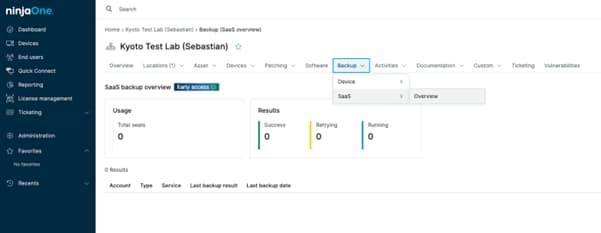
Ensure critical calendar events and schedules are protected with automated backup and recovery, helping IT teams prevent data loss, restore deleted events, and maintain continuity across Google Workspace.






Google Calendar backup helps organizations protect important meetings and schedules from being accidentally deleted or lost. By keeping secure copies of calendar data, IT teams can quickly restore events, avoid disruptions, and ensure teams always have access to the information they rely on every day.
Here are the key ways this approach delivers value for IT teams managing Google Workspace:
Allows IT teams to quickly restore deleted or changed calendar events, helping teams get back on track without disrupting daily work.
Automatically protects calendar data from accidental deletions or unintended changes that can happen in shared and collaborative environments.
Gives IT teams a clear view of backed-up calendar data, making it easier to manage restores, keep records, and support business or compliance needs through centralized SaaS backup management.
Google Calendar backup solutions provide a set of features designed to protect calendar data, simplify recovery, and help IT teams maintain visibility and control across Google Workspace environments.

Calendar data is backed up automatically on a regular schedule, reducing the risk of data loss and ensuring recent events and changes are always protected without manual effort.

Allows IT teams to restore individual events or entire calendars, making it easier to recover only what is needed without impacting other data or users.

Backed-up calendar data is stored separately from Google Workspace, providing an additional layer of protection if native recovery options are no longer available.

Calendar backups can be managed from a single interface, giving IT teams clear visibility into protected data and simplifying restore operations across the organization.

Helps organizations retain historical calendar data for longer periods, supporting internal policies, audits, and regulatory requirements.
Below are common scenarios where IT teams rely on Google Calendar backup to prevent data loss, reduce disruption, and maintain business continuity across Google Workspace.
When an employee deletes important meetings or shared calendar events by mistake, IT teams can quickly restore the missing data and avoid missed appointments, delays, or confusion across teams.
For teams that depend on shared calendars to coordinate projects, shifts, or client engagements, backups ensure schedules can be recovered if changes are overwritten or data is lost.
Organizations can restore past calendar information when it is needed for audits, internal reviews, or business records, even after native Google recovery options are no longer available.
Don’t let accidental deletions or missing events disrupt your day. Protect your calendars, recover what matters in minutes, and keep your teams moving forward with a simple, reliable backup approach. With NinjaOne and its Google Workspace backup solution, safeguarding Google Calendar data becomes part of your everyday IT workflow.
Multiple backup types are available to store and secure your data safely. Let’s discuss the different types of backups, their features, and their respective benefits.

Securing Google Workspace means protecting identities, data and collaboration at scale. To achieve this, you must turn on multi-factor authentication, set up shared drive permissions correctly and use the alert center for ongoing monitoring. These steps form the baseline to secure your Google Workspace environment against unauthorized access and data breaches.
100,000
Endpoints managed
“NinjaOne is a scalable solution. It’s built on a modern SaaS architecture and it’s future-proof.”

40%
More Cost Effective
“NinjaOne’s price point is 40% less than any other endpoint management tool on the market, while being more powerful and easy to use.”

10-15
Tools Replaced
“Before, I needed 10-15 different tools to execute what NinjaOne does in its centralized, single pane of glass.”

30%
Less time for patching
“We observed a 30% reduction in the time taken for patch deployments compared to our previous solution.”

2,000
Endpoints managed
“NinjaOne gives me much more flexibility and security in my work”

30%
Annual ROI
“[NinjaOne] has already shown its value in ROI…it’s at least a hundred thousand dollars annually.”

24x
Faster Endpoint Management
“Our processes have become 24x faster with NinjaOne.”

20-40
Hours Saved Each Week
“Leveraging the automations feature within NinjaOne has enabled me to save upwards of what would likely be 20 to 30 to even 40 hours per week.”

It is the secure copying of organizational calendar data such as meetings, shared calendars, and schedules so it can be restored if information is accidentally deleted, modified, or lost.
Because Google Workspace is not designed as a backup solution and offers limited calendar recovery. Google Calendar backup provides the long-term protection and reliable restoration businesses need.
A SaaS backup solution uses official Google APIs to automatically copy Google Calendar data and store it separately from Google Workspace. This enables recovery when Google’s native options are limited. Tools like NinjaOne follow this approach as part of their SaaS backup capabilities.
Yes, deleted Google Calendar events can be recovered if a backup exists, even after Google’s native recovery window has passed.
A Google Calendar backup typically includes calendar events, event details, and calendar metadata needed to restore schedules accurately.
Because Google Workspace provides limited native recovery options for deleted or modified calendar data, organizations often rely on automated, regular backups. From both an operational and regulatory compliance perspective, daily backups are commonly used to help ensure calendar events, updates, and metadata can be restored to meet recovery, audit, and retention requirements when data is accidentally deleted, altered, or lost.
Yes, a Google Calendar backup allows you to restore individual events or entire calendars, depending on the backup solution, giving flexibility to recover only what is needed.
Yes, it helps organizations retain historical calendar data and access records needed for legal, regulatory, or internal audit requirements.
You should look for automated backups, secure storage outside Google Workspace, flexible restore options, and long-term data retention to ensure reliable calendar recovery.