Windows patch configuration with NinjaOne Patch Management
Windows patch configuration defines the update schedules, approval rules, and reboot behavior applied to managed Windows endpoints in NinjaOne Patch Management.
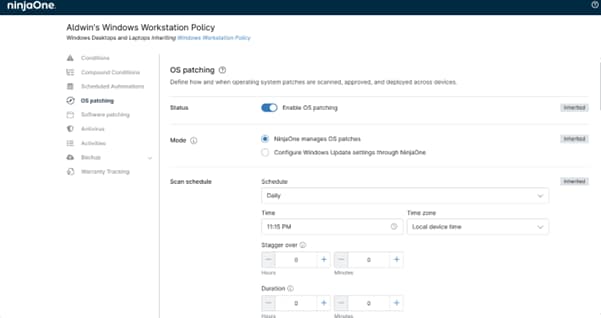
Windows patch configuration defines the update schedules, approval rules, and reboot behavior applied to managed Windows endpoints in NinjaOne Patch Management.






| Problem | How NinjaOne resolves it |
| Unmanaged Windows updates can install unexpectedly and force restarts that interrupt users during the workday. | Windows patch configuration sets the scan and install windows and the reboot rules, so updates run inside approved maintenance hours instead of business hours. |
| Remote and on-premises Windows devices can fall out of sync over time, leaving gaps in patch compliance across the environment. | Windows patch configuration applies the same Windows update classifications and approval rules to every targeted device over the internet, with no VPN required. |
| Applying the same update approval decisions across every Windows device by hand does not scale and can delay routine, low-risk updates. | Windows patch configuration lets IT admins approve, defer, or reject updates automatically by classification, severity, or KB number, while routine updates deploy without manual steps. |
| Applying one Windows update policy across every department and site can disrupt teams with different maintenance windows or risk tolerances. | Windows patch configuration assigns distinct policies to organizations, sites, or device groups from one console. |

Administrators set the exact days, weeks, and times for Windows scan and installation tasks. Scheduled deployments run outside peak business hours reducing bandwidth consumption and minimizing disruption to users.

Windows Patch Configuration applies reboot prompts, deferral options, and enforcement rules after Windows updates install. End users can postpone scheduled restarts within configured limits, while policies can enforce a reboot for critical updates.

Teams approve, defer, or reject Windows updates automatically by classification, severity, or KB number. Routine quality updates can deploy automatically while feature updates stay under manual control.

Device groups can inherit a primary policy while allowing targeted overrides. Overrides handle department and site requirements without requiring separate policies for every group.
Organizations with remote staff apply Windows update policies over standard internet connections instead of a corporate VPN. Administrators track compliance for remote and on-premises Windows devices from the same dashboard, so off-site machines follow the same rules as those in the office.
Infrastructure teams assign a policy to Windows servers with stricter manual approval requirements and narrow install windows. Updates apply only during defined lmaintenance windows, which keeps critical applications available and limits unplanned restarts.
Managed service providers set a shared Windows update baseline for client endpoints and adjust maintenance windows to each client’s business hours. Technicians manage separate client environments from one console, which reduces configuration errors across organizations.
Administrators define Windows update schedules, approval rules, and reboot preferences in the central console.
Teams map policies to organizations, sites, or device groups using the management hierarchy.
The NinjaOne agent coordinates with the Windows Update Agent to identify missing patches and install them according to policy.
The dashboard shows Windows patch status and flags failed installations or configuration drift.
100,000
Endpoints managed
“NinjaOne is a scalable solution. It’s built on a modern SaaS architecture and it’s future-proof.”

40%
More Cost Effective
“NinjaOne’s price point is 40% less than any other endpoint management tool on the market, while being more powerful and easy to use.”

10-15
Tools Replaced
“Before, I needed 10-15 different tools to execute what NinjaOne does in its centralized, single pane of glass.”

30%
Less time for patching
“We observed a 30% reduction in the time taken for patch deployments compared to our previous solution.”

2,000
Endpoints managed
“NinjaOne gives me much more flexibility and security in my work”

30%
Annual ROI
“[NinjaOne] has already shown its value in ROI…it’s at least a hundred thousand dollars annually.”

24x
Faster Endpoint Management
“Our processes have become 24x faster with NinjaOne.”

20-40
Hours Saved Each Week
“Leveraging the automations feature within NinjaOne has enabled me to save upwards of what would likely be 20 to 30 to even 40 hours per week.”

An independent IDC study of NinjaOne customers found a 720% three-year ROI and reported that organizations using NinjaOne patched 276% more endpoints and resolved issues 63% faster than before adopting the platform, with a four-month payback period.
Source: IDC Business Value Snapshot sponsored by NinjaOne, The Business Value of NinjaOne for IT Operations, Doc #US54520326-BVS, May 2026.
“We observed a 30% reduction in the time taken for patch deployments compared to our previous solution. NinjaOne’s efficient patching mechanisms allowed for quicker and more streamlined updates.”
- Manoj Gopalakrishnan, Director of IT, Al Abbar Group
Source: NinjaOne customer story
Discover how NinjaOne Patch Management helps organizations monitor patch compliance across remote offices, standardize patching policies, and maintain compliance across distributed environments.
Automatically evaluate updates, deploy trusted patches faster, and keep every endpoint secure without operational disruption.

This article describes the process for patching Windows endpoints via NinjaOne’s patch management features.
This article describes the operating system (OS) patch management features available for Microsoft Windows endpoints managed by NinjaOne. It also explains how to activate, configure, and view patching activity.
Windows patch configuration is the set of controls in NinjaOne Patch Management that define how Windows updates are discovered, approved, scheduled, and installed. Administrators manage the Windows Update Agent across managed endpoints from one console to hold devices to a consistent update baseline.
Administrators build policy templates in the Patch Management console. Each template sets scan and install frequency, approval rules by severity or classification, and the reboot and notification behavior end users see.
Through patch configuration policies, NinjaOne Patch Management natively handles feature updates, quality updates, driver updates, and security updates, alongside critical updates, update rollups, definition updates, service packs, and general tools. Administrators can filter, schedule, and automate deployment actions directly based on these standard Microsoft update classifications.
Yes. Policies attach to endpoints by organization or site so workstations, production servers, and individual client environments can each take a distinct configuration.
Yes. Administrators set the days and times when scans, installs, and reboots run, which keeps Windows updates inside approved low-impact hours.
Updates install during scheduled maintenance windows, and reboot behavior is configurable. End users can postpone a restart, which limits work disruptions.
Yes. Approval, deferral, and deployment can be automated, based on update clasificaion, severity, or KB number, while major feature updates can remain under manual control.
Patch Management help enforce consistent update schedules and rmaintains centralized logs of update installations, providing a documented patch history for security reviews and compliance audits.