Validate and Track Every Patch
Use patch auditing logs to review patch activity, check update results, and export detailed patch data to support validation, reporting, and compliance efforts.
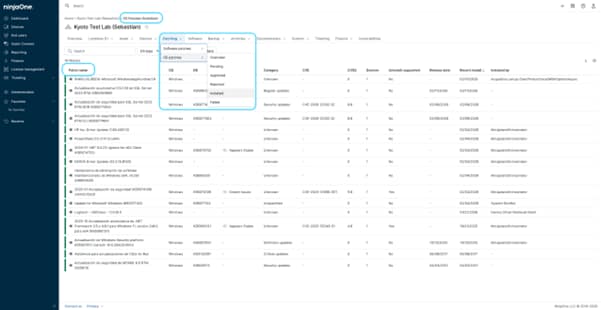
Use patch auditing logs to review patch activity, check update results, and export detailed patch data to support validation, reporting, and compliance efforts.






See which patches were applied across devices and when, giving teams a clear view of patch activity without relying on assumptions or manual tracking.
Identify failed or incomplete updates so teams can take action faster and avoid leaving systems in an inconsistent or vulnerable state.
Use patch data and exports to support reporting and audits with reliable information, instead of piecing together data from multiple sources.

See patch activity across devices, including installed, pending, and failed updates, along with timestamps that show when patches were applied.

Review patch-level details such as KB numbers, categories, severity indicators, and installation dates to better understand each update.

Export patch data into CSV files for further analysis, auditing, or sharing, using structured information directly from the platform.

Check patch activity for individual devices, making it easier to investigate update history and troubleshoot specific issues.

View how patches were applied, including system processes or scheduled updates, providing additional context around patch activity.
When patch activity is hard to track, IT teams can end up spending too much time confirming what was installed, what failed, and which devices still need attention.
Here are a few common scenarios where patch data and reporting views provide practical value:
When an internal review or external audit requires proof that systems are being updated, IT teams can use patch history and exported data to show what was installed, when it was applied, and which devices remain pending or failed.
When a device has patching issues, teams can review its patch activity to see which updates failed, when they were attempted, and what was successfully installed before or after the issue. This makes troubleshooting faster and more focused.
After scheduled patching, IT teams can review patch status across endpoints to confirm that updates were applied as expected. This helps identify gaps quickly and avoids relying on assumptions that everything completed successfully.
Patching vulnerable software and systems is more important and challenging to keep up with than ever. Here’s how IT pros can make their patch management process more efficient, eliminate disruption, and keep their networks secure.

By recognizing the differences between patches vs updates, software developers can effectively prioritize and communicate the nature of their releases, and your IT department can easily implement its patch management solution.
In this guide, we’ll break down the stages of the patch management lifecycle, explore common challenges, and show how automation can streamline the process for IT professionals.
100,000
Endpoints managed
“NinjaOne is a scalable solution. It’s built on a modern SaaS architecture and it’s future-proof.”

40%
More Cost Effective
“NinjaOne’s price point is 40% less than any other endpoint management tool on the market, while being more powerful and easy to use.”

10-15
Tools Replaced
“Before, I needed 10-15 different tools to execute what NinjaOne does in its centralized, single pane of glass.”

30%
Less time for patching
“We observed a 30% reduction in the time taken for patch deployments compared to our previous solution.”

2,000
Endpoints managed
“NinjaOne gives me much more flexibility and security in my work”

30%
Annual ROI
“[NinjaOne] has already shown its value in ROI…it’s at least a hundred thousand dollars annually.”

24x
Faster Endpoint Management
“Our processes have become 24x faster with NinjaOne.”

20-40
Hours Saved Each Week
“Leveraging the automations feature within NinjaOne has enabled me to save upwards of what would likely be 20 to 30 to even 40 hours per week.”

Patch audit logs in NinjaOne refer to the patch data, history, and reports that allow IT teams to review what updates were applied, when they were installed, and their status across devices, using available patching views and exportable data to track and validate patch activity.
By providing visibility into patch status, history, and results across devices, allowing IT teams to review which updates were installed, which failed, and when changes occurred, helping them monitor patch activity without relying on manual tracking.
Patch audit logs in NinjaOne include details such as patch names, operating system, KB identifiers, status (installed, pending, or failed), installation dates, and additional context like patch category or how the update was applied, providing a structured view of patch activity across devices.
By providing a record of patch activity, including what updates were applied, their status, and when they were installed, allowing IT teams to use this information as supporting evidence during audits and demonstrate that patching processes are being followed.
Yes, NinjaOne shows who initiated a patch in the “Installed by” field when the action is triggered by a user, and shows the system or process when it is applied automatically.
Patch data remains available within NinjaOne for ongoing review, typically covering recent patch activity over operational timeframes, while data can be exported at any time for long-term storage and historical analysis.
Yes, NinjaOne allows patch data to be exported as CSV files, making it easy to use the information for external auditing, reporting, or further analysis outside the platform.
Patch data from NinjaOne can be exported and used with other reporting tools, allowing IT teams to incorporate patch activity into external dashboards, reports, or analysis workflows.
By providing clear records of patch activity, including what updates were applied, their status, and how they were installed, helping IT teams maintain better oversight, support internal processes, and ensure patching is handled consistently across the environment.