Not every endpoint should be patched the same way, gain precise control where it matters most

Gain granular patch management and flexible control at the endpoint level, giving IT teams the precision to handle exceptions without disrupting broader policies.
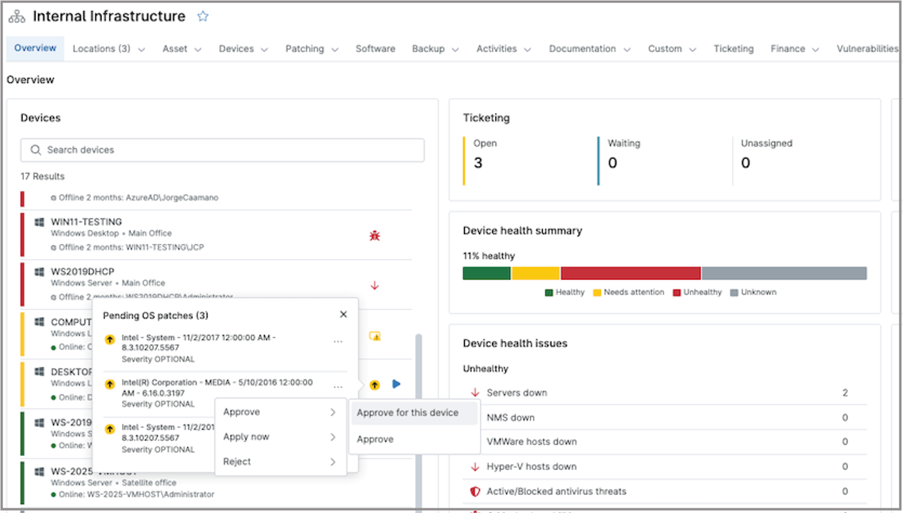

Endpoint-Specific Patching
IT business logo
Provide logo
Advantage Technologies logo
Dedicated IT logo
Alticap logo
Network Coverage logo

Endpoint-Specific Patching Core Values

Granular Endpoint Control

Apply endpoint-specific patching to tailor updates per device, ensuring critical systems receive the right patches without disrupting standard policy-based patching.

Flexible Patch Deployment

Adapt patching to real-world needs with device-level patching, enabling on-demand updates, exclusions, and scheduling adjustments without impacting the broader environment.

Reduced Risk on Critical Systems

Minimize disruption by applying targeted patch deployment to sensitive endpoints, allowing careful control over updates while maintaining overall patch compliance.

What does this product do?

Simplicity by design icon

On-Demand Patch Execution

Run patch scans and installations directly on a specific endpoint at any time, enabling immediate remediation without waiting for scheduled policy-based patch cycles.

Device-Level Patch Overrides

Override standard patching behavior for individual devices, allowing exceptions such as delayed updates or custom approvals without modifying global policies.

Lightning-fast icon

Granular approvals

Approve or reject patches at the individual device level, enabling precise control over updates for critical systems without impacting broader patching policies.

Endpoint-Specific Patching Use Cases

Protect Critical Production Servers

Production servers often support business-critical workloads where stability is more important than immediate patching. Endpoint-specific patching allows IT teams to delay or selectively approve updates on these systems, test patches in lower environments first, and then deploy only validated updates. This reduces the risk of downtime or application disruption while still maintaining a secure and controlled patching process.

Handle Remote or Low-Bandwidth Devices

Endpoints in remote locations or with limited connectivity may not be able to follow standard patch schedules. With endpoint-specific patching, IT teams can adjust timing, run updates on demand, or stagger deployments to avoid network congestion. This ensures devices remain updated without overwhelming bandwidth or causing performance issues for end users.

Isolate Devices With Known Issues

When a patch is known to cause compatibility problems on certain devices, endpoint-specific patching enables targeted exclusions. IT teams can prevent the update from being applied to affected endpoints while continuing normal patching elsewhere. This approach maintains overall compliance while protecting specific systems from instability or failures.

Safeguard Sensitive Application Servers

Servers running sensitive or business-critical applications often require strict change control. Endpoint-specific patching allows IT teams to delay updates, apply only approved patches during approved maintenance windows, and selectively approve only validated updates. This ensures application stability and compliance requirements are met, while still maintaining control over security exposure and minimizing the risk of unexpected service interruptions.

Take Control with Endpoint-Specific Patching

  • Apply patches precisely where and when needed
  • Maintain stability on critical and sensitive systems
  • Adapt patching strategies to real-world conditions

Related Resources

This is why customers love us

Ready to simplify the hardest parts of IT?

Endpoint-Specific Patching FAQs

Endpoint-specific patching in NinjaOne refers to the ability to control patching behavior at the individual device level, rather than relying only on broad, policy-wide settings. This includes initiating on-demand patch scans or installations, approving or rejecting patches for a specific device, and overriding policy-level patch decisions when a particular endpoint requires different handling.

NinjaOne allows patches to be applied based on individual device needs by using policies set to manual approval, which lets administrators approve or reject discovered patches for a specific device, and by allowing on-demand patch scans and installations when immediate action is needed.

Yes, NinjaOne patching policies can be customized for specific groups of endpoints by assigning different policies based on organizational needs. For individual devices, policies can be supplemented with device-level actions—such as manual patch approvals, exclusions, or on-demand patching—to address specific requirements without changing the broader policy.

Endpoint-specific patching improves patch management flexibility by allowing IT teams to adapt patching behavior to the needs of individual devices, rather than applying a one-size-fits-all approach.

While standard policies ensure consistency across the environment, endpoint-specific patching enables exceptions where needed. Administrators can delay updates, approve or exclude specific patches, or run patching on demand for a single endpoint.

Yes, different patch strategies can be applied to critical and non-critical devices in NinjaOne by using policy-based segmentation combined with endpoint-specific controls.

At a high level, IT teams can assign separate patching policies to different groups of devices (for example, production servers vs. user workstations). This allows critical systems to follow a more controlled approach—such as manual approvals, delayed deployments, or restricted maintenance windows, while non-critical devices can use automated patching for faster remediation.

In addition, endpoint-specific patching provides further flexibility for exceptions. Administrators can apply manual approvals, exclusions, or on-demand patching actions to individual devices when needed, ensuring that even within the same group, unique requirements can be addressed without impacting the broader strategy.

Endpoint-specific patching reduces risk during patch deployment by allowing IT teams to control how and when updates are applied on a per-device basis, rather than deploying changes uniformly across all systems.

This enables safer rollout strategies. Teams can delay patches on critical systems, test updates on selected endpoints first, and exclude known problematic patches from specific devices. By limiting exposure and validating updates in controlled scenarios, the risk of widespread disruption or outages is significantly reduced.

In addition, the ability to run patches on demand and tailor deployment timing helps avoid conflicts with business operations. Critical systems can be patched during approved maintenance windows, while less sensitive devices can be updated more aggressively. This balance ensures security updates are applied without compromising system stability or availability.

Yes, endpoint-specific patching can be combined with scheduling and prioritization in NinjaOne to create a more controlled and risk-aware deployment strategy.

Scheduling is primarily defined at the policy level, allowing IT teams to set consistent patch windows across groups of devices. Endpoint-specific patching complements this by enabling on-demand actions and exceptions for individual devices—such as triggering updates outside the schedule or delaying them when needed.

Prioritization is achieved through a combination of patch approval settings (e.g., manual vs. automatic), severity-based approvals, and targeted device actions. This allows critical patches or high-risk systems to be addressed first, while less urgent updates can follow standard schedules. Together, these capabilities provide flexibility without sacrificing overall control or consistency.

NinjaOne supports consistent patching across diverse environments through a policy-driven approach that standardizes patch approvals, scan schedules, deployment timing, and reboot behavior across managed devices. It supports mixed environments by providing centralized patch management for Windows, Linux, macOS, and third-party software, while allowing IT teams to segment devices according to organizational needs. This combination helps organizations maintain consistent patching processes at scale while still adapting to different platforms and risk profiles.

Granular patch control improves IT operational efficiency by allowing teams to target patching actions precisely, instead of applying broad changes across all devices.

Administrators can approve, schedule, or exclude patches based on device needs, reducing unnecessary deployments, minimizing disruptions, and avoiding time spent troubleshooting issues. This enables automation at scale while still handling exceptions efficiently.

Endpoint-specific patching supports compliance and security by helping teams apply the right patches to the right devices at the right time.

It enables controlled updates for critical systems while allowing faster patching on less sensitive devices, helping meet compliance requirements and reduce security risk.